Holiday Hack 2025 Appendix B: Snow Field
Introduction
The 2025 Holiday Hack Challenge takes place in the Dosis neighborhood, in a map similar to 2015’s with a general shape of:
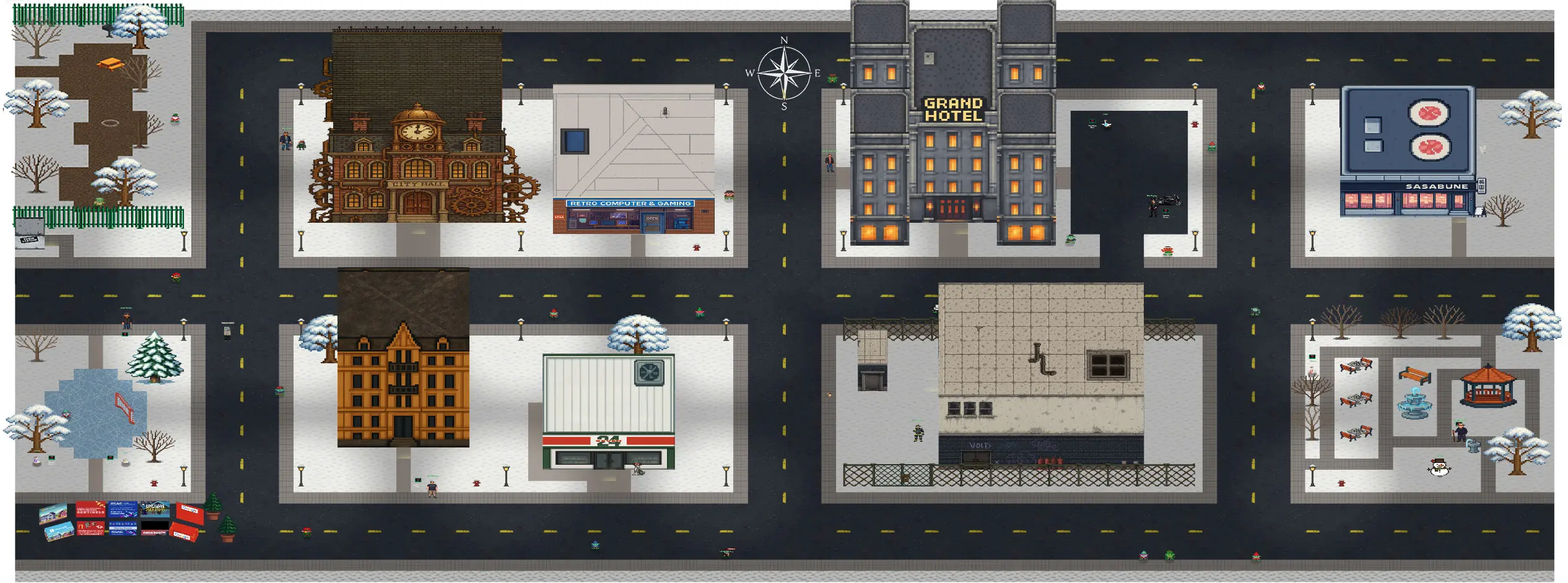
On the left edge of the map, there’s a small strip of snow:

On the right edge, it’s much bigger:

Not only that, but in my TamperMonkey script, it shows a bunch of NPCs located at higher X values than my character who is allegedly at the edge of the map:

I’m at 104, and can’t go further right, but there are 16 NPCs with X locations greater than 104.
Furthermore, using my TamperMonkey script to access the grid data, and replacing the spaces with periods, it’s clear there’s 8 more columns of unwalkable space on the right edge:

From the start of the competition, this all had me very curious.
Analysis
Initial Theory
My initial theory was that this was some part of the game that would become available in later parts of the challenge, either in future acts or on completing some additional challenge. Perhaps it would be the final scene where Santa congratulates me on solving the challenge, and these other gnomes / NPCs are there to celebrate.
With that in mind, I put this aside until after I solved the entire challenge. And this didn’t come up.
Walk Anywhere
I added Walk Anywhere mode to my HolidayHackHack.js script so I could walk out to where the NPCs are. Here I am standing on top of Emcee Gnome:

Nothing interesting happened.
NPCs
Thinking that maybe I can talk to these NPCs, I’ll take a closer look at the NPC entities. Emcee Gnome has display set to None:

Looking at the CSS, all these NPCs do:

I can edit that to “block” right there in devtools, and they all show up:

If I had a more careful eye, I would have noticed that these all share the same names with the gnomes that are running around the map. Once they are visible, they respond to being clicked:

Each just says “…gnomish nonsense…”.
Twins
It turns out that each of these NPCs has a different div with the class gnome-[name]. So for example, Emcee Gnome has the following NPC in the snow:
<div class="ent npc npc-gnomeemcee p-112-9" data-location="112,9"><div class="xpos x112"><div class="ypos y0"><div class="zpos z9" style="transform: translateZ(950px) rotateY(9360deg);"><div class="npc-username">Emcee Gnome</div><div class="npc-avatar"></div><div class="shadow"></div></div></div></div></div>
And then another running around:
<div class="gnome gnome-gnomeemcee" style="transform: translate3d(3367.3px, 13px, 1523.27px); transition: transform 1s linear;"><div class="avatar-holder"><div class="avatar" style="transform: rotateY(9360deg);"></div></div><div class="shadow"></div></div>
The second doesn’t have the classes ent or npc.
JavaScript
To understand why these hidden gnomes exist, I looked at the game’s JavaScript (christmasmagic.js).
The NPC gnomes are not mentioned in the code, but rather come down in the AAANNNDD_SCENE WebSocket message:
$ cat reference/AAANNNDD_SCENE.json | jq '.areaData.entities.npc[] | select(.id | contains("gnome"))' -c
{"id":"gnomefestive6","x":106,"y":5}
{"id":"gnomefestive8","x":106,"y":6}
{"id":"gnomevandal","x":107,"y":6}
{"id":"gnomefestive7","x":109,"y":6}
{"id":"gnomecorpo","x":110,"y":6}
{"id":"gnomegym","x":105,"y":7}
{"id":"gnomefestive2","x":106,"y":7}
{"id":"gnometroll","x":6,"y":8}
{"id":"gnomefestive4","x":108,"y":8}
{"id":"gnomefestive5","x":109,"y":8}
{"id":"gnomeemcee","x":112,"y":9}
{"id":"gnomehacker","x":106,"y":10}
{"id":"gnomefestive1","x":108,"y":10}
{"id":"gnomefestive3","x":111,"y":10}
{"id":"gnomehooligan","x":109,"y":11}
{"id":"gnometerminator","x":108,"y":12}
{"id":"gnomesteamymcsteamface","x":108,"y":15}
{"id":"gnomeelder","x":5,"y":17}
On the other hand, the moving gnomes are hardcoded in the JavaScript:

They spawn at a random location, and move every second (1e3 = 1000 ms).
The key connection between the animated gnomes and the hidden NPCs is that they share matching IDs. Both use identifiers like “gnomeemcee”, “gnomefestive1”, etc.
When I click a running gnome, this function is called, passing the identifier / name:
            dispatchGnome: t => {
                e(Object(un.i)(t, "npc"))
            }
This sends a websocket message:

This is the same message sent as when I click on a legit NPC

The hidden NPC elements in the DOM aren’t directly queried when clicking a running gnome. Instead, the NPC data lives in the React application state (loaded from the AAANNNDD_SCENE message), and clicking a gnome triggers a lookup against that state using the matching ID. The hidden DOM elements are just a side effect of React rendering all NPCs from the scene data.
Conclusion
This expedition turned out to be not a big discovery, but an interesting look at how the game is built. My best guess is that for some reason the game development system wasn’t friendly to having moving NPCs. So the team put these non-NPC gnomes in and had them move around. When clicked, they wanted the gnomes to behave like NPCs, so they faked the call as if an NPC was clicked, but for the game state to do that, they had to be actual NPCs (in the React state). It’s not uncommon when developers are using a framework that they run into edge cases and have to hack around them, which seems like what happened here.
As for the positions in the snow field (X coordinates 105-112), they’re essentially arbitrary. Since the NPCs are hidden with display: none, their positions don’t matter for gameplay. They were likely just placed in the unwalkable area to keep them out of the way during development.